diff --git a/docs/index.html b/docs/index.html
index cd20579..6d0f898 100644
--- a/docs/index.html
+++ b/docs/index.html
@@ -1 +1 @@
-
Windows 1.8.2.1 maintenance release
Windows 1.8.2.1 packages the staff authorization, explicit database configuration and component metadata corrections. Its exact signed installed checks cover setup, the 1.8.1.1 upgrade, saved staff records, procurement/Contracts handoffs, backup/restore and uninstall retention. Unchanged module and 31-source/34-format import evidence remains attributed to the earlier build that produced it; this is not a new exhaustive test of every module or live provider.
Windows 1.8.2.1 has signed installed acceptance for fresh setup and an in-place upgrade from Windows 1.8.1.1. Before upgrading, back up city data and settings, close Townlight, run the signed MSI, and reopen it under the same Windows account with the existing %LOCALAPPDATA%\CivicSuite profile. Keep the prior installer and a restore path. Other upgrade paths are unverified. Station uses its separately configured service. The acceptance summary distinguishes new maintenance checks from reused workflow evidence.
Release and downloads · Acceptance and limits
Townlight Core · Townlight Beta 1
A shared foundation for accountable municipal work.
Core provides the shared contracts, ingestion, identity helpers, task infrastructure and recovery foundation used by Townlight. Staff encounter these capabilities through Setup, Settings and System Health. Business decisions stay with their owning product.
townlight-core 1.3.0.dev2AGPL-3.0-onlyBeta evaluation · Windows fresh-install and shared-import acceptance
For IT administrators and platform maintainers
What the workflow delivers
- Complete setup. Choose folders and the full product composition. Create the city profile and the first named administrator. Choose a protected backup location. Defer optional local AI if it is not needed.
- Activate the runtime. Run the first-run health check, wait for readiness and open Townlight. In System Health select Finish Records Migration to activate the canonical Python and PostgreSQL services. A running process alone is not a ready database.
- Create staff access. Use Settings to create named staff. Sign out and confirm that staff can sign in with their own account. Keep administrator privileges with people responsible for setup; ordinary staff cannot administer users.
- Import through the right product. Use the source library of Code, Zoning, Planning or Permitting. Inspect provenance and permissions there. Core ingestion helpers do not bypass the owning product’s source review.
Connected evidence
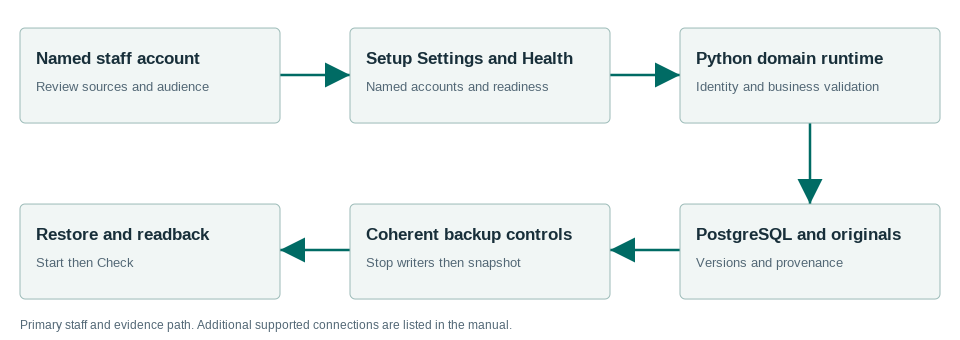
All products use selected Core contracts. Core does not create unrestricted access between products. Access and Notice provide the bounded staff workflows described in their current manuals and acceptance summary.
Know the beta boundary
Shared catalog, exemption and module-generator code exists in the released Windows beta. It is not a centrally hosted federation service. A business product still owns its decisions, identity mapping and permission checks. Historical placeholder ADRs are retained as history, rather than descriptions of the current implementation.
Architecture
Where the evidence goes

All products use selected Core contracts. Core does not create unrestricted access between products. Access and Notice provide the bounded staff workflows described in their current manuals and acceptance summary.
Ready to evaluate?
Begin with the current manual and download the Windows x64 beta 1.8.2.1. Configure the chosen test site and have its staff review source applicability and run the existing workflows.
Shared meeting imports · Windows 1.8.1.1
Windows 1.8.1.1 adds shared meeting imports for 31 source families, with 34 supported source/format pairs. Installed Windows Sandbox checks exercised preview, save and durable readback using public captures and fixtures, plus the documented Townlight handoffs. These checks do not establish automatic discovery on every live portal or a complete retest of every module.
All 31 sources, formats, operator steps and integration contracts · Installed acceptance and limits.
Windows 1.8.2.1 has signed installed acceptance for fresh setup and an in-place upgrade from Windows 1.8.1.1. Before upgrading, back up city data and settings, close Townlight, run the signed MSI, and reopen it under the same Windows account with the existing %LOCALAPPDATA%\CivicSuite profile. Keep the prior installer and a restore path. Other upgrade paths are unverified. Station uses its separately configured service. The acceptance summary distinguishes new maintenance checks from reused workflow evidence.
Windows 1.8.2.1 contains Townlight Runtime 0.3.2 and Meetings 1.0.6, including corrected version displays.