


Production-minded, minimal-attack-surface VPN infrastructure for self-hosted operators.
A self-hosted VPN gateway with a token-authenticated REST API and a lightweight web dashboard — fully provisioned via Ansible. WireGuard is the default backend; AmneziaWG can be selected for mobile or DPI-hostile networks.
Designed as an Infrastructure Security & Network Engineering project: opinionated, reproducible, and built for a single operator or a small team.
aegis-node is not a hosted VPN service.
It is an infrastructure-as-code blueprint that transforms a vanilla Ubuntu VPS into a hardened, self-operated VPN gateway — including firewall policy, DNS resolver, and a private control-plane API.
You bring the VPS. The playbook brings the security model.
- Provisions a hardened VPS from scratch: VPN backend, firewall (iptables), SSH hardening, Unbound DNS, sysctl tuning — all idempotent Ansible roles.
- Runs a control-plane API (FastAPI) on the VPN interface only — not exposed to the public internet.
- Manages VPN peers via API: add, remove, or provision new peers with auto-assigned IPs and QR-code config generation.
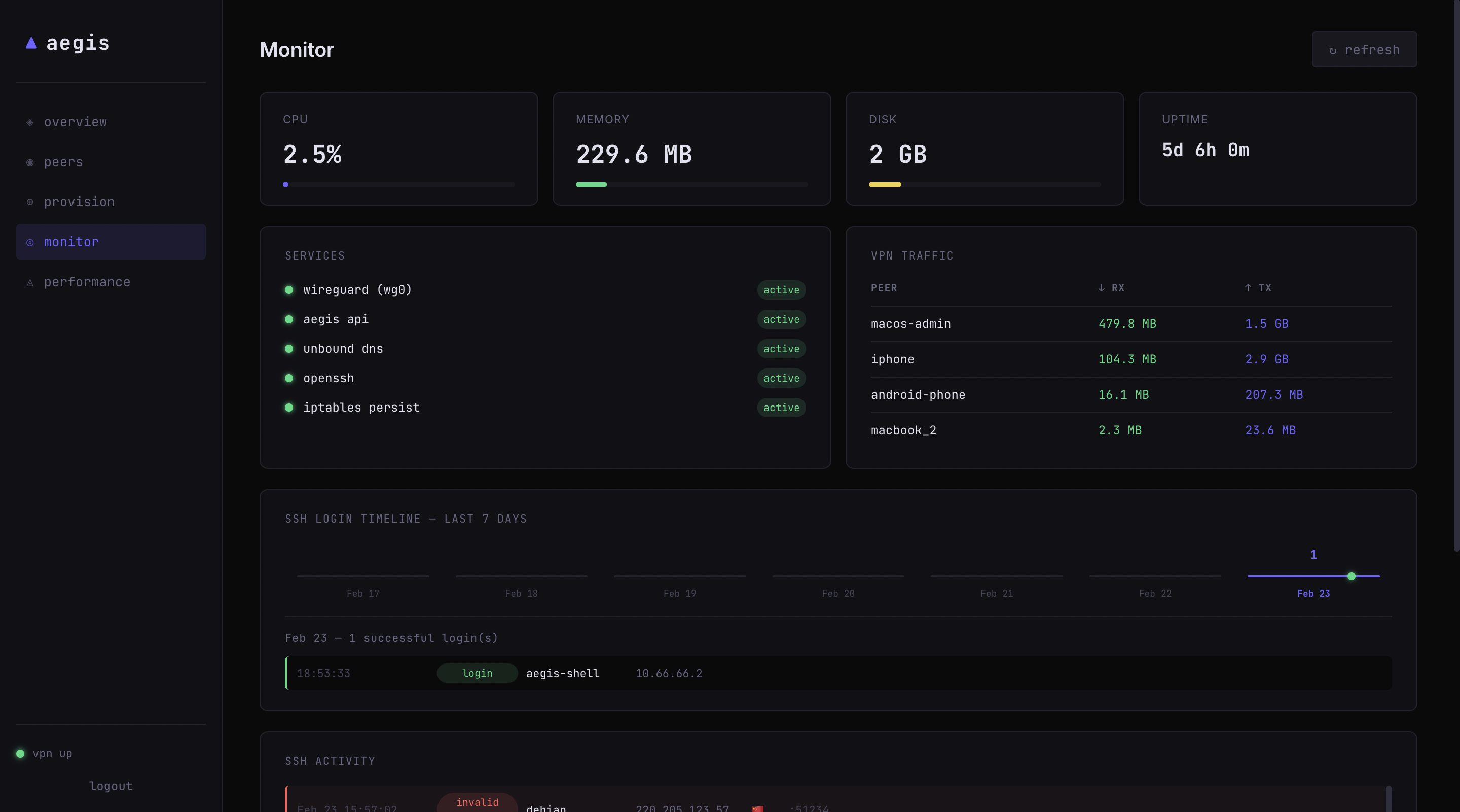
- Monitors the node in real time: CPU, memory, disk, uptime, VPN traffic per peer, and SSH event log with geo-IP enrichment.
- Bootstraps the admin peer locally — private key never leaves your machine.
aegis-node runs as a single Ubuntu VPS acting as a hardened VPN gateway with strict separation between:
- Data Plane — encrypted peer traffic (WireGuard or AmneziaWG)
- Control Plane — peer management & monitoring API
Public interface (eth0)
UDP 4500— selected VPN backendTCP 22— SSH (hardened)
No HTTP services are publicly exposed.
Private interface (wg0 or awg0 – 10.66.66.0/24)
- FastAPI control-plane (
:8000) - Unbound DNS
- Internal monitoring endpoints
The control-plane API is bound exclusively to the private VPN address and is not reachable from the public internet.
Access requires:
- An active VPN session
- A valid
X-Aegis-Token
Peer → selected VPN backend (UDP 4500) → wg0/awg0 → iptables (NAT + kill-switch) → Internet
                                                 └──→ aegis-api (:8000, VPN only)
- Single-operator or small-team self-hosted VPN
- Full-tunnel routing (
0.0.0.0/0) with DNS leak prevention - Reproducible infrastructure: one playbook, any Ubuntu VPS
- Operational visibility: peer health, system stats, SSH audit log
- Anonymity guarantees — your VPS provider can still observe metadata; this is not a commercial VPN
- Multi-region / high availability — single node by design
- Advanced censorship bypass guarantees — optional AmneziaWG transport can help with DPI-hostile networks, but no bypass guarantee is claimed
- End-user client management — no GUI client, no billing, no accounts
aegis-node assumes full ownership of the target server. It applies its own firewall policy (default-DROP), DNS configuration, and SSH hardening. Running it on a multi-purpose server with pre-existing services is likely to conflict with those configurations and is not a supported use case.
| Threat | Mitigation |
|---|---|
| ISP / local network eavesdropping | All traffic encrypted by the selected VPN backend |
| DNS leaks | Unbound resolver on VPN interface; client DNS points to wg_server_ip |
| IPv6 leaks | IPv6 disabled at kernel level (wg_enable_ipv6: false) |
| VPN dropout exposing traffic | iptables default-DROP policy; only selected VPN endpoint exempt |
| SSH brute-force | Key-only auth, root login disabled, fail2ban, rate-limited firewall rule |
| Unauthorized API access | Control-plane bound to the VPN address only; token auth on all endpoints |
| Rogue peer traffic | Per-peer AllowedIPs = /32; no peer-to-peer routing |
| Key compromise | Admin private key stays local; peer revocation via API |
Trust boundary: The VPS provider is implicitly trusted. This setup does not protect against a compromised or malicious hosting environment.
aegis-node/
├── ansible/
│   ├── playbook-wireguard.yml   # main provisioning playbook
│   ├── group_vars/all.yml       # single source of truth for all vars
│   ├── inventories/dev/         # host inventory
│   ├── roles/
│   │   ├── system/              # user, packages, sysctl
│   │   ├── wireguard/           # wg install, key gen, wg0.conf
│   │   ├── amneziawg/           # awg install, key gen, awg0.conf
│   │   ├── dns/                 # Unbound resolver
│   │   ├── firewall/            # iptables rules + NAT
│   │   ├── hardening/           # SSH, fail2ban, unattended-upgrades
│   │   └── dashboard/           # control-plane deploy + systemd
│   └── deploy-panel.sh          # hot-redeploy control-plane only
└── control-plane/
    ├── app/
    │   ├── main.py              # FastAPI routes
    │   ├── auth.py              # token auth middleware
    │   └── services/
    │       ├── wg.py            # peer CRUD + active backend adapter
    │       ├── health.py        # VPN health endpoint
    │       ├── monitor.py       # system stats + SSH timeline
    │       └── labels.py        # peer label / metadata store
    └── requirements.txt
- Control machine: Ansible,
wgCLI, Python 3.10+ - VPS: Ubuntu 22.04 / 24.04, SSH access with a key
The inventory file (hosts.ini) tells Ansible exactly where your server is and how to connect to it. Open ansible/inventories/dev/hosts.ini and update it with your VPS details.
# ansible/inventories/dev/hosts.ini

[aegis]
aegis-edge ansible_host=[IP_ADDRESS] ansible_user=[INITIAL_USERNAME] ansible_shell_executable=/bin/bash
Connection Details:
ansible_host: The public IP address of your newly provisioned VPS.ansible_user: The user Ansible will use to connect. On a fresh VPS, this is typicallyrootor a provider-specific user likeubuntuordebian. However, adhering to the principle of least privilege, any initial user withsudoaccess is completely supported (e.g., a customaegis-shelluser).- Authentication: By default, Ansible expects you to have SSH key-based authentication set up. Ensure you can successfully connect to the server via terminal (e.g.,
ssh YOUR_USER@YOUR_VPS_IP) before running the playbook. If you must use a password for the initial connection, you can appendansible_ssh_pass="your_password"to the line above, though key-based auth is strongly recommended.
Edit ansible/group_vars/all.yml — the most important ones:
| Variable | Default | Description |
|---|---|---|
vpn_transport |
wireguard |
Active VPN backend (wireguard or amneziawg) |
wg_subnet_cidr |
10.66.66.0/24 |
VPN subnet |
wg_port |
4500 |
Active backend UDP port |
wg_bootstrap_admin |
true |
Auto-add your local machine as admin peer |
dashboard_bind_port |
8000 |
Control-plane API port |
dns_enable |
true |
Deploy Unbound resolver on the VPS |
cd ansible
ansible-playbook playbook-wireguard.yml
The playbook asks which VPN backend to deploy:
VPN transport [wireguard/amneziawg] [wireguard]:
On first run this will:
- Harden the VPS (SSH, firewall, sysctl)
- Install and configure the selected VPN backend
- Deploy the control-plane as a systemd service
- If
wg_bootstrap_admin: true, generate a local keypair, register it as a peer, and writepeers/admin.conf
For non-interactive runs, pass the selection as an extra var:
ansible-playbook playbook-wireguard.yml -e vpn_transport=amneziawgThe playbook prompts for a small AmneziaWG obfuscation preset unless amneziawg_obfuscation_preset is supplied. Supported presets are balanced, carrier, and quiet.
Switching vpn_transport later converges the server to the selected backend, but existing client profiles should be treated as stale. Reprovision and re-import clients from the dashboard after switching between wireguard and amneziawg.
The local peers/admin.conf bootstrap profile is generated for the selected backend. Import it with WireGuard when vpn_transport=wireguard, or with an AmneziaWG-compatible client when vpn_transport=amneziawg.
# macOS WireGuard app
File → Import Tunnel → peers/admin.conf

# or CLI
sudo wg-quick up $(pwd)/peers/admin.conf
Then access the dashboard:
# get your token
cat ansible/.secrets/dashboard_token

# hit the API
curl -H "X-Aegis-Token: <token>" http://10.66.66.1:8000/api/healthAll endpoints require the X-Aegis-Token header.
| Method | Path | Description |
|---|---|---|
| GET | /api/health |
VPN up/down, active transport, peer counts |
| GET | /api/peers |
All peers with labels and handshake age |
| POST | /api/vpn/add |
Add a peer by public key + IP |
| POST | /api/vpn/remove |
Remove a peer by public key |
| POST | /api/vpn/provision |
Auto-generate keypair + backend-matched config + QR code |
| POST | /api/wg/* |
Compatibility aliases for existing clients/scripts |
| GET | /api/monitor/system |
CPU, memory, disk, uptime |
| GET | /api/monitor/services |
systemd service statuses |
| GET | /api/monitor/traffic |
Per-peer bytes transferred |
| GET | /api/monitor/ssh |
Recent SSH events (geo-enriched) |
| GET | /api/monitor/ssh/timeline |
7-day successful login timeline |
| GET | /api/monitor/performance |
Load avg, ping, interface counters |
Interactive docs available at http://10.66.66.1:8000/docs once connected to the VPN.
After changing control-plane/ without wanting to re-run the full playbook:
./ansible/deploy-panel.sh- The control-plane API is not reachable without an active VPN connection (bound to
wg_server_ip). - Token authentication is enabled by default (
dashboard_enable_auth: true). Token is auto-generated on first provision and stored inansible/.secrets/dashboard_token. - Private keys are never sent to the VPS. The admin peer private key stays on your local machine.
peers/andansible/.secrets/are excluded from version control via.gitignore.- For production use, consider encrypting
dashboard_auth_tokenwithansible-vault. - Dashboard peer provisioning generates client profiles for the active backend. Standard WireGuard clients cannot import AmneziaWG profiles; use an AmneziaWG-compatible client when
vpn_transport=amneziawg.
- IPv6 dual-stack tunnel support
- Split-tunnel profile (per-peer
AllowedIPsmanagement) - Ansible Vault integration for automated secret management
- Prometheus metrics endpoint + Grafana dashboard
- Key expiration and automated peer rotation
- Multi-VPS site-to-site linking
MIT