
English | 简体中文
AlwayGit is a graphical Git workbench for VS Code editor tabs, the Primary Sidebar, Secondary Sidebar, and Panel. It brings repository and reference navigation, commit history, commit details, working-directory status, and read-only diffs into one interface. Text files can open in VS Code's native editor; images and other binary files are previewed inside the Workbench.
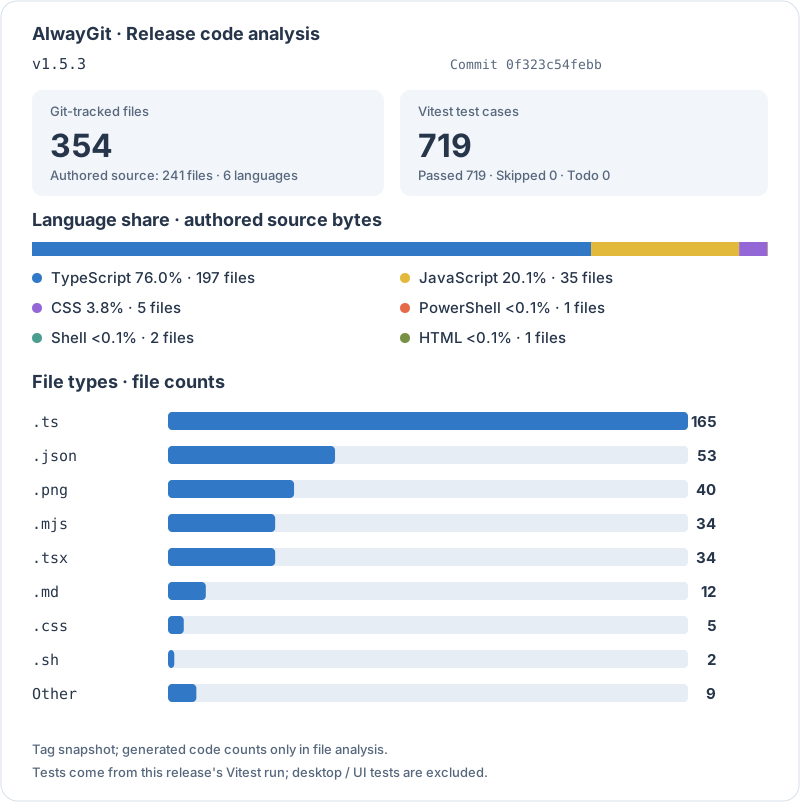
The card identifies its release Tag and updates only after a stable Release succeeds. See counting rules, Pages setup, and recovery.
Use VS Code 1.106 or later. Basic functionality requires Git 2.40+; Git 2.46+ is recommended for all advanced operations. See the manual requirements for operation-specific minimums. Building from source uses Node.js 24 and npm.
npm ci
npm run build
Open this project in VS Code and press F5 to launch the Extension Development Host. Click the AlwayGit Activity Bar icon, then Open Workbench in the launcher to open or focus the configured default location. Open Workbench in New Window creates an independent window without a repository selected. The AlwayGit view-title gear enables one or more of Editor Tab, Primary Sidebar, Secondary Sidebar, and Panel, and selects the default entry. All four locations can coexist with independent state. The status-bar icon and AlwayGit: Show Workbench command open or focus only the default. Sidebar directions follow VS Code's primary-sidebar placement. Applying location settings opens the default. Add, group, select, and remove repositories inside the Workbench.
The fixed installation package is artifacts/alwaygit.vsix. For an initial manual installation, choose Install from VSIX… from the Extensions view menu. The shared Windows/Linux installation menu is node scripts/install.mjs; Linux also supports bash scripts/install.sh. Dependency preparation, packaging, installation verification, and Tag-triggered GitHub Releases are described in Validation and Local Updates.
Release packages target win32-x64, linux-x64, and linux-arm64. With Remote SSH, choose the package matching the remote computer's operating system and CPU architecture and install it into the remote extension host. See remote installation.
- Multiple repositories and Worktrees, confirmed recursive discovery, repository removal and custom groups, and independent Workbench tabs in one window.
- Multiple-reference filters, recursive branch trees, paginated topological commit graphs, file history, combined author/date/path/code-change searches, and HEAD location.
- Commit details, complete file trees at any commit, Merge Parent selection, automatic two-commit and bidirectional branch comparison, file-path filtering, and read-only text/image diffs.
- Shared bottom Diff and terminal tabs with Shell selection, renaming, termination/restart, collapse, and maximization.
- Working Tree conflict, Unstaged, and Staged management; whole-file, Git-hunk, and bulk staging actions; Commit, Amend, and per-repository drafts.
- Conflict-file navigation, native three-way merge editing with a manual fallback, complete-side selection, and reviewed staged results before continuation.
- Git LFS status, tracking-rule previews, object fetching/uploading, cache checkout, and explicit historical-object downloads and previews.
- Branch, remote-branch, Tag, Stash, and Worktree management, plus Fetch, Pull, Push, Merge, ordinary and interactive Rebase, Cherry-pick, Reset, Revert, and active-operation handling.
- Reflog browsing and recovery-branch creation, plus a Worktree status overview.
- Four-region layout, resizable panels/columns, light/dark themes, Graph palettes, font size/density, English/Simplified Chinese, and session restoration.
- Offline Help & Guide with quick start, common tasks, troubleshooting, complete bilingual manuals, topic filtering, and section navigation.
- Native VS Code text editing/Diff, existing project-window reuse, and opening across windows.
For complete interactions, configuration, and feature boundaries, see the Workbench Specification.
| Document | Purpose |
|---|---|
| User Manual (English) / 用户手册(简体中文) | Quick start, everyday operations, terminals, shortcuts, advanced tasks, and troubleshooting; both editions and in-application help share screenshots |
| Workbench Specification | Current product behavior, interactions, configuration, and feature boundaries |
| Architecture and Development | Runtime structure, code entry points, conventions across layers, development workflow, and maintenance boundaries |
| Validation and Local Updates | Checks appropriate to each change, acceptance scope, validation evidence, packaging, and installation |
| Issue Log (Chinese) | Causes, fixes, and validation records for confirmed problems |
| Project Collaboration Rules (Chinese) | Rules for commits, documentation, testing, and local updates |
The project has not specified an open-source license and has not been published to the VS Code Marketplace.