A terminal-first helper toolkit for Linux web servers running NGINX, Apache, Certbot, PHP, and common service/process diagnostics.
This fork/continuation adds a cleaner single-key interface, improved terminal visuals, process-aware port inspection, simplified log viewing, wildcard SSL helpers, and a basic user process manager.

- A Debian/Ubuntu-based Linux system
gitsudoaccess
Install Git if it is not already available:
sudo apt update
sudo apt install -y gitClone the repository:
git clone https://github.com/Blackh8t/hmm.git
cd hmm
chmod +x hmm.sh
./hmm.sh
Make sure the filename is
hmm.sh, nothmmh.sh.
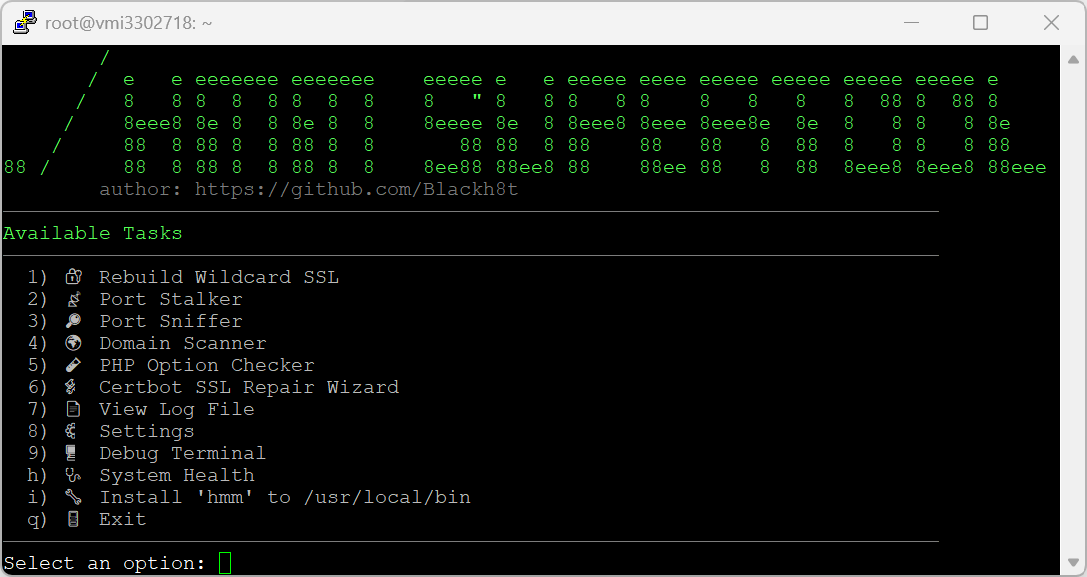
From the main menu, select:
i) Install 'hmm' to /usr/local/bin
Once installed, you can launch the toolkit from any directory:
hmmThe original cloned directory is no longer required after the system-wide installation:
cd ..
rm -rf hmmTo install the latest version:
rm -rf hmm
git clone https://github.com/Blackh8t/hmm.git
cd hmm
chmod +x hmm.sh
./hmm.sh
Select the system-wide installation option again:
i) Install 'hmm' to /usr/local/bin
This replaces the existing /usr/local/bin/hmm installation.
Remove the system-wide command:
sudo rm -f /usr/local/bin/hmmRemove the local configuration file:
rm -f ~/.hmmrcOriginal project credit goes to:
Blackh8t
https://github.com/Blackh8t/hmm
Credit where it is due.
The attribution notice in the script must not be removed from copies, forks, redistributed versions, installer scripts, modified builds, or derivative works.
- Select tools with one key.
- No Enter required for main menu selections.
- Clears the screen between tools so each result is readable.
- Returns to the menu after each action.
- Bold menu options.
- Bold feature names.
- Green bold prompt line at the bottom.
- Clear visual separation between sections.
- Status, success, warning, and error messages use distinct colours.
- Rebuild wildcard SSL certificates.
- Supports manual DNS challenge.
- Supports Cloudflare DNS plugin.
- Supports DigitalOcean DNS plugin.
- Supports AWS Route53 DNS plugin.
- Repair existing Certbot certificates from discovered NGINX vhosts.
- Reloads NGINX and Apache where available.
Shows listening TCP/UDP services with:
- Protocol
- Port
- Local bind address
- PID
- Process name
Shows externally-bound services with:
- Protocol
- Port
- External exposure status
- PID
- Process name
- Local bind address
This helps quickly identify whether services are listening locally only or exposed on 0.0.0.0, [::], *, or the public IP.
A simplified process list for the current user.
- Shows top user-owned processes.
- Single-letter selection.
- Sends
TERMfirst. - Offers
KILLif the process remains alive. - Avoids forcing destructive action by default.
Scans NGINX vhost files from:
/etc/nginx/sites-enabled/etc/nginx/sites-available
Filters out common placeholders like _, localhost, and wildcards.
- Scans PHP files under
/var/wwwby default. - Lists detected
require,require_once,include, andinclude_oncereferences. - Lists currently loaded PHP CLI modules when PHP is installed.
- Finds common NGINX, Apache, and system log files.
- Lets you choose a log from a numbered list.
- Remembers the last opened log.
- Lets you choose how many lines to display.
Opens a child shell with helper aliases:
ports
nginx-test
nginx-reload
apache-test
certs
logs-nginx
Type exit to return to hmm.
Displays a quick system overview:
- Hostname
- Uptime
- Current user
- Disk usage
- Memory usage
- NGINX / Apache / Certbot service status where available
Clone or copy the script, then make it executable:
chmod +x hmm_fixed.sh
./hmm_fixed.sh
To install globally from inside the tool, select:
i
Or manually install:
sudo cp hmm_fixed.sh /usr/local/bin/hmm
sudo chmod +x /usr/local/bin/hmm
hmmThe tool stores lightweight user settings at:
~/.hmmrcCurrently stored values:
CERT_EMAIL="admin@example.com"
LAST_LOG_FILE="/var/log/nginx/error.log"
The config reader only loads known keys and does not execute arbitrary shell code from the config file.
You can override default paths with environment variables:
HMM_CONFIG_FILE="$HOME/.custom-hmmrc"
HMM_SITES_ENABLED="/etc/nginx/sites-enabled"
HMM_SITES_AVAILABLE="/etc/nginx/sites-available"
HMM_WEBROOT="/var/www"
Example:
HMM_WEBROOT="/srv/www" ./hmm_fixed.shRecommended packages:
sudo apt update
sudo apt install -y iproute2 certbot curl procps coreutils findutils
Optional packages depending on use:
sudo apt install -y nginx apache2 php-cli python3-certbot-nginx python3-certbot-apacheFor DNS wildcard SSL modes, install the relevant Certbot plugin:
sudo apt install -y python3-certbot-dns-cloudflare
sudo apt install -y python3-certbot-dns-digitalocean
sudo apt install -y python3-certbot-dns-route53
Package names may vary by distro.
This tool is designed for server administration. Some actions can affect live services.
Use care with:
- Certificate rebuilds
- Web server reloads
- Process termination
- Running with sudo/root privileges
The process manager sends TERM first and only offers KILL after the process remains active.
Improve hmm UI, SSL tooling, port/process inspection, and attribution

- Add single-key menu flow with clean screen transitions
- Add bold menu choices and green bold prompt styling
- Add process names and PIDs to port inspection tools
- Add simplified user process list with safe kill workflow
- Add wildcard SSL rebuild helper with DNS challenge modes
- Add Certbot repair wizard from discovered NGINX vhosts
- Add log viewer, debug shell, and system health snapshot
- Harden config loading by avoiding arbitrary source execution
- Add mandatory attribution to Blackh8t original hmm project
This continuation keeps visible attribution to the original project:
Blackh8t / hmm
https://github.com/Blackh8t/hmm
admin@securenode.io
Do not remove the attribution block from the script or redistributed copies.