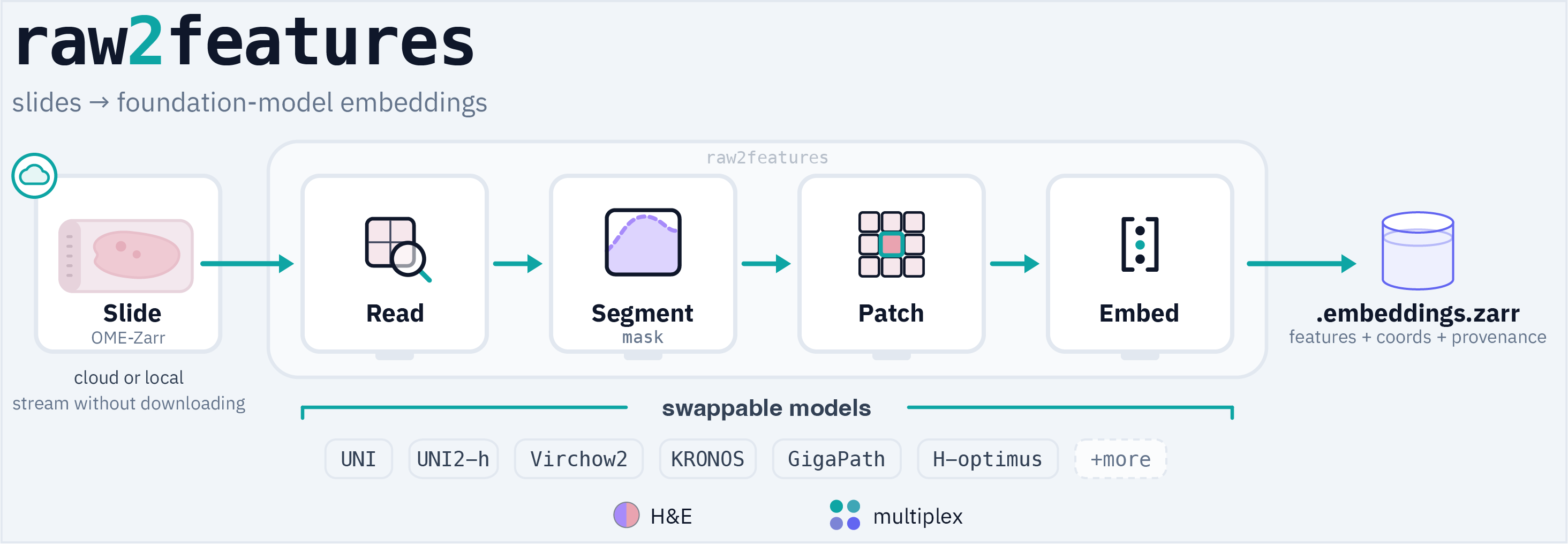
Read a whole-slide image in OME-Zarr / OME-NGFF and emit patch- and slide-level foundation-model embeddings - with storage backend and embedding models independently swappable.
Cloud-native and FAIR: slides read directly from cloud storage, and each embedding carries the metadata needed to interpret and reuse it.
By analogy to bioformats2raw and raw2ometiff, but for features: point it at a raw OME-Zarr WSI,
choose from 30+ feature extractors (UNI/UNI2, Virchow/Virchow2, CONCH, KRONOS/KRONOS2,
KEEP, GigaPath, H-optimus, Phikon, CTransPath, …; full list in
MODELS.md),
and get back a compact, self-describing *.embeddings.zarr with per-patch
coordinates such that every embedding is relocatable to the slide.
Status: alpha, under active development. Contributions welcome.
Zarr stores large N-dimensional arrays as chunked, compressed pieces you can read individually - enabling you to stream just the region you need, directly from cloud storage. OME-Zarr (OME-NGFF) is the bioimaging convention on top of Zarr: a multi-resolution pyramid plus standard metadata (pixel size, axes, channels). It's a community driven and widely adopted format for bioimaging. The BioImage Archive and IDR are adopting it at scale: the IDR has migrated its infrastructure to OME-Zarr (image viewing and raw-pixel access are now served directly from OME-Zarr in public object storage), and the BioImage Archive publishes whole-slide images in the same FAIR format. raw2features reads OME-Zarr (local or remote) and writes its embeddings back out as a Zarr store too.
- OME-Zarr in, embeddings out. raw2features focuses on cloud-optimised, parallel-friendly NGFF reads → embeddings.
- Exact MPP. Patches are extracted at the requested microns/pixel (e.g. default 0.5 µm/px @ 224 px) by downsampling from the nearest finer pyramid level such that embeddings are comparable across slides and datasets.
- Modular implementation. Reader, segmenter, patcher, patch-embedder,
multiplex-strategy, slide-embedder, and sink implementations are plugin seams exposed
through Python entry points. Entry points add implementations/families; the CLI's
patch-model names come from the bundled provenance registry, while Python callers can
inject external embedder instances through
embed_slide(..., embedders=[...]). - FAIR & provenance-first. Stable models' weights are pinned to an immutable HuggingFace
revision (or a sha256-pinned URL), with preprocessing sourced from each
model's card. Every output records that provenance plus a 1:1
coords↔features mapping, so an embedding is reproducible and traceable to the exact
weights that made it. SEAL is explicitly experimental in v0.2.0: its adapter is
pinned and verified, but its upstream factory still fetches the frozen base from a
mutable revision; see
MODELS.md.
pip install "raw2features[all]"     # full stack: OME-Zarr reads + segmentation + torch + models
pip install "raw2features[zarr]"    # lean: remote/Zarr reads only, no torch
pip install raw2features            # core only (bring your own reader/model extras)
Extras are composable - e.g. raw2features[zarr,torch,models]. The export bridges
(spatialdata, h5) stay opt-in; see MODEL_LICENSES.md and
INTEROP.md.
Gated git-package encoders. A few encoders (CONCH, KRONOS, MUSK) ship as gated, non-PyPI git packages, so they install in two steps. The extra pulls the PyPI stack, then one command installs the package itself:
pip install "raw2features[conch]"  && pip install git+https://github.com/Mahmoodlab/CONCH.git@141cc09c7d4ff33d8eda562bd75169b457f71a62
pip install "raw2features[kronos]" && pip install git+https://github.com/mahmoodlab/KRONOS.git@48979362386c8440c934954be3d88ccfa74d6f36
pip install "raw2features[musk]"   && pip install git+https://github.com/lilab-stanford/MUSK@714b666969c1911e5efe70d991140a21030f4ef3
The same pattern covers the other gated encoders - mostly slide encoders (e.g. madeleine,
gigapath_slide, seal), a few with extra model-specific steps (a pinned fork, flash-attn,
or Drive-hosted weights). Each model's exact install is in its MODELS.md row
and the matching extra's comment in pyproject.toml.
KRONOS2. The gated KRONOS2 repository is loaded from a pinned Hugging Face snapshot, so it needs no separate git-package install:
pip install "raw2features[all,kronos2]"
hf auth login
Request access to MahmoodLab/KRONOS2
with the institutional account required by its gate. On x86-64 Linux with CPython 3.11
or 3.12, the extra installs the authors' pinned Torch/xFormers/Transformers/timm
reference stack; raw2features validates this path on Python 3.12. Python 3.13 and other
platforms use the upstream PyTorch attention fallback, which is slower and may use more
memory. The KRONOS2 extra is not available on Python 3.14 because the pinned Torch
release does not support it. Normal use of the released marker vocabulary does not
download BioLinkBERT; that conditional download occurs only when a complete novel-marker
CSV is supplied. See
MODALITIES.md for marker selection and registration.
Development (from a clone, with uv):
uv sync --no-default-groups  # dependency-lean core only
uv sync --extra zarr --extra image --extra torch --extra models # full stackWith the stack installed (above):
raw2features sample sample.ome.zarr                          # synthetic slide
raw2features embed  sample.ome.zarr out/ -m resnet50 --device auto
--device auto picks CUDA → Apple MPS → CPU, so this runs anywhere. Tested on A100, L40S,
GB10, and CPU.
Runnable tutorials live in notebooks/. Start with the
visual walkthrough - a real SurGen H&E slide
resolved from the BioImage Archive and taken cloud-direct (nothing downloaded) from
thumbnail → tissue segmentation → patch tiles → a ResNet-50 feature map of the slide, all
on CPU with no model-access-token. Its figures are pre-rendered on GitHub.
Full guide: docs/usage.md - every command, what actually
happens under the hood (exact MPP, decode-once fan-out, output schema), the
rerun-safe / skip-if-complete model, thumbnails, and example SLURM cohort runs.
Named-channel inputs, native multiplex encoders, and the channelwise RGB-encoder
strategy are covered in docs/MODALITIES.md.
raw2features info slide.ome.zarr
raw2features embed slide.ome.zarr out/ \
    --model uni --model resnet50 \
    --mpp 1.0 --patch-size 224 \
    --emit-thumbnail                                  # optional QC thumbnail + overlay
raw2features list embedders

# Thumbnails can also be made standalone, before/after the embed run. By default
# they render at the segmentation MPP, so --overlay aligns the tissue mask + the
# kept-patch grid with no resampling (--thumbnail-mpp / --max-px to override).
raw2features thumbnail slide.ome.zarr out/ --overlay

# Optional post-hoc exports from the native out/slide.embeddings.zarr store:
# SpatialData for squidpy/napari, or HDF5 for TRIDENT/CLAM/TITAN/STAMP.
# These never re-compute embeddings; install [spatialdata] or [h5] as needed.
raw2features export-spatialdata out/slide.embeddings.zarr   # -> slide.spatialdata.zarr
raw2features export-h5 out/slide.embeddings.zarr --layout trident   # or --layout clam / stamp
For gated Hugging Face models, authenticate once with hf auth login or set
HF_TOKEN in the environment. Passing --hf-token is supported, but environment or
cached authentication avoids placing a token in shell history or process listings.
<slide_id>.embeddings.zarr/
├── .zattrs                  # source, provenance + a grids index
└── grids/<mpp>_<px>/        # one per geometry (usually just one, e.g. mpp0.5_px224)
    ├── .zattrs              # this grid's full header (patching, models, provenance)
    ├── coords/              # (N,2) int32 level-0 (x,y) - 1:1 with every features/<model>
    ├── grid_index/          # (N,2) int32 (row,col)
    ├── mask/                # (rows,cols) uint8 fraction of each cell that is tissue, 0-255 (unless --no-seg)
    └── features/<model>/    # (N, dim) float16

<slide_id>.thumbnail.png            # optional (--emit-thumbnail / thumbnail cmd)
<slide_id>.thumbnail.overlay.png    # optional QC overlay: tissue tint + kept-patch grid

<slide_id>.spatialdata.zarr/        # optional - `export-spatialdata`, see docs/INTEROP.md
<slide_id>.h5                       # optional - `export-h5` (TRIDENT/STAMP), see docs/INTEROP.md
Interop (optional export for supported packages):
export to scverse SpatialData (squidpy / napari-spatialdata) or to pathology-MIL
HDF5 (TRIDENT/CLAM/TITAN, KatherLab STAMP). These are one-way export bridges so you
can feed existing toolchains; for full FAIR provenance use the default
.embeddings.zarr. See INTEROP.md.
Any command that takes a slide path also takes a remote OME-Zarr URL - the reader
opens http(s)://, s3://, gs://, etc. via fsspec/zarr, so the whole pipeline
(segment → tile → embed) runs directly against a cloud store without downloading the
slide. Needs the [zarr] extra (ships fsspec); s3:///gs:// need s3fs/gcsfs.
# Extract straight from the EBI BioImage Archive - nothing lands on local disk.
raw2features embed \
  https://uk1s3.embassy.ebi.ac.uk/bia-integrator-data/S-BIAD1285/.../image.ome.zarr/0 \
  out/ -m uni --mpp 0.5 --read-block 16        # fewer, larger reads cut round-trips
Authenticated URLs are kept intact only while opening the source. Stored metadata,
receipts, output IDs, and captured command provenance use a credential-free URI:
userinfo and known AWS, Google, Azure, and generic authentication parameters are
removed, while selectors such as an object version or series remain. Rotating a signed
URL therefore reuses the same output ID. Query credentials must authorize the Zarr
prefix and its child objects; a presigned URL for one S3/GCS object generally cannot
authorize an entire Zarr hierarchy. Prefer native s3:// / gs:// credential-provider
configuration for those stores.
Validated end-to-end against the EBI BioImage Archive. Remote reads are latency-bound, but
in our read benchmark (raw2features benchmark) a cold embed-once run (the normal case)
was only about 1.6x slower than local: the GPU, segmentation, and write work dominate and
don't depend on where the slide lives, so the raw-read gap (around 16x on warm re-reads)
mostly disappears. On a slow store, --read-block N groups patches
into N×N reads to cut round-trips (bit-identical output; try 16 remote, 8 local), and 8
read-workers was the sweet spot either way. For large cohorts, staging slides to local
storage is still faster. See docs/usage.md for the remote-read and
--read-block guidance.
MIT - see LICENSE. If you use raw2features, please cite it (see CITATION.cff).
raw2features does not ship model weights and grants no rights to them. When using a pretrained encoder please refer to that model's own licence (several are non-commercial, e.g. CC-BY-NC-ND). See MODEL_LICENSES.md.