Repository navigation
Force Solver
This library includes the ability to solve for the vector forces at each contact from a photoelastic image. On this and the following few wiki pages, we review the technique for doing this, some differences when compared to past implementations, and guidelines for choosing parameters.
This is primarily a review of the equations presented in [1], though I have written out the expressions in a more explicit form.
Assuming we are illuminating our particles with monochromatic light, the intensity at any given point within a particle is given by
as viewed through a darkfield polariscope, or
as viewed through a brightfield polariscope. is the difference in principal stress at the given point, and
is the (wavelength-independent) stress-optic coefficient. The principal stress difference can be written using the components of the stress tensor in 2D as
.
The components of the stress tensor are calculated as
,
with
and
.
is the vector from the center of the particle to the force contact, and
is the chord for a given force. The sums (and the index
) run over every force acting on the particle, characterized by a magnitude
, angular position
, and contact angle
.
This is certainly not the first library to implement this method to solve for the vector contact forces given a photoelastic image. Other openly available versions include:
In the case that someone has previously used either of these libraries (which are implemented very similarly), we would like to make note of a few structural and practical differences.
-
In most physical scenarios, it is most common to write coordinates, as [x,y], whereas in image processing, it is also common to use [y,x]. This library uses the latter [y,x] convention pretty much everywhere, whereas the two previously mentioned libraries use [x,y]. Be sure to verify that any data about particle centers or other positions are reversed. This can be easily done with array slicing simply by doing something along the lines of
center[::-1](just make sure that you are indexing the correct dimension). -
Almost all positions/lengths/etc. are kept in units of pixels. Some methods may require physical units, for which you may need to pass a parameter along the lines of
pxPerMeter-- but you should never convert to mm/cm/m manually unless explicitly stated. This decision is made to keep construction of masks and other image filtering objects very simple and straightforward. -
This version does not center around a
particlestruct that contains all of the information about any given particle. The various quantities (active forces, positions, angles, etc.) are left to the user's organization scheme. My reasoning here is that this is much more extensible, since we are not tied to a particular system to run every single analysis -- ie. if we want to quickly test some method, we do not need to spend any time organizing every possible parameter a particle could have into a struct. See the test notebooks for examples of what this looks like, though it is very Python-ish, and thus shouldn't be too jarring to anyone that has worked with numpy/scipy/etc. before.
Note that the final arrays generated from force-solving (eg. force magnitudes, alphas, and betas) tend to have the structure:
forceArr[particleIndex]
        [forceIndex]
        [timeIndex]
This is reminiscent of the struct format from previous implementations, in that all of the forces for a single particle can be easily accessed by taking eg. forceArr[0]. See documentation for pepe.utils.rectangularizeForceArrays().
-
Handling of boundary contacts. See section below.
-
There is significantly more control over the optimization process (see several subsequent sections). This includes doing multiple rounds of optimizations with different parameters -- eg. first vary alpha, but keep force constant, then vary force, and keep alpha constant --, selection of optimization method, and changing bounds/tolerances for the free parameters.
-
This library includes a full pipeline function --
pepe.auto.forceSolve()-- that takes in the name of a directory and outputs forces, particle positions, etc. for all frames contained in that directory. This function can reuse the settings passed to a previous call, which makes running new data sets very simple.
After making an initial guess about the location, direction, and magnitude of each force acting on the particle, we refine these values using a nonlinear fit to the analytic solution discussed earlier. There are several different possible optimization methods that can be used, which will likely vary in the final accuracy and evaluation speed. In this section, we discuss several of the methods that can be passed to the pepe.analysis.forceOptimize() function via the method keyword argument.
tl;dr
-
method='nelder'ormethod='bfgsb'are the middle of the road with quite good accuracy (typical error: 10-3 N) and reasonable evaluation time. These options are pretty much equivalent, and are recommended for most use cases. -
method='powell'can give the highest accuracy (typical error: 10-3 - 10-4 N), but convergence takes a while, and it is not always stable. -
method='cobyla'evaluates the fastest, but is not as accurate (typical error: 10-2 N).
Test Cases
In the following sections, we test the various optimization methods using the same randomly generated set of synthetic data. Of the 20 test cases, there can be anywhere between 2-4 forces acting on the particle, and the initial guesses have been manually verified to be at least somewhat close to the correct answer (they detect all of the forces, etc.). Unless otherwise specified, a uniform distribution of noise is added to the images, giving a signal-to-noise ratio of approximately 20:1.
We only optimize beta (the position of the contact) and the magnitude of the force in the next few sections. Alpha is not included as a free parameter in the optimization because we most commonly see radial forces in a system of circular disks. One can attempt to optimize all three parameters at once using the parametersToFit keyword argument in pepe.analysis.forceOptimize(), but this often runs into issues of dimensionality. It is recommended to instead optimize for two parameters (eg. force and beta) and then optimize again for another two parameters, included the previously fixed one (eg. force and alpha).
Below we have a comparison of the error for the four different optimization schemes (with all other options set to default), which includes a comparison to the error before optimization. All four schemes show great improvement over the initial guess, with nelder/bfgsb showing the most consistently accurate results. powell can achieve more accurate results than the other schemes, but does not achieve these consistently. cobyla did actually quite well, especially considering that it failed on several particles in the data you see below.
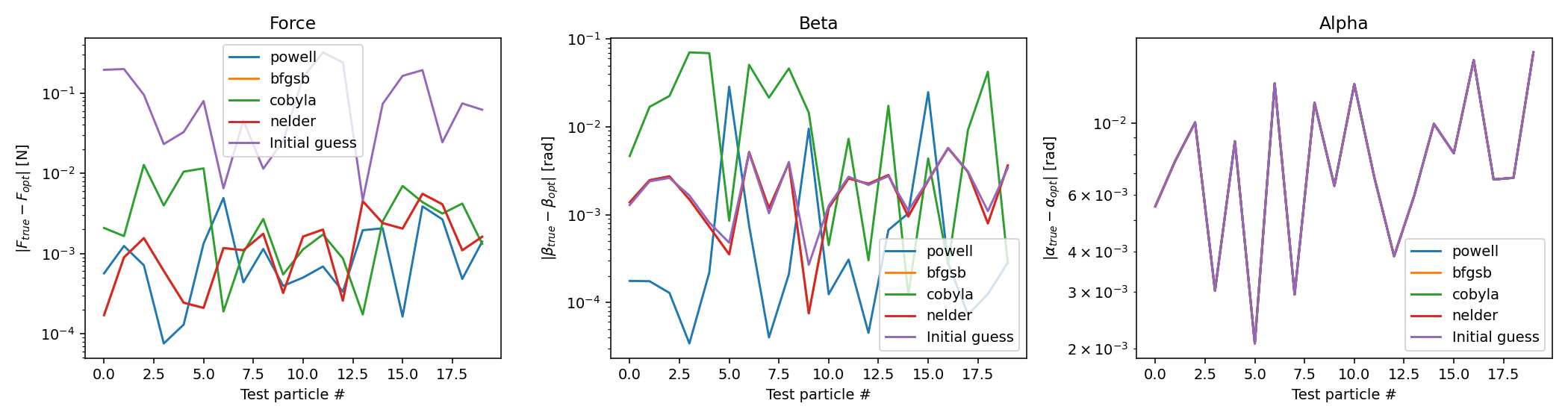
It is important to note that all of the test particles were only optimized for a set number of evaluations (in this case, 300), and so there is potential that some methods will become more accurate with more evaluations, while others will not. While the lmfit.minimize() function (and the scipy method that it wraps around) can detect convergence and exit before this evaluation limit is reached, that did not happen often in these tests. That being said, an error that is consistently less than .01 Newtons (as in nearly every case here), should be suitable for many applications. In the case that more accuracy is needed, the number of evaluations can be increased at the cost of computation time/power.
Because these tests are conducted with synthetic data, it is important to test the robustness of the results for cases that are more directly applicable to experiments, which include various types of error. Here, we introduce various levels of noise (randomly generated from a uniform distribution) while solving for the vector forces.
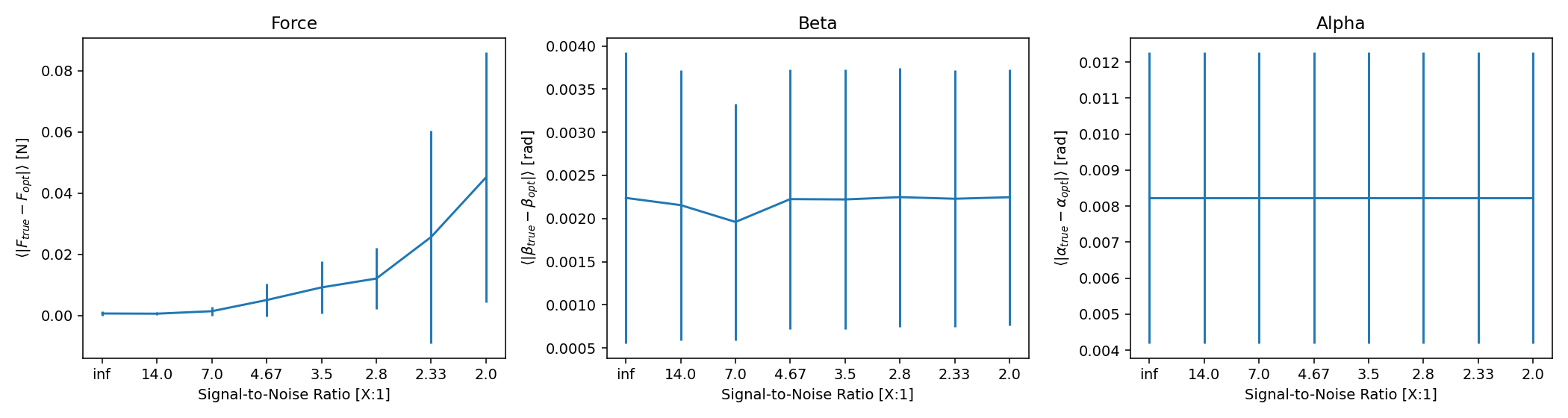
As expected, the accuracy of the solver decreases quite considerably with an increase in noise, but this is still reasonably accurate, considering that the images for that last data point look like this:
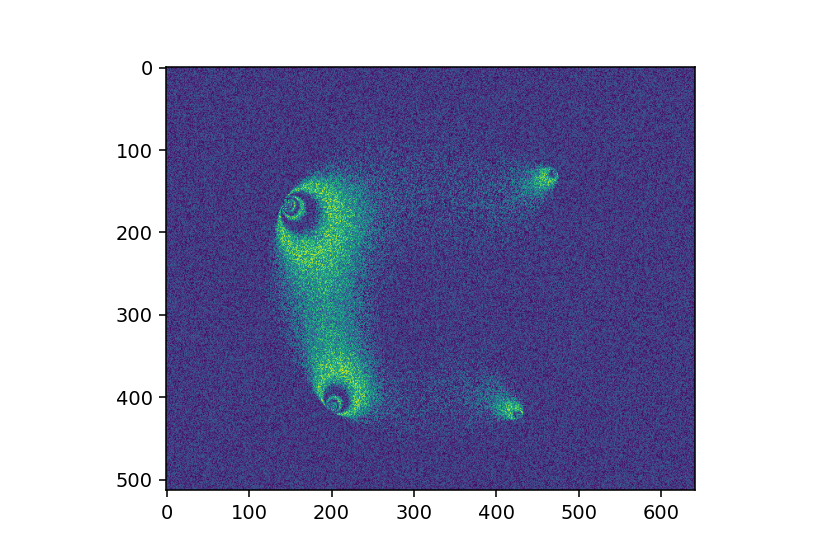
(If your data is worse than that, I would recommend focusing on your experimental setup before you fine tune this analysis...)
In the last section, we have shown that the optimization process is quite robust even when there is a significant amount of noise in a given image. Unfortunately, there is still a very good chance that the whole process will have sub-par results in the presence of noise, primarily due to the initial force guessing algorithm.
To generate the initial guesses of the force magnitudes, we use the average gradient squared (G2) of the particle. Since noise introduces widespread variations from pixel to pixel in the image, this method is very sensitive to the amount of noise. To demonstrate this, we show below two synthetic systems of particles, one without noise, and one with a small amount. The magnitudes of the force guesses are drastically different.
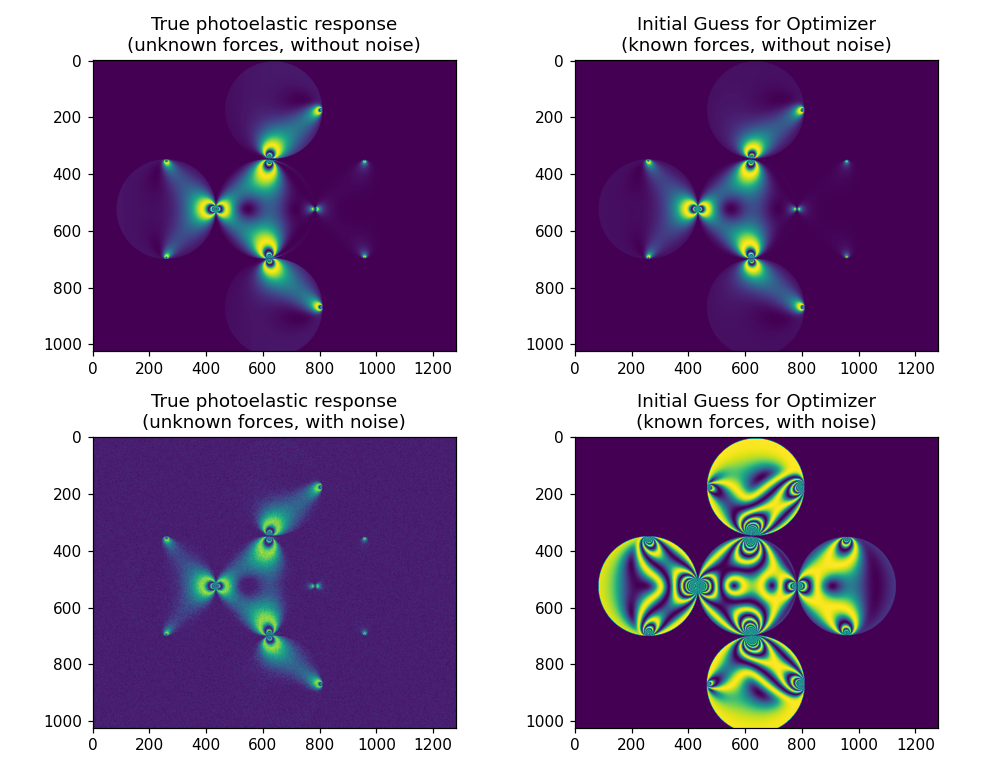
Given the noisy initial guess, the optimizer will almost certainly fail to give a good result, even after thousands of function evaluations. Generally, it is a good idea to guess weaker than what your forces actually are, and this is doing the exact opposite of that. There are a few ways around this issue, which allow you to still get good results from the optimizer, discussed below.
Improving Image Quality
Of course your first approach should be to see if there are any sources of noise in your images that can be removed. This could involve adjusting your camera's zoom, aperture, region of interest, etc. As has been mentioned previously, it is much easier to address these types of issues in your experimental setup than in the analysis code.
Smoothing Images
Blurring or smoothing your images before generating your initial guesses can help to remove the impact of noise on the force magnitudes. This can be done very easily through many python image packages e.g. in OpenCV:
from pepe.preprocess import checkImageType
import cv2

image = checkImageType('data/example_file.bmp')
# (3,3) is the kernel size
photoelasticChannel = cv2.blur(image[:,:,1], (3,3))
You may find it worthwhile to test various blurring procedures; the above example uses a simple averaging method, but Gaussian, median, or bilateral filtering may be better suited to a particular problem. See here for more information.
Forgoing Force Magnitude Guess
The optimizers implemented for this library are reasonably efficient, and you may find that you don't actually need an initial guess for the force magnitudes at all. Instead, initializing every force magnitude as some small, reasonable value, such as .1 Newtons, has worked in some cases where the initial guess was much too large. The estimate of , and
within
pepe.analysis.initialForceSolve() shouldn't be nearly as susceptible to noise, so something like the following might be worth trying.
# Generate initial guesses for a noisy image
forceGuessArr, alphaGuessArr, betaGuessArr = initialForceSolve(photoelasticChannel,
                                                centers, radii, fSigma, pxPerMeter,
                                                contactPadding, g2MaskPadding,
                                                contactMaskRadius=contactMaskRadius,
                                                boundaryMask=maskArr, ignoreBoundary=False)

# Force estimate will be bad anyway, so just throw them away
for i in range(len(forceGuessArr)):
    forceGuessArr[i] = np.zeros(len(forceGuessArr[i])) + .1
While the particular value that initialize the forces as shouldn't matter too much, it is not a good idea to leave it at zero, as this will cause the optimizer to take much longer to converge. Once again, guessing lower is almost always better than guess higher; sometimes, it isn't a bad idea to just divide the force guesses in half, even if there is only a small amount of noise.
Many granular systems can have very important interactions with objects outside of particle-particle interactions, as in the case of a hopper, drum, or annulus. This library can identify contacts with arbitrary non-particle objects so long as this information is provided to pepe.analysis.initialForceSolve via the boundaryMask and ignoreBoundaries keywords. By default, the latter value will be set to False, and no contacts outside of those between particles will be accounted for. By setting this latter value to True (but leaving boundaryMask alone), the solver will assuming your particles are in a rectangular box, defined by the upper-most, lower-most, left-most, and right-most particles.
If your geometry is more complicated than a simple rectangular box, you can define an arbitrary boundary using the boundaryMask keyword. This value should be an array (preferably of some integer type) that has 0's everywhere that represents a boundary, and 1's everywhere else. Below is an example that we will examine, which consists of a general cross-like shape, with some curved portions towards the edges.
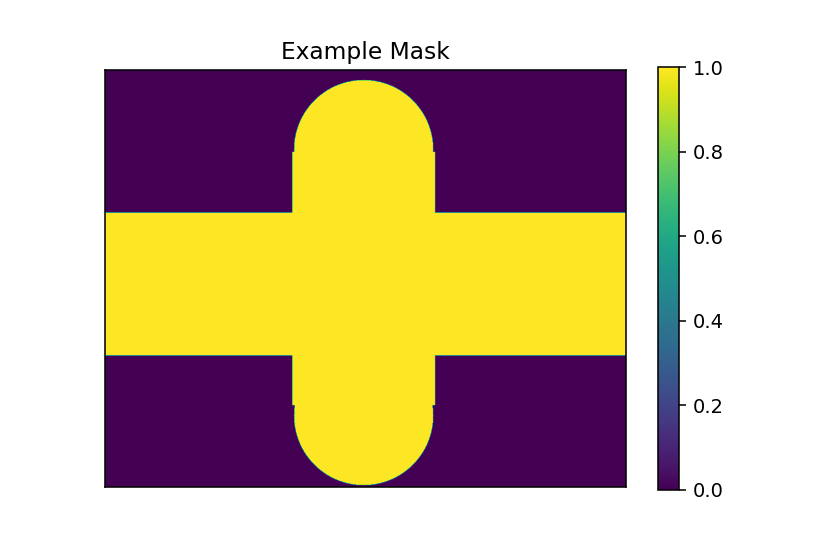
This particular example is from an experiment that involves pushing particles through a channel, with two boundary particles at the center, with separation slightly less than the particles (so that the central ones have to force their way through). This mask was constructed with the following code:
from pepe.preprocess import crossMask, rectMask, circularMask, mergeMasks

# Create a cross-shaped channel, with some parts on the ends
maskArr = crossMask(image.shape, xlim=np.array([460, 810]), ylim=np.array([350, 700]))

semiCircleMask = mergeMasks(np.array([rectMask(image.shape, corner=np.array([0,400]), dimensions=np.array([200, 500])),
                             circularMask(image.shape, np.array([195, 635]), np.mean(radii)+7)]),
                           signs=np.array([1,-1], dtype=np.int16))

semiCircleMask2 = mergeMasks(np.array([rectMask(image.shape, corner=np.array([0,400]), dimensions=np.array([200, 500])),
                             circularMask(image.shape, np.array([175, 635]), np.mean(radii)+7)]),
                           signs=np.array([1,-1], dtype=np.int16))

listOfMasks = np.array([maskArr,
                       semiCircleMask,
                       semiCircleMask2[::-1]])

maskArr = mergeMasks(listOfMasks, signs=np.array([1,-1,-1], dtype=np.int16))
Now I'll admit this isn't the cleanest code, but it demonstrates how you can build an arbitrarily complex mask from simple shapes, and the pepe.preprocess.mergeMasks() method. See the documentation for these methods for more info, but now that we have a mask, we can detect contacts with the wall.
This is done via the pepe.analysis.detectWallContacts() method and has a whole host of keyword arguments that won't be discussed here (see the documentation for info). It generally functions by looking at which areas of a particle are closest to the boundary, clustering these points together, and then applying a mask around the edge of each region to give a guess for the initial force.
I would like to note in particular about it's behavior around extended wall contacts, as might be seen in the previously shown example mask (this is the reason I have chosen that one to show off). You can imagine that a particle in the vertically oriented channel, either towards the top or bottom, could have a contact with the wall that doesn't exist at only a single point, but across a larger distance. In this case, there is some ambiguity as to how to deal with this, since pepe.simulate.genSyntheticResponse() -- the method used in the optimization -- cannot handle a non-point contact easily. We have a few options:
-
Just use a discrete force at the center of the extended contact. Computationally very simple, but doesn't capture the real physics very well.
-
Simulate an extended contact by adding a dense set of contact forces that are constrained by some total magnitude of force. Optimization wise, this isn't -- in theory -- so expensive, since such a force would still be characterized by 3 parameters: the total magnitude of force, the center of the region, and the extent of the region (assuming all forces have
). Unfortunately, it does actually end up being computationally expensive, because the
pepe.simulate.genSyntheticResponse()method's evaluation time scales with the number of forces acting on the particle, therefore making each optimization step much more costly. -
Accept discrete forces, but simply put several of them in. This is the method that is currently implemented. The amount of forces that are added is variable via the
maxContactExtentkeyword forpepe.analysis.detectWallContacts(). This is a happy medium between the first two options, and seems to mostly be able to recreate the proper photoelastic patterns, as shown below.
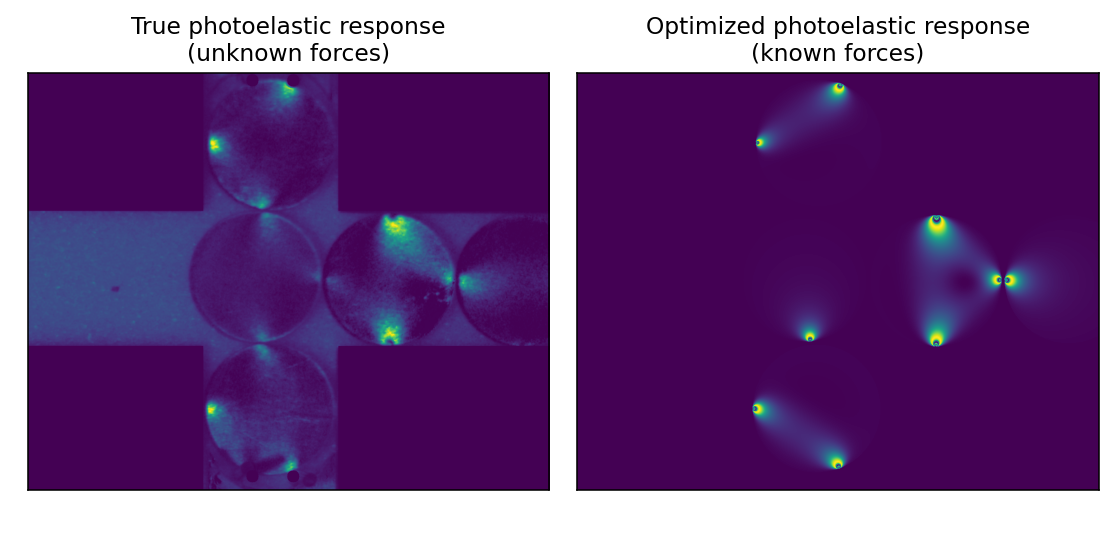
The second option may be worth looking into, to see if there is a way to make it less computationally expensive, but I have not done this yet.
[1] Daniels, K. E., Kollmer, J. E., & Puckett, J. G. (2017). Photoelastic force measurements in granular materials. Review of Scientific Instruments, 88(5), 051808. https://doi.org/10.1063/1.4983049
[2] Abed Zadeh, A., Barés, J., Brzinski, T. A., Daniels, K. E., Dijksman, J., Docquier, N., Everitt, H. O., Kollmer, J. E., Lantsoght, O., Wang, D., Workamp, M., Zhao, Y., & Zheng, H. (2019). Enlightening force chains: A review of photoelasticimetry in granular matter. Granular Matter, 21(4), 83. https://doi.org/10.1007/s10035-019-0942-2
[3] Alexander Rodin, A hack for showing LaTeX formulas in GitHub markdown.md. https://gist.github.com/a-rodin/fef3f543412d6e1ec5b6cf55bf197d7b