

A lightweight web interface designed to simplify the execution, monitoring, and reporting of UiPath Test Manager test workflows through its REST APIs.
TM Executor allows users to execute Test Cases and Test Sets, monitor execution status, manage execution labels, retrieve execution results, and download final test reports in PDF format.
🚀 Portfolio / Engineering Project
TM Executor is an independent engineering project created to explore and demonstrate the integration of UiPath Test Manager REST APIs with a lightweight web interface and containerized deployment.
The project combines QA/Test Automation, UiPath, REST APIs, Postman, API integration, web development, responsive UI, execution orchestration, telemetry, reporting, and Docker deployment.
Explore the TM Executor interface directly in your browser. This live demonstration is hosted and powered by GitHub Pages.
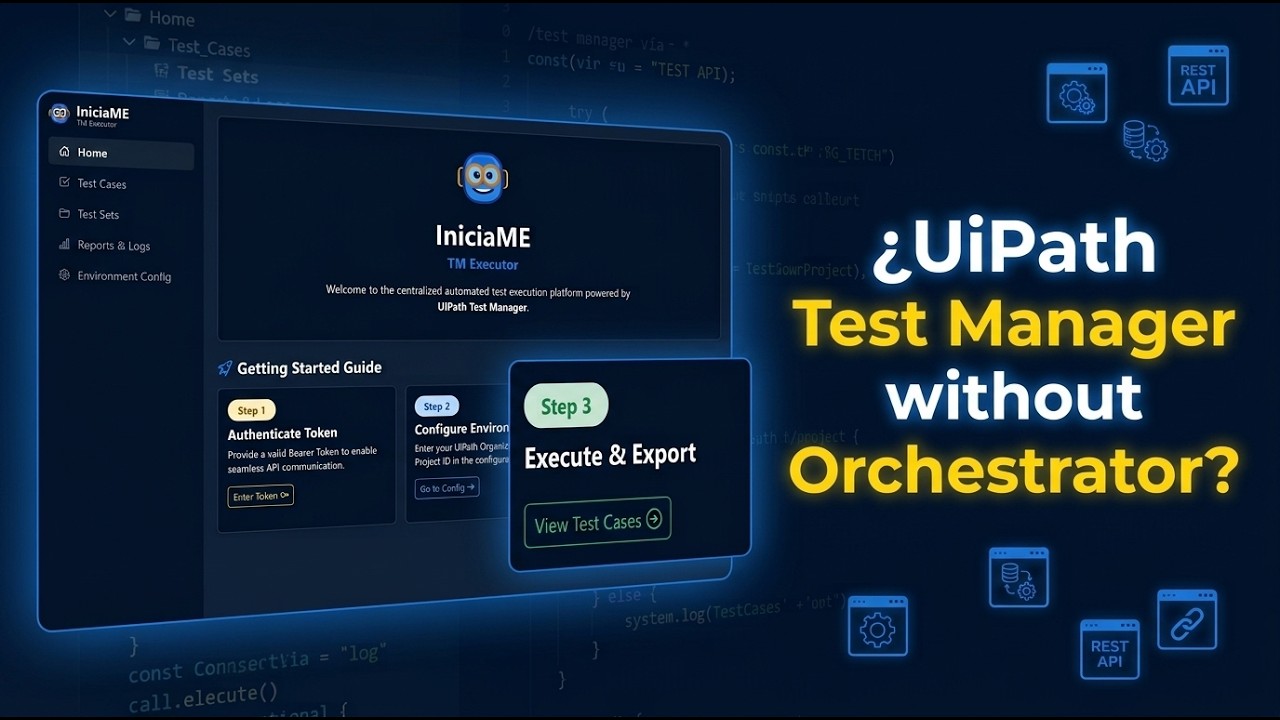
🎬 Watch the full video on YouTube: UiPath Test Manager without Orchestrator? REST API Test Execution & PDF Evidence
- UiPath Test Manager (UTM) Overview: Understanding the core configuration and test architecture.
- API Exploration via Postman: How the REST API endpoints are consumed and validated.
- TM Executor (TME) Interface: Executing test sets and generating instant PDF evidence.
- Containerization with Docker: Deploying the application seamlessly using Docker Compose.
- Mobile Execution: Running tests remotely from a smartphone connected to the containerized instance.
- GitHub Pages Integration: Accessing the live demo directly hosted on GitHub Pages.
I wanted to explore how far UiPath Test Manager could be driven directly through its REST APIs and how those capabilities could be exposed through a simpler execution interface.
The project started as an API exploration using Postman.
The initial objective was to understand and validate the available Test Manager operations, including:
- Test Cases
- Test Sets
- Test Executions
- Execution Results
- Execution Status
- Labels
- Reporting
Once the API workflows were understood and validated, the next step was to translate those operations into a lightweight web interface.
The goal was not to replace Test Manager, but to explore a simpler interaction model for users who need to execute, monitor, and retrieve test results without having to interact directly with the complete underlying automation ecosystem.
TM Executor currently provides a web-based interface for:
- Token-based API authentication
- Organization configuration
- Tenant configuration
- Test Project discovery and selection
- Test Case discovery and execution
- Test Set discovery and execution
- Test execution triggering
- Real-time execution status monitoring
- Dynamic execution labels
- Execution result retrieval
- Pass / Fail / None result metrics
- PDF test result retrieval
- Responsive web interface
The application is intentionally designed to minimize the amount of information users need to enter manually.
Only three configuration elements are required to begin:
- Bearer Token
- Organization
- Tenant
⚠️ Note: The Bearer Token must be obtained through an additional authentication process before using the application.
Once the Organization and Tenant are provided, TM Executor can retrieve the available Test Projects and present their names for selection.
The corresponding Project ID is handled internally by the application.
The intended flow is:
Token
   |
   v
Organization + Tenant
   |
   v
Load Configuration
   |
   v
Available Test Projects
   |
   v
Select Project by Name
   |
   v
TM Executor retrieves the corresponding Project ID internally
This approach avoids requiring users to manually search for and copy Test Project GUIDs.
The solution is intentionally lightweight and is structured around the following components:
+-----------------------------+
|       TM Executor UI        |
|       HTML / JavaScript     |
+--------------+--------------+
               |
               | REST API
               v
+-----------------------------+
|    UiPath Test Manager      |
|           APIs              |
+--------------+--------------+
               |
         +-----+-----+
         |           |
         v           v
   Test Execution  Results
         |           |
         v           v
   Test Manager   PDF Report
The project uses Postman as the API exploration and validation layer, while TM Executor provides a simplified web interface over the validated workflows.
| Technology | Purpose |
|---|---|
| UiPath Test Manager | Test management, execution and reporting |
| UiPath REST APIs | Programmatic integration with Test Manager |
| Postman | API exploration, validation and workflow sequencing |
| WAMP | Local / Self-Hosted Web Server |
| HTML / JavaScript | Web interface and client-side orchestration |
| Bootstrap | Responsive UI components |
| Docker | Containerized deployment |
| Docker Compose | Local container orchestration |
| REST / JSON | API communication and data exchange |
-
index.html
Front-end interface for triggering test workflows, managing configuration, displaying execution telemetry, retrieving results and interacting with Test Manager APIs. -
IniciaME_TM_Executor.postman_collection.json
API collection used to explore, understand, validate and document UiPath Test Manager REST endpoints before and during their integration into the web interface. -
docker-compose.yml
Container orchestration configuration used to deploy and validate the web service in an isolated environment. -
README.md
Project documentation, architecture overview, setup instructions and testing strategy.
The Postman collection was used as the initial exploration and validation layer for the Test Manager APIs.
The workflow was intentionally developed in stages:
UiPath Test Manager
        |
        v
   API Discovery
        |
        v
  Postman Validation
        |
        v
Request / Response Analysis
        |
        v
Execution Workflow Design
        |
        v
Web Interface Integration
This approach made it possible to validate individual API operations before integrating them into the web application.
The collection includes examples and execution workflows covering the main Test Manager operations required by TM Executor.
This service operates as an orchestration and telemetry layer for Test Manager API operations, enabling test execution, real-time visualization, result retrieval and report downloads.
To validate its capabilities, the test automation project:
RPA.UiPath.MyFirst_TestProject
was used as the target benchmark across three testing tiers.
Direct execution and parameter validation of isolated workflows, such as:
MFP_My First TestCase.xaml
using dynamic input values.
The purpose of this layer was to validate the behavior of the underlying automation independently from Test Manager.
Direct communication with UiPath Test Manager REST APIs through the Postman collection.
This stage was used to explore, validate and debug endpoint behavior, including:
- Test Case retrieval
- Test Set retrieval
- Test execution triggering
- Execution status polling
- Execution result retrieval
- Dynamic label assignment
- Report retrieval
The validated workflows were subsequently integrated into TM Executor.
The complete execution loop is validated through the web interface:
TM Executor
     |
     v
Trigger Test Execution
     |
     v
UiPath Test Manager
     |
     v
Execution Processing
     |
     v
Real-Time Status Monitoring
     |
     v
Execution Results
     |
     v
PDF Report
This validates the interaction between the web interface, Test Manager APIs and the target UiPath automation.
A typical execution follows this sequence:
1. Authenticate
       |
       v
2. Configure Organization / Tenant
       |
       v
3. Load and select Test Project
       |
       v
4. Select Test Case or Test Set
       |
       v
5. Trigger Execution
       |
       v
6. Monitor Execution Status
       |
       v
7. Retrieve Execution Results
       |
       v
8. Display Pass / Fail / None metrics
       |
       v
9. Retrieve Final Report
The objective is to expose the execution lifecycle through a simpler interface while keeping the underlying Test Manager capabilities accessible through its APIs.
The Postman collection is intended both as an API demonstration and as an execution utility.
Some requests intentionally use Post-response scripts to automatically select the first item returned by the API. This keeps the demonstration workflow simple and allows subsequent requests to execute without requiring the user to manually copy identifiers.
⚠️ Important — Automatic SelectionFor demonstration and functional purposes, some requests automatically use the first item returned by the API.
This applies to resources such as Test Cases, Test Sets and Test Executions where the collection needs an identifier for subsequent requests.
If you need to work with a specific item, inspect the response matrix, identify the desired ID, and assign it to the corresponding collection variable.
Alternatively, remove the Post-response script responsible for automatically selecting the first returned item.
The examples included with the individual requests provide additional context about the expected behavior.
For Test Executions, the collection may use API ordering to identify the execution to be tracked. The corresponding request should be reviewed if a specific execution must be selected.
TM Executor relies on client-side state management for API authorization.
To initialize the connection, the user provides only 3 core inputs:
- Bearer Token: Pre-generated Authorization Bearer token.
- Organization: UiPath Automation Cloud Organization name.
- Tenant: Target Tenant name.
- Test Project: Once the 3 main inputs are provided, TM Executor automatically queries the Test Manager API to discover and populate all available Test Projects in a dynamic dropdown for selection.
⚠️ SecurityNever commit valid credentials or production environment secrets to the repository.
- Valid Bearer Tokens (even short-lived ones)
- Client secrets
- Passwords
- Production credentials
- Real customer identifiers
- Sensitive environment configuration
Demonstration values included in the repository are intentionally non-production values.
Users deploying the application in their own environment are responsible for configuring appropriate authentication and security controls.
The application is designed to run as a lightweight containerized web service.
The included Docker configuration makes it possible to deploy the application without requiring a dedicated local development web server.
Developer / User
       |
       v
Docker Compose
       |
       v
TM Executor Container
       |
       v
Web Interface
This also makes the application portable across environments where Docker is available.
If you find this project useful, consider giving it a Star ⭐️
💡 IMPORTANT
Do not open
index.htmldirectly from your file explorer using:
file:///C:/...Browsers enforce security restrictions that can prevent web applications from communicating with external REST APIs when loaded directly from the file system.
The recommended approach is to serve the application through a web server or containerized environment.
Fork this repository to your own GitHub account and clone it locally.
Open a terminal in the project directory and run:
docker-compose up -d
Navigate to:
http://localhost:8085
The application can also be hosted using a local or enterprise web server such as:
- IIS
- WAMP
- XAMPP
- Apache
- Other static web hosting environments
For example, with IIS:
C:\inetpub\www\WEB.UiPath.TM_Executor
With XAMPP:
htdocs\WEB.UiPath.TM_Executor
Then access the application through the corresponding web server URL.
⚠️ Enterprise environments may require appropriate web-server, network and security configuration when consuming external APIs.
v1.0 — Demonstration / Portfolio Release
The current version focuses on demonstrating:
- UiPath Test Manager API integration
- Test execution workflows
- Execution monitoring
- Result retrieval
- PDF reporting
- Label management
- Responsive web UI
- Docker deployment
The project is intentionally lightweight and is not intended to replace UiPath Test Manager.
The following features represent potential future directions for the project:
Extend the configuration module to provide broader environment discovery and selection capabilities.
The current version already supports retrieving available Test Projects after providing the Organization and Tenant.
- Retrieve existing tenant labels dynamically.
- Define custom labels from the UI.
- Apply labels in bulk during runtime execution.
Generate detailed, structured execution logs capturing dynamic assertion outcomes per Test Case / Test Sets, complete with customizable layouts and corporate branding.
Extend the reporting module to support additional formats such as:
- Excel (.xlsx)
- IniciaME Custom Report (HTML/PDF)
Enable direct creation and logging of defects based on failed execution results.
Explore additional integrations with existing automation and CI/CD ecosystems.
Note: Roadmap items represent potential future enhancements and do not imply that these features are currently implemented.
Beyond the application itself, TM Executor was created as an engineering exercise covering multiple areas:
QA / Test Automation
        |
        +-- Test Strategy
        +-- E2E Validation
        +-- Test Execution

UiPath
        |
        +-- Test Manager
        +-- Automation
        +-- REST APIs

API Engineering
        |
        +-- REST
        +-- JSON
        +-- Authentication
        +-- Request Sequencing
        +-- Response Handling

Web Development
        |
        +-- HTML
        +-- JavaScript
        +-- Responsive UI
        +-- Client-side State

DevOps
        |
        +-- Docker
        +-- Docker Compose
The project reflects an approach of understanding the functional platform first, exploring its APIs, validating individual operations, and then building an integration layer around the validated workflows.
TM Executor is an independent personal/community engineering project.
It is not an official UiPath product and is not affiliated with or endorsed by UiPath.
UiPath, Test Manager, Orchestrator and related product names are trademarks of UiPath.
Until a license is defined, the repository is publicly available for demonstration and portfolio purposes only.
No rights to UiPath products, APIs, trademarks, documentation, or other third-party intellectual property are claimed by this project.