
🌍 Languages: English | Deutsch

A self-hosted AI assistant that gets things done — tool chains, sub-agents, multi-agent debates, voice, camera surveillance and local LLM inference on your own hardware.
AIfred runs on your own machine and works for you across every channel you use: it reads and answers e-mail, books appointments, manages contacts, documents and databases, watches your cameras and talks to you through the browser, Telegram, Discord or a voice terminal in your living room. Local models, persistent memory, no cloud dependency — your data stays with you.
📺 Example showcases — exported chats: multi-agent debates, chemistry, maths, coding and web research.
⭐ If AIfred is useful to you, please star the repo. Self-hosters easily forget — but stars are the main signal that tells me people are actually using this. It directly affects whether I keep building.
At a glance
- 🔗 Autonomous tool chains across plugins — one prompt, many steps, from any channel
- 📬 Your mail, read properly — unread mail, several at once, PDFs and Office files as text, scans and photos through the vision model; nothing is cut off, long mails are read in steps
- 📅 Nextcloud as your hub — calendar, tasks, contacts, notes and files, with rights per module
- 🌅 Morning briefing — by mail every morning: the next seven days of appointments, birthdays, open tasks and unread mail, anything with a deadline first
- 🎩 Multi-agent system — AIfred, Sokrates, Salomo and your own agents debate, criticise, judge — or take delegated tasks as sub-agents
- 📡 Reachable everywhere — web UI, Telegram, Discord, e-mail, Echo Dot voice terminal; runs headless
- 🎤 Voice — speech-to-text plus the TTS-Suite service over seven engines (local, other hosts, cloud, browser), voice cloning, spoken announcements on the Echo Dot
- 👁️ Vision & Vigilantia — image analysis in chat and continuous camera surveillance with face recognition
- ⚙️ Local inference, tuned automatically — llama.cpp, vLLM and Ollama with VRAM-aware context calibration across multiple GPUs
- 🔒 Security built into the framework — permission tiers per channel, prompt-injection defences, credential broker, audit log

Auto-Consensus mode: AIfred answers, Sokrates criticises, Salomo synthesises — local DeepSeek-V4-Flash via vLLM, with timings per answer.
The real value doesn't come from individual tools but from chains that AIfred works through on its own across several plugins — from any channel: browser, voice terminal (FreeEcho.2), Telegram, Discord, e-mail.
Example (real, tested end to end): you photograph a business card with your phone and say — typed or spoken:
"Analyze this business card, extract all the data, create the contact in Google, check next week for a free morning, book a two-hour appointment, and send me the photo along with the contact details via Telegram."
AIfred runs this as one continuous chain:
- 👁️ Vision — the VLM reads the card (name, phone, e-mail, address, web) directly from the image
- 📇 Google Contacts — creates the contact in structured form (
google_contacts_create) - 📅 Google Calendar — first checks the time window for free slots (
google_calendar_list_events) and only then books the appointment; an existing appointment is recognised and AIfred asks back instead of creating a duplicate - 📤 Telegram with attachment — sends you the photo of the card plus the contact details — without knowing your chat ID (owner default)
All local, a single prompt, no clicks in between. Files from the conversation (uploaded images, PDFs or plots from the sandbox) can be sent as attachments over any channel, isolated per session.
Second example (real, tested end to end): mail with a scanned invoice and a PDF report attached:
"Which mails are unread? One of them has an invoice as a scan and a report of a test drive. Read both attachments and give me only the invoice number, the amount, the due date and the driver's name."
- 📬 Unread mail — lists only what you have not read yet; reading changes nothing in your mailbox
- 📖 Several at once — reads the mails in a single call, HTML turned into plain text
- 📄 PDF — reads the report through the same parsers as the document index
- 👁️ Scan — the invoice has no text layer, so its pages go to the vision model, which ran beside the chat model without unloading it
No fixed limit decides what AIfred may see: how much fits in one step follows the model's context, and long mails and attachments are read by lines, like files. Text from a mail stays marked as foreign, so a mail cannot give AIfred orders.
Prerequisites & knobs:
- Security tier: creating things (contact, appointment, running code) needs
WRITE_DATAor higher. In the browser you always have it; external channels are raised as needed in the Plugin Manager — deliberately only there, no sender can grant itself rights. See Security - Vision + tool chains: for reliable tool calls on the image path, turn thinking off for the vision LLM (🧠 icon; the 💭 reasoning prompt may stay on). Reasoning models with speculative decoding (MoE/MTP) otherwise swallow tool calls after thinking
The LLM decides on its own which tools to use — OpenAI-compatible function calling, up to 100 tool calls per request, every tool delivered by a plugin:
- E-mail — read, send and search across all folders, parts of words and attachments included (own local index), via IMAP/SMTP; sending needs explicit confirmation (draft → review → confirm). A second private mailbox can be connected strictly read-only: mails stay unread. AIfred lists unread mail, leaves out its own, reads several mails in one call and works through attachments: PDF, Office, text and calendar invitations as text, scans and images through the vision model, into the document index on request. See E-mail
- Nextcloud — calendar, tasks, contacts, notes and files over CalDAV, CardDAV and WebDAV, with off, read or write per module; shares from your account are found by their plain name. Searches report the real total. See Nextcloud
- Google Suite — Calendar, Contacts, Drive and Tasks via OAuth 2.0; agents work in one dedicated Drive folder (setting
GOOGLE_DRIVE_AGENT_FOLDER) and nowhere else, the Document Manager shows your whole Drive - EssentialPIM — full read/write access to the EssentialPIM database: appointments, contacts, notes, to-dos, password entries; name-to-ID resolution and anti-hallucination guards
- Workspace (files & documents) — upload PDF, Word, Excel, PowerPoint, LibreOffice, TXT, MD, CSV; AIfred browses, reads (PDFs page by page), writes, patches, renames, copies, moves and deletes files, indexes them in ChromaDB (bge-m3, token-accurate chunking) and searches every passage by meaning and exact words at once, with folder filter and neighbour-chunk context. Document Manager UI with preview, bulk folder indexing and orphan cleanup; Google Drive appears there as a second, live source (browse, search, download, upload — no local mirror)
- Sandboxed code execution — Python in an isolated subprocess (numpy, pandas, matplotlib, plotly, scipy, sklearn, …); interactive HTML/JS results (Plotly 3D, canvas games, simulations) right in the chat, verified by a headless-browser screenshot
- Web research — the agent decides when to search: SearXNG (self-hosted) plus optional Tavily and Brave, LLM-based URL ranking, parallel scraping incl. PDFs; every research runs fresh, no result cache. Modes and pipeline: Research Pipeline
- Long-term memory — per-agent memory in ChromaDB, recalled before every answer; agents read, store, update and delete entries themselves. Memory Browser for inspection, incognito mode 🔒
- Scheduler — the LLM creates cron, interval and one-shot jobs; results arrive as notification, channel message or webhook. See Scheduler
- More plugins — Audio Player (library search, folders, seek, speed, resume), System Monitor (CPU, RAM, GPU, disk, temperatures), Printer (CUPS:
print_filewith copies, page range and duplex,printer_statuswith supply levels — a scheduler job can poll it and notify on any channel), Translator (DeepL, 30+ languages), Narrator (whole documents → one MP3, multi-voice audio dramas via[SPEAKER]:markers), Bible and Judaica (exact passages + thematic vector search over Tanakh, Talmud, Mishnah, Midrash, Halacha, commentaries), Calculator - Tool-output cap — a single tool result is trimmed so that system + history + memory + result stay within 75 % of the context; JSON-aware, the model still sees structured data
Every plugin is a directory under aifred/plugins/tools/ or aifred/plugins/channels/ — auto-discovered, switchable at runtime in the Plugin Manager. Overview: Available Plugins · writing your own: Plugin Development.
-
Agents — 🎩 AIfred (butler & scholar), 🏛️ Sokrates (critic), 👑 Salomo (judge), 📷 Vision, plus shipped custom agents 🔥 Pater Tuck, 🤖 Codine (code & sandbox), 🔴 HAL 9000, 🕎 Rabbi Shmuel — and as many of your own as you like: name, emoji, role, bilingual prompts, own memory, own model and voice, created in the Agent Editor
-
Five discussion modes
Mode Flow Who decides? Standard One agent answers — Critical Review AIfred → Sokrates (critique + pro/contra) You Auto-Consensus AIfred → Sokrates → Salomo, N rounds Salomo (votes) Tribunal AIfred ↔ Sokrates, N rounds → Salomo Salomo (verdict) Symposion 2+ chosen agents discuss, reflection layer from round 2 Nobody — many perspectives -
Sub-agents (delegation) — any agent can hand a self-contained task to a sub-agent via
delegate_task: a fresh model run with its own context and tool loop. Only the report returns to the caller; the full transcript sits collapsed in the chat bubble. A task can also go to another main agent with its persona, model and tools — measured with Qwen3.8-27B, AIfred's prompt shrinks from 31,730 to 17,449 tokens per turn (≈ 45 % less prefill). See Sub-Agents -
Address agents by name — "Sokrates, what do you think…?" — in every channel; mode switches by voice or text ("Start a tribunal and discuss X") in any language
-
Every agent sees the conversation from its own perspective, prompts are assembled from up to ten layers (identity, reasoning, roles, task, memory, personality, tools, …)
Details — flows, prompt files, perspectives, labels: Multi-Agent System.


Agent Editor (tools per agent with tier badges) and Plugin Manager (channels with security tier, plugins on/off at runtime).
AIfred watches external channels and answers on its own — headless, no browser needed. The web UI is only for setup and monitoring.
- Channels — Telegram and Discord bots, e-mail (IMAP IDLE push + SMTP replies), FreeEcho.2 voice terminal; files as attachments on every channel
- One pipeline — listener → envelope normalisation → SQLite routing table → AIfred engine with the full toolkit → reply
- User mapping — Telegram IDs and e-mail addresses map to AIfred users (
data/user_mapping.json), so AIfred recognises you everywhere - REST API — remote control for browser sessions plus a webhook endpoint for headless runs: REST API
Setup: Telegram · Discord · architecture: Message Hub.
- Speech-to-text — the STT-Suite (Peuqui/STT-Suite, Whisper and Parakeet in Docker, set up by the installer) for browser and FreeEcho.2 alike. AIfred only chooses the device (automatic, CPU only, GPU only); engine, model, quality per device and the order of the automatic mode are set on the STT-Suite's own page. Before an LLM load GPU-Orc releases the GPU worker; it also unloads itself when idle. Large uploads (meetings) go to the CPU, get a duration estimate and a confirmation for long files
- Meeting pipeline — transcribe in the original language → translate on demand (DeepL) → narrate into a phone-friendly MP3; every step leaves a file
- FreeEcho.2 voice terminal — Echo Dot 2 hardware with custom firmware: wake word, the question appears in the browser within ~500 ms after STT. The household language (German or English: STT language prior, prompt language, tool replies) is a setting of the channel plugin
- Spoken announcements without an LLM —
POST /api/audio/announcereads a finished text (or several paragraphs as one announcement) in one room, a group or all rooms; a running stream is paused first, start and end tone are plugin settings. See REST API - TTS-Suite (details) — speech comes from its own service, not from AIfred: AIfred sends text and an ordered list of entries (engine plus place, edited in the TTS tab of the Agent Editor); the service lets the first entry that can speak do so, starts the containers on demand on a card with room, and after a failure mid-text announces the voice change once and speaks on. The bubble notes who spoke. The list of a fresh install: Qwen3-TTS local → XTTS local → Qwen-Audio 3 (cloud) → Piper → Edge → browser (speaks only into an open browser session). Speech unit (sentence, paragraph, whole) is one setting per engine. The calibrated profile leaves room for the engine; before a model's cold start GPU-Orc clears its cards, local engines included
- Seven TTS engines, per-agent voice, speed and pitch, gapless streaming playback, regenerate button per bubble:
| Engine | Type | Default speech unit | Quality | Latency* | Resources |
|---|---|---|---|---|---|
| Qwen3-TTS 1.7B | Local Docker | sentence | High (voice cloning, 10 languages incl. native DE) | ~8.5 s | ~5–7 GB VRAM |
| XTTS v2 | Local Docker | sentence | High (voice cloning) | ~2.8 s | ~2 GB VRAM |
| DashScope Qwen-Audio 3 | Cloud API | sentence | High (system voices, cloned voices for the flash model) | — | DASHSCOPE_API_KEY |
| Piper | Local | whole | Medium | < 100 ms | CPU |
| eSpeak | Local | whole | Low (robotic) | < 50 ms | CPU |
| Edge TTS | Cloud | sentence | Good | ~200 ms | Internet |
| Browser | Web Speech API of the device | — | depends on the device | — | none on the server |
* Local cloning engines measured head to head on the same bilingual paragraph (V100, fp16) — full comparison and the story behind each engine: TTS Model Comparison. eSpeak is not in the default list. Fish-Speech and MOSS-TTS were evaluated and removed (too large and slow); the comparison keeps their numbers. TTS VRAM is measured under a worst-case burn-in and cached, not hand-tuned.
Image analysis in chat — drop several images per message (limit: MAX_IMAGES_PER_MESSAGE in config.py, crop dialog included), follow-up questions on the same image, a dedicated vision LLM (Qwen3-VL, DeepSeek-OCR, Ministral, any llama.cpp model with --mmproj) hands structured JSON to the main LLM.
Vigilantia — camera surveillance. The vision pipeline's watch mode turns AIfred into a continuous monitoring agent:
- Sources — webcams (V4L2/MJPEG) and RTSP/IP cameras; credentials only via the credential broker, never logged or shown to the LLM
- Watchers per camera — motion detection with zone masks (ignore / GDPR black-out / region of interest, painted over the live stream), face recognition (InsightFace) against the Personarium identity database, own YOLO confirmation for AI cameras' person/vehicle/animal events
- Named, aggregated alerts — one alert per happening, every recognised person named, unknowns and vehicles counted
- Casus event browser — filters, slideshow, VLM analysis per event or in bulk, near-duplicate clustering (pHash); nightly auto-describe so the chronicle is complete by morning
- Vision tools for the LLM — snapshot, analyse, enrol faces, start/stop watches, query events
- Side-channel GPU — the VLM gets its measured VRAM on a separate card, calibrated alongside the main LLM
Details: Vision / Vigilantia plugin.
- Backends — llama.cpp via llama-swap (GGUF) and vLLM (as entries in the same llama-swap catalog), Ollama, cloud APIs (Claude, Qwen, DeepSeek, Kimi); switchable in the UI
- Automatic context calibration — VRAM-aware context sizing per model with a greedy cascade (fill the fastest GPU class first, spill to the next), binary search, RoPE scaling, tensor-split optimisation, speed variants with fewer GPUs; hardware-agnostic, no hand-tuned GPU lists. A 2D picker calibrates each combination of VLM and TTS engine as its own profile, with a capacity guard for the shared side-channel GPU. Algorithm: Calibration Strategy (German) · vLLM: vLLM Calibration
- Zero-config models —
ollama pull …orhf download …, thenllama-swap-restart: the autoscan finds the model, tests it, writes the YAML entry, groups and VRAM cache. See llama.cpp setup - Per-agent tuning — model, sampling, reasoning prompt 💭 and thinking 🧠 separately, reasoning effort, context size and speed variant per agent
- History compression — at 70 % context utilisation the oldest messages become summaries: conversations of unlimited length
- Distributed inference — llama.cpp RPC across machines in the LAN
- Clearing the cards before a load — GPU-Orc, a small service per machine, asks the speech services and llama-swap's helper models to let go of the cards a model needs and checks that they did (status and memory per card); it never ends a process itself. Set up by the installer: Deployment → GPU-Orc
Settings, compression, performance tuning: Configuration.
Enforced by the framework, not left to plugins:
- Five permission tiers — READONLY → COMMUNICATE → WRITE_DATA → WRITE_SYSTEM → ADMIN; every tool has a fixed tier (badges T0–T4 in the Agent Editor), every channel a configurable maximum
- Prompt-injection defences — inbound sanitisation (HTML strip, zero-width removal, NFC),
<external_message>fencing with sender and trust level, security-boundary prompt, research results fenced as untrusted data - Who asks, not which channel — agent memory and the shared documents folder are open to you wherever you are verified: the browser, your Telegram user ID, e-mail with SPF, DKIM and DMARC passed, your own scheduled jobs. A forged sender gets nothing, and a new channel follows the same rule
- Rule of two — write-tier tools are blocked for external channels unless raised in the Plugin Manager
- Limits — rate limiting per channel, max 100 tool calls per request
- Secrets — plugins only get credentials via the credential broker; secret patterns are stripped from tool output
- Audit log — every tool call with time, channel, tool, tier and result
- Login everywhere — accounts with whitelist, signed cookies on every API route, tokens for the remote-control endpoints
Details: Security Architecture.
- Settings modal (☰) — Agent Editor, Memory Browser, database management, Plugin Manager, audit log
- Accounts — username + password, whitelist-based registration; sessions belong to you and follow you across devices
- Sessions — chat list with LLM-generated titles; agent and discussion mode are stored per session
- Share chat — export as a self-contained HTML file (KaTeX inline, TTS audio embedded, works offline)
- LaTeX & chemistry (KaTeX, mhchem), HTML preview, Harmony format for GPT-OSS
Requirements: Linux with systemd, Python 3.10+ (3.12+ for the TTS-Suite and GPU-Orc), Docker, an NVIDIA GPU (CUDA) with enough VRAM for the models you want plus the NVIDIA Container Toolkit (GPU containers for speech recognition and TTS; without a GPU the STT-Suite runs on the CPU and the TTS-Suite offers its cloud engines and the browser voice), and one LLM backend — llama.cpp via llama-swap (recommended, setup) or Ollama (easiest start: the installer offers the small starter model qwen3.5:4b for chat, tools and images; for speed switch later to llama.cpp or vLLM, which are considerably faster than Ollama).
git clone https://github.com/Peuqui/AIfred-Intelligence.git
cd AIfred-Intelligence
./scripts/install-all.sh
The interactive installer handles system packages (apt, dnf, pacman, brew), the Python venv and requirements, the Playwright browser, the Reflex patch, .env, ChromaDB + SearXNG, the two speech services, each cloned next to AIfred and set up by its own scripts — the TTS-Suite (spoken output: service on port 5090, optionally as system unit with the polkit rule so AIfred can start it) and the STT-Suite (speech recognition: container on port 5080, on a machine without an NVIDIA GPU with its CPU compose file), then GPU-Orc (clears the cards before a model loads: service on port 5070, optionally as system unit with the polkit rule), Ollama (offered via its official curl | sh installer, default yes) with the bge-m3 embedding model, a first whitelist user and the systemd services. Every step verifies itself and the run ends with a summary of what is missing.
Tested end to end on a fresh Ubuntu 24.04 (container with GPU passthrough, October 2026; without a GPU and with every question answered by Enter, GPU-Orc included, 25 October 2026). Every question can be answered in advance for an unattended install, e.g. AIFRED_INSTALL_SYSTEMD=y AIFRED_INSTALL_USER=alice ./scripts/install-all.sh — all variables: Unattended install.
Updating from before October 2026: Whisper STT moved out of docker/whisper/ into its own repo. After git pull, re-run ./scripts/install-all.sh — it clones STT-Suite and replaces the old container whisper-stt (now stt-suite); the downloaded models stay in the old volume whisper_models (copy them as described in the STT-Suite README, "Updating", otherwise they download again).
Then:
- Register in the web UI with the whitelisted username (
./aifred-admin add <name>for more users) - Open
http://localhost:8080— the installer sets up a minimal Caddy reverse proxy (deploy/Caddyfile) in front of the two processes (frontend3002, backend8002); without a proxy images and audio stay blank. Own domain or nginx instead: Access the web UI - Add models and calibrate them in the UI
Step by step, services, .env, Polkit, vision and camera setup: Deployment Guide.
Is AIfred for me? It is a personal assistant — built for one user, fine for a household of two or three. Backend, models and settings are shared by everyone; it is not a multi-tenant service. More: Configuration → Multiple users.
Full index: docs/README.md
| Topic | Documents |
|---|---|
| Setup | Deployment · llama.cpp + llama-swap · Configuration · Telegram · Discord |
| Using & extending | Plugins · Printer · Google Suite · Plugin Development · REST API |
| Architecture | Multi-Agent · Research Pipeline · LLM Call · Message Hub · Security · Scheduler · Spoken Output / TTS-Suite · Codebase |
| Calibration | Strategy (German) · vLLM |
| Benchmarks | vLLM Auto-Calibration · Quantization Quality · Tensor Split |
AIfred is developed with these open-source tools, which also work on their own:
- TTS-Suite and STT-Suite — the speech services AIfred uses
- GPU-Orc — clears the GPUs before a model loads: asks the services that hold them to let go and checks it, never ends a process itself; AIfred and Agent-Orc use it
- Agent-Orc — starts, watches and stops coding agents (Claude Code, …) in
tmuxsessions, from the phone or the desktop - AI-Connect — lets AI coding agents message each other across machines
- sandbox-install — plays a project's installation through in a fresh container, the way a stranger would
- 1Cat-vLLM — my fork of vLLM for older NVIDIA cards (Volta, Turing), the basis of AIfred's fast local inference
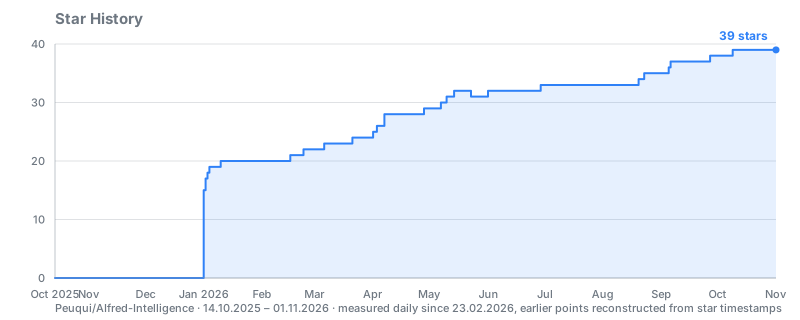
Recorded daily in Peuqui/Traffic, together with views and clones. GitHub restricted the stargazer API to repo admins on 2026-06-30, so external chart services now need a token with write access.
PolyForm Noncommercial License 1.0.0 — see LICENSE.
Free for personal, educational and non-commercial use. Commercial use requires a separate licence from the author.
If you find this project useful, consider supporting me:
