
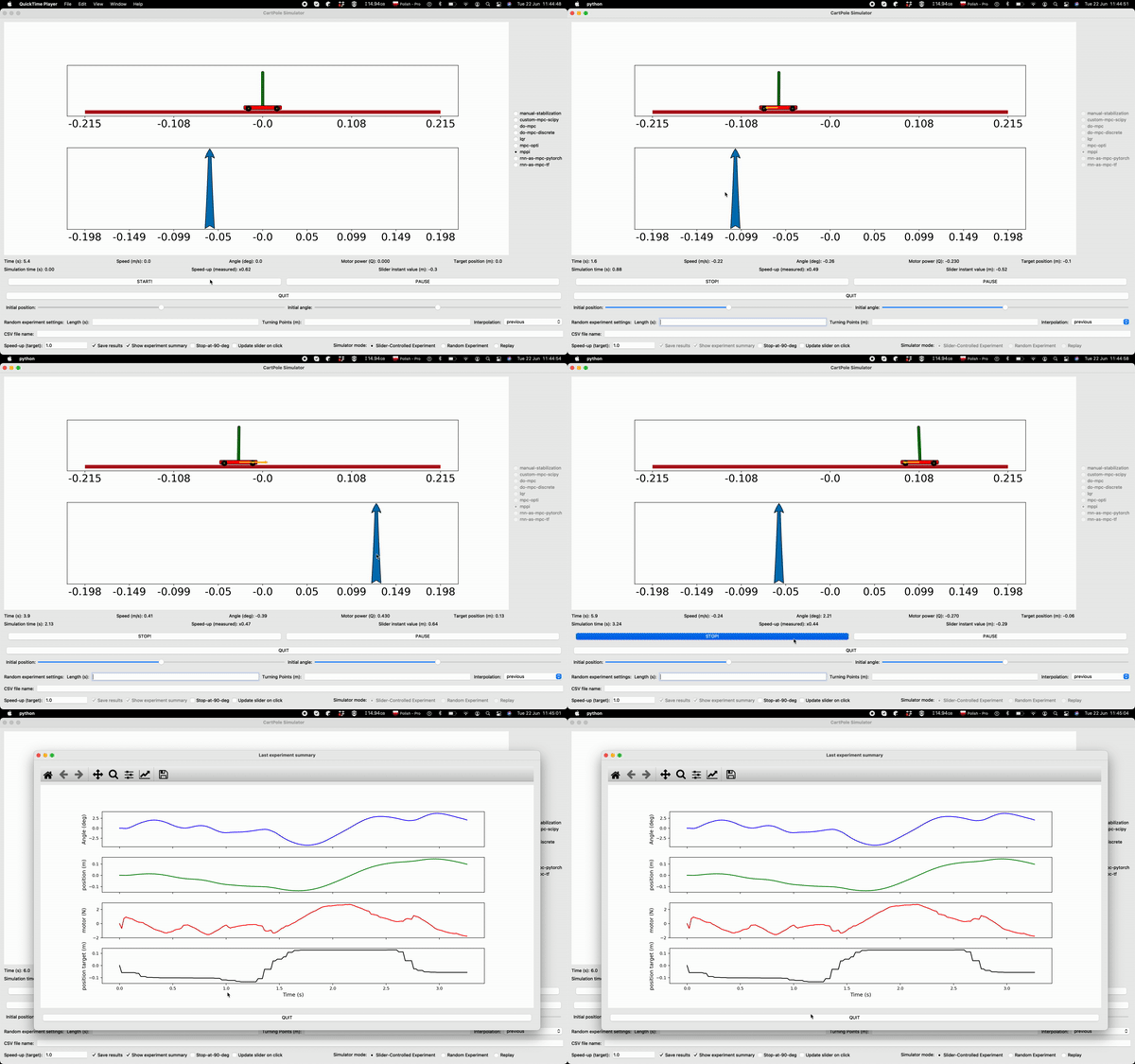
Python simulation of the cartpole plant: interactive GUI, batch data generation, MPC / neural controllers, and an SI_Toolkit training pipeline.
This tree is also vendored as a git submodule inside
physical-cartpole at
Driver/CartPoleSimulation/. When used from there, install the parent
requirements.txt, use the parent cpp() alias, and run scripts from the
repo root or with Driver/CartPoleSimulation on PYTHONPATH — see
physical-cartpole README.
Video paths may predate the current file layout; prefer this README for paths.
- Installation
- Quick start
- Configuration map
- Machine learning pipeline
- Controllers
- Code map
- Analysis tools
- Deploying to hardware
git clone --recurse-submodules https://github.com/SensorsINI/CartPoleSimulation.git
cd CartPoleSimulation
conda create -n CPS python=3.11
conda activate CPS
pip install -r requirements.txt
If SI_Toolkit or Control_Toolkit folders are empty:
git submodule update --init --recursiveSI_Toolkit and Control_Toolkit track cartpole_master, not the toolkit
master/main defaults used by
f1tenth_development_gym.
Prefer pinned submodule commits. git submodule update --remote follows
cartpole_master only.
Convenience aliases (optional):
alias cps='conda activate CPS'
alias pypa='export PYTHONPATH=./'Use the parent environment and paths — do not maintain a separate CPS env unless you prefer isolation:
git clone --recurse-submodules https://github.com/SensorsINI/physical-cartpole
cd physical-cartpole
pip install -r requirements.txt
# cpp() alias — see parent README
python Driver/CartPoleSimulation/run_cartpole_gui.pyFrom the CartPoleSimulation directory (standalone) or repo root (submodule):
python run_cartpole_gui.pyDefault controller and timing: config_gui.yml.
- Edit config_data_gen.yml (
controller,length_of_experiment,number_of_experiments, …). - Run:
python run_data_generator.pyRecordings go to ./Experiment_Recordings/ unless ML_Pipeline_mode is enabled.
| File | Purpose |
|---|---|
| config_data_gen.yml | Batch experiments; set ML_Pipeline_mode: True for train/val/test split layout |
| config_gui.yml | GUI defaults (dt, default controller) |
| cartpole_physical_parameters.yml | Sim parameters aligned with the physical robot |
| Control_Toolkit_ASF/config_controllers.yml | Controller hyperparameters (mpc, neural-imitator, lqr, …) |
| Control_Toolkit_ASF/config_optimizers.yml | MPC optimizers (rpgd, rpgd-c, …) |
| Control_Toolkit_ASF/config_cost_function.yml | MPC cost definitions |
| SI_Toolkit_ASF/config_training.yml | Training pipeline paths and architecture |
| SI_Toolkit_ASF/config_testing.yml | Brunton test selection |
| SI_Toolkit_ASF/config_predictors.yml | Neural / GP predictors for MPC |
Parameter comments also live in CartPole/cartpole_parameters.py and CartPole/data_generator.py.
- Set
ML_Pipeline_mode: Trueand experiment count in config_data_gen.yml. - Generate data:
python run_data_generator.pyThis creates SI_Toolkit_ASF/Experiments/Experiment-[X]/ with Train/Validate/Test
CSVs and copied configs.
- Point SI_Toolkit_ASF/config_training.yml
paths/path_to_experimentto that folder. - Normalize:
python SI_Toolkit_ASF/Run/A1_Create_Normalization_File.py- Train (TensorFlow default; library in
config_training.yml):
python SI_Toolkit_ASF/Run/A2_Train_Network.py -h   # architecture flags
python SI_Toolkit_ASF/Run/A2_Train_Network.py ...- Brunton test:
python SI_Toolkit_ASF/Run/A3_Run_Brunton_Test.py -h
python SI_Toolkit_ASF/Run/A3_Run_Brunton_Test.py ...- Export C for embedded targets:
python SI_Toolkit_ASF/Run/Convert_Network_To_C.py- Closed loop in sim: set predictor / controller in
config_data_gen.ymlor GUI, runrun_data_generator.pyor GUI, replay in GUI.
Preprocessing helpers live under SI_Toolkit_ASF/Run/.
CartPole loads controllers from Control Toolkit. Cartpole-specific controllers are in Control_Toolkit_ASF/Controllers/.
Overview: Control_Toolkit_ASF/CONTROLLER_DESCRIPTION.md.
Adding a controller: implement the template in
Control_Toolkit/Controllers/template_controller.py or add
controller_*.py under Control_Toolkit_ASF/Controllers/.
MPC can use any optimizer listed in config_optimizers.yml.
| Component | Location |
|---|---|
| Plant dynamics | CartPole/cartpole_equations.py, cartpole_parameters.py |
| Batch data generation | CartPole/data_generator.py, run_data_generator.py |
| GUI | GUI/, entry run_cartpole_gui.py |
| State utilities | CartPole/state_utilities.py |
| SI_Toolkit customization | SI_Toolkit_ASF/ToolkitCustomization/ |
- others/DataViz/ — Tkinter GUI for CSV exploration. See others/DataViz/README.md.
- others/L4DC_Plots/ — paper figures (historical).
Training and simulation live in this repository. To run a controller on the physical cartpole, use the physical-cartpole repo:
- Set
CONTROLLER_NAMEor on-chip weights (NC_C/,NC_LSTM/, PL bitstream). - Align
MOTOR_CORRECTION, hanging, and angle constants between sim and firmware. - Flash / program per Docs/firmware-and-flash.md.
Details: physical-cartpole Docs/pc-driver.md and examples/models/.
- Manual stabilization — click the lower chart to set motor power. Default
plant parameters are fast; reduce pole length or motor gain in
cartpole_parameters.pyto make it feasible. - LQR / do-mpc — click the lower chart to set cart target position.
- Quit button — provided for IDEs where the window close button fails (e.g. Spyder on Windows).
- CSV file name — path relative to
./SI_Toolkit_ASF/Experiments/; empty on load selects the latest experiment.
Regions use #region / #endregion. PyCharm default; Atom needs a fold plugin.