
This is a modified Fork of the commet Repository, that has some new features added, and some bugs fixed, to be mostly used by our small Friend Group

We are building a client for Matrix focused on providing a feature rich experience while maintaining a simple interface. The goal is to build a secure, privacy respecting app without compromising on the features you have come to expect from a modern chat client.
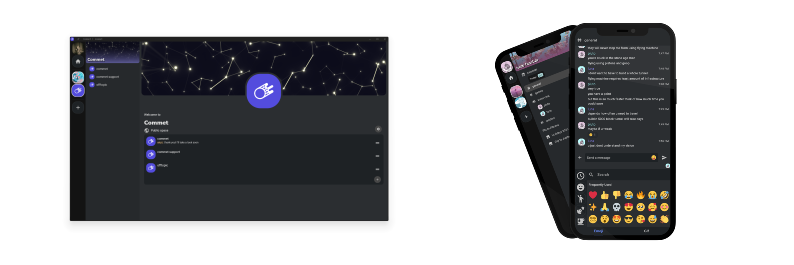
- Supports Windows, Linux, Android, as well as iOS/iPadOS through the Web App
- End to End Encryption
- Custom Emoji + Stickers
- GIF Search
- Threads
- Encrypted Room Search
- Multiple Accounts
- Spaces
- Emoji verification & cross signing
- Push Notifications
- URL Preview
- Search Filters
- Presence Status selection
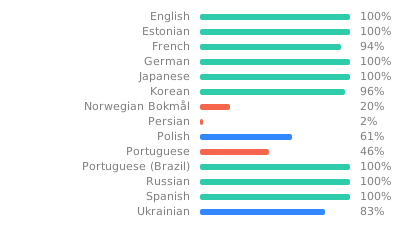
Help translate to your language on Weblate
To build, you require Flutter, currently v3.41.9
This repo currently has a monorepo structure, containing two flutter projects: Commet and Tiamat. Commet is the main client, and Tiamat is a sort of wrapper around Material with some extra goodies, which is used to maintain a consistent style across the app. Tiamat may eventually be moved to its own repo, but for now it is maintained here for ease of development.
Tip
If you are using ArchLinux and you want to build the entire application locally we have created some buildscripts, found at commet/buildscripts.
There is also another README which goes more into detail what is needed to get these buildscripts to work.
The build scripts are intended to build the same application code as our published releases. Build results may vary depending on the build environment and configuration.
Commet requires some additional libraries to be built
sudo apt-get install -y cmake clang ninja-build rustup libgtk-3-dev libmpv-dev mpv ffmpeg libmimalloc-dev libwebkit2gtk-4.1-dev keybinder-3.0 libayatana-appindicator3-dev libayatana-ido3-devNote
On arch linux you can use sudo pacman -Syu cmake clang ninja rustup gtk3 mpv ffmpeg mimalloc webkit2gtk-4.1 libkeybinder3 libayatana-appindicator ayatana-ido to install all reqired packages
You will need to change directory in to the project, then fetch dependencies
cd commet
flutter pub getWe make use of procedural code generation in some parts of the project. As a rule, generated code will not be checked in to git, and will need to be generated before building.
To run code generation, run the script within the commet directory:
dart run scripts/codegen.dart
When building, there are some additional command line arguments that must be used to configure the build.
Required
| Argument | Valid Values | Description |
|---|---|---|
| PLATFORM | 'desktop', 'mobile', 'linux', 'windows', 'macos', 'android', 'ios', 'web' | Defines which platform to build for |
| BUILD_MODE | 'release', 'debug' | When building with 'debug' flag, additional debug information will be shown |
Optional
| Argument | Valid Values | Description |
|---|---|---|
| GIT_HASH | * | Supply the current git hash when building to show in info screen |
| VERSION_TAG | * | Supply the current build version, to display app version |
| BUILD_DETAIL | * | Can provide additional detail about the current build, for example if it was being built for Flatpak or Snap |
Example:
cd commet
flutter run --dart-define BUILD_MODE=debug --dart-define PLATFORM=linux
Warning
On arch linux, do not use flutter-bin (AUR), use fvm instead.
Now, if no flutter version is configured, run fvm use <flutter version> (currently: 3.41.9) in order to select the flutter version of the project.
Or you can just run fvm install in the root of the repository to use the configured version, which should match the version mentioned before.
Then prefix every command with fvm.
- Downloading dependencies will become:
fvm flutter pub get - Running codegen will become:
fvm dart run scripts/codegen.dart - Building will become:
fvm flutter run --dart-define BUILD_MODE=debug --dart-define PLATFORM=linux