




An Oracle Database plugin for Tabularis, the lightweight database management tool.
The plugin connects Tabularis to Oracle Database 12c and newer, including Oracle Database Free/XE, Autonomous Database and Amazon RDS for Oracle. It provides multi-schema browsing, query execution, row editing, DDL, views, routines, table and column comments and Visual EXPLAIN with runtime statistics through a JSON-RPC 2.0 over stdio interface. It is written in Rust on top of ODPI-C via the oracle crate.
Requires Tabularis v0.25.0 or later, the first release that exposes table and column comments from plugins. Raw plugin EXPLAIN output and plugin-provided parser bundles, also used by this plugin, arrived in v0.23.0.
Discord — Join our Discord server and chat with the maintainers.
- Features
- Screenshots
- Runtime Requirement: Oracle Instant Client
- Connection Configuration
- Visual EXPLAIN
- Installation
- Supported Operations
- Implementation Notes
- Known Limitations
- Development
- Contributing
- Changelog
- License
- Oracle 12c+ through ODPI-C: EZConnect,
tcps://(Autonomous Database), full connect descriptors and TNS aliases - Multi-schema browsing through the
ALL_*catalog views: tables, columns, identity columns, primary and foreign keys, indexes, views, functions and procedures - Table and column comments (
COMMENT ON ...) surfaced in the schema dialog - Query execution with
OFFSET/FETCHpagination, PL/SQL blocks, exactNUMBERhandling and nativeJSONcolumns - Insert, update and delete with bound values and composite primary keys
- Table, column, index, foreign-key and view DDL
- Visual EXPLAIN from
PLAN_TABLE, plus EXPLAIN ANALYZE with per-operation runtime statistics fromV$SQL_PLAN_STATISTICS_ALL - Release archives for Linux x86_64 and ARM64, macOS x86_64 and Apple Silicon, and Windows x86_64
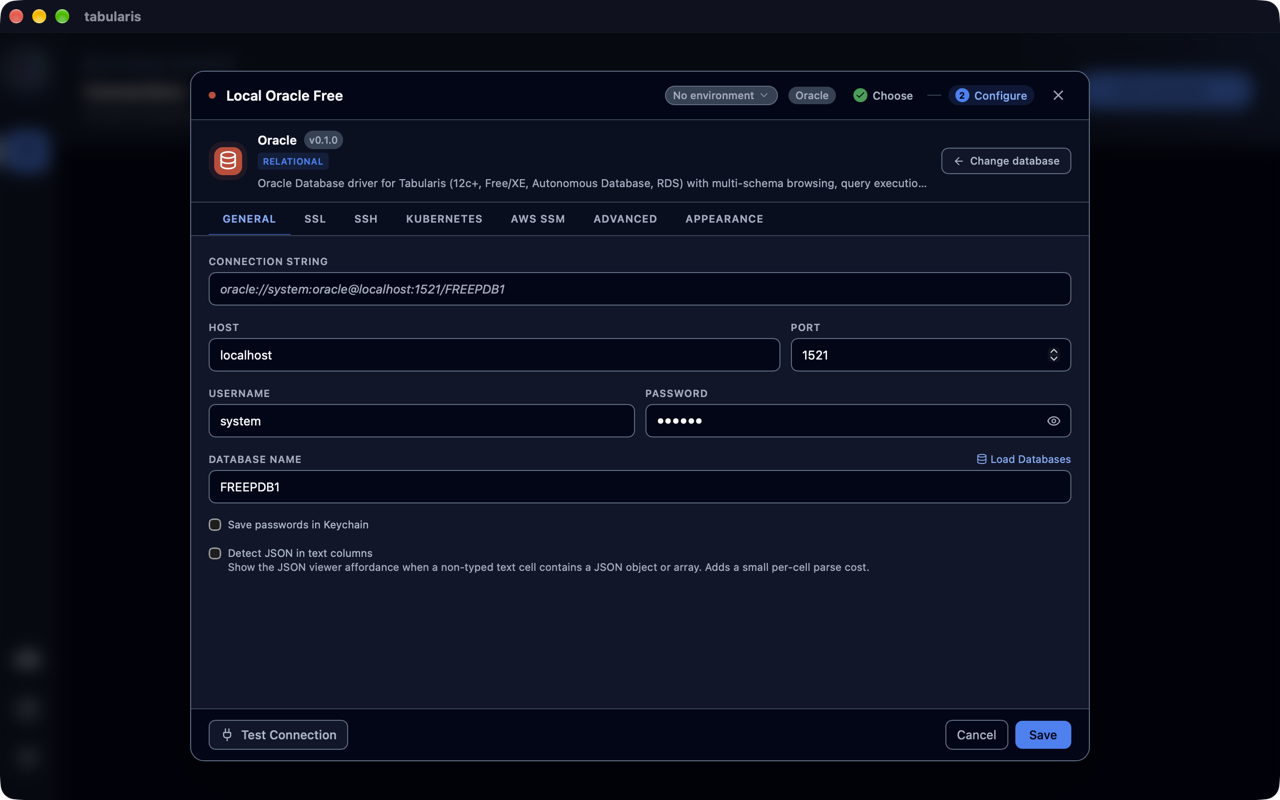 Connection configuration |
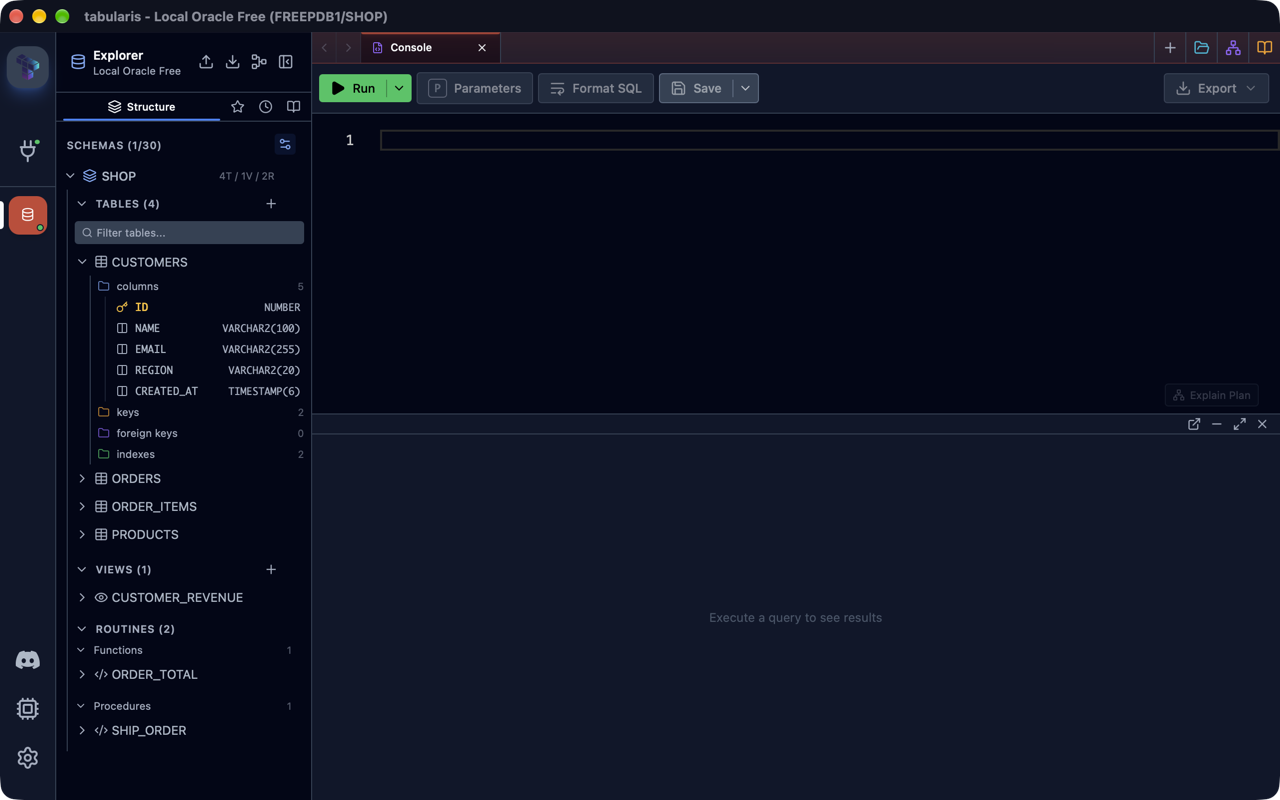 Schema browsing |
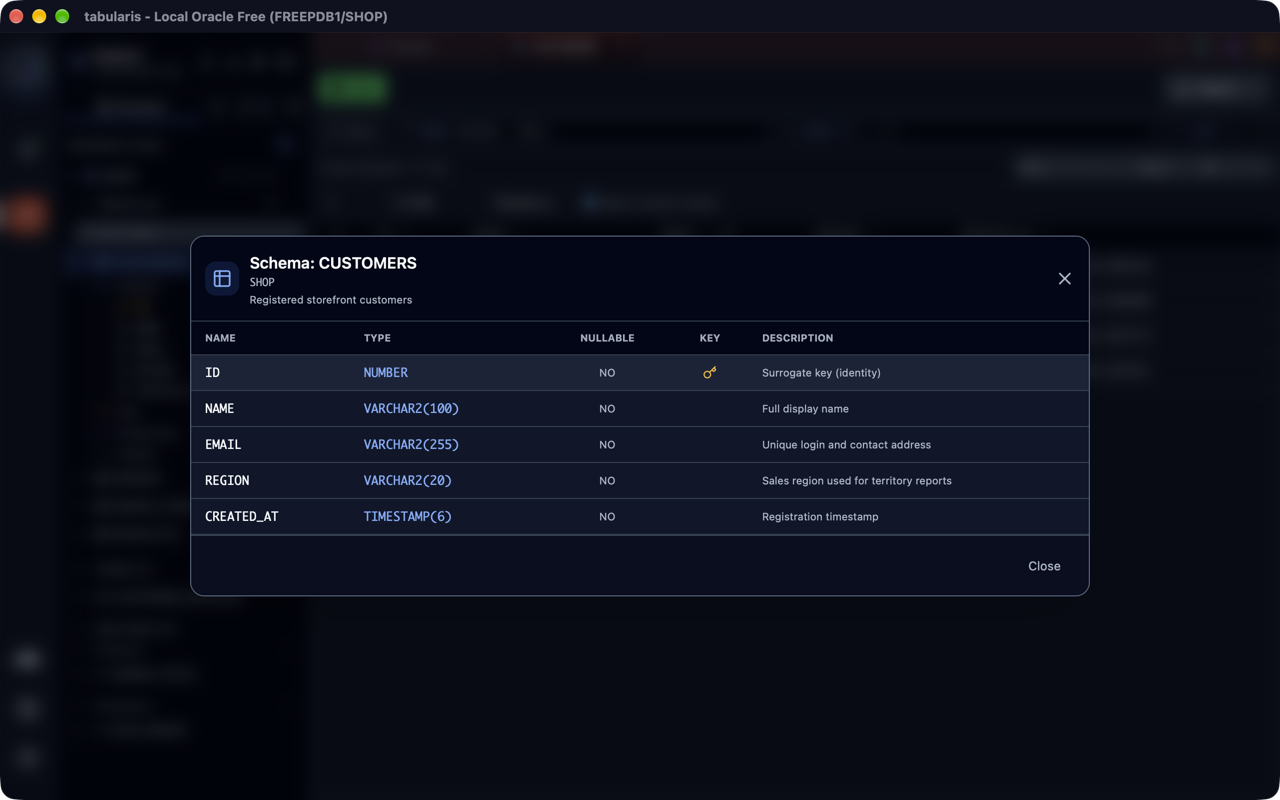 Table and column comments |
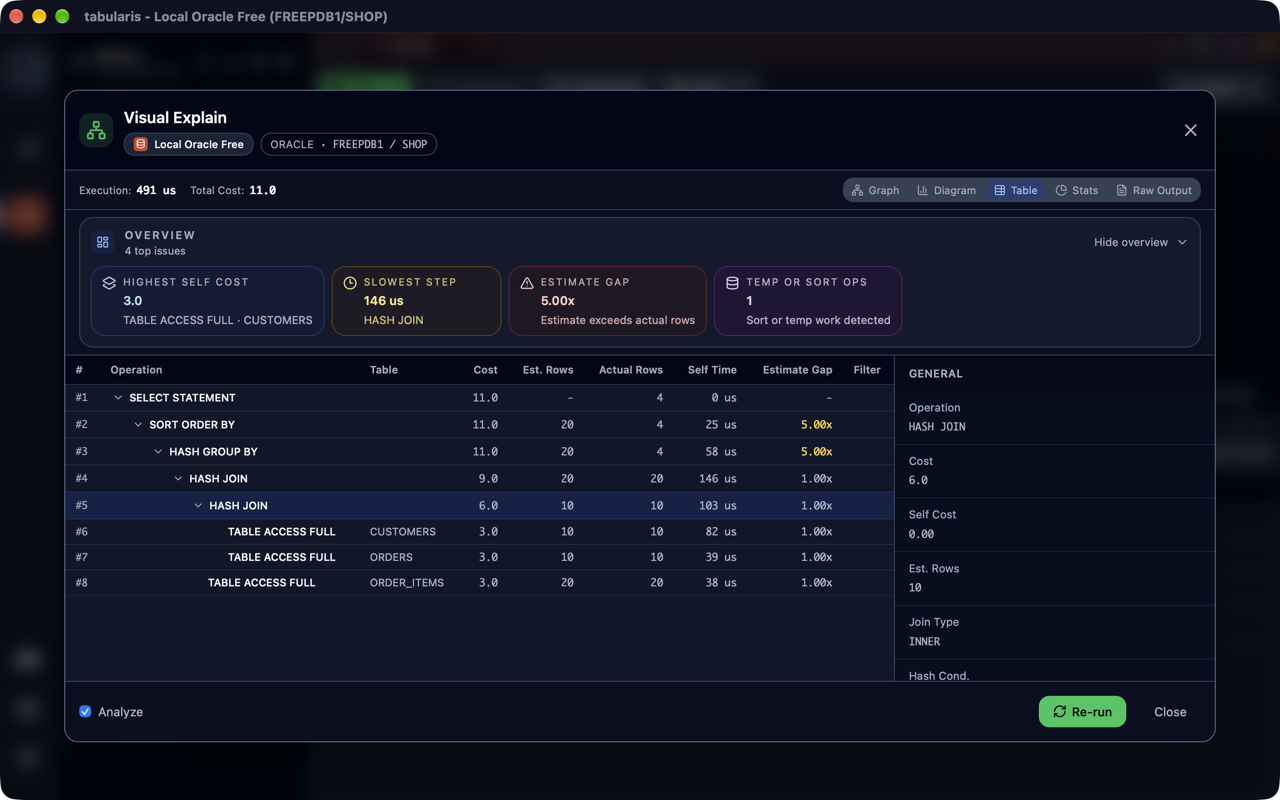 Visual EXPLAIN with runtime statistics |
More screenshots live in assets/screenshots/.
Oracle's wire protocol is proprietary, so every driver goes through Oracle's own client library. ODPI-C is compiled into the plugin, so no Oracle SDK is needed to build, but the Oracle Instant Client is required at runtime.
Install the free Oracle Instant Client "Basic" or "Basic Light" package and make it findable in one of two ways:
-
macOS / Windows: put its directory on the standard library path /
PATH, or set Oracle Client library directory in the plugin's settings (Settings → Installed Plugins → Oracle → gear icon) to the Instant Client folder. -
Linux: register the directory with the dynamic loader before starting Tabularis, for example:
echo /opt/oracle/instantclient_23_26 | sudo tee /etc/ld.so.conf.d/oracle-instantclient.conf
sudo ldconfig
or export
LD_LIBRARY_PATH. The plugin setting alone is not enough on Linux: the loader resolveslibclntsh's own dependencies (libnnz, ...) only from the system search path. The Instant Client also needslibaio(libaio1t64on Ubuntu 24.04, plus alibaio.so.1symlink).
If the library cannot be found, connections fail with a clear DPI-1047 hint rather than a cryptic loader error.
| Field | Value |
|---|---|
| Host / Port | Listener host and port (default 1521) |
| Database | The service name, for example FREEPDB1, XEPDB1 or ORCLPDB1 |
| Username / Password | Credentials (system works for local test containers) |
SSL mode require |
Uses tcps://, for example Autonomous Database on port 1522 |
Power-user forms are also accepted in the Database field, in which case Host/Port are ignored:
- A full EZConnect string:
//db.example.com:1521/ORCLPDB1ortcps://adb.region.oraclecloud.com:1522/xxx_high - A full connect descriptor:
(DESCRIPTION=(ADDRESS=...)...) - A TNS alias resolved through
tnsnames.ora
Schemas are first-class: the schema selector lists all users visible to the connection (ALL_USERS), and metadata is read through the ALL_* catalog views, so you see exactly what your account has rights on.
explain_query returns raw oracle-plan-json output, which Tabularis hands to the plugin-owned TypeScript parser in explain/. The same parser ships in the plugin archive as explain/dist/index.iife.js and on npm as @tabularis/explain-oracle.
- Estimated plans run
EXPLAIN PLAN SET STATEMENT_ID = ... FOR <query>and read the rows back fromPLAN_TABLE: operation, object, cost, cardinality, bytes and access/filter predicates. - EXPLAIN ANALYZE executes the query with
STATISTICS_LEVEL = ALLand reads the cursor's last-execution statistics fromV$SQL_PLAN_STATISTICS_ALL: starts, actual rows, elapsed time and buffer gets. It needsSELECTonV$SESSIONandV$SQL_PLAN_STATISTICS_ALL(for example throughSELECT_CATALOG_ROLE) and is only allowed forSELECT/WITHqueries, so a plan request never modifies data. - The Raw Output view shows the
DBMS_XPLANrendering (TYPICAL, orALLSTATS LASTfor analyzed plans).
Open Settings → Plugins, find Oracle in the registry and install it. Tabularis downloads the archive for your platform from the GitHub release.
Download the archive for your platform from the releases page and extract it into the Tabularis drivers folder:
- Linux:
~/.local/share/tabularis/plugins/drivers/oracle/ - macOS:
~/Library/Application Support/tabularis/plugins/drivers/oracle/ - Windows:
%APPDATA%\tabularis\plugins\drivers\oracle\
Restart Tabularis (or toggle the plugin in Settings) and Oracle appears in the database picker.
| Area | Status |
|---|---|
test_connection, ping (native OCI ping) |
✅ |
| Schemas, tables and columns with comments, primary keys and identity columns | ✅ |
| Indexes and foreign keys | ✅ |
| Views: list, definition, columns, create/replace/drop | ✅ |
| Stored procedures and functions: list, parameters, source | ✅ |
Query execution with OFFSET/FETCH pagination (12c+) |
✅ |
PL/SQL blocks (BEGIN ... END;, CREATE PROCEDURE, ...) |
✅ |
| Insert / update / delete rows (bound parameters, composite keys) | ✅ |
| Schema snapshot and batch columns/foreign keys (ER diagram) | ✅ |
CREATE TABLE, add/modify column, create/drop index, add/drop foreign key |
✅ |
| Visual EXPLAIN and EXPLAIN ANALYZE | ✅ |
| Triggers, routine editing, database users | ❌ Not yet implemented |
ON UPDATE actions on foreign keys |
❌ Oracle has no ON UPDATE |
- Identifiers are quoted ANSI-style (
"NAME") exactly as the catalog returns them, so mixed-case objects work. NUMBERvalues are fetched as text and re-parsed: integers stay exact (beyond-i64 integers are returned as strings instead of losing precision), decimals become JSON numbers.RAWandBLOBvalues are returned base64-encoded;CLOB/LONGas text.- Native
JSONcolumns (21c+) are fetched as text: rust-oracle cannot create fetch buffers for the JSON type, so queries that hit one are transparently retried with the JSON columns wrapped inJSON_SERIALIZE(... RETURNING CLOB)(column list discovered server-side throughDBMS_SQL.DESCRIBE_COLUMNS2). - The session is cached inside the plugin process and reused across calls (guarded by an OCI ping), because opening an Oracle session is expensive.
- Trailing semicolons are stripped from plain SQL (OCI rejects them) but kept for PL/SQL blocks, which need them.
- The Oracle Instant Client must be installed separately; its license does not allow bundling it in the plugin archive.
- Triggers, routine editing and database-user management are not implemented yet.
- EXPLAIN ANALYZE requires read access to dynamic performance views.
Requires a Rust toolchain, a C compiler (for the bundled ODPI-C), and Node.js 22.13+ with pnpm for the EXPLAIN parser. No Oracle software is needed to build or run the unit tests.
just build         # EXPLAIN parser bundle + debug build
just test          # cargo test: unit tests for SQL builders, parsing, RPC
just test-explain  # typecheck + test the TypeScript plan parser
just lint          # clippy -D warnings
just dev-install   # build + copy binary, manifest and parser into the Tabularis drivers folder
just repl # local JSON-RPC REPL over stdiojust demo-db # gvenzl/oracle-free:slim (system / oracle / FREEPDB1)
just live-test /path/to/instantclient # tests/live_db.rs against the containerCI runs the same test against an Oracle Free service container with the Linux Instant Client.
echo '{"jsonrpc":"2.0","method":"get_tables","params":{"params":{"host":"localhost","port":1521,"database":"FREEPDB1","username":"system","password":"oracle"},"schema":null},"id":1}' \
| ./target/debug/oracle-pluginsrc/
├── main.rs # stdio JSON-RPC loop
├── rpc.rs # method routing + response helpers
├── client.rs # connect-string building, session cache, query/execute
├── settings.rs # initialize-time settings (Instant Client location)
├── models.rs # ConnectionParams
├── error.rs # PluginError (incl. friendly DPI-1047 hint)
├── handlers/ # metadata / query / explain / crud / ddl
└── utils/ # identifiers, pagination, SQL classification
explain/ # TypeScript plan parser (plugin IIFE + npm package)
Pull request titles follow Conventional Commits (feat:, fix:, docs:, ...), and CI checks them. Add one prerelease:alpha, prerelease:beta, prerelease:rc or prerelease:stable label so the version-suggestion job can compute the next tag.
Releases are cut by pushing a v* tag whose version matches .tabularium, Cargo.toml and explain/package.json. The release workflow builds all five platforms, publishes the GitHub release with the .tabularium manifest as a standalone asset, and publishes @tabularis/explain-oracle to npm from the same tag.
See CHANGELOG.md.
Apache-2.0