This software and instructions are provided as is, without warranty of any kind. This is a hobby project. Using this might damage your equipment, cause injury or death. Use at your own risk.
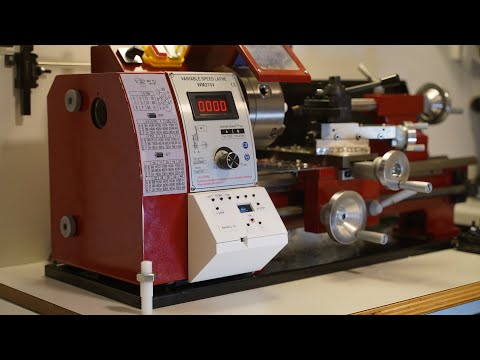
90€ DIY Electronic Lead Screw (ELS) based on Arduino Nano for metal lathes.

- Positive and negative screw pitches
- From -10mm to 10mm
- Resolution 0.01mm
- Automatic lead screw stops
- Independent carriage moves without losing the thread
- Lead screw position indication
- Spindle angle indication
- Plastic gears and mounts shouldn't heat up or they will deform and disconnect. Stepper can heat up quite a bit during continuous operation. Depending on the stepper driver current, the limit seems to be ~50% duty cycle with 10min operation / 10min cooldown. For higher duty cycle something like metal HTD 5M gears, belt and a metal stepper mount would be required.
- Nema 23 stepper usable maximum is ~600 RPM, here a 1:1 stepper to leadscrew ratio is used. In practice this means that cutting e.g. 2mm thread with a 2mm leadscrew spindle top speed should stay under 600 RPM.
- NanoEls would take the stepper at 1000 RPM and higher but it likely won't have much torque at that point
- This can be mitigated to some extent by using e.g. 40 tooth gear on the leadscrew and 60 tooth gear on the motor at the expense of the maximum leadsrew torque
- Lead screw position only equals the carriage position if the backlash was taken out before the measurement started. Changing the direction introduces the backlash again.
- 5 plastic 3D-printed parts (gears, mounts)
- Uses readily available hardware
- 46€ Nema 23 stepper and driver
- 10€ 24V 5A power supply
- 9€ printed curcuit board (PCB)
- 9€ rotary encoder
- 3€ Arduino Nano
- 3€ push buttons
- 2€ OLED display
- 5V power supply e.g. an old phone charger
- 8 bolts, 2 nuts, 2 washers and a few wires
- Optionally, two
2kOhmresistors
- Does not require metalworking
- Does not require drilling holes in the lathe
- Soldering iron, solder
- Hex and screwdrivers
- Soft hammer or a woodworking clamp
- 50T metal gear that your lathe came with
- Grease for the gears
As long as you can securely connect the rotary encoder to the spindle and stepper motor to the leadscrew, most lathes are supported.
3D printed gears and mounts are available for the following models:
- WM210 or WM210V
Please note that sometimes 2 lathes of the same model have different dimensions and 3D printed parts might not fit. Please share with us your 3D models if you made new ones.
We've tried to simplify the process as much as possible but building NanoEls is still going to take considerable time and effort, basic mechanical and electrical knowledge.
You might need to design your own mounts and gears if the ones we have don't fit. If you need help designing a 3D printed part, please open a GitHub Issue with exact dimensions of the part that you need.
I used the following one but most Nema 23 or higher steppers should work.
- Nema 23 Stepper Motor Bipolar 1.8deg 3.0 Nm 4.2A 57x57x113mm 4 Wires Open Loop
- DM556Y Driver 1.7-5.6A DC20V~50V
DM556Y is 118.5mm wide which fits the case 3D model. DM556 fits too. R60 should fit (didn't test). Other drivers might not fit.
Cheap drivers like TB6600 are not recommended, they are very rough and noisy. DM556 is OK but requires reducing acceleration and max speed in the settings or it will lose steps during jogging (PULSE_DELTA_US from 7 to 2 and PULSE_MAX_US from 2000 to 1500). Generally, paying for a better brand such as "Rtelligent" or "STEPPERONLINE" is worth the money as their drivers work noticeably better than brandless black boxes.
Closed Loop stepper might be nice to have but not necessary for NanoEls to work on small lathes. For bigger lathes or heavy cuts, closed loop system might be better.
It's entirely reasonable to locate the driver in the electrical cabinet and not under the lathe as shown above - but make sure to get the stepper with a shielded cable in that case.
It's suggested to run the stepper in the 200 steps mode or 400 if your driver doesn't support full steps. Microstepping will reduce the torque and will make Arduino spend more time issuing steps, potentially lowering the maximum usable rpm.
Tested with the following 600 steps encoder but 200 and 400 step encoders will also work. It's possible to salvage one of these from an old printer, they are also readily available on AliExpress as "optical rotary encoder".
The code was tested using an Arduino Nano V3 clone.
SSD1306 monochrome 4-pin I2C OLED 128x64 display.
Using 6x6x13mm switches. 13mm is the optimal height for the provided case, if you're using a different case, desired height might be different. AliExpress has very convenient 200 button sets of different height for a few euros.
6x6 buttons can be too small for fingers to comfortably click, consider buying caps to put on them, keywords for AliExpress are "switch push button hat 6mm".
24V 5A power supply worked well. Stepper driver allows picking the current, 2A current was so far sufficient for my small lathe so power supply is running in the light mode.
48V power supply can be used on NEMA 23 for maximum power (check your driver max voltage).
Arduino Nano doesn't draw much current so a 0.5A phone charger would work.

It's a 70mm by 90mm board with holes for M3 mounting bolts, 1.6mm thick. You will need clearance above, below and on the sides of the board for the through-hole components, their pins (legs) and wires coming into the PCB.
PCB is best placed away from the electromagnetic noise sources such as lathe motor wires. Grounded metal housing is ideal.
Some PCB production techniques use lead and other nasty stuff. Order at your own risk and dispose properly.
Ordering it from JLCPCB takes just a few clicks - upload the ZIP file, use all default settings, choose shipping and checkout.
Ideally, a 50 tooth metal gear (~8mm thick) from the original lathe gear set would be used.

This case is designed for the 120mm wide lathe base with two holes for M5 bolts on the bottom plate.
Stepper driver DM556Y is mounted onto the case with 2 M6 bolts, washers and nuts.
PCB is mounted onto the case with 4 M3 bolts.
Case is covering the stepper from the metal chips.

Dimensions of the lead screw front bearing housing for the provided 3D-printed part to fit: 28mm outside diameter, 12mm wide.
Stepper should rest on e.g. a piece of rubber when attached to the lathe - provided 3D printed part is only held by friction and is not designed to hold the full weight of the stepper long term.

This gear is designed to fit the NEMA 23 shaft (10mm diameter / 9.5mm narrow dimension) without any set screws. Gear is 10mm wide, entire part is 20mm wide.
Using this gear can be very noisy on certain RPMs.

If you have 2 metal gears that add up to 100 tooth together (e.g. 2x50 tooth gears) that came with the lathe, it's possible to simply use one of them on the leadscrew and one on the stepper with the help of the adapter above. It can be somewhat noisy on certain RPMs but otherwise works well.

This is the best stepper to leadscrew connection method that I tried so far but it requires printing 2 parts above and buying a 180mm HTD 5M belt which is not expensive (2-10€) but can be hard to find.
This is the quietest option that also doesn't need greasing. 2 pulleys and a belt fit tight on the normal stepper mount shown above without a need for a tensioner.
16T-5M pulleys with various inner bore diameters are also available on AliExpress for 5-6€ each.

To be glued to the lathe wall with the double-sided carpet sticky tape. Holds well if surfaces are properly cleaned with e.g. Acetone.
Using an M4 set screw is optional.

Check the distance between the spindle gear and the lathe housing: for the provided conical gear to fit, it has to be 23mm.
Encoder gear should fit loosely to the spindle allowing for it to move ~1 degree back and forth when the spindle is idle - it reduces the noise and forces applied to the encoder.
Working with electrical wiring is dangerous, unplug the lathe. Proceed at your own risk.
Connect the 24V and 5V power supplies to the lathe power so that the lathe on/off and safety switches cut off the power for the ELS too.
Test Arduino Nano before soldering it on, unsoldering it without a desoldering station is very hard.
Don't solder the Arduino upside-down or rotated 180 degrees, check the white outlines on the board.
Carefully solder 10 buttons (6X6X11 switches to fit the provided case), OLED 128x64 4-pin display and an Arduino Nano onto it. Plug USB into Arduino to test - display and buttons shoulad already work.
It's important that buttons are soldered vertically or the result won't fit into a case. To achieve this, solder only 2 diagonal legs for each button first while pressing on the button firmly. Then check all buttons for verticalness, at this point it's easy to correct the angle by pressing on the button and re-heating one of the legs. Once satisfied, proceed to solder all the remaining legs.

Solder 5V/GND wires to the PCB.
Solder encoder and stepper driver wires to the PCB according to the input/output labels on the PCB.
Optinally solder two 2kOhm pull-up resistors. They aren't strictly needed but will improve the stability of the optical encoder readings.
When connecting the gears, make sure to leave ~0.5mm space between them for optimal threading. This can be achieved e.g. by temporarily placing a piece of paper between them. Add grease and spread it between the gear teeth, remove the excess.
- Download the Arduino IDE
- Install
Adafruit_SSD1306andFastGPIOlibraries via the Library Manager in the Arduino IDE - Download and open NanoEls.ino
- Check the top constants (e.g. encoder steps, motor steps, display offset) and adjust if needed
- Upload the sketch to your Arduino Nano
- Swap D2 and D3 pins in the code if carriage direction is inverted, re-upload
- Make sure that stepper motor and ELS are turned off using the lathe emergency power off switch
- Test the automatic stop and other ELS functionality before relying on it
- In case of unexpected movements, disengage the half-nut or use the emergency power off switch
- Select the desired pitch using
-and+buttons or0.10mm,1mmand2mmshortcut buttons in the top row - Turn on the lead screw using the
ONbutton - Start the lathe spindle
- Stop the lathe spindle when done
- Turn off the lead screw using the
ONbutton
- Move the carriage with the help of ELS to the desired stop position
- Set the stop using e.g.
L STOPbutton - Hold
RIGHTto move to another stop position and pressR STOP
Now you can:
- Use lathe forward/reverse spindle movements to move the carriage between the stops
- Use
LEFTandRIGHTbuttons to move the carriage ~1mm (possibly more when required to stay on the thread) within the stops in either direction when spindle is not turning
Setting only one stop is also supported. Stops aren't lost when ON button is clicked or pitch is changed.
- Make sure the cutting tool is not going to contact the material and there's room to move the carriage physically
- Use
LEFTandRIGHTbuttons to move the carriage ~1mm (possibly more or less when required to stay on the thread) when spindle is not turning - If stops are set, they will be respected
Using LEFT and RIGHT buttons is not supported when the spindle is turning and ELS is on.
The spindle and stepper positions are reset to 0 every time one of the following happens:
ONbutton is pressed (including long press for reset)- Pitch is changed e.g. by pressing
-or+ - Stepper is not in the desired position when ELS is powered up
- Results in
LTWlost thread warning - Might happen if ELS was abruptly shutdown
- Results in
Thread is not lost when ELS is simply powered off.
It's possible for the lead screw to go out of sync with the spindle by removing the L STOP or R STOP while the carriage is standing on it. It's indicated by the SYN word on the display.
This situation should resolve itself once the spindle makes a full turn.
ELS remembers all the positions and ON/OFF status when powered off.
- Hold
ONbutton for 6 seconds- Reset stepper and spindle positions to 0
- Resets pitch to 0
- Removes stops
- Removes out-of-sync state
- Shows NanoEls version
- Questions: please file a GitHub Issue
- Successful/failed builds: please file a GitHub Issue with explanations and photos
- Code changes: please only make the necessary minimal edits
- Run in the
TESTmode, add new tests if needed - Split unrelated changes into separate PRs
- Run in the
- PCB changes: incompatible changes (move button / display / Arduino / change PCB size / change used pin purpose) will require making
h2folder with another hardware version of the project, please file an Issue first to confirm. Backward-compatible PCB changes are cool. - 3D models: in most cases, don't edit the model, add a new file. Also include the PNG preview and a dimension drawing if possible.