
Out with the BS, in with the Markdown.
If you prefer MD over BS ;) 🦕
🌐 Demo course (online) · 📐 Software Guidebook · 📖 User manual · 📦 JSR
Brightspacosaurus is a CLI tool that converts Markdown course material into a Brightspace Common Cartridge (.imscc) package.
What you can do with it:
- 📝 Write course material in Markdown — versionable, diffable and AI-editor-friendly
- ✅ Build quizzes for student self-testing — Quizzosaurus/QuizDown Markdown becomes scored Brightspace quizzes (QTI); see its syntax and module docs
- 📊 Include diagrams as code — accessible PlantUML and Mermaid diagrams
- ⚡ Preview everything before importing — a live Docusaurus site from the same Markdown
- 🚦 Check student progress through GitLab — work items, commits and comments per student, as a stoplight
- 📄 Publish readers as PDF — reference material with a cover page
- 🃏 Practise core concepts with flashcards — term/definition lists become interactive cards
- 👩🏫 See which version is in Brightspace — on a teacher-only page that also hosts the progress dashboard
- 💻 Include code blocks in lesson material — with syntax highlighting and a copy button
- 🔎 Lint your course material like code —
bso lintcatches broken includes, wrong quiz answer keys, diagram and flashcard mistakes, stray frontmatter and hard-wrapped text before students (or Brightspace) do - 🧭 Set the menu order — with folders,
sidebar_positionandreadersModule
Each feature is explained, with a page that shows it, in the online demo course.
Quiz questions and answer options can hold syntax-highlighted code (Figure 1).
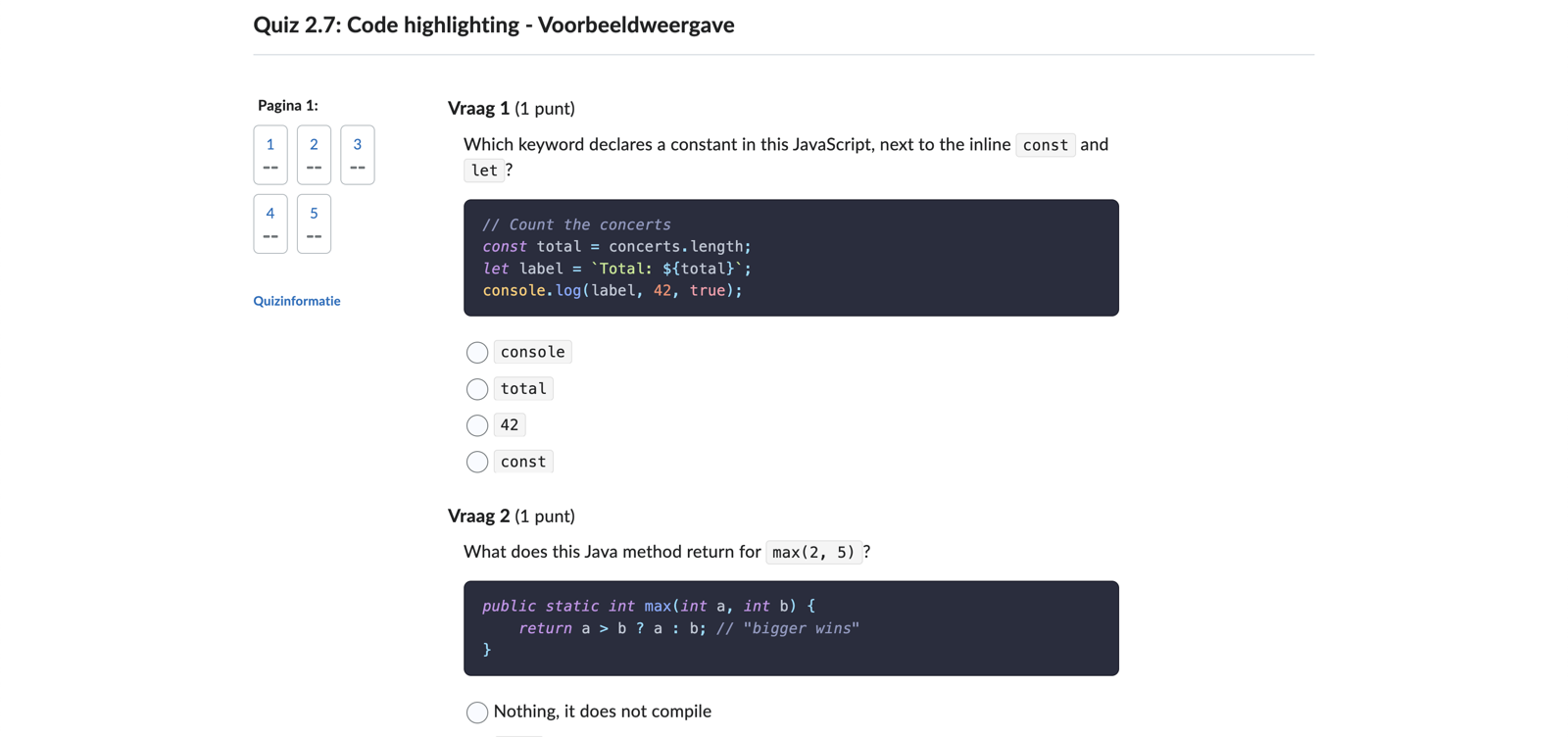
Figure 1: Code in quiz questions and answer options in Brightspace. Look at the dark code blocks with colored keywords and strings, and at the grey inline code in the question and the options.
🤖 Brightspacosaurus was built with substantial help from AI coding assistants, but with human-in-the-loop. See About: building this with AI for the full story.
Note: Brightspacosaurus is built for Deno (≥ 2.0). It is published to both JSR and npm for discoverability, but it requires the Deno runtime — it is not a standalone Node.js CLI. See ADR 008 for why.
Four kinds of documentation, each with its own role:
| Document | Purpose | Reader |
|---|---|---|
| README | Short pitch, feature list, links | Anyone seeing BSO for the first time |
| Demo course | Shows what BSO can do and how it looks, with the minimal setting to turn each feature on | Author: "what do I get and how do I enable it?" |
| User manual | Full reference: config fields, edge cases, Brightspace import process, troubleshooting | Author or administrator setting it up |
| Software Guidebook | Architecture and design decisions (sources in docs/) |
Developer, contributor |
For AI-assisted workflows in a course project, see the installable BSO authoring skills. They are separate from the BSO development instructions.
Brightspacosaurus was created by Bart van der Wal, lecturer in Software Engineering at the HAN University of Applied Science, Academy of IT and Media Design. He and other colleagues were using a markdown-based approach and publishing through Docusaurus for course materials. This dropped WYSIWYG, but allowed including code previews with syntax highlighting, adding UML diagrams with diagrams-as-code tools like PlantUML and Mermaid, and even programmable parts like quizzes, using React/MD. They also preferred Git versionable, diffable files, and also having the modern option of AI-enhancement in the editor. This is of course impossible in Brightspace itself where the presence of direct student information makes access of LLM's unwanted/unacceptable.
- Deno ≥ 2.0 — see ADR 008 for the rationale
- pandoc (optional) — required for reader-PDF generation and the instructor manual
You need Deno 2.0 or newer. Without it, see No Deno yet? below.
deno install -A -g -n bso jsr:@bartvanderwal/brightspacosaurus/cliCheck it with bso --version.
There is no update command: you install again, with -f (force) to overwrite the old version.
deno install -A -g -f -n bso jsr:@bartvanderwal/brightspacosaurus/cliIf the newest version was published only a short time ago, Deno may still install the older one, because it does not take a version that is too new (a defence against a malicious package that is published and used before anyone notices). To get the version that was just published, add --min-dep-age 0:
deno install -A -g -f --min-dep-age 0 -n bso jsr:@bartvanderwal/brightspacosaurus/cliThen run bso --version to see which version you have. To install one exact version, put it in the address: jsr:@bartvanderwal/brightspacosaurus@0.35.0/cli.
A project can also pin the version in its own scripts (deno run -A jsr:@bartvanderwal/brightspacosaurus@0.35.0/cli build), so that everyone who builds the course uses the same version.
-A grants all permissions, for brevity. For least privilege, replace it with --allow-read --allow-write --allow-run=pandoc,git,npm --allow-env; git is only used for deterministic reader-PDF cover dates, and npm for the preview and the slides (see ADR 008 for the security rationale).
deno run -A jsr:@bartvanderwal/brightspacosaurus/cli buildInstall it first, no Node.js needed:
curl -fsSL https://deno.land/install.sh | sh      # macOS/Linux
irm https://deno.land/install.ps1 | iex            # Windows (PowerShell)
Or brew install deno (macOS), choco install deno / winget install DenoLand.Deno (Windows), scoop install deno. See the Deno install docs for all options.
The installer adds Deno to your shell profile, but you may need to restart your terminal (or source your profile) before deno and bso are on your PATH.
See all flags of deno install in the Deno docs.
The package is published to npm too, mainly for discoverability. It still requires the Deno runtime — pure Node.js usage is not supported. Prefer the JSR installation above.
-
Start a new course in your chosen directory:
bso init
bso lint
bso initlists the files it will add and asks you to confirm the absolute directory (default no). Usebso init --yesorbso init -yfor scripts. It never overwrites existing files; unrelated files in a non-empty directory are allowed.This creates
brightspacosaurus.config.jsonand the demo course from your installed BSO version: lessons, all quiz question types, flashcards, diagrams, readers, slides and a teacher page. The course name defaults to the directory name and the course version to0.1.0; sources are inlessons/, readers inreaders/, slide decks inslides/, and output goes tobuild/brightspace/. Quiz, flashcard and diagram settings use the documented defaults; readers and slides are enabled in the config. No Docusaurus app,package.jsonornode_modulesis created. -
Adapt the demo material as Markdown in the configured
sourcesDir. Brightspacosaurus classifies files by name:- Lesson pages — regular Markdown files. Headings, lists, tables, images (relative paths), and fenced code blocks (any language, with a copy button and syntax highlighting for every language Prism supports) are all supported.
- Quizzes — files with the
quiz-prefix are converted to QTI 1.2 and imported into the Brightspace Quizzes tool. - Readers — files with the
reader-prefix in the configuredreadersDirare converted to PDF via pandoc (great for reference material students can download). - Diagrams — PlantUML and Mermaid fenced blocks in lesson pages are rendered during
bso buildviaremark-kroki-a11yand Kroki. The Brightspace HTML output uses native no-JavaScript disclosure controls for source and textual descriptions. - Instructor answer keys — files with the
-antwoorden-docentsuffix are deliberately excluded from the student-facing package.
- Flashcards — use
::::flashcardswith inner:::flashcardcards, lightweight- **term:** definitionlists inside:::flashcards, or automatically convert glossary sections viaflashcards.sectionHeadings: ["Kernbegrippen"]. Definitions support normal Markdown and remain readable without JavaScript. See the flashcard guide.
Includes use clickable Markdown-link syntax so the same source works in BSO, an editor and a Docusaurus preview:
{@include: [Learning objectives](../partials/learning-objectives.md)}A bare path or embedded HTML link is invalid and is reported by bso lint.
See the user manual (docs/user-manual.md) for the exact file conventions and the quiz format. Run bso lint to check BSO-specific authoring rules before exporting.
-
Preview locally (optional) with Docusaurus, so you can review content, links, code blocks and diagrams before importing into Brightspace:
bso preview
Preview currently needs a separate Docusaurus setup and
docusaurusDirin your config — it does not work directly afterinityet (see Preview and #124).initdeliberately does not create that app. -
Build the package — convert your Markdown to HTML + QTI and package it into a
.imscc:bso build bso pack
The result is a file such as
build/brightspace/my-course.v0.1.0+3f9c2a1.imscc(the digits are a hash of the content) that you can import into Brightspace (see Importing into Brightspace). Diagram rendering needs access to Kroki (defaulthttps://kroki.io); PDF generation needs pandoc and XeLaTeX, and slides need npm. For a build without PDF/slide tooling, usebso build --skip-readers --skip-slides. -
Import into Brightspace — upload the generated
.imscc(see Importing into Brightspace). -
Iterate. Editing course material is a repeating cycle: adjust your Markdown, re-run
bso build && bso pack, and re-import. A few things to keep in mind:- Preview first. Use
bso previewto check your changes locally before every import — it is faster than the import round-trip and catches most issues early. - Brightspace import is additive. Re-importing does not overwrite existing modules or quizzes; it adds duplicates. Remove the old content in Brightspace before re-importing (you can delete an entire week/module at once via the module's ⋮ menu → Delete Module).
- Bulk cleanup helper. For larger courses, manually deleting items is tedious. An experimental browser-console script (
utils/verwijder-brightspace-paginas.js) can bulk-delete content within a module. See Cleaning up before re-import. - Advanced / partial imports. For selectively importing or overwriting only changed parts, see the user manual (
docs/user-manual.md) for the advanced import scenarios.
- Preview first. Use
All project-specific settings are managed via brightspacosaurus.config.json. CLI arguments take precedence over values from the configuration file.
| Field | Type | Description |
|---|---|---|
courseName |
string |
Course name as shown in the manifest |
sourcesDir |
string |
Source directory for lesson pages and quizzes (relative to the working directory) |
version |
string |
Version number (semver), used in the .imscc file name and HTML badge |
| Field | Type | Default | Description |
|---|---|---|---|
name |
string |
derived from courseName |
Project name for the .imscc file |
readersDir |
string |
null (skip) |
Source directory for reader Markdown (PDF conversion via pandoc) |
assetsDir |
string |
null (no extra assets) |
Directory with static assets (banners, logos) |
outputDir |
string |
"build/brightspace" |
Build output directory |
customCss |
string |
null (default CSS only) |
Path to a custom CSS file |
docusaurusDir |
string |
null (no preview) |
Path to the Docusaurus directory for bso preview |
quiz |
object |
{ "maxAttempts": 0, "shuffleAnswers": false } |
Configuration for generated Brightspace quizzes |
diagrams |
object |
see below | Configuration for PlantUML/Mermaid rendering in lesson HTML |
teacherManual |
object |
null (skip) |
Configuration for the instructor manual PDF |
teacherPage |
string |
"for-teachers.md" |
Teacher page in sourcesDir on which BSO fills in the course and BSO versions; see the user manual |
maxAttempts is a non-negative integer (0 means unlimited).
shuffleAnswers is a boolean, default false. Set it to true to request random
answer order in the exported QTI and in the demo's interactive quiz preview.
Builds keep stable option IDs and ordering; randomization happens per attempt.
| Field | Type | Default | Description |
|---|---|---|---|
sectionHeadings |
string[] |
["Core concepts"] |
Heading titles whose unordered term/definition lists become flashcards. Case-insensitive, exact matching after trimming; a leading section number such as 7. or 2.3 is ignored. [] disables automatic conversion. |
For example, "flashcards": { "sectionHeadings": ["Kernbegrippen"] } converts lists such as - **request:** Message sent by a client. under that heading. The section ends at the next heading of the same or a higher level. Each item must have a term and definition separated by the first colon. Invalid lists, numbered lists and task lists remain unchanged. Headings such as ## 7. Kernbegrippen match too, because leading section numbers are ignored. Omitting this option recognizes Core concepts; set [] to disable automatic conversion. Explicit flashcard containers always work.
| Field | Type | Default | Description |
|---|---|---|---|
krokiUrl |
absolute URL string | "https://kroki.io" |
Kroki-compatible render endpoint. Use a self-hosted Kroki service for offline/CI builds. |
output |
"img-html-base64" | "inline-svg" | "img-base64" | "object-base64" |
"img-html-base64" |
How rendered SVG is embedded in the generated HTML. |
failOnError |
boolean | true |
true fails the build on diagram errors; false warns and keeps the original fenced code block. |
Local Kroki works well for PlantUML. Mermaid needs the yuzutech/kroki-mermaid companion service when using a local Kroki Docker setup; the public https://kroki.io endpoint includes that companion.
BSO's Brightspace output does not rely on custom JavaScript: source and generated natural-language descriptions use native <details>/<summary> controls, and descriptions are linked to diagrams with ARIA where available. This keeps diagram access robust when Brightspace content sandboxing or browser restrictions affect scripts. It is an accessibility aid, not a formal WCAG conformance claim; verify important course pages manually with assistive technology in Brightspace.
| Field | Type | Default | Description |
|---|---|---|---|
maxAttempts |
non-negative integer | 0 |
Maximum number of attempts for each generated quiz; 0 means unlimited |
| Field | Type | Default | Description |
|---|---|---|---|
inputFiles |
string[] |
(required) | List of Markdown source files (relative to the working directory) |
outputName |
string |
"docentenhandleiding.pdf" |
File name for the output PDF |
outputDir |
string |
<outputDir>/docenten/ |
Output directory for the PDF |
{
  "courseName": "Software Engineering",
  "version": "2.1.0",
  "name": "SE",
  "sourcesDir": "student-material/lessons/",
  "readersDir": "student-material/readers/",
  "assetsDir": "images/",
  "outputDir": "build/brightspace",
  "customCss": "assets/custom.css",
  "docusaurusDir": "scripts/docusaurus",
  "flashcards": {
    "sectionHeadings": ["Kernbegrippen", "Core concepts"]
  },
  "diagrams": {
    "krokiUrl": "https://kroki.io",
    "output": "img-html-base64",
    "failOnError": true
  },
  "quiz": {
    "maxAttempts": 0,
    "shuffleAnswers": false
  },
  "teacherManual": {
    "inputFiles": [
      "instructor-manual/chapter-1.md",
      "instructor-manual/chapter-2.md"
    ],
    "outputName": "docentenhandleiding-se.pdf",
    "outputDir": "build/brightspace/docenten"
  }
}Usage: brightspacosaurus <command> [options]
Commands:
build Generate Brightspace HTML, QTI quizzes, PDFs and assets
pack Package the build directory into a .imscc archive
preview Start the Docusaurus dev server (requires docusaurusDir in config)
Options:
--config <path> Path to the configuration file (default: brightspacosaurus.config.json in cwd)
--sources <dir> Source directory for lesson and quiz Markdown (overrides config.sourcesDir)
--output <path> Build directory that also receives the .imscc (overrides config.outputDir)
--readers-only Generate reader and instructor PDFs only
--skip-readers Skip PDF generation with pandoc (faster local builds)CLI arguments always take precedence over values from the configuration file.
When working from the source repo, use deno task build / deno task pack instead of the installed bso command.
Do not use deno prepare (or deno build). These are project tasks, not built-in Deno commands: write deno task build. An unrecognised command such as deno build is treated as a module to run (like deno run build), so it can fail with a directory-import error for the existing build/ directory. deno task build looks up the project task in deno.json instead. deno compile is a different, built-in command for creating a standalone executable, not for generating course content.
From BSO 0.23.0 onwards, build replaces prepare, without a compatibility alias. Update scripts to bso build or deno task build. An older installed bso still uses the old command; updating this repository does not update that installed CLI. Use the local task until the new version is published and installed.
deno task testRuns all unit and property-based tests.
bso buildScans the configured source directory and:
- Converts lesson Markdown to standalone HTML
- Converts quiz Markdown (prefix
quiz-) to QTI 1.2 XML - Converts reader Markdown (prefix
reader-) to PDF via pandoc (if configured) - Generates the instructor manual PDF (if configured)
- Copies referenced images into the build directory
This builds the Brightspace export artifacts in outputDir; bso pack turns them into the .imscc archive. Docusaurus renders the same Markdown sources itself: it does not consume the generated Brightspace HTML or QTI. bso preview can reuse the generated reader PDFs, alongside its own web versions of the readers.
bso packPackages the contents of the build directory into a .imscc archive including imsmanifest.xml.
For a course's own Docusaurus app, bso preview writes the complete BSO stylesheet to src/generated/brightspacosaurus.css in that app (git-ignored). Import it at the start of the app's registered src/css/custom.css, before your own overrides:
@import '../generated/brightspacosaurus.css';No path to a BSO checkout or node_modules, and no extra npm package, is needed. See Loading BSO styles in your Docusaurus preview.
bso previewStarts the Docusaurus dev server by running npm start in the configured docusaurusDir. This requires:
- A
docusaurusDirfield inbrightspacosaurus.config.jsonpointing to your Docusaurus directory (relative to the working directory). - The
--allow-run=npmpermission. If you installedbsowithdeno install -A ...this is already covered; otherwise add--allow-run=npmto the run permissions.
For the bundled demo, run these commands from this repository's root:
npm ci --prefix demo-course-docs
bso preview
The root configuration selects examples/demo-course; its Docusaurus app lives in
demo-course-docs. To preview with the local CLI source, use
deno task preview. You can also run bso preview from examples/demo-course.
The demo course is published as a Docusaurus site at
bartvanderwal.github.io/brightspacosaurus,
as an example of what BSO produces, together with the
Software Guidebook,
the user manual and the ADRs.
The workflow .github/workflows/demo-preview-pages.yml
rebuilds it after every push to main (or by hand via Run workflow): it runs lint and
deno task test:fast first and deploys only when they pass.
The online preview shows the same pages, flashcards, quizzes, diagrams and teacher-page tabs as
the Brightspace export, but it is not a Brightspace test: the course menu, quiz scoring, hidden
modules and topic navigation only behave as intended after importing the .imscc into a
Brightspace sandbox. The demo's Voortgangsverkenner points to a fictitious GitLab server, so it
loads but cannot fetch data.
If your installed bso only permits running pandoc, reinstall it with npm permission:
deno install -g -f --allow-read --allow-write --allow-net --allow-env --allow-run=pandoc,npm -n bso jsr:@bartvanderwal/brightspacosaurus/clibso lint
bso lint --sources path/to/lessons
# Use the local development version before publishing/installing the new release
# (install once with: deno install -A -g -f -n bso-local --config deno.json src/main.ts):
bso-local lintbso lint brings developer best practices to course material: you check content the way you check code, before it ships. It runs offline and read-only on your lessons, quizzes, readers and linked includes, and starts by saying what it scanned. It catches problems that otherwise only show up after the Brightspace import, or never:
- Broken references: include syntax, missing, unsafe or cyclic include targets.
- Quizzes: missing, duplicate or unmatched answer keys, empty prompts and options.
- Diagrams as code: unsupported languages, empty diagrams, bad fence options and sources.
- Flashcards: nesting, incomplete cards, and flashcard sections without any flashcards.
- Source hygiene: YAML frontmatter in lesson files, fields that run together on one line, and paragraphs hard-wrapped at a fixed column, which make diffs noisy and AI-assisted editing harder.
Diagnostics go to stderr as file:line:column: error|warning rule: message, with the severity colored on a terminal; the summary goes to stdout. Exit code 1 means authoring errors, warnings alone return 0, so it fits in CI (see the GitHub Pages workflow). It complements Quickmark/Markdown style linting. Invalid configuration or inaccessible source directories also fail the command. Flashcard sections under flashcards.sectionHeadings (default Core concepts) warn unless they hold complete term: definition bullet lists or a ::::flashcards set; conversion still preserves other content.
Limit linting to selected directories with this optional config fragment:
{
  "lint": {
    "includeDirs": ["lessons/week-1", "lessons/week-2"]
  }
}
The directories are scanned recursively, replacing the usual sourcesDir and
readersDir inputs. Paths are relative to the working directory; each must be
inside the project root. --sources overrides this selection with one directory.
Linked includes are still checked as dependencies even outside the selected folders.
bso lint uses the configuration of the current directory and starts with the directories and file counts it scanned. Run it in examples/demo-course for the clean course (0 errors, 0 warnings) and in examples/demo-course-antipatterns for the deliberately invalid one (24 errors, 6 warnings, exit 1).
The antipattern course has its own config and one lesson per linter rule. Automated tests verify exactly one diagnostic per lesson and require the regular demo to stay clean.
After generating the .imscc file, import it into Brightspace as follows:
- Go to the course you want to import into.
- Open Course tools → Import/Export/Copy Components.
- Scroll to the Import Components section and select the radio button.
- Choose from a course package (not "from a learning object repository").
- Click Start.
- Drag the
.imsccfile (e.g.course.v1.0.0.imscc) onto the upload area (or click to browse). - Choose Import All Components.
- Wait for the import to complete (this can take a few minutes; progress is shown with green checkmarks).
Brightspace Common Cartridge import is additive for content modules and quizzes: it adds items but does not remove or overwrite existing modules or quizzes. There is no deduplication based on identifier or title.
The import wizard does offer the "Overwrite existing files" option. This applies to files in Manage Files (images, PDFs, HTML files) — not to content modules or quizzes as a whole.
This means:
- Re-importing into the same course produces duplicates for modules and quizzes.
- Files (images, PDFs) are overwritten if the option is checked and the path matches.
- Removing previously imported content modules must be done manually in Brightspace.
- There is no "sync" or "deploy" — only a one-way push.
- Iterating/testing: import into a clean course (create a new sandbox or reset the existing one).
- Production: import once into the target course. When making changes: use "Import Selected Components" to add only changed modules, and manually remove what has been replaced.
- Alternative: generate per-module packages instead of a single course package, so you can import selectively with limited damage from duplicates.
Because import is additive for modules and quizzes, you must manually remove old items before importing again.
- Go to Content in the course.
- Navigate to the module(s) you want to re-import.
- Click the dropdown menu (⋮) next to the module → Delete Module.
- Confirm. This removes the module including all topics within it.
- Go to Assessment → Quizzes.
- Check the quizzes belonging to the previous import (recognizable by name/prefix).
- Click Delete (at the top of the list).
- Confirm the deletion.
Note: if a quiz already contains attempts (student results), Brightspace will warn you. In that case only delete in a test/sandbox course, or archive the results first.
- First remove the old content and quizzes.
- Then import the new
.imsccpackage. - Verify that the new items appeared correctly.
The source of truth remains Git. Brightspace is the distribution channel, not the store of record.
brightspacosaurus/
├── deno.json                  # tasks, imports and JSR publish config
├── README.md                  # this file
├── skills/                    # installable agent skills for course authors
├── src/
│   ├── types.ts               # TypeScript interfaces
│   ├── config-loader.ts       # load, validate and merge configuration
│   ├── source-scanner.ts      # scan source directories
│   ├── markdown-converter.ts  # Markdown → HTML (unified/remark)
│   ├── manifest-builder.ts    # generate imsmanifest.xml
│   ├── quiz-converter.ts      # quiz Markdown → QTI XML
│   ├── reader-pdf-converter.ts # reader Markdown → PDF (pandoc)
│   ├── packer.ts              # HTML + QTI → .imscc
│   └── main.ts                # CLI entry point
├── assets/
│   ├── brightspacosaurus.css  # default stylesheet (HAN house style)
│   ├── reader-header.tex      # pandoc LaTeX header for readers
│   └── include-filter.lua     # pandoc Lua filter
├── tests/
│   ├── config-loader.test.ts
│   ├── config-loader.property.test.ts
│   ├── source-scanner.test.ts
│   ├── markdown-converter.test.ts
│   ├── manifest-builder.test.ts
│   ├── quiz-converter.test.ts
│   ├── packer.test.ts
│   └── cli.test.ts
├── utils/
│   └── verwijder-brightspace-paginas.js  # experimental cleanup utility
├── docs/adr/                  # Architecture Decision Records
├── docs/
│   ├── user-manual.md
│   └── software-guidebook.md
└── examples/
    └── *.config.json          # example configurations
- Deno as runtime instead of Node.js — see ADR 008
- unified (remark/rehype) for Markdown → HTML — see ADR 010
- Rich quiz content — see ADR 011
- Reader-PDF conversion via pandoc — see ADR 014
- JSR as the primary distribution channel — see ADR 015
- Config-driven with sensible defaults — project-specific settings via
brightspacosaurus.config.json, CLI arguments take precedence over config - All output in
build/, never next to source files - Deterministic file ordering for reproducible archives
For the full rationale behind these choices, see the Design Decisions chapter in the Software Guidebook (docs/software-guidebook.md).
BSOsaurus was set up with AWS' Kiro, a Spec-Driven Development tool (AI tool).
The full feature spec (requirements, design, tasks) lives in the Kiro specs in this repo:
.kiro/specs/brightspacosaurus/, the original bootstrap.kiro/specs/brightspacosaurus-generiek/, the later step toward a separate, more generic tool and JSR module- Possibly more later...
Brightspacosaurus was built with substantial help from AI coding assistants. Honestly, it would not exist alongside a full-time teaching job without them. Building it was also a deliberate learning exercise in working with the tools of the AI-enhanced era: GitHub Copilot, Claude Code, and — above all — AWS Kiro and its spec-driven development workflow.
That said, the goal throughout was to apply solid software engineering, not to let the tools run unchecked. The code is self-testing in the spirit of Martin Fowler: unit tests and integration tests, complemented by Kiro's mutation testing. Converting Markdown to .imscc is not rocket science — though it turns out to be a bit more involved than that phrase suggests.
A few honest reflections:
- I tried to keep the human in the loop, and even in the lead. In practice the human quickly becomes the bottleneck.
- Writing the tests entirely by hand did not happen — the AI wrote most of them, under review.
- The result is a real, working tool, shaped by human decisions and engineering judgement rather than generated wholesale.
There is a real irony here, best captured by xkcd 974, "The General Problem":
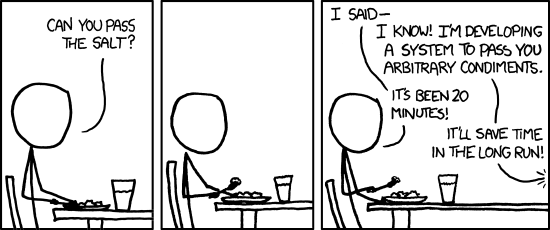
Figure: xkcd 974, "The General Problem" by Randall Munroe (xkcd.com/974, CC BY-NC 2.5). Title text: "I find that when someone's taking time to do something right in the present, they're a perfectionist with no ability to prioritize, whereas when someone took time to do something right in the past, they're a master artisan of great foresight."
Brightspacosaurus falls a little under that banner. I would have been done much faster if I had simply written the course material and placed it in Brightspace by hand — and, crucially, I would have read and validated that material far more thoroughly in the process. That last point is the real catch with AI-generated content: even when it is produced from elaborate prompts, specs, spec-driven development, and existing source material, the question remains whether a lesson survives being read meticulously by a critical student who gets rattled by contradictions or vagueness. Producing plausible-but-slightly-inconsistent text is exactly what AI is good at. The generic tool was fun and educational to build; whether it saved time "in the long run" is, honestly, still an open question.
Contributions are welcome: bug reports, bug fixes, feature enhancements, and feature requests all help.
And while this started at HAN University of Applied Sciences, it should be useful to any school or university that uses Brightspace and authors course material in Markdown — lesson content, software documentation, UML diagrams, inline code, and the like.