

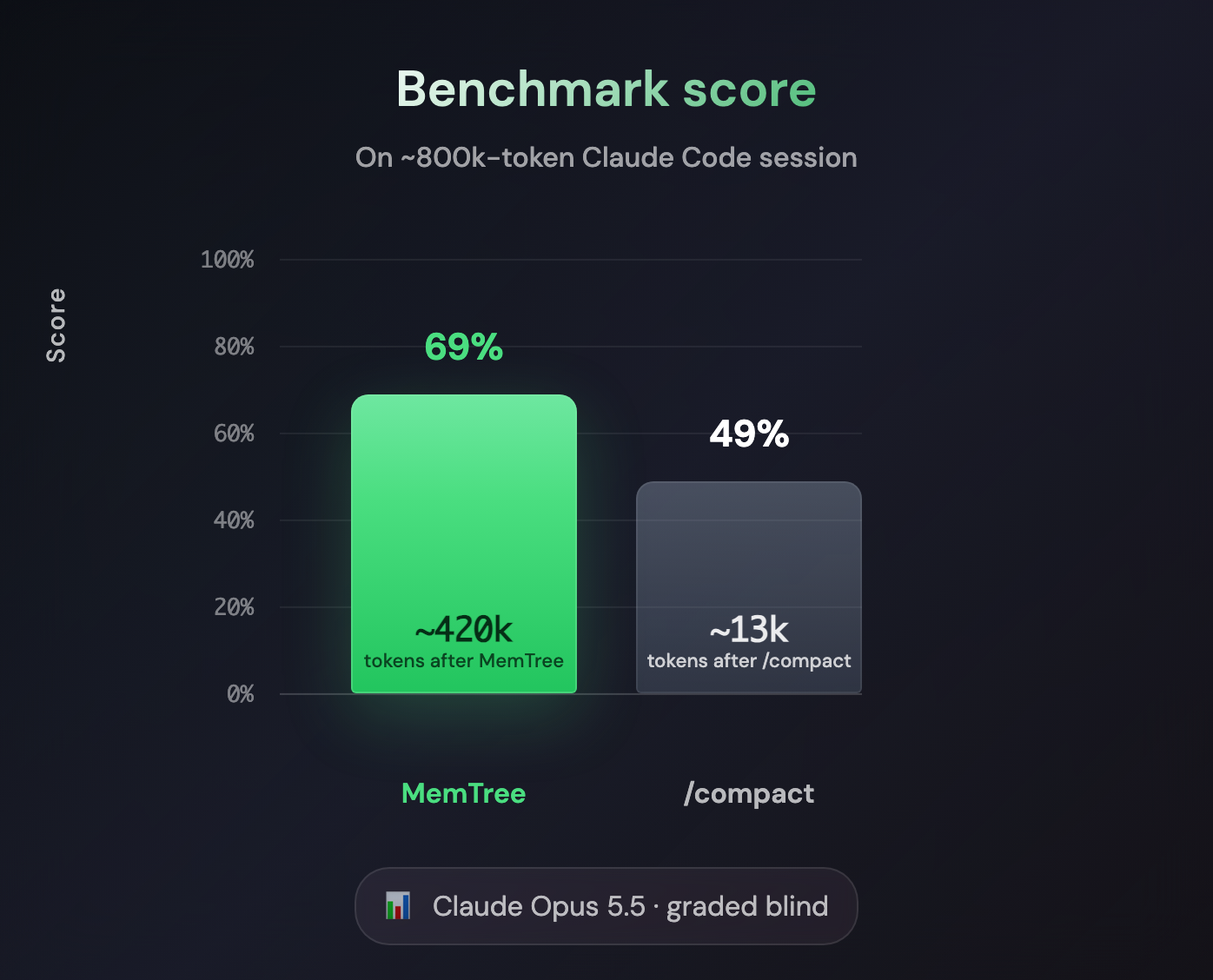
Long-session benchmark (Claude Opus 5.5, graded blind): MemTree beat /compact by 20 points,
on a ~800k-token Claude Code session. It also matched full context on this test (69 vs 69).
Full results
Infinite context for Claude Code: memory for long-running agents. Claude Code Infinite indexes your Claude Code sessions with MemTree so their history can be easily searched, navigated, and understood, by you and by Claude, within a session and across all of them.
- Claude Code in your terminal, signed in with Claude Pro or Max
- node.js 20.3 or newer
Also works with an Anthropic API key that has credit, but that's far costlier than Pro or Max.
- Install Claude Code Infinite (Node ≥ 20.3; no git needed)
npm install -g claude-code-infinite- Run it from your project folder
cccThis will guide you through setting up your MemTree key which you can also get here.
Needs Claude Code in your terminal, signed in with Claude Pro or Max.
Don't have Claude Code in your terminal yet?
# Windows PowerShell
irm https://claude.ai/install.ps1 | iex
# macOS / Linux
curl -fsSL https://claude.ai/install.sh | bashOr just run ccc: when Claude Code isn't installed it offers to install it for you (with the
same official command) and starts it, and Claude Code asks you to sign in. The Claude desktop
app isn't enough: ccc needs the claude command in your terminal
(help).
While Claude works, MemTree summarizes each new batch of messages in the background and files it under a topic. Each topic gets its own summary, and the whole session gets one at the top. When a session outgrows the context window, Claude works from these summaries plus your most recent messages, so the session can keep going indefinitely. When it needs a detail, it opens a branch and follows it down to the original messages.
- Search across every session. Claude can find what was decided, tried or ruled out in any of your past sessions, by exact words or by meaning, filtered by project and date
- Browse each session's MemTree in your browser, from the link
cccprints in the terminal - Never loses anything vs Claude Code. On Opus 5 and up, you get the vast majority of the
1M-token window word for word, exactly as Claude Code sends it. Only near the limit does MemTree
compress, to about half the window to minimize the number of compressions: recent messages stay word for word
and older ones become a searchable memory, the originals one tool call away. MemTree matched full context (69 vs 69) and beat
/compactby 20 (benchmark) - Unlimited-length sessions, with relevant past information recalled automatically
- A local proxy, so no slowdown. Requests go straight from your machine to Anthropic and MemTree indexes in the background; only the occasional compression step, when a session outgrows the context budget, waits on MemTree
The magic starts past the context limit. Keep one session going for days and it learns how you
work: your priorities, the nuances of your projects, your company and your environment. Where
/compact would wipe that detail, MemTree keeps it, so the thread becomes an expert in you. Let it
orchestrate dozens of subagents on your behalf.
Every ccc session is indexed as it runs, and Claude gets read-only memtree tools over all of
your indexed sessions, so you can just ask:
- "What did we decide about the retry limit last week?"
- "Find the session where we fixed the token-count bug, and show me the fix."
- "We tried this before. What went wrong last time?"
| Tool | What it does |
|---|---|
search |
Searches this session's tree or all of your sessions. Hybrid mode (default) runs text and vector together, fused by rank: the best recall, and the mode for finding things. Text mode matches exact words, ids, paths and errors, for when you know them; vector mode matches meaning. A search costs $0.0005 in any mode, first page only (continuations and a text search of one tree are free). Filter by project, since and until. |
list |
Lists your sessions, most recently active first, with title, first message, project (directory, repo, branch), models and times. Filter by time, project or words. |
read_node |
Opens a node: its summary, its path from the root, and its children. |
read_lines |
Reads the exact original transcript lines under a leaf. |
user_messages |
Lists only your own messages in a session over a time range (typed, commands, board messages); tool results and other agents' messages are left out. |
handover |
A handover pack for taking over a session: your recent messages, how it ended, and your goals, decisions with reasons and open questions (read by a model on the server, each citing its messages). |
Every indexed ccc session on any machine using the same MemTree account is searchable; Codex and plain
claude sessions are not. MemTree is shared memory, not messaging: to hand work to another agent
or machine, name the source session id in the prompt (see
Two agents, or two machines).
Hits name their node, so Claude goes from a search hit to the summary around it and then to the
exact lines. Type /memtree-view to open this session's tree in your browser. Details are under
Memory tools.
Generate the registration from a trusted directory.
ccc memtree-mcp --print-configPaste the output into your Codex config.toml. For a client that uses an mcpServers JSON
object, add --format json. Add --env staging to generate a staging registration. The
command finds the running Node executable and this installation’s dist/cli.js without
reading your saved key. Rerun it if upgrading Node or ccc moves either path.
The Node command line must come from trusted configuration. Keep NODE_OPTIONS empty in
the server environment so a client cannot forward preload options that run workspace code
before ccc starts.
For manual setup, replace both absolute paths in this example with the paths to your trusted Node executable and your installed ccc entry point.
[mcp_servers.memtree]
command = '/usr/local/bin/node'
args = ['/usr/local/lib/node_modules/claude-code-infinite/dist/cli.js', 'memtree-mcp', '--direct']
env = { NODE_OPTIONS = "" }
On Windows, use the same TOML literal strings with single backslashes, for example
'C:\Program Files\nodejs\node.exe'.
Direct mode uses the production key saved in ~/.claude-code-infinite/config.json.
Add --env staging to use your saved staging key. Direct reads connect to MemTree over HTTPS
using Node’s bundled CA certificates and bypass environment proxies. Use list or an unscoped search
to find a tree or session id, then pass it to the read tools. Direct mode has no current tree.
Direct mode checks Node startup flags before reading the saved key. It accepts
--max-old-space-size=N or --max_old_space_size=N (heap limit), --no-warnings (suppress warnings),
--trace-warnings and --trace-deprecation (warning stacks), and --disable-sigusr1
on Node versions that support it. Direct mode refuses to load the key if the inspector is already
listening. On macOS and Linux, it also handles SIGUSR1 before loading the key so the signal cannot
start the inspector afterward. On Windows, another process running as you can still start the
inspector after this check.
In a blind-graded benchmark on a 775k-token Claude Code session, MemTree matched full-context
Claude Code and beat Claude Code's built-in /compact by 20 points, finishing in about half the
time. That is the same score as full context with a third of the tokens.
| Setup | Score | Input tokens / run | Wall time | How it handles the history |
|---|---|---|---|---|
| Claude Code Infinite | 69 | 39M | 11–22 min | Sent whole until the 800k budget, then compressed once to ~420k; never compacted |
| Full context | 69 | 113M | 24–54 min | Grew to ~970k and hit Claude Code's auto-compaction mid-task every round |
/compact |
49 | 17M | 29–40 min | Claude Code's /compact before the task, 789k → 13k |
Every setup resumes the same ~775k-token history and is given one task: fix the security issues
found earlier in the session, which are listed only in the conversation. Claude Opus 5.5, 3
rounds, graded blind against a fixed answer key by an independent grader. Scores are 0–100 means
(68.7 / 69.3 / 48.7 in table order); the noise floor is 10 points, so MemTree vs full context is parity, not a
win, while MemTree was ahead of /compact in every round. Average wall time was 16 min
for MemTree and 38 min for full context. Input tokens count uncached, cache-read and cache-write
tokens; /compact's exclude the one-time /compact step. This is one task family, one model and
3 rounds, not a general benchmark.
MemTree compresses as late as possible: the whole ~775k-token history went out word for word, exactly as Claude Code would send it, and MemTree compressed only once, near the limit, keeping the most recent messages word for word.
A rerun on Oct 20, with MemTree's lookup tools loaded and the same outputs graded again at a
higher reasoning effort, gave the same shape: MemTree 65, full context 66, /compact 45.
MemTree's figure there is the mean of its 2 clean rounds (a harness bug let the third round read
another round's work); full context still fixed more of the issues (21 vs 17 on average).

The benchmark above fits inside Claude Opus 5.5's 1M-token window. This one does not. Each setup resumes the same 1M+-token history, built in time order from real Claude Code sessions of our own engineering work: the design and implementation of a backend feature, four rounds of code review in which an outside reviewer's findings were confirmed and, for several, re-scoped by the session, then about 550k tokens of later, unrelated work. The task comes at the end: the commits that fixed review rounds 2–4 were lost, so re-implement every fix as the session approved it, each with a regression test, in one commit. The findings and decisions exist only in the conversation, and the task forbids re-reviewing the code to find them again. Since the history is already past the window, MemTree compressed it on the first turn: the most recent messages stayed word for word, and the older ones became a memory tree whose original messages Claude can read back with one tool call. An independent grader scored each result blind (0–100) against the real fixes, their regression tests and the session's decisions.
| Setup | Score | Findings addressed (of 8) | How it handles the history |
|---|---|---|---|
| Claude Code Infinite | 69.9 | 8: 3 fully, 5 partly | Compressed to ~200–290k on the first turn; looked up the review rounds with its MemTree tools |
/compact |
23.0 | 0 | Claude Code's /compact before the task; made no changes and asked for the findings |
| Full context | n/a | n/a | Not possible: the history is larger than the 1M-token window |
/compact failed because its summary dropped the findings: it recorded the reviews only as
confirmed reviewer findings, with no finding or decision in it, so there was nothing to fix. Its
23 points are for reporting that honestly (regrading the same empty diffs gave 23 every time). MemTree recovered all 8 findings from the
session's memory in every round, fixed 3 fully and 5 partly every round, and implemented the
session's decisions rather than the reviewer's original proposals. Before writing any code, it searched its tree for the review rounds and read about 400 lines of the original exchange word for word with read_lines. MemTree's round scores were
74.6, 67.6, 67.1, 69.4, 68.1 and 72.6, with 5 regressions charged across the 6 rounds.
Caveats: 6 rounds, one task, one model, one grader; no significance claims. Blinding is weak: /compact made no changes and its report says it worked from a summary,
so a grader can tell the setups apart. The same task prompt went to both setups and mentions
MemTree's lookup tools, which plain Claude Code doesn't have. There is no full-context arm, since
the history doesn't fit. Grading used a fixed rubric (coverage 30, fix quality 30, fidelity to the
session's decisions 15, report accuracy 20, process 5); the harness and the answer key stay
private because they come from a private codebase.
The tool supports multiple environments (this selects the MemTree compression API only — Anthropic traffic always goes directly from your machine to api.anthropic.com):
- Production (default):
ccc- Uses https://api.polychat.co - Local:
ccc local- Uses http://localhost:8080 for local development
Each environment maintains its own separate API key.
Type these inside a ccc session (the ccc: prefix is optional). ccc answers them
locally, so they cost no model turn.
| Command | What it does |
|---|---|
/ccc:memtree |
Lists the MemTree commands and links your usage dashboard. |
/ccc:memtree-view |
Opens this session's MemTree page (its newest tree) in your browser and prints its one link. It only prints the link in -p/non-TTY runs, over SSH, in CI, on Linux without a display, and for any URL that is not a page of the MemTree server ccc uses. |
/ccc:memtree-compact [tokens] |
Compacts the session on your next message (to half the budget, or a target such as 400k) and keeps the compressed history. |
/ccc:memtree-compact off |
Goes back to sending the conversation whole. |
From a shell or script (no session needed):
| Command | What it does |
|---|---|
ccc link <session-id> |
Prints the session's newest MemTree page URL on stdout, one line and nothing else. --json prints {session_id, url, tree, updated_at} instead (updated_at is the session's last activity). Exit status 0 printed, 1 no saved key or the server could not be reached (5 s timeout), 2 bad invocation, 3 the session has no MemTree yet (or no session with that id on your key; stderr says which). Only your own sessions (those of your saved key) are found. ccc staging link / ccc local link use that environment's key. |
ccc fetch <memtree-url> |
Prints one of your MemTree pages as JSON, using your saved key. |
ccc statusline install |
Adds this session's MemTree link to Claude Code's status line (on by default: details). ccc statusline uninstall undoes it. |
Environment variables, set when launching ccc:
| Variable | What it does |
|---|---|
CCC_COMPACT_TARGET=500k |
Compaction target for every session (useful for headless -p runs); off starts every session with compaction off. |
CCC_MEMTREE_MCP=0 |
Turns off the memtree MCP tools (details), in interactive and headless (-p) runs. |
CCC_MEMTREE_HYBRID_SEARCH=0 |
Opts out of hybrid search: the memory tools' search goes back to text mode by default (a search of one tree is then local and free) and no longer offers hybrid (details). Hybrid (text and vector fused by rank, one page) is the default otherwise, one tree included, so those searches are charged. A MemTree server without hybrid search (older, or its setting off) answers them in text mode, as before, and ccc asks it again after 10 minutes. |
CCC_AGENT_BUDGET_TOKENS=200k |
Experimental, off by default: subagents compress at this budget instead of the model's, to CCC_AGENT_TARGET_TOKENS (default half of it, or of the context window's limit when that is lower). The main thread keeps its budget. requests.jsonl shows budgetSource: "agent". |
CCC_SUBAGENT_PARENT_TREE=1 |
Experimental, off by default: a subagent's first request gets a short note naming its parent session as the MemTree tree to read (the session id, which the memtree tools resolve to the parent's newest tree) and how: search, read_lines on a hit for exact values, and read_lines with tail for the parent's newest, not yet indexed messages; 1 also tells it to make a search of that memory its first call and, where it covers the task, to use the parent's findings instead of re-deriving them (facts only for an independent check; files and logs read again for their current contents) (the first-step wording). Added once at SubagentStart, so its bytes never change; same account only. Off, subagents get the one-line hint. on, true and yes work as 1; anything unrecognised reads as off. A style name (pointer, search-first, example, outline, first-step) picks that wording; none gives subagents no note. Without the read_lines tool (e.g. --disallowedTools) subagents get the one-line hint, and outline without read_node gets pointer. |
CCC_COMPRESS_ON_COLD_CACHE=1 |
Experimental, off by default: when a lane (the main thread or a subagent) has sent nothing to Anthropic for longer than its prompt cache's TTL (an hour for ttl: "1h" markers, else 5 minutes; measured within one ccc process) and its context is more than 10% above its compaction target, compress it to the target first, since Anthropic writes the whole context again anyway. At most once per idle gap. Logged as coldCache and compaction.reason: "cold-cache". |
CCC_PROJECT_TREES=0 |
Interactive sessions in a git repository with an origin remote start with a short list of your earlier MemTree sessions in that repository (model context only); this turns it off. |
CCC_MEMTREE_LINK |
Where the MemTree link appears: turn (default, end of a turn with a new page), message (under every reply), stop (end of every turn), success (only after an optimized turn), or off. |
CCC_AUTO_COMPACT=1 |
Restores Claude Code's own auto-compaction and idle compaction settings (details). |
CCC_NO_UPDATE_CHECK=1 |
Turns off the update check, and with it automatic updates (details). |
CCC_DISABLE_AUTOUPDATE=1 |
Keeps the update notice but never installs (details). |
CCC_NO_DIAGNOSTICS=1 |
Turns off diagnostics (details). So do DO_NOT_TRACK=1, Claude Code's DISABLE_TELEMETRY=1 or CLAUDE_CODE_DISABLE_NONESSENTIAL_TRAFFIC=1, and "diagnostics": false in ~/.claude-code-infinite/config.json. |
Links are clickable in terminals that support OSC 8 hyperlinks (iTerm2, Ghostty, WezTerm, kitty, VS Code, JetBrains, Windows Terminal); elsewhere you get the plain URL.
ccc keeps each session's MemTree link in
~/.claude-code-infinite/statusline/<session id>.url. On servers that offer it, that is the
session's stable link (/m/sessions/<session id>, yours only: it opens the session's newest
tree with its newest messages, so it never goes stale; to share a tree with someone, use the
page's Share control, not this link); otherwise the newest tree's link,
updated in the background as trees finish. Claude Code's status line can show it as a clickable 🌿 tree (the plain URL in
terminals without OSC 8 links; CCC_STATUSLINE_LINK=url or osc8 forces either). The status
line reads that file, so it never waits on the server. During active sessions, ccc
refreshes the link in the background about once a minute. Stop omits the routine link
only when ccc statusline printed the current tree URL or the stable session URL in
this interactive session within the last minute. A blank or broken status line keeps
the Stop fallback. The first tree is always announced.
-
On by default: the first interactive
cccrun (after installing or upgrading) runsccc statusline installonce and says so in the session's first message. It pointsstatusLinein~/.claude/settings.json(or$CLAUDE_CONFIG_DIR/settings.json) atccc statusline, which runs your existing status-line command with the same input and appends| 🌿 tree. Your original command is saved in~/.claude-code-infinite/statusline-<id>.json(one per settings file) and settings.json is backed up first. When that can't be done safely (settings.json is not valid JSON, yourstatusLineis not a command, orcccis not on PATH) it changes nothing and tells you. It is done once (~/.claude-code-infinite/statusline-auto.json), so afterccc statusline uninstallit stays off;CCC_STATUSLINE_AUTO=0skips it. AstatusLinein a project's.claude/settings*.jsonoverrides yours.ccc statusline uninstallputs the original back; run it before uninstalling ccc.ccc statusline installadds it again. Not on Windows yet (Claude Code runs status lines in Git Bash there): use the snippet. -
Manage it yourself: add this to the end of your own status-line command (it reads Claude Code's JSON from
$input, as most status lines do; needsjq):link=$(cat ~/.claude-code-infinite/statusline/"$(echo "$input" | jq -r .session_id)".url 2>/dev/null); [ -n "$link" ] && printf ' | \033]8;;%s\033\\🌿 tree\033]8;;\033\\' "$link"
ccc disables Claude Code's automatic conversation compaction for the Claude process it launches. MemTree manages the context sent to the model, so letting Claude Code independently summarize the full local transcript can compact a conversation MemTree already reduced. Manual /compact remains available.
Manual /compact also asks once: while MemTree is compressing, the first /compact answers
"MemTree already keeps this session within its budget; /compact would discard detail…" and
suggests /ccc:memtree-compact; typing /compact again within two minutes runs Claude Code's
own. While MemTree is paused or its key is refused, /compact runs at once, and under
CCC_AUTO_COMPACT=1 it is never intercepted. Claude itself is told the same: context is
MemTree's job, so it won't suggest /compact, /clear or a fresh session to free context,
and if MemTree is paused it is told why (MemTree's usage limit, not Claude's) and how to fix it.
That includes idle compaction (Claude Code 2.1.286 and later), which summarizes a
long conversation while you're away, just before the prompt cache expires
("Compacted while idle, before the prompt cache expired"). The
DISABLE_AUTO_COMPACT=1 that ccc sets turns it off too, so you don't need
"idleCompaction": false in your settings.
Claude Code 2.1.219 also recommends “Resume from summary” for any old session
above a fixed 100k-token threshold, even when the active model has a 1M window
and auto-compaction is disabled. ccc suppresses that resume-time
recommendation as well; it does not disable the manual /compact command.
With auto-compaction off, Claude Code still refuses a request itself, without
sending it, once its own estimate reaches the window minus 23k (977k on a 1M
window). MemTree compresses at 960k, so a single large tool round could reach that
refusal before ccc ever saw the request. ccc sets
CLAUDE_CODE_BLOCKING_LIMIT_OVERRIDE (unless you exported your own) so such a
request reaches the proxy, which compresses it mid-turn.
On Anthropic's own API, Claude Code can send tool-loop turns as "message threads":
only the newest messages, with Anthropic keeping the rest of the conversation. MemTree
needs the whole conversation to compress and index it, so ccc sets
CLAUDE_CODE_TETHER_LIVE=0 for the Claude Code it starts, and every request carries
the full conversation as before. This is an undocumented Claude Code switch (checked on
2.1.325). A value under env in your Claude Code settings would win over it, so don't
set it there. For the desktop app, run ccc desktop setup again and paste the new lines.
A session whose last response reached the verified local refusal threshold
(for example one sent whole while MemTree was unavailable) would otherwise be
refused locally with "Context limit reached" on every prompt after a resume.
On ccc --resume <id>, ccc backs the transcript up to
~/.claude-code-infinite/transcript-backups/ and lowers that last response's
recorded usage to half the window, so the next message is sent and MemTree
compresses it.
To restore Claude Code's native auto-compaction and idle compaction settings for one invocation, use:
CCC_AUTO_COMPACT=1 cccClaude Code normally treats any custom ANTHROPIC_BASE_URL as an unverifiable
gateway and can therefore account for a resumed native-1M model as if it had a
200k window. ccc identifies its transparent localhost relay as trusted, so
current native-1M models retain the same context window they have when Claude
Code connects directly to Anthropic. The official
CLAUDE_CODE_DISABLE_1M_CONTEXT=1 switch still forces the legacy 200k behavior.
ccc runs a small proxy on 127.0.0.1 and launches Claude Code with ANTHROPIC_BASE_URL pointed at it (or, in the opt-in HTTPS-proxy mode below, HTTPS_PROXY) and automatic compaction disabled. Claude Code keeps its native login — token refresh, plan-default model selection, and rate-limit handling behave exactly like vanilla Claude Code, and your OAuth token is sent only to api.anthropic.com from your own machine.
Claude Code ──▶ localhost proxy (ccc)
                  ├──(messages only, MemTree API key)──▶ api.polychat.co /v1/context_memory
                  │◀──(compressed messages)─────────────┘
                  └──(compressed request + your local OAuth)──▶ api.anthropic.com
- Only message content is sent to MemTree for indexing/compression — never credentials.
- Anthropic requests go directly from the local proxy to api.anthropic.com using the authentication Claude Code supplied. MemTree never sees that credential or Anthropic traffic.
- If MemTree is unreachable, slow, or your MemTree plan needs payment,
cccdegrades to a transparent passthrough so your session is never interrupted. While MemTree is paused (usage limit reached), a request that still fits the model's context window (by Anthropic's token count, or ccc's conservative estimate when counting is unavailable) goes out unchanged, as plain Claude Code would send it, and once the session reaches the compression budget the paused notice suggests Claude Code's own/compactwhile it still fits. A request that no longer fits is refused at once with "MemTree is paused (usage limit reached), so this long conversation can't be compressed…", your subscribe link, and/clearto start fresh (/memtree-compactneeds MemTree, so it is not offered then). After you subscribe, the next request compresses again with no restart.
Claude Code offers Remote Control only when it talks to api.anthropic.com itself, so in the
default mode above /remote-control is "Unknown command". HTTPS-proxy mode keeps Claude Code's
base URL at api.anthropic.com and makes ccc its HTTPS_PROXY instead. Every model turn still
goes through MemTree. Turn it on for one session, or for every session:
CCC_HTTPS_PROXY_MODE=1 ccc
# or always: add "httpsProxyMode": true to ~/.claude-code-infinite/config.json
# (CCC_HTTPS_PROXY_MODE=0 turns it off for one session)
How it works and what it changes:
- A certificate for
api.anthropic.comonly, new each session. At each startcccmakes a certificate authority in memory, signs one certificate forapi.anthropic.comwith it, and drops its key. The key is never written to disk. The CA is name-constrained: it can't vouch for any other host name, a subdomain or an IP address. Only Claude Code trusts it, throughNODE_EXTRA_CA_CERTSin its own environment. Nothing goes into your system or keychain trust store. The public certificate sits in~/.claude-code-infinite/https-proxy/and is removed whencccexits. - What
cccdecrypts. Only Claude Code's connections toapi.anthropic.comthat carry the session's proxy token. Model calls get MemTree as before. Everything else Claude Code sends there (Remote Control's bridge and session events, file uploads, settings, telemetry) is relayed to Anthropic unchanged and never logged or sent to MemTree. Connections to any other host go through a blind tunnel thatcccdoesn't decrypt. A connection without the token (for example from another user on the machine) is refused. - Programs you run from Claude Code's Bash tool see what they see today.
cccgives Claude Code aCLAUDE_ENV_FILEthat puts back your own proxy, CA andNO_PROXYsettings and the usualANTHROPIC_BASE_URL, so scripts, SDK apps and acccstarted from Bash work as in the default mode, and none of them sees the proxy token. ACLAUDE_ENV_FILEof your own is still sourced. - Hooks, status-line commands and MCP servers that Claude Code starts aren't Bash commands,
so they inherit the proxy and the session CA. Node-based ones work. A non-Node one that calls
api.anthropic.comitself (for example a status line that curls Anthropic's usage endpoint, or a Python MCP server using the Anthropic API) fails TLS. Run such sessions withCCC_HTTPS_PROXY_MODE=0. - When it stays off.
cccuses the default mode for the session, and says so in one line, on Windows; when you already use a proxy (HTTPS_PROXY,HTTP_PROXYorALL_PROXYin your environment); when a Claude Code settings file (user, project, local, managed, or--settings) sets a proxy,NO_PROXY,NODE_EXTRA_CA_CERTSorCLAUDE_ENV_FILEin itsenv; and when Claude Code's Bash sandbox is enabled. These are checked at startup. If you turn one on mid-session and your prompts stop reachingccc, it warns you once. Restartcccthen. CCC_PROXY_TRACE=<file>writes a debug trace: connection targets, and the method, path, status and User-Agent of each decrypted request. It holds no other header values and no bodies.
Remote Control also needs a full-scope Claude login (claude auth login). A long-lived setup
token isn't enough.
The desktop app's Code tab runs its own copy of Claude Code, so ccc can't wrap it. Instead
ccc desktop setup runs a small always-on ccc service (a launchd agent) that is the HTTPS
proxy of the Desktop sessions you point at it, with the same interception as HTTPS-proxy mode
above. Desktop keeps its own sign-in, plan and Remote Control.
ccc desktop setup       # service, certificate, memory tools; prints six lines
ccc desktop env         # print the six lines again
ccc desktop status      # is the service up, how many sessions it serves
ccc desktop uninstall   # stop and remove it all
Paste the six lines into the desktop app once: Code tab > environment menu > add a local environment (for example "ccc") > Environment variables. New sessions started from that environment get MemTree. Sessions in other environments are unchanged.
- What setup installs:
~/.claude-code-infinite/desktop/(0700): the service's port and token, its certificate, and a Bash env file; the launch agent~/Library/LaunchAgents/co.polychat.ccc-desktop.plist; and a user-scopememtreeMCP server (throughclaude mcp add-json), which has no tools in sessions that don't go throughccc. - The certificate is for
api.anthropic.comonly, from a name-constrained CA whose key is dropped as soon as it signs it. Only the certificate's own key is kept, readable only by you. Nothing goes into your system or keychain trust store: only the sessions with the pastedNODE_EXTRA_CA_CERTStrust it. Setup keeps a corporate CA from your shell'sNODE_EXTRA_CA_CERTSin that bundle. It lasts a year:ccc desktop statusand a terminalcccsay when it's due, andccc desktop setuprenews it (restart open sessions then).--rotate-camakes a new one at once;--rotate-tokena new proxy token (paste the lines again). - If the service stops, sessions in the ccc environment can't reach Claude ("Unable to
connect to API") until it's back. launchd restarts it if it crashes.
ccc desktop statussays what's wrong and how to restart it, and a terminalcccwarns when it's down. To stop using it, switch those sessions to another environment. - Setup refuses when your shell already uses a proxy or a
NO_PROXYthat coversapi.anthropic.com, or when Claude Code's settings set a proxy,NO_PROXY,NODE_EXTRA_CA_CERTS,CLAUDE_ENV_FILEor the Bash sandbox, as HTTPS-proxy mode does. A session whose project's settings do so gets an error explaining why instead of running. - After upgrading Node or moving ccc, run
ccc desktop setupagain: the agent and the MCP server name the Node and ccc paths setup ran with.
ccc sends a few diagnostics to MemTree so we can see why a session fails to start or stalls:
- versions (ccc, Claude Code, Node), how ccc was installed (npm, npx, linked), OS and CPU architecture, terminal type and locale;
- how Claude Code is signed in, as a type only (Claude.ai subscription, API key, Bedrock, Vertex, Foundry), the plan's tier name when Claude Code records one (Pro, Max, Team), the main model's context window ccc uses (200k or 1M), and where Claude Code was found (on PATH, its installer's folder, npm, winget);
- when npm installs or reinstalls ccc: one anonymous
installedevent (ccc and Node versions, OS, CPU architecture, install method, the install id below; not in CI or under sudo, not under any opt-out below); - lifecycle events (first run, sign-in prompt shown, key accepted or rejected, session start, the MemTree-paused notice shown, update hint or background update result);
- errors as codes, status numbers, sizes and timings (an Anthropic 401, a MemTree 402, a compression timeout).
Never sent: your prompts or any conversation content, file paths, project or repository names,
hostnames, usernames, environment values, keys or tokens, or error message text. Each event is
checked against a fixed allowlist on your machine before it is queued, and again by the server.
They are tied to your MemTree key when you have one, otherwise to a random install id in
~/.claude-code-infinite/install_id. Sending is batched in the background and never slows a
request; a failed send is dropped.
Turn diagnostics off with any of: CCC_NO_DIAGNOSTICS=1, "diagnostics": false in
~/.claude-code-infinite/config.json, DO_NOT_TRACK=1, or Claude Code's own
DISABLE_TELEMETRY=1 / CLAUDE_CODE_DISABLE_NONESSENTIAL_TRAFFIC=1.
Every ccc session, interactive or headless (-p and non-TTY runs), gets a small MCP server, memtree, with six tools (see Search across sessions): mcp__memtree__search (query; optional tree, "current" for this session or omitted for all of your sessions; mode hybrid (default: text and vector fused by rank in one page, no cursor), text (exact words) or vector (meaning), $0.0005 per search in any mode, first page only (hybrid is for finding things, text for when you know the exact words, ids or paths; a text search of one tree is local and free; a search that names no mode is a charged server search, one tree included; a server without hybrid search answers a default search in text mode, silently, and an explicit hybrid in text mode with a note, then ccc uses text by default for 10 minutes before asking again; CCC_MEMTREE_HYBRID_SEARCH=0 makes text the default again); project, since, until, cursor, limit (default 10, at most 50)), mcp__memtree__read_node (node, an address <tree>#<id> from search, or id with optional tree: summary, path from the root, children, leaf line range), mcp__memtree__read_lines (a leaf's node, or block, start, end with optional tree: exact transcript lines, at most 400 lines / 40k characters per call) (with tail: true instead, the newest messages after the tree that are not indexed yet) mcp__memtree__list (your sessions, most recently active first; since, until, project, q, cursor, limit), mcp__memtree__user_messages (your own messages in a tree over since/until, optional query, cursor, limit, full, context) and mcp__memtree__handover (a handover pack: tree, days or since/until; the server reads it with a model call). Other sessions' trees are named explicitly by reference and authorized by your MemTree key. This session's tree (tree: "current", or no tree on read_node/read_lines) is the one the current request was served from: the server asks the ccc proxy for GET $ANTHROPIC_BASE_URL/memtree/current?session=<id> (only that session's compression source page, or its stored source page on resume; when the proxy has neither, as after a restart in a session that has only been indexed, the session's newest completed tree on the server, found by its exact session id among your key's own sessions; current.json?session=<id> returns the page itself). Completed pages are cached. If the proxy temporarily serves an older prefix while a newer tree is indexing, the tools reuse that prefix during a 45-second cooldown, then check the page again. ccc registers it with --mcp-config=<temp file>, which keeps working under --strict-mcp-config, and pre-allows these tools; CCC_MEMTREE_MCP=0 turns it off. The MCP process requires CLAUDE_CODE_SESSION_ID and checks that both the pointer and page belong to it. If Claude Code retains an MCP process with an old session ID after /clear or a session switch, reconnect the MCP server with the current session ID; it cannot infer a new identity from another session using the proxy. Your own choices win: if your --mcp-config already names a server memtree, ccc adds and pre-allows nothing (if it runs ccc memtree-mcp, or ccc staging memtree-mcp, the tools work as usual); --allowedTools lists are added together, so yours is kept and only the memtree tools are pre-allowed; tools named by --disallowedTools (one tool, mcp__memtree, or mcp__memtree__*) are neither pre-allowed nor advertised. With --continue, Claude Code starts MCP servers under a new session id before it switches to the continued session, so this session's tree fails closed (list and searches across sessions still work); use --resume <id> instead. Whenever the tools are configured, compress calls carry x-memtree-tools: search,read_node,read_lines,list,user_messages,handover so MemTree tells the model how to use them. The tools are loaded up front (alwaysLoad), in resumed sessions and subagents too; search's description says so, because a resumed session keeps the MCP instructions and deferred-tools list it was first given, which may predate that. A subagent (the Agent/Task tool, foreground or background) gets one line at its start, from the SubagentStart hook while MemTree works: the parent's session id and newest tree, and to search it before re-deriving the parent's work.
ccc -p works like claude -p, so an agent or orchestrator can drive it. Keep one Claude Code session per long-lived agent and resume it on every call, so MemTree keeps compacting and indexing one growing conversation:
ccc -p --resume <session-id> --output-format json "…"Start the session with ccc -p --session-id <uuid> "…" (or take session_id from the first JSON result). Never run two ccc processes on one session at the same time: both would append to the same transcript. Headless runs have the memory tools with no extra flags (CCC_MEMTREE_MCP=0 turns them off; they can read all of the sessions your MemTree key owns, so give each user of a shared agent platform their own key). Stdout carries only Claude Code's output, so --output-format json and stream-json parse as with claude; ccc's own lines (banner, mode, request log path) go to stderr. --mcp-config takes several values, so pass your own as --mcp-config=<file> or put the prompt before it; otherwise it swallows a prompt that follows it.
To show an agent's memory after a run, ccc link "$sid" prints the session's newest MemTree page URL (exit 3 when it has no tree yet). It can trail the run by one call: a -p run's newest tree is built as it exits.
The full guide for agent platforms (setup, output parsing, memory tools, tree links, older versions) is docs/headless.md.

|
When you send a message, we retrieve relevant details and summaries from the prior messages in your thread. These details and summaries populate a memory message. Following the memory message, we append a compressed version of your recent message history. The resulting context-window is dramatically smaller, allowing Claude to process your request with much greater efficacy, lower latency, and reduced cost.
Compaction keeps a stable prefix. While a conversation fits the model's budget (900k tokens for Opus 5.5, where plain Claude Code would auto-compact at 967k), it is sent whole. When a request reaches the budget, ccc compresses it once, to half the budget (or your /memtree-compact N), and keeps those compressed bytes as the session's prefix. Every later request, human turns included, is that same prefix followed by the messages that came after it, verbatim, with no compression call (MemTree still indexes in the background). Because the prefix does not change, Anthropic reads it from the prompt cache on every turn after the one that compacted, instead of writing the whole compressed context again. ccc compresses again only when prefix plus newer turns reach the budget (measured from the size Anthropic reported for the previous request, plus an estimate for what was added), or when the messages the prefix stands for change (rewind, edit, fork, /clear). If that recompression fails, the turn is sent on the old prefix rather than the whole history. The prefix is also kept on disk, one file per session under ~/.claude-code-infinite/stable-prefixes/ (mode 600 in a private directory, at most 64 sessions and 256 MB, oldest dropped first), so the first turn after ccc --resume rides it instead of waiting on a fresh compression. A stored prefix belongs to the MemTree backend and key that wrote it (identified by a hash, never the key itself) and is never used with another. It is used only if the resumed history still matches what it replaced; a main-thread history that no longer matches discards it, while side requests (such as Claude Code's web-search helper) leave it alone. Only the main thread's prefix is stored, never a subagent's. The budget is the one MemTree reports for the model; until the server reports one, ccc uses the context window less 40k for the reply for every Claude model (960k of 1M, just under where plain Claude Code would auto-compact at 967k; never below 80%, so 160k of a 200k window; at most 400k for Sonnet 4.x and 550k for Sonnet 5 / 5.5, which degrade before their window), and 80% for other models. A request is sized as it will be sent (history plus the new tool results), and compressed when that size reaches the budget or would leave less than 40k of the window for the reply. On a 1M window, once a main-thread request passes ~850k, ccc asks MemTree in the background for the compressed prefix and refreshes it every ~50k of growth; the request that crosses the budget (say a 100k tool result at 940k) is then sent at once on that prepared prefix plus the messages after it, with no compression wait (compaction.prepared: "used" in requests.jsonl), and falls back to compressing then when no prepared prefix fits. MemTree bills a preparation as the compression it replaces. If even after compression a single tool result cannot fit the window, ccc saves it whole under ~/.claude-code-infinite/tool-outputs/ (mode 600, at most 64 files and 512 MB, oldest dropped first, never one under an hour old) and sends its beginning and end word for word with the middle replaced by a pointer to that file, which Claude reads with its Read tool, instead of refusing the request. A human turn clearly under the budget by its token count is sent at once, with its MemTree call in the background (turnType: "followup-under-budget"). CCC_BUDGET_TOKENS=60k overrides it for testing. Every requests.jsonl line carries the pid of the ccc process that wrote it, which tells apart concurrent sessions sharing the log. The same rule holds inside a tool loop, so a long single turn (a headless -p run, or a long agentic loop) is compacted as it grows rather than only when you next type: each tool request under the budget goes out with no compression call, the one that reaches it is compressed once and becomes the stable prefix, and later tool requests and your next message ride that prefix until it reaches the budget again. requests.jsonl shows the compaction of each main-thread human turn and of every tool turn (budget, its source, the size estimate, and the reason for a compaction: budget, prefix-mismatch, manual or target-change); a human turn sent on the stable prefix is turnType: "followup-prefix", a tool turn tool-memory (on its route) or tool-prefix (on the prefix directly), and a tool turn that compacted tool-recompressed.
That compressed context stays in force for the rest of the turn: the tool loop it kicks off, and the matching Count Tokens calls, are routed through the same compressed prefix. The Count Tokens part matters — Claude Code sizes its context from those replies, so counting the uncompressed history would make it auto-compact a conversation memory had already shrunk. A mismatched or resumed conversation shape drops the route rather than grafting one session's prefix onto another.
Compressed prefixes are stored per lane, not in a single slot: the main thread, each subagent, and the away-summary side channel each key their own route by session and identity. Every lane gets the same deal — it installs its own prefix and rides it — and lanes cannot evict one another, so a subagent or a background side request can no longer strand the main conversation on full history.
Programs you run from inside a ccc session (scripts, test suites, SDK apps) inherit its ANTHROPIC_BASE_URL, so their Anthropic calls reach ccc too. ccc handles only Claude Code's own requests, which always carry an X-Claude-Code-Session-Id header. Anything else is forwarded to Anthropic unchanged: it is never compressed or indexed on MemTree, and it cannot disturb the session's compressed history. These requests are logged in requests.jsonl as turnType: "foreign" with the start of their User-Agent. CCC_CLAUDE_CODE_ONLY=0 turns the filter off.
Subagents follow the same budget rule in their own tool loops: under the budget a subagent's tool request goes out as it is, and the one that reaches it is compressed once and becomes that subagent's route, which its later tool requests ride. A tool-turn compression is a blocking MemTree call and a soft fuse, not a hard cap: if MemTree is unavailable or returns nothing usable within its normal compression budget, the request goes out on the old prefix, or whole when there is none; a failed call puts compression on a brief cooldown, so an outage costs one stall rather than one per tool call, and a lane whose attempt produced nothing waits until its history has grown by a twentieth of the budget before trying again. An attempt that finds nothing indexed yet (a no-op with no tree) makes the lane skip compression calls until MemTree reports that tree built; a request that would overflow the context window still tries. A request with no session id is compressed without installing, since a route that cannot be matched later must not be stored. /memtree-compact off and CCC_COMPACT_TARGET=off pass tool requests through with no compression call. CCC_TOOL_ROUTE_RECOVERY=0 turns off tool-turn compression for one invocation (tool requests make no size check and no compression call; human turns still compact); outcomes are recorded in ~/.claude-code-infinite/logs/requests.jsonl under routeLane/routeMiss/routeRecovery (compressed, noop, failed, no-gain, cooldown, in-flight, backoff, awaiting-index, disabled, ...).
Routing decisions, per-turn timings and usage, recovery outcomes, and delivery status are recorded in ~/.claude-code-infinite/logs/requests.jsonl.
The compression budget is a trigger to try MemTree, not a hard forwarding limit.
If compression is unavailable, ccc sends the available request when its input
plus output reservation fits the model's native window. If Count Tokens fails or
is disabled, a learned estimate alone cannot block the turn: the final check uses
the plain bytes-based estimate. Such a fallback can still be rejected by the
upstream API, which makes the final tokenization decision. An overBudgetForward
field in the request log marks requests forwarded above the compression budget.
Sizing belongs to the individual request. Original bodies, validated compressed
prefixes, and replacement bodies each retain their own estimate and count result;
the compression planner, client_input_tokens, and final selection consult that
shared record. A fitting compressed candidate is preferred, with the original as
a fallback. If counting is unavailable, candidate selection uses the conservative
bytes-based input estimate plus the requested output reservation against the
model's native window. Refusal requires that no eligible candidate fits; a failed
replacement cannot discard an original or prefix that still fits.
ccc uses Anthropic Count Tokens selectively to check uncertain sizes and before
refusing an estimated overflow. Counts describe the particular body being sent,
including a compressed body when applicable. A request shares a three-second
counting allowance across its checks; authentication failures and rate limits
put counting on a bounded cooldown. CCC_COUNT_TOKENS=0 disables these checks.
The countTokens array in each request-log record lists the status class and
elapsed milliseconds of each actual attempt, without bodies or credentials.
If counting an assembled compressed prefix discovers that it is over budget,
ccc makes at most one bounded recovery compression attempt before deciding
whether to forward or refuse it. The request log records that decision under
lateCountRecovery.outcome as compressed, forwarded, or refused.
A blocking compression call normally gets 15 seconds plus 2.5 ms per KiB it uploads
(~79 seconds for a 26 MB session; MemTree has taken up to 53 seconds for one that size);
when it fails, the request goes out on the old prefix or whole. When there is neither
(no compressed prefix to ride, as on the first turn after --resume, and a whole
request that delivery would refuse as over the window), the call gets 120 seconds (or
its upload's budget, if longer) instead, since a timeout could only end in a refusal.
CCC_COMPRESS_TIMEOUT_MS overrides the 15 and 120 seconds. A Claude Code retry that
arrives while the same session's compression of the same history is running waits for
that call instead of starting another. On a 1M window, a main-thread compression the
turn stopped waiting for (or whose turn Claude Code abandoned) is not dropped: it runs on
to the long budget as the session's prepared prefix, and the next turn at the budget
waits for it and rides it instead of starting another (compress.carriedOver in
requests.jsonl). A compression whose connection drops before any answer (a Wi-Fi
switch: ECONNRESET, EHOSTUNREACH, ...) is sent once more within the same budget, and a
token count that loses its connection is retried like one that timed out.
Background indexing sends each conversation's history at most one call at a time, keeps only the newest waiting call, and skips a call until the history has gained about 30,000 characters of text (the server's 10k-token index minimum) since the last one it sent. A subagent is indexed once, when it ends (SubagentStop, or at exit for one still running), and on every tool turn only once it passes half of its budget, so its tree is ready if it ever needs compressing. Its tree, searchable with the MemTree tools and on its page, therefore covers a running subagent's work only from the moment it ends.
Before publishing a release, verify Claude subscription OAuth counting in a live
session: launch this checkout's node dist/cli.js --resume with the normal Claude
subscription login and resume a large conversation. After sending a turn, inspect
the new countTokens entries in the request log for that process's pid. A
successful count confirms acceptance; an authentication failure should leave the
turn on the bytes-based fallback and suppress further counts during cooldown.
An absent entry means no count was needed, so that turn does not verify OAuth
acceptance. Mock tests verify header forwarding and failure behavior; they do not
establish that Anthropic accepts subscription OAuth for this endpoint.
Memory quality is evaluated offline: the weekly memtree-bench harness replays a fixed scenario through a ccc-wrapped arm and a vanilla Claude Code arm and grades complete outcomes blind against an answer key. (An earlier in-request memory-vs-full A/B comparison with a live grader was removed in 2026-08; it was off by default, and the offline benchmark measures the same question with a stronger instrument.)
Search tools alone don't keep a long session's context from growing until the model degrades. Claude Code Infinite does both: it indexes and searches your history, and it manages what the model sees, keeping it within budget. It works alongside your MCP servers, tools and other Claude Code features, and their output, often the biggest source of tokens, is exactly what MemTree reduces most.
-
If you want your session to apply to many different tasks, we recommend giving the overall high level goal you want for your session in the first message, e.g. "Refactor this project to remove code smells and bugs". Then followup with lower level tasks in subsequent messages. This as Anthropic models key heavily off the first message. You should also feel free to start new sessions for new tasks. This as the model will continue to have a focused context with your CLAUDE.md and first message always included. Reach out to support@polychat.co if you have any questions or concerns!
-
Add context to your status line to see how MemTree keeps your context small
/statusline add context % used
-
You want your fresh session context to be 10k tokens or less. If your starting context is more than that, consider reducing the size of your custom MCP's and slash commands to ensure Claude performs at its very best
-
You can resume previous threads with
/resume
For ccc --resume <id>, an automatic, best-effort repair can unblock a transcript whose last response already exceeds Claude Code’s local refusal limit. It changes only that response’s usage totals and the iteration Claude Code counts, after writing an exclusive, uniquely named backup under ~/.claude-code-infinite/transcript-backups. Earlier iterations and conversation content stay intact. The installed Claude Code 2.1.288 computes its blocking limit as the context window minus the output allowance (capped at 20,000) minus 3,000 tokens: 977,000 for the supported 1M models. Other versions use the conservative full-window threshold. The window comes from ccc’s model table, explicit [1m] transcript model signals, and any --model or ANTHROPIC_MODEL override, conservatively keeping the largest supported window. A successful response with input already beyond that inferred window disproves the inference and is never repaired. Unknown model overrides (including unresolved aliases), models or usage shapes, threshold overrides, possible running writers, changed snapshots, backup collisions, and filesystem errors all skip repair and continue the original resume. Process and file checks are bounded; other running JavaScript runtimes may conservatively prevent repair.
Releases are published by GitHub Actions through npm Trusted Publishing (OIDC): no npm
token, passkey or staging step. Each one waits for approval of the npm GitHub environment
(reviewer: crizCraig). That approval is a GitHub permission: anything holding a maintainer's
GitHub token with repo scope (including an agent using gh) can grant it, so keep such
tokens out of untrusted sessions.
- release-please keeps a Release x.y.z
pull request open on
main(.github/workflows/release.yml). It bumpspackage.json,package-lock.jsonand.release-please-manifest.jsonand adds aCHANGELOG.mdentry, and it updates itself on every push tomain. - Merge it when you want to release. release-please then tags
vX.Y.Z, creates the GitHub release and starts.github/workflows/publish.ymlon the tag. That checks that the tagged commit is onmainand that the tag equalspackage.json's version, runs the full CI matrix (ci.yml), and checks that the committeddist/matches a fresh build. - Approve the
npmenvironment (one tap in the GitHub mobile app, or Review deployments on the run). The job then runsnpm publish --provenance --access public.
Commits: release-please only opens the PR, and only lists a commit in the changelog, for
conventional prefixes: feat:, fix:, perf:, refactor:, revert: or deps: (a scope
is fine, e.g. fix(exit): ...). Other subjects such as Exit: ... or README: ... are
allowed and ship in the release, but are not listed. Every release is a patch bump. For a
minor or major release, or to release with no listed commit, push an empty commit:
git commit --allow-empty -m "chore: release 1.1.0" -m "Release-As: 1.1.0"The trusted publisher on npmjs.com is bound to the workflow file publish.yml and the GitHub
environment npm; renaming either breaks publishing. ./publish.sh --local [patch|minor|major]
is the emergency path: from a main that matches origin/main, it publishes directly from
your machine with npm web auth, then pushes the release commit (including the release-please
manifest) and the tag in one atomic push, and creates the GitHub release.
publish.yml still tests that tag but skips publishing, since the version is already on npm.
ccc never touches your Anthropic credentials — Claude Code manages its own login exactly as it does without ccc. If you see auth errors, fix them the vanilla way: run /login inside Claude Code (or claude directly) and re-authenticate.
ccc runs Claude Code, so it has to be installed and signed in first. ccc finds it on
PATH and, failing that, where its installers put it (%USERPROFILE%\.local\bin,
%APPDATA%\npm, winget's folder and your saved user PATH on Windows; ~/.local/bin,
~/.claude/local and Homebrew elsewhere), so a terminal opened before the install works
too. If it is not there, ccc asks "Claude Code isn't installed. Install it now? [Y/n]"
(also when only the Claude desktop app is installed). Yes runs Anthropic's official installer
(Windows PowerShell: irm https://claude.ai/install.ps1 | iex; macOS/Linux:
curl -fsSL https://claude.ai/install.sh | bash) with its output on screen, then carries on
in the same terminal (on a first run, after your MemTree key) into Claude Code, which asks you
to sign in. ccc never installs anything
without that yes, and without a terminal (ccc -p, a pipe) it only prints those commands.
To install it yourself: run the command, open a new terminal, run claude once to sign in,
then run ccc again, from your project folder.
On Windows, ccc recognizes npm, pnpm and Yarn batch shims. It launches the executable
declared by the installed Claude Code package or the native installer's claude.exe directly.
For JavaScript it uses the Node executable running ccc. Startup, sign-in checks and resume
pass prompts as literal arguments, including line breaks. A stale or unsupported shim lets ccc
try later PATH entries. Interactive startup names the first refused wrapper on stderr when
ccc uses a later install on PATH.
For a custom batch wrapper, install Claude Code with npm, pnpm, Yarn or the native installer, or set
CCC_CLAUDE_PATH to the absolute path of claude.exe or its JavaScript entry. For example,
in PowerShell run $env:CCC_CLAUDE_PATH = 'C:\Tools\Claude Code\cli.mjs' before starting ccc.
When Anthropic answers a turn with 429 or 529, ccc tells the two apart the way Claude Code
does. Your Claude plan's usage limit (a 429 its limiter rejected) gets "You've hit your Claude
plan's usage limit. It resets at ." (your local time, when Anthropic says) on your next
prompt and as ccc exits. Anything else (529 overloaded, another 429) is Anthropic being busy:
Claude Code retries it itself, and if it still failed you get "Anthropic was busy; try again in
a moment." on your next prompt or as ccc exits. The response itself reaches Claude Code
unchanged, so its own retries and messages work as they do without ccc. In a print run
(ccc -p) the line goes to stderr right away (for busy: "Anthropic is busy; Claude Code will
retry.").
ccc isn't free Claude: it runs your own Claude Code with your own Anthropic login. When
Anthropic answers "credit balance too low", Claude Code is billing an API key, an
Anthropic Console account (API usage billing) or a Claude account without a paid plan, and
that balance is empty. ccc says so as it exits, and again before the first prompt of the
next launch until a request goes through. Sign in with a Claude Pro or Max plan: run
claude, /logout, then /login and choose "Claude account with subscription" (not
"Anthropic Console account"). Or add credit.
ANTHROPIC_API_KEY, ANTHROPIC_AUTH_TOKEN and an apiKeyHelper setting beat /login:
with one of them set, Claude Code bills that key even when you're signed in with a plan.
ccc prints a line before Claude Code starts when that happens; unset it to use your plan.
When a turn can't be sent (too large for the window even after MemTree had its chance), the error says why and what to do:
- Still indexing:
MemTree is still indexing ~1.2M new tokens (~3 min). Retry then.The time is MemTree's own estimate when it gives one, else the un-indexed size at ~40k tokens a minute. - Slow upload:
MemTree timed out after 139 s on this 51 MB request (likely a slow upload). Retry, ideally on a faster connection.After such a timeout the session's next large upload (20 MB+) gets more time (twice, up to 240 s), and the message says so when the try that failed did not have it yet.CCC_COMPRESS_TIMEOUT_MSraises the base budget (for every compression, so only raise it on a slow link). - MemTree slow:
MemTree didn't answer within 20 s. Retry in a minute; …(a timeout that was not a large upload). - Rebuilding:
MemTree is rebuilding this session's compressed history (Claude Code resent earlier messages changed). Retry in a minute. - MemTree error:
MemTree couldn't compress this turn (HTTP 500). Retry in a minute; … - Over the window:
MemTree couldn't fit this request (~3M tokens) in the model's 1M-token context window. Run /ccc:memtree-compact or /clear.
Each ends with the session's MemTree link. requests.jsonl records the cause as
refusal.cause.
If you see an inline "⚠ MemTree degraded — this turn ran uncompressed" notice, the turn needed compression (over its budget, an explicit /memtree-compact, or a size ccc could not confirm fits) but the compression API could not be reached or answered too slowly, so the turn went out whole. Your session keeps working uncompressed. A turn still under the budget needs no compression, so a MemTree failure on it shows no notice (it is recorded in ~/.claude-code-infinite/logs/requests.jsonl). Check your key at MemTree, or delete it from ~/.claude-code-infinite/config.json and re-run ccc to re-enter it.
ccc checks npm at startup (bounded to 1.5 seconds, silent if offline, and cached for a
day in ~/.claude-code-infinite/update-check.json). Prereleases are never offered, and
print (-p) or non-TTY runs skip the check. When a newer release exists and ccc can
update itself, it does (see Automatic updates); otherwise it shows
one line under the MemTree banner inside Claude Code, e.g.
• ccc 1.0.21 is available (you have 1.0.20) · npm i -g claude-code-infinite@latest.
To upgrade by hand:
npm i -g claude-code-infinite@latestSet CCC_NO_UPDATE_CHECK=1 (or the older CCC_SKIP_UPDATE_CHECK=1), or add
"updateCheck": false to ~/.claude-code-infinite/config.json, to disable the check
(air-gapped or CI runs). That also turns off automatic updates.
Like Claude Code, ccc installs a newer release for you in the background. A few
seconds after an interactive session starts, if the update check found a newer
release, ccc runs
npm install --global --prefix=<your npm prefix> claude-code-infinite@<that version> --no-fund --no-auditin a detached process, so the session never waits for it and quitting ccc does not
stop it. When it has finished, the next session start inside Claude Code (a new
conversation, /clear, or a resume) shows, once:
✔ ccc 1.0.21 installed · restart ccc to use it
The session keeps running the version it started with until you restart ccc. If the
install fails, you get the usual • ccc 1.0.21 is available … · npm i -g claude-code-infinite@latest line instead, and ccc waits a day before trying again; it
tries each version at most twice. The npm output of the last attempt is in
~/.claude-code-infinite/auto-update.log, and its result in update-state.json next to
it. Only one session installs at a time (update.lock.d there). If an installer was
killed in a way ccc cannot verify, that lock stays held rather than risk two installs
at once; after an hour ccc shows the update line instead, and deleting
~/.claude-code-infinite/update.lock.d clears it.
When it doesn't. ccc updates itself only when it is a plain global npm install
(npm i -g) whose files are in npm root -g and writable by you. It never uses sudo.
In every other case it only shows the update line, with the command that fits the install:
npm linked or git checkouts: a development copy is never touched, and the line says togit pull && npm run buildin a git checkout, or to update and rebuild the linked folder otherwise (npm i -gwould replace the link with the published package),npxand project-local installs,- pnpm, yarn, bun and Volta global installs (the line gives your tool's own command),
- a global prefix that needs
sudoto write, orcccrunning as root, - print (
-p) and non-TTY runs, which never install anything.
Windows. The install starts as ccc exits rather than during the session: the
background installer waits for that ccc to be gone before npm runs, so npm does not
rewrite files under the session that started it. The banner says so (• ccc X is available … · installs when you exit ccc). A ccc started while it installs says
"Finishing a ccc update…" and waits for it (usually seconds, at most two minutes), then runs the new
version. Closing the terminal window usually counts as exiting too. By hand:
npm i -g claude-code-infinite@latest.
ccc --debug prints which install method was detected and what it decided.
Sessions running during an update. npm replaces ccc's files while other ccc
sessions may be running. They are unaffected: each ccc loads all of its code when it
starts, and the Claude Code hooks it registers either call into that running ccc over
localhost or run files in its own temporary plugin directory, never the installed
package. The one exception is the memtree MCP server, which Claude Code starts from the
installed files: a server started after the update (for example, Claude Code restarting
it with /mcp) runs the new version against the old session. It keeps working, and if a
tool call fails it says that the versions differ and to restart ccc. If Claude Code
starts it in the few seconds while npm is writing the files, it can fail to start; /mcp
reconnects it.
Turning it off. Any of these keeps the update line but never installs:
CCC_DISABLE_AUTOUPDATE=1,"autoUpdate": falsein~/.claude-code-infinite/config.json,- Claude Code's own
DISABLE_AUTOUPDATER=1.
The update-check opt-outs above turn off both the check and automatic updates.
Browser links use the existing PolyChat pages by default. After the MemTree host is ready,
start ccc with CCC_MEMTREE_BROWSER_LINKS=1 to open key, usage and pricing pages on
app.memtree.dev. Unset it or set CCC_LEGACY_BROWSER_LINKS=1 and restart ccc to
restore the previous links. The API default is api.polychat.co.