


react-docx is a DOCX viewer and editor for JavaScript and React applications, built as a monorepo.
The main package is @extend-ai/react-docx, which gives you:
- A shared viewer for read-only previews and editable documents
- A controller API for import/export and custom DOCX editing UIs
- Pagination, page layout, theme, tracked-change, form-field, and thumbnail hooks
- Configurable page surface and inter-page background colors
- A dark read-only night-reader mode that inverts document content while preserving image hues
- Lower-level OOXML, model, layout, and serialization exports for custom pipelines
For application code, you usually want the main package:
pnpm add @extend-ai/react-docxFor React integrations, also install react and react-dom. The vanilla entry bundles Preact and does not require React.
For native Rust parsing, structured extraction, and serialization, use extend-docx:
cargo add extend-docxImport it as extend_docx in Rust. The Rust crate and npm packages have independent release versions.
The native Rust parser is extend-docx, also used by the JavaScript package through WebAssembly. It builds an editable document model and structured blocks with source references. The comparisons below measure native parsing and extraction; browser loading, layout, pagination, and editing are outside the timing scope.
Measured November 2, 2026, on a seeded 1,000-document DOCX corpus. Latency uses the 999 inputs all four parsers completed; accuracy includes every reference-bearing input and counts parser failures as zero. Comparison versions: docx-rs 0.4.22, office_oxide 0.1.15, undoc 0.27.1.
| Parser | Parsed | Median | p95 | Body-text F1 | Ordered-text F1 |
|---|---|---|---|---|---|
| extend-docx | 1,000/1,000 | 0.673 ms | 5.080 ms | 99.983% | 99.995% |
| docx-rs | 999/1,000 | 1.193 ms | 9.499 ms | 99.740% | 99.747% |
| office_oxide | 1,000/1,000 | 0.750 ms | 5.380 ms | 99.917% | 99.926% |
| undoc | 1,000/1,000 | 1.130 ms | 14.260 ms | 99.988% | 99.975% |
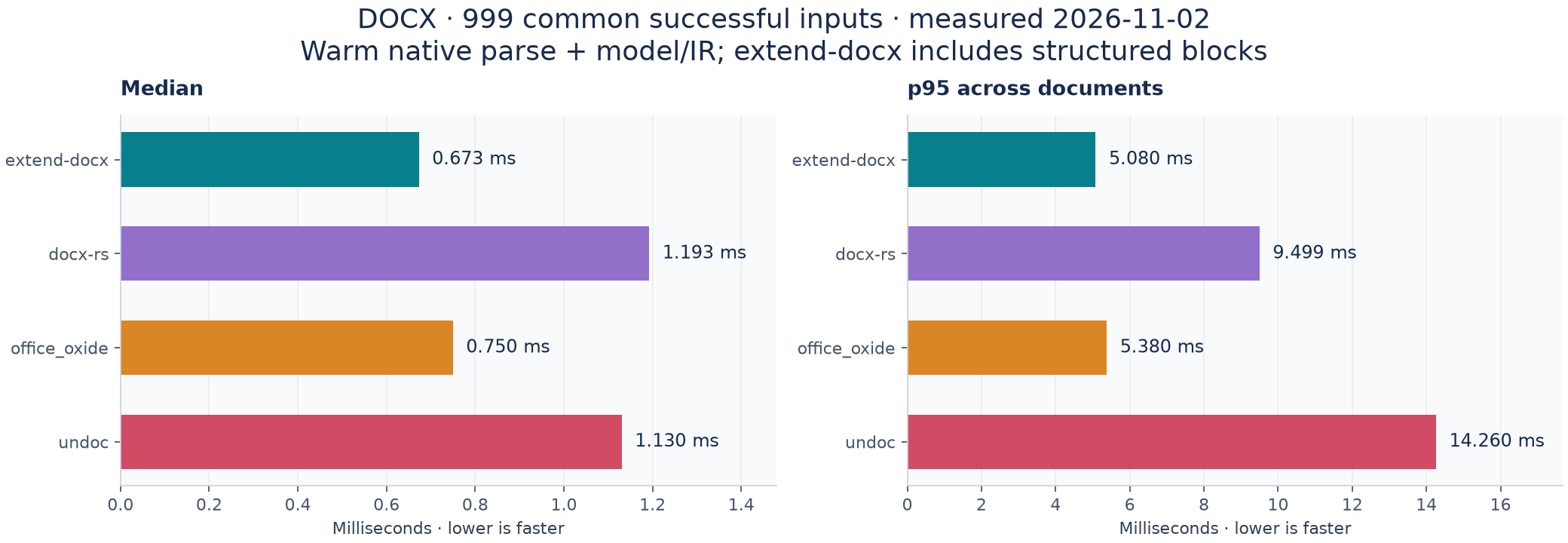
Extend-docx has the lowest median and p95 in this run. Its median is 10.3% lower than office_oxide's; this does not establish a 5× speedup. Undoc has the highest five-gram text F1, while extend-docx has the highest ordered-text F1.
Each document has five warm samples, each averaging 1–20 parses. Timings include parsing and native model/IR construction; extend-docx also projects structured blocks. File reads, process startup, JSON serialization, object destruction, and reference generation are excluded. The p95 is across document medians. Results come from a shared development machine and the libraries retain different amounts of structure.
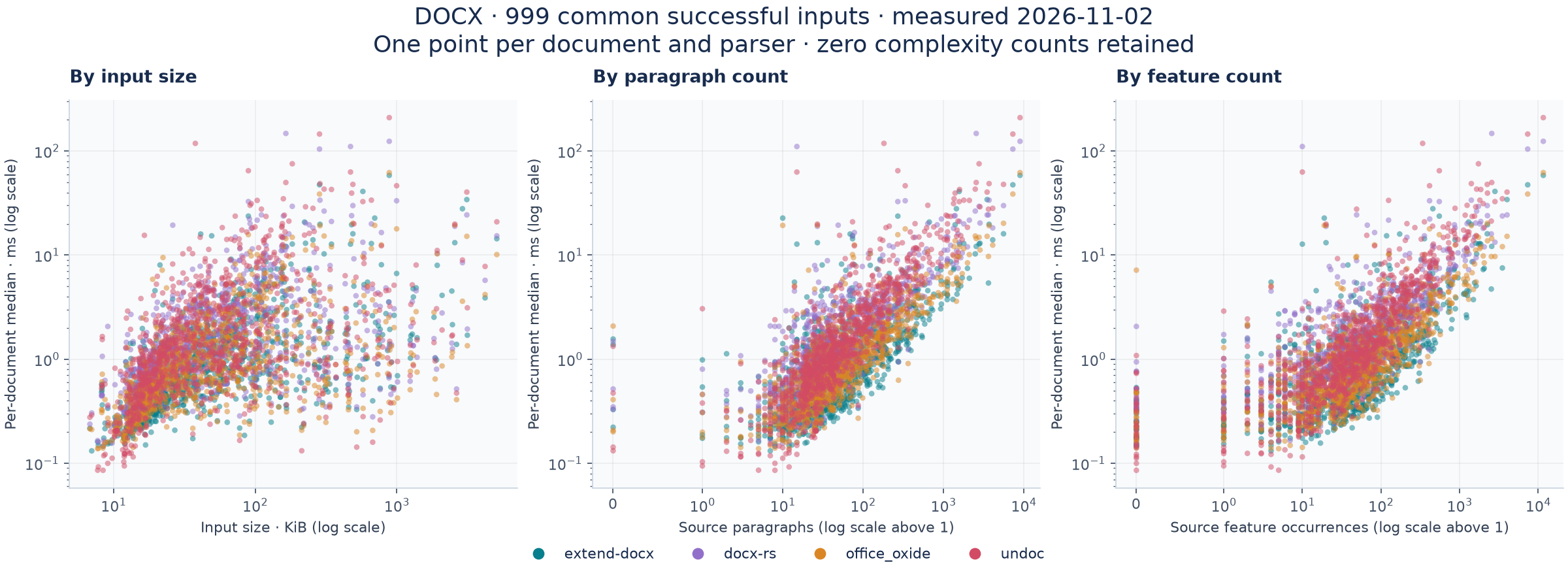
The same 999 successful inputs appear for every library. Each point is one document's median latency. Complexity counts come from the source reference and are shared across parsers. Logarithmic axes retain zero complexity counts.
These are recall checks against an independent source-XML extractor, not universal accuracy or Word rendering scores. Image occurrences match retained payload bytes and multiplicity. Literal table/span checks allow additional output characters; exact-anchor checks remain separately available. Positive explicit-formatting recall does not establish precision or inherited-style correctness.
| Check | Expected units | extend-docx | docx-rs | office_oxide | undoc |
|---|---|---|---|---|---|
| Images · payload-matched occurrences | 1,069 | 100.000% | 97.381% | 95.603% | 97.568% |
| Explicit bold · aligned characters | 680,435 | 100.000% | 94.577% | 99.948% | 98.016% |
| Tables · literal text retained | 2,267 | 100.000% | 96.427% | 99.868% | 97.706% |
| Horizontal spans · literal text + exact span | 3,706 | 99.946% | 98.354% | 100.000% | 99.217% |
| Headings · text + level | 6,741 | 99.985% | 53.004% | 99.466% | 86.219% |
| Lists · paragraph membership | 15,361 | 99.980% | 98.568% | 91.758% | 93.184% |
| Vertical merges · start markers | 1,398 | 99.571% | 99.928% | 98.069% | 94.134% |
| Textboxes · exact text anchors | 2,652 | 99.774% | 35.633% | 99.623% | 100.000% |
All remaining source-reference feature checks
| Check | Expected units | extend-docx | docx-rs | office_oxide | undoc |
|---|---|---|---|---|---|
| Tables · exact text anchors | 2,267 | 98.985% | 96.427% | 97.045% | 97.706% |
| Table cells · exact text anchors | 62,518 | 99.744% | 99.520% | 99.575% | 99.659% |
| Nested tables · text anchors | 97 | 100.000% | 97.938% | 98.969% | 97.938% |
| Horizontal spans · exact text + span | 3,706 | 96.492% | 98.354% | 96.114% | 99.217% |
| Headers · paragraph text | 807 | 100.000% | 69.888% | 99.504% | 100.000% |
| Footers · paragraph text | 818 | 100.000% | 61.858% | 98.044% | 100.000% |
| Footnotes · paragraph text | 339 | 100.000% | 0.000% | 100.000% | 92.035% |
| Endnotes · paragraph text | 46 | 100.000% | 0.000% | 100.000% | 95.652% |
| Comments · paragraph text | 40 | 100.000% | 100.000% | 100.000% | 0.000% |
| Equations · occurrence count proxy | 52 | 100.000% | 0.000% | 0.000% | 0.000% |
| Images · node-count proxy | 1,069 | 87.278% | 97.381% | 95.603% | 97.755% |
| Explicit bold · run five-grams | 548,210 | 98.236% | 96.942% | 98.247% | 98.236% |
| Explicit italic · run five-grams | 378,087 | 99.270% | 98.035% | 99.215% | 99.269% |
| Hyperlinks · text five-grams | 88,320 | 99.341% | 95.138% | 96.355% | 68.332% |
| Explicit italic · aligned characters | 433,678 | 100.000% | Not scored | Not scored | Not scored |
| Hyperlink targets · aligned characters | 101,572 | 100.000% | Not scored | Not scored | Not scored |
Run-based checks are sensitive to segmentation and inherited formatting. Image node counts can undercount composite SVGs even when all payloads are retained. “Not scored” means that adapter has no measurement for the stated native semantic audit; the comparable five-gram rows remain above. Original measurements, precision/F1, and denominators are preserved in the aggregate data.
Measured November 3, 2026, on 25 documents selected from the start of the fixed manifest without score filtering. All four parsers completed all inputs. Text uses Microsoft Word's object model; image payload checks use the original source bytes. This small sample supplements the larger XML-reference benchmark.
| Parser | Median / p95 | Word body recall | Word body F1 | Source image payloads |
|---|---|---|---|---|
| extend-docx | 0.530 / 6.880 ms | 99.949% | 99.952% | 52/52 · 100.000% |
| docx-rs | 1.089 / 6.606 ms | 99.939% | 99.947% | 48/52 · 92.308% |
| office_oxide | 0.680 / 3.668 ms | 99.937% | 99.946% | 48/52 · 92.308% |
| undoc | 1.084 / 11.990 ms | 99.949% | 96.999% | 52/52 · 100.000% |
Extend-docx has the lowest median in this sample; office_oxide has the lowest p95. Body F1 here pools ordered character counts; it is a different metric and cohort from the macro-averaged source-XML scores above.
Each cell below is precision / recall. Resolved formatting covers only 10 documents whose Word capture completed within its time budget. Native table and hyperlink references cover 24.
| Word object-model check | extend-docx | docx-rs | office_oxide | undoc |
|---|---|---|---|---|
| Resolved bold · 611 characters | 100.000% / 99.836% | 100.000% / 93.781% | 100.000% / 93.781% | 93.558% / 99.836% |
| Resolved italic · 387 characters | 100.000% / 100.000% | 100.000% / 88.372% | 100.000% / 100.000% | 100.000% / 100.000% |
| Top-level tables · 28 text anchors | 100.000% / 100.000% | 89.286% / 89.286% | 96.429% / 96.429% | 100.000% / 100.000% |
| Hyperlinks · 73 text anchors | 69.307% / 95.890% | 95.745% / 61.644% | 97.183% / 94.521% | 97.222% / 95.890% |
The hyperlink reference omits some field-generated links, so additional valid output can lower apparent precision. Word can normalize or repair input; its exports and the custom extractor each have limits. Neither benchmark establishes visual fidelity, exact image placement, or complete OOXML conformance.
Binary DOC and DOT use LibreOffice conversion as a reference proxy. Template/macro cohorts have only 2–12 inputs each. The retained optimization improves DOC adaptation, but extend-docx remains slower than office_oxide and undoc on binary DOC. Macros are never executed.
All-format accuracy table and latency chart
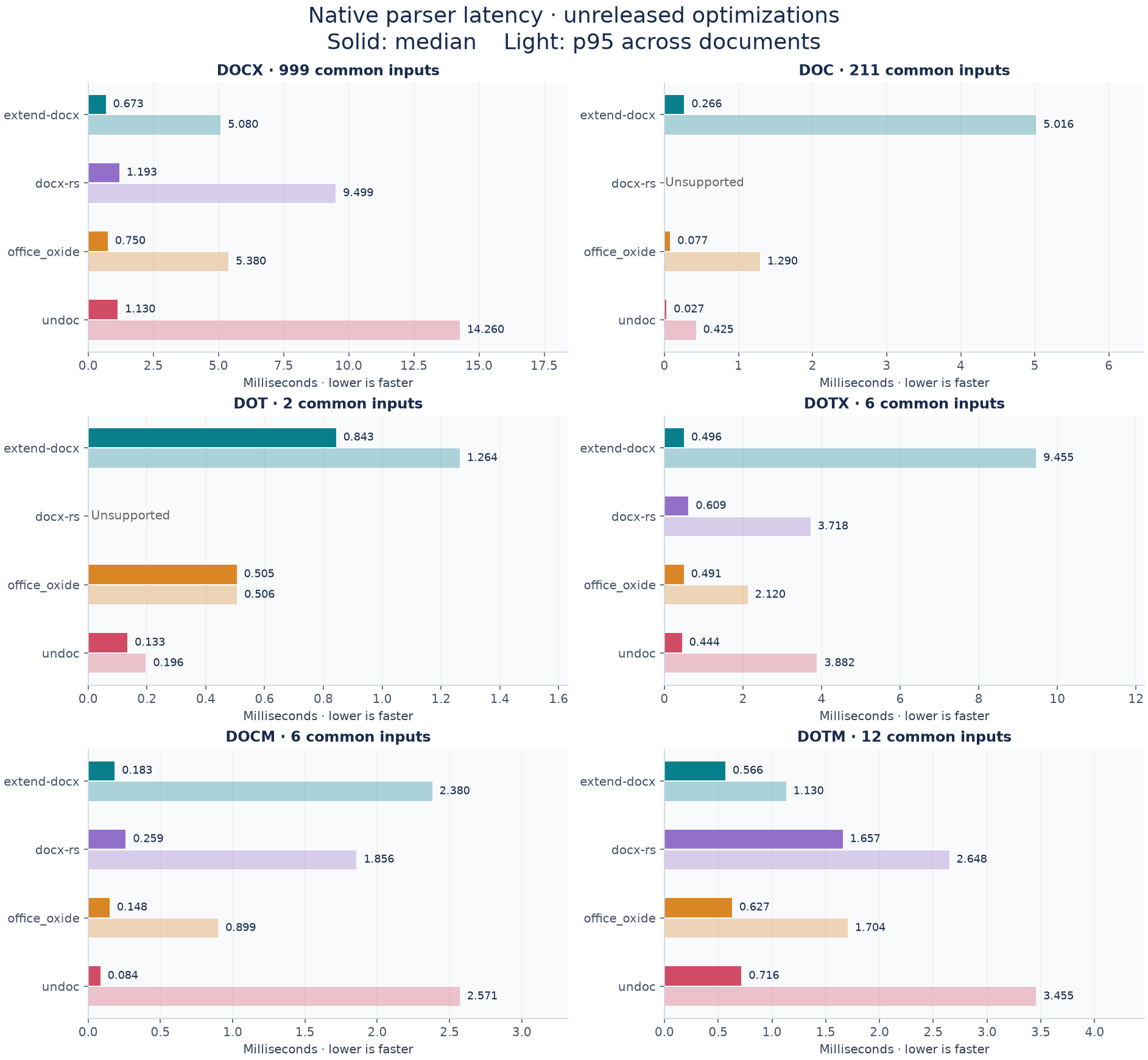
Each cell is body-text F1 · median / p95 milliseconds. Accuracy and latency use the per-format scopes described above.
| Format | extend-docx | docx-rs | office_oxide | undoc |
|---|---|---|---|---|
| DOCX | 99.983% · 0.673 / 5.080 | 99.740% · 1.193 / 9.499 | 99.917% · 0.750 / 5.380 | 99.988% · 1.130 / 14.260 |
| DOC | 98.748% · 0.266 / 5.016 | Unsupported | 97.979% · 0.077 / 1.290 | 95.293% · 0.027 / 0.425 |
| DOT | 100.000% · 0.843 / 1.264 | Unsupported | 99.902% · 0.505 / 0.506 | 100.000% · 0.133 / 0.196 |
| DOTX | 100.000% · 0.496 / 9.455 | 99.756% · 0.609 / 3.718 | 99.813% · 0.491 / 2.120 | 99.911% · 0.444 / 3.882 |
| DOCM | 100.000% · 0.183 / 2.380 | 100.000% · 0.259 / 1.856 | 100.000% · 0.148 / 0.899 | 100.000% · 0.084 / 2.571 |
| DOTM | 100.000% · 0.566 / 1.130 | 100.000% · 1.657 / 2.648 | 100.000% · 0.627 / 1.704 | 100.000% · 0.716 / 3.455 |
- Measured revisions, timing protocol, validation, and paired optimization results
- Word capture/scoring methods, coverage, and unresolved reference limitations
- Source-reference accuracy aggregates, latency summary, and anonymous scatter data
- Word-reference aggregate precision, recall, F1, and coverage for every measured category
- Per-format distribution and complexity charts and historical npm 0.13.0 results
These are retained completed runs, not new measurements of a documentation release. Source revisions and executable hashes identify each measured build. Historical records use the internal engine identifier docx-core; chart and table labels use the published crate name extend-docx. Public data contains aggregate counts and anonymous numeric points, without source documents or extracted text.
DOCX parsing and export use a WebAssembly binary shipped with the package. It loads on demand, and most bundlers can resolve it automatically. To host it at a specific URL, copy the binary to your application's public directory:
cp node_modules/@extend-ai/react-docx/dist/docx_wasm_bg.wasm public/docx_wasm_bg.wasmConfigure that URL before the first parse or export:
import { setWasmSource } from "@extend-ai/react-docx/vanilla";

setWasmSource("/docx_wasm_bg.wasm");
The binary is also available as @extend-ai/react-docx/docx_wasm_bg.wasm. The package README covers other supported sources and worker behavior.
For Vite development, exclude the vanilla entry from dependency optimization so Vite can resolve the import worker:
import { defineConfig } from "vite";

export default defineConfig({
  optimizeDeps: { exclude: ["@extend-ai/react-docx/vanilla"] },
});Use @extend-ai/react-docx/vanilla for the imperative JavaScript viewer.
Use useDocxEditor + DocxEditorViewer for both read-only and editable
experiences. The hook manages document state, import/export, and editing
commands; the component renders the document. Set mode="read-only" for
view-only use or mode="edit" for editing.
It also re-exports the internal document/model/layout/serializer packages, so you can work below the UI layer when needed.
Use the vanilla entry in a browser app with a bundler such as Vite. Add a container and a file input:
<input id="file" type="file" accept=".docx,.doc" />
<output id="status" aria-live="polite"></output>
<div id="viewer" style="height: 600px; overflow: auto"></div>
<script type="module" src="/main.js"></script>
Create a viewer, observe its state, and allow a local document to replace the initial URL:
import { createDocxViewer } from "@extend-ai/react-docx/vanilla";

const viewer = createDocxViewer(document.getElementById("viewer"), {
  src: "/document.docx",
});

const status = document.getElementById("status");
const unsubscribe = viewer.subscribe((controller) => {
  if (controller.error) {
    status.textContent = controller.error.message;
  } else if (controller.isLoading) {
    status.textContent = "Loading document…";
  } else {
    status.textContent = controller.hasDocument ? controller.fileName : "No document open";
  }
});

document.getElementById("file").addEventListener("change", (event) => {
  const file = event.currentTarget.files?.[0];
  if (file) viewer.setOptions({ file });
});
The viewer defaults to read-only. Set mode: "edit" to enable editing, and use the current controller to run commands after the document loads:
viewer.setOptions({ mode: "edit" });

const controller = viewer.getController();
if (controller?.hasDocument && !controller.isLoading) {
  controller.exportDocx();
}
When removing the viewer, unsubscribe and release its resources:
unsubscribe();
viewer.destroy();
file accepts a File, Blob, or ArrayBuffer. A src URL must be accessible to the browser; cross-origin URLs need appropriate CORS headers. See the vanilla API documentation for source changes, custom content, zoom, and more.
To try the standalone demo, run pnpm dev from this repository and open /vanilla.html on the local playground URL.
Starting in v0.10.0, the intended pattern for read-only viewing is
useDocxEditor with DocxEditorViewer mode="read-only". Use the same component
with mode="edit" when editing is needed.
import { DocxEditorViewer, useDocxEditor } from "@extend-ai/react-docx";

export function ReadOnlyDocxExample() {
  const editor = useDocxEditor();

  return (
    <div style={{ display: "grid", gap: 12 }}>
      <input
        type="file"
        accept=".docx"
        onChange={(event) => {
          const file = event.target.files?.[0];
          if (file) {
            void editor.importDocxFile(file);
          }
        }}
      />

      <DocxEditorViewer editor={editor} mode="read-only" />
    </div>
  );
}
For an already parsed document, initialize the controller with
useDocxEditor({ document }). For a prebuilt document model, use
useDocxEditor({ starterModel: model }). To start from a raw buffer, call
parseDocxForViewer(buffer) and pass the resulting document to the hook.
These options set the initial document; use editor.importDocxFile(file) to
load a different document into an existing controller.
Use useDocxEditor when you want import/export controls, document theme state, selection-aware editing commands, pagination state, and a customizable document canvas.
import * as React from "react";
import {
  DocxEditorViewer,
  useDocxDocumentTheme,
  useDocxEditor,
  useDocxPagination,
} from "@extend-ai/react-docx";

export function EditorExample() {
  const editor = useDocxEditor({
    initialDocumentTheme: "light",
    initialStatus: "Ready",
  });

  const { documentTheme, toggleDocumentTheme } = useDocxDocumentTheme(editor);
  const { pagination } = useDocxPagination(editor);

  return (
    <div style={{ display: "grid", gap: 12 }}>
      <div style={{ display: "flex", gap: 8, alignItems: "center" }}>
        <input
          type="file"
          accept=".docx"
          onChange={(event) => {
            const file = event.target.files?.[0];
            if (file) {
              void editor.importDocxFile(file);
            }
          }}
        />

        <button type="button" onClick={() => editor.exportDocx()}>
          Export DOCX
        </button>

        <button type="button" onClick={() => toggleDocumentTheme()}>
          Theme: {documentTheme}
        </button>

        <span>
          Page {pagination.currentPage} / {pagination.totalPages}
        </span>

        <span>{editor.status}</span>
      </div>

      <DocxEditorViewer
        editor={editor}
        mode="edit"
        pageBackgroundColor="#ffffff"
        pageGapBackgroundColor="transparent"
      />
    </div>
  );
}Use the imperative renderer when a cover or page preview is needed before the
full viewer mounts. The parsed document can be passed to useDocxEditor later,
so the source is read and parsed only once.
import {
  createDocxThumbnailRenderer,
  parseDocxForViewer,
  useDocxEditor,
} from "@extend-ai/react-docx";

const document = await parseDocxForViewer(file, {
  loadEmbeddedFonts: false,
});
const renderer = createDocxThumbnailRenderer(document, {
  scheduling: "immediate",
  pixelRatio: 1,
  pageIndexes: [0],
});
const cover = await renderer.renderPage(0, {
  maxWidth: 240,
  output: "blob",
});

function FullEditor() {
  const editor = useDocxEditor({ document });
  return <DocxEditorViewer editor={editor} />;
}DocxEditorViewer accepts numeric percentages and responsive zoom modes.
Responsive modes stay active and recalculate when the viewport or page layout
changes.
<DocxEditorViewer
  editor={editor}
  mode="read-only"
  defaultZoom="fit-width"
/>
Use zoom with onZoomChange for controlled state, or defaultZoom for
uncontrolled state. Editor toolbars can call editor.setZoom(level),
editor.getZoom(), and editor.getResolvedZoom().
renderPage supports canvas, blob, and imageBitmap output. Pass canvas
to draw into a caller-owned canvas without an encoding round trip. Its timings
separate pagination, page mounting, rasterization, and encoding; the parsed
document timings separately expose file reading, parsing, model construction,
and embedded-font loading. Use loadEmbeddedFonts: "defer" to load fonts later
through document.loadEmbeddedFonts(). The renderer also accepts an existing
DocModel directly when the OOXML package is not needed.
The built-in viewer and editor require a Web Worker for file imports. If a worker
cannot start, they report an import error instead of parsing on the main thread.
For custom imports, pass useWorker: "required" to parseDocxForViewer for the
same behavior. Its default allows a main-thread fallback; useWorker: false
explicitly runs parsing there. Lower-level parsing APIs also run on the calling
thread. Pagination and React rendering still run on the main thread.
Imports transfer internally owned buffers to the worker. Caller-provided
ArrayBuffer objects remain usable unless transferBuffer: true is specified.
Loading or removing embedded fonts invalidates cached text measurements and
repaginates mounted editor viewers.
See @extend-ai/react-docx in action in these live Extend UI examples. Click a screenshot to open the demo and integration docs.
Preview paginated documents with zoom and page navigation.

Try the experimental editor with document formatting, tracked changes, and export.

Fonts embedded in a DOCX load automatically by default. Caller-provided fonts
must be available in document.fonts before layout uses them. When adding or
removing fonts after parsing or mounting, call refreshDocxFontMetrics() after
the change to refresh cached text measurements and mounted viewers.
import { refreshDocxFontMetrics } from "@extend-ai/react-docx";

async function attachViewerFont(face: FontFace) {
  await face.load();
  document.fonts.add(face);
  refreshDocxFontMetrics();

  return () => {
    document.fonts.delete(face);
    refreshDocxFontMetrics();
  };
}
Provide matching font data and descriptors for each required weight and style.
The caller owns loading and cleanup. Load fonts before creating a standalone
createDocxThumbnailRenderer; after changing fonts, dispose and recreate that
renderer to refresh its captured pagination.
The library can expose page thumbnails so you can build your own page strip, mini-map, or navigation UI. Thumbnail painting can render from the live page surface when it is mounted, or from an offscreen one-page surface when viewer virtualization has unmounted that page.
import * as React from "react";
import {
  DocxEditorViewer,
  useDocxEditor,
  useDocxPageThumbnails,
} from "@extend-ai/react-docx";

export function ThumbnailExample() {
  const editor = useDocxEditor();
  const { thumbnails } = useDocxPageThumbnails(editor, {
    maxWidthPx: 160,
    maxHeightPx: 220,
    pixelRatio: 2,
    minRasterIntervalMs: 40,
    pageIndexes: [0, 1, 2, 3, 4, 5],
    renderWindow: {
      visiblePageIndexes: [0, 1, 2],
      prefetchPageIndexes: [3, 4, 5],
    },
  });

  return (
    <div style={{ display: "grid", gridTemplateColumns: "180px 1fr", gap: 16 }}>
      <div style={{ display: "grid", gap: 12, alignContent: "start" }}>
        {thumbnails.map((thumbnail) => (
          <canvas
            key={thumbnail.pageIndex}
            ref={thumbnail.canvasRef}
            width={thumbnail.pixelWidthPx}
            height={thumbnail.pixelHeightPx}
            style={{
              width: thumbnail.widthPx,
              height: thumbnail.heightPx,
              border: "1px solid #ddd",
            }}
          />
        ))}
      </div>

      <DocxEditorViewer editor={editor} />
    </div>
  );
}
Notes:
- Thumbnail canvases can stay attached in a virtualized sidebar; only canvases you mount request paint work.
- Use
renderWindow.visiblePageIndexesfor thumbnails currently visible in your sidebar, andrenderWindow.prefetchPageIndexesto warm nearby pages after visible work. - Use
pageIndexesas a hard render set when unlisted pages must remain metadata-only. It is distinct from the priority hints inrenderWindow. - Call
thumbnail.renderToCanvas(canvas, { scheduling: "immediate" })for a visible cover that must bypass idle scheduling. minRasterIntervalMscontrols repeat renders for the same canvas. Lower values are useful when the consumer already limits thumbnail work to a small visible window.- Thumbnail sizing is bounded by
maxWidthPxandmaxHeightPx, so downstream UIs can bias toward portrait thumbnail rails. - Thumbnails use a direct layout/model canvas renderer first; if a page has no usable snapshot, the hook falls back to an isolated offscreen page surface.
@extend-ai/react-docx exports several hooks for wiring custom UI around the viewer:
useDocxDocumentTheme(editor)for light/dark document modeuseDocxPagination(editor)for current page and total page countuseDocxPageLayout(editor)for page size, margins, columns, and viewport defaultsuseDocxPageThumbnails(editor, options)for rendering page previews into your own canvasesuseDocxParagraphStyles(editor)for available paragraph styles and style selectionuseDocxLineSpacing(editor)for selected line spacing stateuseDocxBorders(editor)for paragraph/table border presetsuseDocxFormFields(editor)for DOCX form-field state and updatesuseDocxTrackChanges(editor)for tracked-change state plus safeacceptChange/rejectChangeactionsuseDocxComments(editor)for comment state, selected-range comment creation, and resolve/reopen actionsuseDocxImageWrapMenu(editor)for image wrapping controls
Annotation mutations intentionally fail closed. Accept/reject currently
supports a single top-level, text-only w:ins or w:del; comment creation
supports one non-empty plain-text range in a top-level paragraph. Moves,
formatting revisions, fields, hyperlinks, tables, nested revisions, drawings,
and cross-paragraph ranges return an unsupported, stale, or unsafe-xml
result without changing the document. Successful actions participate in the
editor's normal undo/redo history. Pass the current DocxTrackedChange or
DocxComment object back to its action; handles are document- and
source-scoped, so a handle retained across an import or conflicting edit
returns stale instead of targeting a reused OOXML id.
The package also re-exports the lower-level internals used by the viewer:
- OOXML parsing from
@extend-ai/react-docx-ooxml-core - Document model helpers from
@extend-ai/react-docx-doc-model - Editing operations from
@extend-ai/react-docx-editor-ops - Layout primitives from
@extend-ai/react-docx-layout-engine - Layout/core snapshot helpers from
@extend-ai/react-docx-layout-core - DOCX serialization from
@extend-ai/react-docx-serializer
This means you can build your own pipeline, for example:
import { buildDocModel, parseDocx, serializeDocx } from "@extend-ai/react-docx";

const pkg = await parseDocx(arrayBuffer);
const model = buildDocModel(pkg);
const output = serializeDocx(model, pkg);DocxEditorViewersupportsmode="edit"andmode="read-only".pageBackgroundColorcontrols the page surface color.pageGapBackgroundColorcontrols the area between pages and defaults to transparent.- The built-in dark page surface uses Tailwind
neutral-950by default. - In read-only dark document mode, the viewer uses an inversion-based night reader path so document content inverts cleanly while images keep their hues.
- Supported VML bitmap groups retain their artwork and individual textbox stories. Text edits preserve the other stories and artwork through export and reopen.
- Images can have a paint area that extends beyond their logical layout box. The viewer, thumbnails, clipboard, and serializer preserve those separate bounds.
- When resized artwork cannot safely reuse its original VML, export rasterizes the current appearance to PNG. Text remains editable in the live document but becomes part of the image in that exported fallback. External applications may round fractional VML coordinates.
crates/extend-docx: the published Rust parser, document model, and serializer,extend-docxcrates/docx-wasm: internal WebAssembly bindings for the JavaScript viewerpackages/react-viewer: the main published React package,@extend-ai/react-docxpackages/ooxml-core: OOXML package parsing and part graph handlingpackages/doc-model: normalized document modelpackages/editor-ops: document editing operationspackages/layout-engine: pagination and layoutpackages/layout-core: layout helpers and snapshot-oriented utilitiespackages/serializer: model-to-DOCX serializationapps/playground: local playground for manual QA and feature developmenttests/unit: unit coveragetests/visual: visual regression coverage
Use Node.js 24.22.1 (pinned in .nvmrc) and pnpm 9.15.0. Node.js 22.23.4 or
newer within the 22.x release line is also supported. Dependency installation
rejects older runtimes.
Install dependencies:
pnpm installRun the playground:
pnpm devThe deployed playground rebuilds WASM from the checked-out Rust sources on every deployment; an npm release is not required. The Build link opens a manifest with the Git revision, Rust source hash, and served WASM hash. See playground deployment.
Build all packages:
pnpm buildTypecheck packages and the playground:
pnpm typecheckRun unit tests:
pnpm test:unitRun visual tests:
pnpm test:visualRun the DOCX-vs-LibreOffice comparison flow:
pnpm test:docx-vs-libreofficeChangesets are used for npm release management:
pnpm changeset
pnpm version-packages
pnpm build
pnpm publish-packages
The Rust crate is released independently with cargo publish -p extend-docx --locked. See Rust publishing for validation and GitHub team ownership.