

Elegant MongoDB migrations for Node.js.
Run a single file, roll back anything, and preview every change before it touches your database.




Single-file runs · rollback by batch, step or file · dry-run previews · transactions ·
lifecycle hooks · SHA-256 tamper detection · MongoDB-native locking · a history that's never
deleted. All in one small mmk CLI with a fully typed API, plus a GUI for VS Code.
📖 Documentation · Quick start · Why another migration tool? · VS Code extension
A real session: preview, run, roll back one file, check the status.
You write small migration files with an up function (make a change) and a down function (undo
it). The mmk command runs them in order, records what ran in your database, and can roll back
exactly the one you mean: the last deploy, an older batch, the last few files, or a single file by
name.
Built for teams who outgrew the basics. You keep up, down, create and status, and gain:
- Run a single migration —
mmk up <file>, not just "all pending". - Roll back anything — a batch (
--batch 3), the last N (--steps 2), one file, orredo. - Preview before you run —
mmk dry-run upprints the exact plan without touching the database. - A GUI in VS Code — a migration console to plan, apply and roll back, with local, staging and prod side by side (see it).
- No race conditions — an atomic MongoDB lock stops two deploys running migrations at once.
- Tamper detection — SHA-256 checksums catch a migration edited after it was applied.
- Audit trail kept — a rollback updates the record, it never deletes it.
- Lifecycle hooks —
beforeAll,afterAll,beforeEach,afterEach,onError. - Opt-in transactions — wrap a migration so it fully commits or fully aborts.
- TypeScript, ESM & CommonJS — all run with no
ts-nodeplumbing, and the package ships its own types (TypeScript guide). - Zero config files required — drive everything from env vars if you prefer.
Tip
Point mmk at the same database and bring your whole history over. Nothing that already ran runs
again, your old changelog is never modified, and you don't rewrite a single migration file.
npx mmk import    # one time: copy your migrate-mongo history into mmk
npx mmk up        # runs only what's new
Your up / down / create / status habits carry over. You gain dry-runs, single-file runs
and rollbacks, lifecycle hooks, and a lock that's on by default.
See how it works ↓
npm install mongo-migrate-kit mongodbnpx mmk init # writes mmk.config.js, set your uri and dbName there
npx mmk create add-users-email-index # makes migrations/<timestamp>-add-users-email-index.jsFill in the file (shown here as an ES module; in a CommonJS project mmk writes the same thing as
module.exports = { … }):
export const description = 'Unique index on users.email';

export async function up({ db }) {
  await db.collection('users').createIndex({ email: 1 }, { unique: true });
}

export async function down({ db }) {
  await db.collection('users').dropIndex('email_1');
}
Then run it, look at it, and roll it back:
$ npx mmk up
✔ Applied  20261015223650-add-users-email-index.js   [117ms]

$ npx mmk status
┌─────────────────────────────────────────┬─────────┬───────┬─────────────────────┬──────────┬──────────┐
│ Migration                               │ Status  │ Batch │ Applied At          │ Checksum │ Author   │
├─────────────────────────────────────────┼─────────┼───────┼─────────────────────┼──────────┼──────────┤
│ 20261015223650-add-users-email-index.js │ applied │ 1     │ 2026-10-15 22:36:51 │ ok       │ Asha Rao │
└─────────────────────────────────────────┴─────────┴───────┴─────────────────────┴──────────┴──────────┘

$ npx mmk down
↩ Reverted 20261015223650-add-users-email-index.js   [5ms]
No config file? MMK_URI and MMK_DB in your environment (or a .env file) are enough.
ES modules or CommonJS: the generated files match your package.json (export for
"type": "module", module.exports otherwise), so they run without changes. See
ES modules or CommonJS.
Next: the tutorial walks through a realistic example in about 15 minutes.
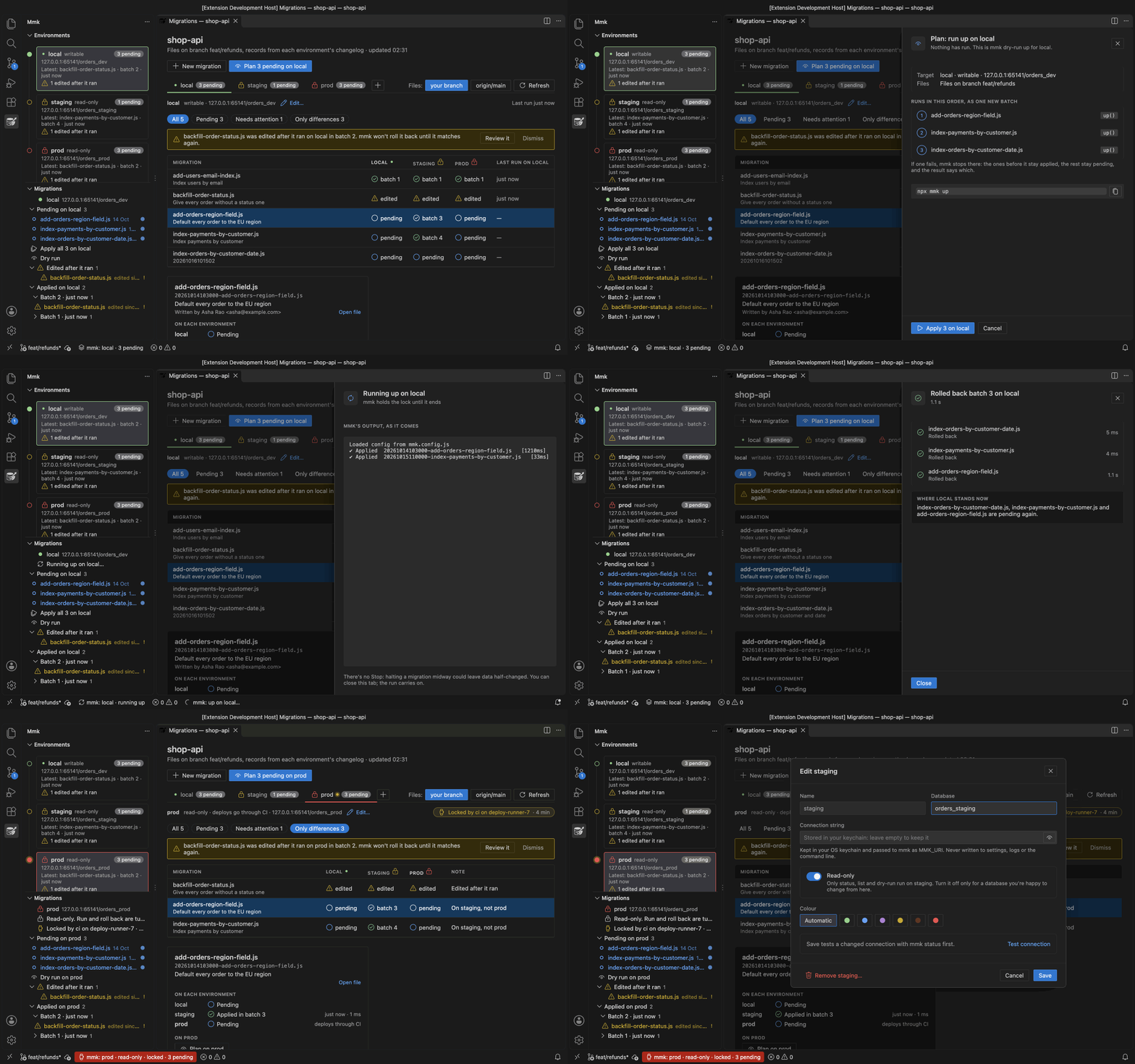
Mongo Migrate Kit for VS Code
gives you a migration console, a sidebar and run links in your files. It runs your project's own
mmk, so the editor and the terminal always agree.
| You want to | In a terminal | In VS Code |
|---|---|---|
| See what would run, then run it | mmk dry-run up, then mmk up |
Plan, then Apply, with mmk's output as it comes |
| Run or roll back one file | mmk up <file>, mmk down <file> |
The links above up() and down() |
| Roll back a batch | mmk down --batch <n> |
Roll back batch n… in the console |
| Compare local, staging and prod | mmk status once per database |
One table in the console |
| See who holds the lock | mmk lock |
A line in the console and the sidebar |
| Notice an edit to a migration that already ran | mmk status, after you save |
A warning while you type |
Also on Open VSX for Cursor, Windsurf and VSCodium. What it does →
The docs are laid out as a path. Each step builds on the one before, and you can stop when you have what you need.
| Step | Pages | Time |
|---|---|---|
| 1. Get it running | Quick start, Tutorial | 10 to 20 min |
| 2. Understand it | How it works, Writing migrations, A normal day with mmk | 15 min |
| 3. Use it in production | Configuration, Deploying and CI, Running from your code, Transactions, When something goes wrong | 30 min |
| 4. Bigger setups | Sharing a database, Moving from migrate-mongo | when needed |
Looking something up instead? CLI cheatsheet · Error codes · FAQ
| Capability | migrate-mongo |
mongo-migrate-kit |
|---|---|---|
| GUI (VS Code extension) | ❌ | ✅ |
| Run a single migration file | ❌ | ✅ |
| Roll back a specific batch (not just the last) | ❌ | ✅ |
| Roll back a single migration file | ❌ | ✅ |
| Dry-run preview | ❌ | ✅ |
redo (down + up) |
❌ | ✅ |
| Concurrency lock on by default | ❌ | ✅ |
| Refuses to roll back an edited migration | ❌ | ✅ |
| Lifecycle hooks | ❌ | ✅ |
| History kept on rollback (never deleted) | ❌ | ✅ |
Adopt an existing migrate-mongo changelog |
— | ✅ |
Reflects migrate-mongo's documented CLI as of mid-2026, and the VS Code Marketplace and Open VSX
for the GUI row as of October 2026. It also gives migrations transaction access via a client
argument; mmk exposes the same plus a declarative per-file useTransaction flag.
Point mmk at the same database and run mmk import. It copies your existing history into mmk's own
collection and never changes the old one. After that, mmk up only runs what's new.
npx mmk import --dry-run    # see what would be copied, write nothing
npx mmk import              # copy it
npx mmk up                  # runs only migrations migrate-mongo never ran
Imported migrations are forward-only, because migrate-mongo calls up(db, client) and mmk calls
up({ db, client }). New migrations roll back normally.
The switching guide has the details.
| Command | What it does |
|---|---|
mmk init |
Create a commented config file |
mmk create <name> |
Create a migration file |
mmk up [file] |
Run pending migrations, or one file |
mmk down [file] |
Roll back the last batch, --batch <n>, --steps <n>, or one file |
mmk redo [file] |
Roll back and run again |
mmk status |
Show every migration (--check exits 1 if any are pending) |
mmk list |
--pending or --applied only |
mmk dry-run <up|down> |
Show what would run, change nothing |
mmk import |
Copy a migrate-mongo history into mmk |
mmk lock |
Show who holds the migration lock, change nothing |
mmk unlock |
Remove a lock left by a crashed run |
mmk namespace adopt |
For repos sharing a database: move older records into this repo's namespace |
Every command takes --uri, --db, --dir and --config. All the flags are on the
CLI cheatsheet.
import { runMigrations } from 'mongo-migrate-kit';

// before the server starts listening
const { applied, upToDate } = await runMigrations(
  { uri: process.env.MONGO_URL!, dbName: 'shop' },
  { onLockHeld: 'wait' }, // other instances wait instead of failing
);
It opens its own connection and always closes it. If a migration fails, it throws, so your app
doesn't start on a half-migrated database. pendingMigrations() gives you a read-only list for
health checks. See Running from your code.
Settings come from (highest wins) command-line flags, MMK_* environment variables, a
mmk.config.js/.ts/.json file, then defaults. Only uri and dbName are required.
// mmk.config.js
export default {
  uri: process.env.MONGO_URL ?? 'mongodb://localhost:27017',
  dbName: 'shop',
  migrationsDir: './migrations',
};
The config can also be an async function, for loading the connection string from a secret manager at runtime. All settings and environment variables are on the Configuration page.
- Node.js 18 or newer. For
.tsmigrations ormmk.config.tswithout a loader, Node 22.18 or newer (see the TypeScript guide). - The
mongodbdriver, version 5 or newer (a peer dependency). - MongoDB server 4.2 or newer. Transactions need a replica set or a sharded cluster.
mongoose7 or newer, only if your migrations use it.
Issues and pull requests are welcome. ARCHITECTURE.md explains how the code is put together and how to add a command. Ideas being explored (not promises) are in IDEAS.md.
MIT © guptasantosh327