


🌐 English | Русский | Deutsch | Español | Português | Français | Italiano | Nederlands | 中文
🔒 Security: Policy | Assessment Report
Home Assistant custom integration for Klipsch Flexus soundbars — control via native local HTTP API, no cloud, no delays.
✅ 42 entities. All write commands are verified live on 2026 firmware (HMAC-signed) and work in standby. Every commit on
mainis tested locally first: see Test results.
A custom Lovelace dashboard driven entirely by the integration's entities — input, sound mode, night / dialog enhance, EQ presets, Dirac filter, tone (bass / mid / treble), surround channel levels and subwoofers — all controlled live over the local API.
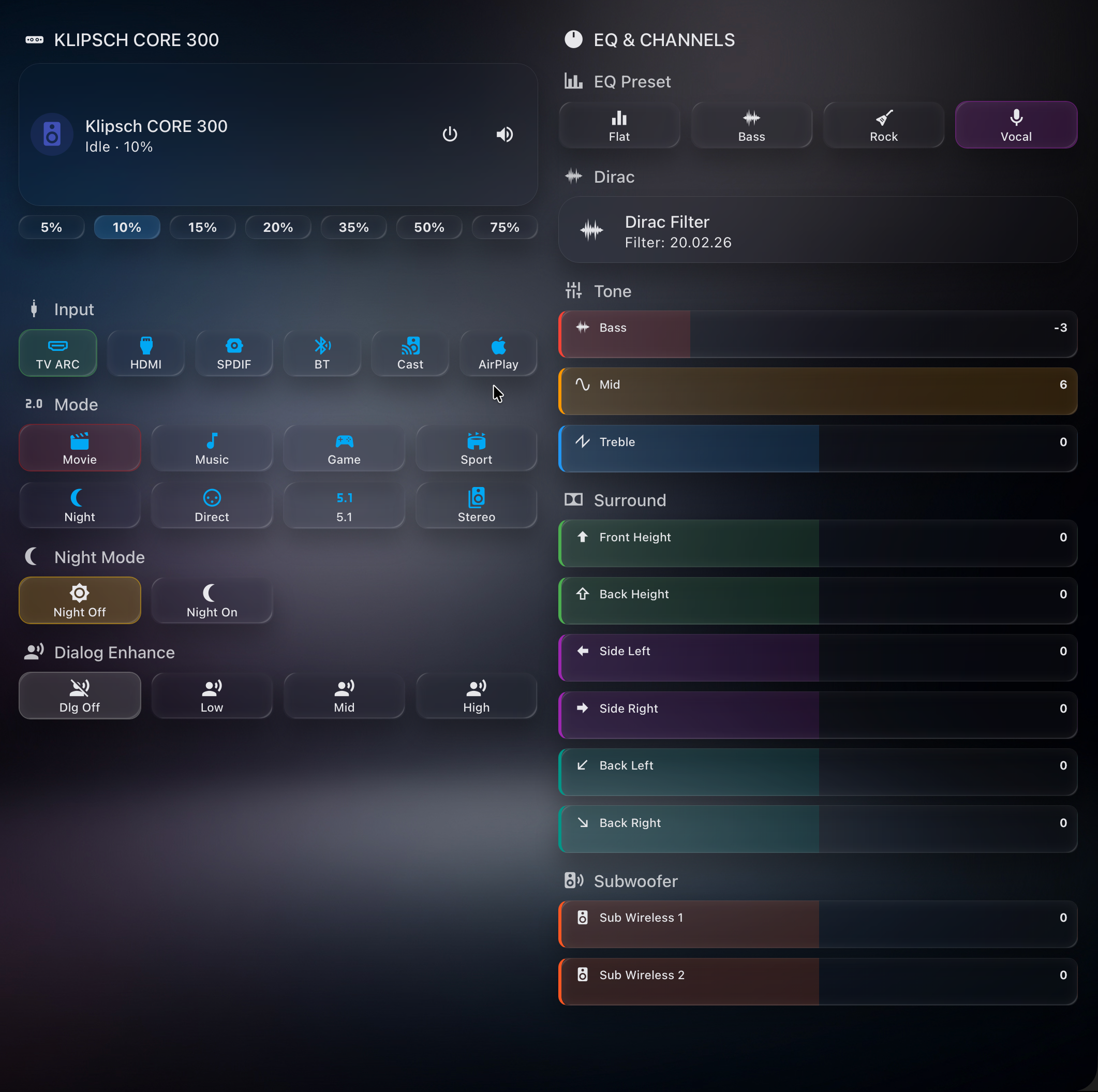
Required HACS components (all installable via HACS):
| Component | Repo | Used for |
|---|---|---|
| Klipsch Flexus | ilia-ae/klipsch_flexus | this integration — the entities |
| Mushroom | piitaya/lovelace-mushroom | media-player card |
| button-card | custom-cards/button-card | source / mode / EQ tiles with dynamic styling |
| card-mod | thomasloven/lovelace-card-mod | active-state highlighting (CSS) |
📋 Full dashboard YAML + colour scheme: docs/DASHBOARD.md
| Model | Channels | Features |
|---|---|---|
| Flexus CORE 300 | 5.1.2 | Dirac Live, Dolby Atmos, 13 drivers |
| Flexus CORE 200 | 3.1.2 | Dolby Atmos up-firing |
| Flexus CORE 100 | 2.1 | Virtual Dolby Atmos |
The integration does not check the model. It adds any Flexus soundbar that announces itself over Google Cast, and it uses the same local API and the same 42 entities for every model. The maintainer tests on a CORE 300. A control for hardware your model does not have (for example the height channels on a CORE 100) can fail with an error.
The soundbar must be fully set up first in the official Klipsch Connect Plus app — go through the entire onboarding at least once (Wi-Fi, firmware update, speaker pairing, Dirac calibration). On 2026 firmware this is also what provisions the write-auth credential the integration relies on, so a half-finished app setup leaves most commands unauthorized. This integration handles ongoing control only.
A 2026 soundbar firmware update (Device Version 1.1.3.x, e.g. 1.1.3.0x7cd294e, Cast build 20250512_0201_RC25) changed the local HTTP API in two ways:
setDatanow requiresPOSTwith a JSON body. The oldGET /api/setData?...returns405 Strict HTTP required!. Fixed in v2.4.1 — update the integration.- Most
setDatawrites are now authenticated (settings:/webserver/authMode = setData). Protected writes return401 ForbiddenwithWWW-Authenticate: HMAC_SHA256_AES256. Fixed in v2.5.0 — the integration now signs these writes automatically.
| Capability | Status |
|---|---|
All sensors / status reads (getData) |
✅ Works |
| Volume, Mute | ✅ Works |
| Input, Sound mode, Night / Dialog, Bass / Mid / Treble, EQ Preset, Dirac, Subwoofer & Surround levels, Power | ✅ Works (HMAC-signed, v2.5.0+) |
| LED, Lip-sync, Balance, Loudness, DND, Auto-standby + 4 more toggles | ✅ Works (signed; added v2.5.8–2.5.9) — also in standby |
You can see the live per-command status on your own device via Download diagnostics (the command_health section, added in v2.4.2). It is read-only: per command it shows whether the setting is readable and how the device answered the writes made since the integration last loaded (http_status, needs_auth when the device asked for a signature).
✅ Solved in v2.5.0 — full control restored, no user action required. The HMAC_SHA256_AES256 request signing is now implemented. The per-device credential is derived automatically from the soundbar's MAC address, so there is nothing to configure — just update the integration. Since v2.5.9 the MAC is read deterministically from the device itself (settings:/system/primaryMacAddress), so resolution works on the first try for every unit (with the previous registry/ARP discovery kept as a fallback). Signed writes go to the device's HTTPS endpoint; volume/mute continue to work unsigned.
Requires the
cryptographypackage (bundled with Home Assistant, so it is already present; not listed as a manifest requirement).
📖 How we reverse-engineered it — the full investigation story (blutter, Frida, WireGuard-MITM, the security-theatre teardown): the field report (also in Russian).
Older firmware (pre-1.1.3) is unaffected and keeps full control via the legacy GET fallback.
- Volume — set level, step up/down, mute/unmute
- Power — turn on / off (network standby)
- Input source — TV ARC, HDMI, SPDIF, Bluetooth, Google Cast. While a streaming app (Spotify Connect, TIDAL Connect, QPlay), USB or Dirac calibration is active, the source shows it
- Sound mode — Movie, Music, Game, Sport, Night, Direct, Surround, Stereo
- Playback — play/pause, next/previous track
- Media info — title, artist, album, artwork, source app
| Channel | Description |
|---|---|
| Front Height | Dolby Atmos front height speaker |
| Back Height | Dolby Atmos rear height speaker |
| Side Left / Right | Surround side speakers |
| Back Left / Right | Surround rear speakers |
| Wired Subwoofer / Wireless Subwoofers | Wired RCA sub output and the wireless subs (one or two, adjusted together), -12 to +6 dB |
| Bass / Mid / Treble | Tone EQ controls |
- EQ Preset — Flat, Bass, Rock, Vocal (+ Custom, reported once Bass / Mid / Treble are changed — from HA or the Klipsch app — or a custom curve is set in the app; it can't be selected from HA)
- Night Mode — reduces dynamic range for quiet listening
- Dialog Mode — boosts dialog clarity (3 levels)
- Dirac Live — room correction filter (auto-discovered from device)
- LED Brightness — front LED: Off / Dim / Bright
- Idle Timeout — idle time before auto-standby: Off / 5 / 10 / 15 / 30 min
- Lip-sync Delay — manual A/V sync (0–500 ms)
- Balance — left/right balance (−10…+10 dB)
- Auto Lip-sync — automatic A/V delay
- EQ Bypass — bypass the equaliser
- Auto Power — auto on/standby behaviour
- Loudness — low-volume loudness compensation
- Do Not Disturb — suppress notifications/sounds
- Auto Standby — drop to standby when idle
- UI Sounds, Extra Sound Modes, BLE Remote Auto-pair, Firmware Auto-update
All settings above are also writable while the soundbar is in standby (the device applies and persists them); the integration keeps the entities available and remembers the value you set rather than reverting it.
- Response Time — API poll duration in ms, request/failure counters
- Device Status — On / Standby / Offline with decoder, input, sound mode info
- Signing MAC — the MAC used to sign 2026-firmware writes (scheme, candidates, resolved state)
- Network Link — active wired/wireless interface, interface names, MAC sources
- Operating Mode / Speaker Test — read-only device state (surfaced, deliberately not controllable)
- Speaker Delays (wired/wireless sub, wireless surround) — read-only, auto-calibrated by the device
- Download diagnostics — full device state export (Settings > Devices > Klipsch Flexus > Download diagnostics). The IP address, every MAC address, the Wi-Fi BSSID, the device ID and stream URLs are redacted
- A device per paired speaker — Flexus SUB / SURR speakers (Wireless Subwoofer 1 / 2, Surround Left / Right) appear as their own devices under the soundbar, with the versions the Klipsch Connect Plus app shows (Product Information): MCU, RX and EQ firmware as Firmware, the hardware version and the model number
- Connected — a sensor per speaker: on when the speaker's wireless link was up at the last read, off when it was down
- When they are read — once after setup and when you press Read wireless speakers (a button on the soundbar), so the regular poll stays as light as before. To follow drop-outs live, turn on Monitor wireless speakers in Options: the link is then read on every poll (one extra request), and a subwoofer that drops out shows up in the Connected sensor's history. Monitored sensors are unavailable in standby
- A speaker gets its device once it has been seen linked, and keeps it while unpaired or offline. An unpaired speaker's device can be deleted from its device page
Full UI translation in 9 languages: English, Russian, German, Spanish, French, Italian, Portuguese, Dutch, Simplified Chinese (zh-Hans). All entity names, states, and configuration screens are translated.
Klipsch Flexus is in the HACS default store, so you do not need to add a custom repository.

- Select the button above to open Klipsch Flexus in your HACS (My Home Assistant link), or open HACS and search for Klipsch Flexus
- Select Download, then restart Home Assistant
- The soundbar should be automatically discovered — check notifications
- Or go to Settings > Devices & Services > Add Integration > Klipsch Flexus
- Copy
custom_components/klipsch_flexus/to your HAconfig/custom_components/directory - Restart Home Assistant
- Add the integration via Settings > Devices & Services
After updating the integration (HACS or manual), restart Home Assistant: HA loads the integration's Python code at startup, so the new version only runs after a restart. Changing Options or Reconfigure-ing the host applies immediately, without a restart (the entry reloads).
New features and fixes ship first as a beta: a GitHub pre-release tagged vX.Y.Z-beta.N. The stable release vX.Y.Z follows later. HACS offers a beta only to users who opt in. If you do nothing, you stay on stable releases and are not notified about betas.
To get betas (HACS 2.x):
- Go to Settings > Devices & Services > HACS and open the Klipsch Flexus service entry (HACS adds one for each repository you downloaded)
- Find the Pre-release switch (a diagnostic entity). It is disabled by default: open it, select the gear icon, turn on Enabled and select Update
- Turn Pre-release on. HACS now offers the newest beta as an update. To check right away, open Klipsch Flexus in HACS and select Update information in the ⋮ menu
- Install the update and restart Home Assistant
To go back to stable, turn Pre-release off. HACS then offers only stable releases again, and you keep the beta until the next stable release replaces it. To switch back at once, open Klipsch Flexus in HACS, select ⋮ > Redownload > Need a different version?, pick the newest release without the pre-release mark, download it and restart Home Assistant.
The soundbar is automatically discovered on your network via mDNS / Zeroconf (Google Cast protocol).
When powered on, Home Assistant will detect the soundbar and display a notification:
Klipsch Flexus CORE 300 found at
192.168.1.100. Do you want to add this soundbar?
How it works:
- Soundbar announces itself as
Flexus-Core-*via_googlecast._tcpmDNS service - Integration identifies the device by
md(model) andfn(friendly name) TXT records - AirCast proxy devices are automatically filtered out
If auto-discovery doesn't work (e.g. network isolation), you can always add the integration manually by entering the IP address.
| Parameter | Default | Description |
|---|---|---|
| Host | — | IP address of the soundbar (required) |
| Poll interval | 15 s | Configurable via Options (5–120 s). In standby the integration always polls every 60 s |
| Monitor wireless speakers | off | Options only. Reads on every poll whether each wireless subwoofer / surround is linked (one extra request), so drop-outs show on its Connected sensor. Off: read after setup and with the Read wireless speakers button |
| Device MAC | auto-detected | Options only (optional). Overrides the MAC used to sign 2026-firmware writes; only needed if commands other than volume/mute fail (see the Signing MAC diagnostic sensor) |
Tip: Assign a static IP / DHCP reservation to the soundbar for reliable operation.
You can change the IP address later via Reconfigure (Settings > Devices > Klipsch Flexus > Reconfigure).
The soundbar exposes a local HTTP API on port 80:
GET /api/getData— read parametersPOST /api/setData— write parameters (JSON body; legacy GET fallback for older firmware)GET /api/getRows— list structured data (Dirac filters)
On 2026 firmware the HMAC-signed writes go to POST https://<IP>/api/setData instead.
The Klipsch Flexus has a single-threaded HTTP server that processes one request at a time. The integration is built around this constraint:
| Mechanism | Description |
|---|---|
| Request serialization | All API calls go through asyncio.Lock — no concurrent requests |
| Retry with backoff | Writes (except media controls) and the power probe retried 2x with 0.5 s delay; poll reads are not retried (cached fallback), and two consecutive timeouts end the poll as offline |
| Adaptive timeouts | 8 s reads, 10 s writes, 15 s power commands |
| Graceful degradation | Failed reads fall back to last-known cached values |
| Optimistic updates | UI updates instantly and keeps the written value until the next regular poll reads it back (the poll ~1 s after a command picks up its side effects, e.g. the decoder after an input change); values applied in standby are cached so the standby poll never reverts them |
| Standby-aware polling | Power state probed first; the first poll after setup reads everything once, even in standby — after that, standby polls make 1 request instead of ~40, cached values preserved, poll interval slows to 60 s. Settings stay available and controllable in standby — the device applies writes and the integration remembers them |
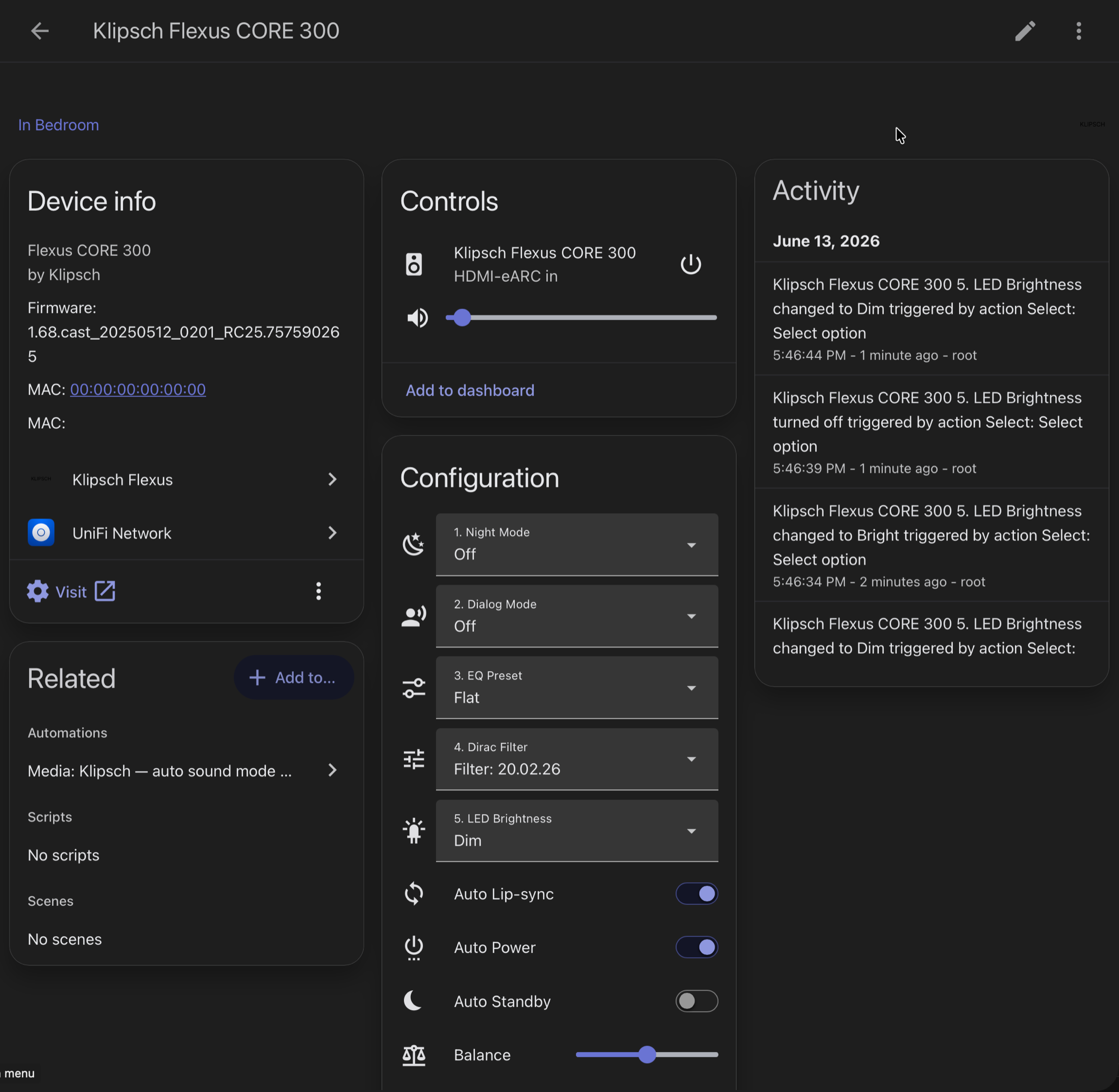
The integration's Home Assistant device page — Device info, Controls, Configuration (Night / Dialog / EQ / Dirac / LED + toggles) and the Activity log.
| Entity | Type | Category |
|---|---|---|
| Klipsch Flexus CORE 300 | Media Player | — |
| Night Mode / Dialog Mode / EQ Preset / Dirac Filter / LED Brightness / Idle Timeout | Select (x6) | Config |
| Back Height / Left / Right, Front Height, Side Left / Right | Number (x6) | Config |
| Wired Subwoofer / Wireless Subwoofers | Number (x2) | Config |
| Bass / Mid / Treble | Number (x3) | Config |
| Lip-sync Delay, Balance | Number (x2) | Config |
| Auto Lip-sync, EQ Bypass, Auto Power, UI Sounds, Extra Sound Modes, BLE Remote Auto-pair, Firmware Auto-update | Switch (x7) | Config |
| Loudness, Do Not Disturb, Auto Standby | Switch (x3) | Config |
| Response Time, Device Status, Active Input, Active Sound Mode | Sensor (x4) | Diagnostic |
| Signing MAC, Network Link | Sensor (x2) | Diagnostic |
| Operating Mode, Speaker Test, Sub Wired/Wireless Delay, Surround Delay | Sensor (x5, read-only) | Diagnostic |
| Read wireless speakers | Button | Diagnostic |
| Connected (on each wireless speaker's device) | Binary Sensor (one per paired speaker, up to 4) | Diagnostic |
Total: 42 entities (1 media player + 6 selects + 13 numbers + 10 switches + 11 sensors + 1 button), plus one Connected sensor per paired wireless speaker
| Problem | Solution |
|---|---|
| Cannot connect | Check that the soundbar is on the same network. Try: http://<IP>/api/getData?path=player:volume&roles=value |
| Entities unavailable | The Klipsch app may be polling simultaneously — close it and retry |
| Slow updates | Increase poll interval in Options (Settings > Devices > Klipsch Flexus > Configure) |
| Commands other than volume/mute fail | Check the Signing MAC diagnostic sensor. If it shows no resolved MAC (or the wrong one), enter the soundbar's MAC as Device MAC in Options |
| Integration not loading | Check Home Assistant logs for import errors. Ensure you're on HA 2024.11+ |
| Wireless subwoofer or surround drops out | Turn on Monitor wireless speakers in Options, then open the speaker's device under the soundbar: its Connected sensor is off while the link is down, and its history shows when it dropped. The soundbar then reports the slot as empty, so this is the soundbar's view of the wireless link. A speaker whose own board hangs while its radio stays linked (no sound) still shows as connected; its mcu_responding attribute shows whether the board answered at the last read (press Read wireless speakers to check). |
| Logo invisible in the dark theme | Update to v2.5.19+ and restart. The dark-theme icon ships with the integration and needs HA 2026.3+; older HA versions show the black icon from the HA brands site |
- One soundbar per integration entry (add multiple as separate entries)
- No multi-room / wireless surround group management (use Klipsch Connect Plus app)
- Control uses only the native HTTP API, not the Cast or AirPlay protocols. Google Cast is a selectable input (start playback from a Cast app); AirPlay is not in the device's input list, so it is not offered as a source (streaming to the bar from an Apple device is unaffected)
- Initial setup must be completed fully in the official Klipsch Connect Plus app — go through the whole onboarding at least once (this is what provisions the 2026 write-auth credential)
See SECURITY.md for security policy and best practices.
Network Security Notice: The soundbar speaks plain HTTP, and its local API is effectively unauthenticated on the LAN. Older firmware required no authentication at all; the 2026 firmware (1.1.3.x) signs most writes (HMAC_SHA256_AES256), but this is not a real security boundary — the credential is derived from the device's own MAC (which it discloses unauthenticated) plus a hardcoded, product-line-wide constant, so any host on the network can forge it. Reads stay open (see Firmware Compatibility). Keep it on a trusted / isolated network segment. See the Security Assessment Report (Section 12) for the full analysis.


All tests run on the maintainer's machine, not on GitHub. The first five badges show the results of that signed local run for the latest verified commit on main (the Signed local CI badge shows its short SHA and date). GitHub writes them only after it has verified the signed evidence. Verify signed local CI is that check on GitHub. HACS validation is the HACS check of the repository, which runs on GitHub.
You can check the evidence yourself (Python 3.11 or newer, git, OpenSSH):
curl -fsSLO https://raw.githubusercontent.com/ilia-ae/klipsch_flexus/ci-results/allowed_signers
git clone https://github.com/ilia-ae/klipsch_flexus.git && cd klipsch_flexus
git fetch origin refs/notes/local-ci:refs/notes/local-ci
python3 -I scripts/verify_local_ci.py --sha "$(git rev-parse HEAD)" --allowed-signers-file ../allowed_signers
allowed_signers holds the owner's public signing key. Compare it with the SSH signing keys that GitHub lists for the owner: curl -s https://api.github.com/users/ilia-ae/ssh_signing_keys. See docs/TESTING.md for details.
Thank you to everyone who has reported issues and sent fixes:
- Kevin Jilissen (@Kevinjil) — found that the soundbar volume runs 0–50, not 0–100, and fixed the mapping (#22, #23)
- G Johansson (@gjohansson-ST) — replaced the removed
STANDBYmedia player state so the integration keeps working on Home Assistant 2026.12+ (#25)
See the full contributor list.
- Questions and ideas: GitHub Discussions. See SUPPORT.md for what to include.
- Bugs: open an issue with the bug form, and attach the diagnostics.
- Security problems: report them privately, see SECURITY.md.
- Pull requests are welcome. CONTRIBUTING.md explains how to test your change and how the maintainer verifies it. docs/TESTING.md describes the tests and the signed local CI.
- Everyone taking part follows the Code of Conduct.
MIT — see LICENSE.