


Compare two fingerprint images using minutiae: the ridge endings and bifurcations that make each print unique. Built on NumPy, SciPy, scikit-image and OpenCV.
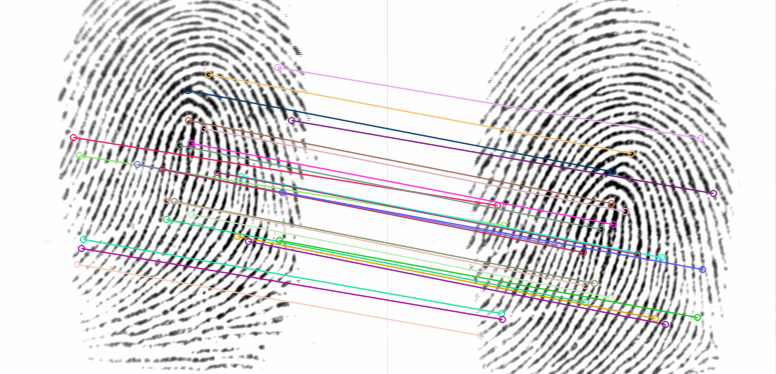
- Contrast: CLAHE evens out the brightness of the scan.
- Enhancement: the image is normalised and segmented, local ridge orientation and frequency are estimated, and a bank of oriented Gabor filters turns it into a clean binary ridge map (Hong, Wan & Jain, 1998).
- Minutiae: the ridge map is thinned to one-pixel-wide lines, and the crossing number of each pixel marks ridge endings and bifurcations. Minutiae at the edge of the print, or crowded together (spurs and broken ridges), are discarded.
- Alignment: each minutia gets an ORB descriptor rotated to the local ridge direction. Descriptor matches propose correspondences, and the rotation, translation and scale that most of them agree on aligns the two prints. Every candidate transform is tried, so results are deterministic.
- Scoring: after alignment, minutiae that sit within 10 px of each other with ridge directions within 20° are paired one-to-one. The score is the number of pairs; 12 or more is a match (the classic "12-point" rule). The score is computed both ways and the lower one is kept, so the order of the prints doesn't matter.
On the sample images, the two same-finger pairs score 25 and 40 and the four different-finger pairs score 3 or less. Rotating a print by any angle doesn't change the verdict.
Requires Python 3.11 or newer.
pip install fingerprint-recognitionFor the interactive --show window, install the plot extra:
pip install "fingerprint-recognition[plot]".
fingerprint-recognition database/101_1.tif database/101_2.tifFingerprint matches. (25 paired minutiae, threshold 12)
| Option | Description |
|---|---|
-t, --threshold |
Paired minutiae needed for a match (default 12) |
--json |
Print the score, minutiae counts and verdict as JSON |
--save PATH |
Write an image of the matches used to align the prints |
--show |
Display the keypoints and matches (needs matplotlib) |
The exit code is 0 on a match, 1 when the prints don't match and 2 if an
image can't be read, so it can be used in scripts.
from fingerprint_recognition import compare

result = compare("database/101_1.tif", "database/101_2.tif")
print(result.score, result.is_match)
print(result.transform)  # 2x3 matrix mapping the first print onto the second
compare also accepts grayscale NumPy arrays. The steps are available on
their own too: enhance returns the ridge map, extract_minutiae the
minutiae, and extract_features / match_features let you extract features
once and compare them many times.
docker build -t fingerprint-recognition .
docker run --rm -v "$PWD/database:/data" fingerprint-recognition 101_1.tif 101_2.tif
Paths are relative to /data in the container, so mount the folder that holds
your images there.
The project uses uv.
uv run pytest          # tests
uv run ruff check .    # lint
uv run ruff format .   # format
uv run mypy src # type checkThis is a compact, readable pipeline for learning and experimenting, not a certified biometric system. It has only been checked on the four sample images (from FVC2002) and rotated copies of them. Before relying on the default threshold, measure false-accept and false-reject rates on a larger dataset such as the full FVC2002 databases. Don't use it for anything security-sensitive.
The enhancement step is based on Utkarsh Deshmukh's Fingerprint-Enhancement-Python, itself a port of Peter Kovesi's MATLAB code.
A write-up of the original version in Macedonian is in docs/.
MIT. The enhancement code keeps the notices of the works it is derived from; see THIRD_PARTY_NOTICES.md.