
Spinifex is an open-source infrastructure platform that brings core AWS services — EC2, IAM, EKS, ECR, EBS, ELBv2 — to bare-metal, edge, and on-prem deployments. It exposes a fully AWS-compatible API, so any tooling that works against AWS works against a Spinifex node unchanged, with a single profile swap.
This guide walks through deploying a self-contained AI inference platform on bare metal using only standard AWS tooling: a GPU-accelerated LLM chat API and a real-time CV stream, running in Kubernetes, provisioned entirely with Terraform.
| Component | Specification |
|---|---|
| Chassis | Supermicro X14 2U CloudDC with Intel Xeon 6730P |
| GPUs | 2× NVIDIA RTX Pro 6000 Blackwell Server Edition (96 GiB GDDR7 each, 192 GiB total) |
| Storage | 4× NVMe SSD: 2× 1.5 TB, 2× 880 GB — one 1.5 TB drive carries the OS; the remaining three back Predastore |
| Spinifex instance family | g7e — one RTX Pro 6000 per instance via VFIO PCIe passthrough |
| Kubernetes | k3s, managed via Spinifex EKS API |
| API endpoint | https://<host>:9999 (AWS-compatible) |
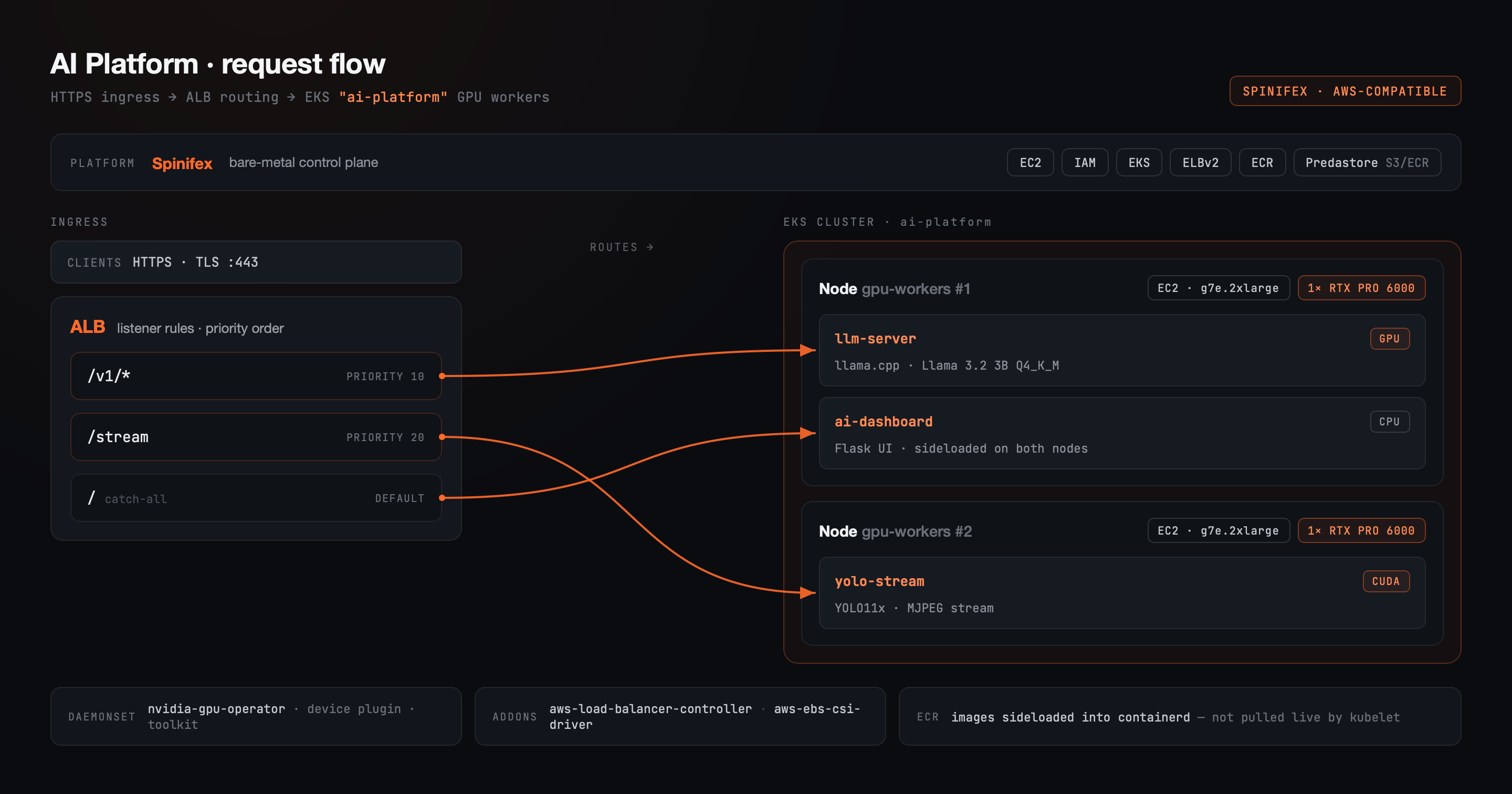
Three workloads run in the inference namespace of an EKS cluster backed by two GPU worker nodes:
| Pod | Role | GPU | Model | Image source |
|---|---|---|---|---|
llm-server |
OpenAI-compatible chat API (llama.cpp) | 1× RTX Pro 6000 | Llama 3.2 3B Instruct Q4_K_M GGUF | ECR llm-server:latest |
yolo-stream |
MJPEG object-detection stream (CUDA) | 1× RTX Pro 6000 | YOLO11x | ECR yolo-stream:latest |
ai-dashboard |
Web UI: chat + live detection feed | CPU only | — | ECR ai-dashboard:latest |
Both GPU workloads bake their model weights into the Docker image at build time — llm-server's GGUF weights (~2 GiB) and yolo-stream's YOLO11x checkpoint (~109 MB) are present in the image when it starts.
yolo-stream renders a 1280×720 sample video through YOLO11x once on startup (~25 s), caches the annotated frames in memory, then serves /stream from that cache — smooth MJPEG playback decoupled from per-frame inference cost after the initial warm-up.
The two GPU nodes are split one-per-workload. With one RTX Pro 6000 per node and both pods requesting nvidia.com/gpu: "1", the scheduler cannot fit both on the same node, so the split happens naturally without explicit affinity rules.
| Service | Role |
|---|---|
| IAM | Cluster role, node role (with ECR, LBC, EBS-CSI permissions inline), viewer access entry |
| ECR | Private registry for all three images; source of truth for builds, though nodes receive images via sideload rather than live OCI pull for this demo |
| EC2 | 2× GPU microVM (g7e.2xlarge), one RTX Pro 6000 each via VFIO PCIe passthrough |
| EKS | Cluster, GPU nodegroup (desired_size = 2), LBC and EBS-CSI managed addons, access entries |
| ELBv2 | ALB provisioned by the LBC addon; single shared IngressGroup across all three services |
| ACM | Self-signed cert (ai-platform.spinifex.local) imported and attached to the ALB HTTPS listener |
| EBS (Viperblock) | 200 GB root volume per GPU worker node, provisioned by the nodegroup (disk_size = 200) |
All permissions for the LBC and EBS-CSI addons are attached directly to the node role. Both addons support IRSA, but fall back to the node's instance profile when no service_account_role_arn is supplied — sufficient for a single-cluster deployment.
1. Configure host-local VPC networking
Spinifex uses bridged networking via OVN. The X14 exposes a single public IP on one physical NIC — before installing Spinifex, ensure br-wan exists with the physical NIC enslaved to it, and attach a host-local address range for EC2 instance communication:
# /etc/netplan/…
bridges:
  br-wan:
    addresses:
      - 192.168.10.1/24             # VM pool gateway — host-local
      - <existing-wan-ip>/<prefix>  # existing WAN IP — unchanged
    routes:
      - to: default
        via: <upstream-gateway>
Apply with sudo netplan apply. For outbound connectivity from instances through the host's WAN interface:
sysctl -w net.ipv4.ip_forward=1
iptables -t nat -A POSTROUTING -s 192.168.10.0/24 -o br-wan -j MASQUERADE
2. Install Spinifex
Follow the Single Node Install guide. Edit /etc/spinifex/spinifex.toml to wire up the bridge:
[network]
external_mode = "pool"

[[network.external_pools]]
name        = "wan"
source      = "static"
range_start = "192.168.10.2"
range_end   = "192.168.10.100"
gateway     = "192.168.10.1"
prefix_len  = 24
dns_servers = ["8.8.8.8"]
Then restart all services:
sudo systemctl restart spinifex.target3. Bind the GPUs to VFIO
sudo spx admin gpu setup
# Reboot, then:
sudo spx admin gpu enable
Confirm both GPUs are bound:
lspci -d 10de: -nn
# Expect: NVIDIA Corporation Device [10de:2bb5] appearing twice
4. Import the EKS GPU node AMI
GPU worker nodes require the ecr-credential-provider binary so kubelet can call GetAuthorizationToken against ECR. Import the dedicated EKS GPU node AMI:
spx admin images list
spx admin images import --name spinifex-eks-node-gpu
Confirm the AMI is registered:
aws ec2 describe-images --query 'Images[*].[Name,ImageId]' --output table5. Verify the GPU instance type
sudo spx admin gpu statusThe RTX Pro 6000 Blackwell Server Edition (PCI device 10de:2bb5) maps to the g7e family. The workbook defaults to g7e.2xlarge (one GPU per node). Do not use g7e.12xlarge — that is the 2× GPU size.
- OpenTofu >= 1.6
- kubectl
- Docker
- AWS CLI profile:
[profile spinifex]
region = ap-southeast-2
endpoint_url = https://<host>:9999
git clone https://github.com/mulgadc/eks-ai-platform
cd eks-ai-platformmake infra ENDPOINT=https://<host>:9999This provisions the VPC (10.33.0.0/16), IAM roles, ECR repositories, EKS cluster, GPU nodegroup (2× g7e.2xlarge, 200 GB disk each), LBC and EBS-CSI managed addons, a self-signed ACM certificate, and the NodePort security group rules the ALB needs to reach the worker nodes.
Update your kubeconfig once the cluster reports ACTIVE:
$(tofu -chdir=workbook output -raw update_kubeconfig)
kubectl get nodes
# Expect: 2 Ready nodes in the gpu-workers nodegroupmake images ENDPOINT=https://<host>:9999This authenticates to ECR, then builds and pushes all three images:
llm-server— based onghcr.io/ggml-org/llama.cpp:server-cuda; downloads Llama 3.2 3B Instruct Q4_K_M GGUF (~2 GiB) from Hugging Face at build time and bakes it into the image.yolo-stream— based onpytorch/pytorch:2.7.1-cuda12.8-cudnn9-runtime; installs Ultralytics and downloads YOLO11x weights at build time. PyTorch 2.7.1+cu128 is required: the RTX Pro 6000 Blackwell is compute capability sm_120, and earlier PyTorch releases ship no sm_120 kernels.ai-dashboard— lightweight Flask proxy that aggregates the LLM API and YOLO stream into a single page.
make sideload ENDPOINT=https://<host>:9999This exports each image from the local Docker daemon and imports it directly into each worker node's containerd store via short-lived privileged pods. All three Deployments use imagePullPolicy: IfNotPresent and depend on the images already being present in containerd — this step is required, or Deployments will sit stuck in ImagePullBackOff.
The script also labels the two GPU nodes deterministically (workload=llm-server / workload=yolo-stream, sorted by node name), and the Deployments use matching nodeSelector values so each pod lands on the node that already has its image. Expect several minutes for yolo-stream's image (CUDA + PyTorch + YOLO11x weights, ~4.5 GiB).
make workloads ENDPOINT=https://<host>:9999This deploys the NVIDIA GPU Operator via Helm, then all three application Deployments, ClusterIP and NodePort services, and the shared ALB Ingresses.
Watch the GPU Operator complete, then the inference pods come up:
kubectl -n gpu-operator get pods -w
kubectl -n inference get pods -w
Confirm each GPU node reports nvidia.com/gpu: 1 in allocatables:
$(tofu -chdir=workbook output -raw gpu_verify_hint)Retrieve the ALB IP:
$(tofu -chdir=workbook output -raw alb_ip_hint)
ALB_IP=<output>
Validate the LLM endpoint:
curl -sk https://$ALB_IP/v1/chat/completions \
  -H "Content-Type: application/json" \
  -d '{"model":"llama-3.2-3b-instruct","messages":[{"role":"user","content":"What is Spinifex?"}]}' \
  | python3 -m json.tool
Open https://$ALB_IP/ to reach the dashboard. If accessing from a remote machine:
ssh -L 8443:$ALB_IP:443 <spinifex-host>
# Open https://ai-platform.spinifex.local:8443/
# Add 127.0.0.1 ai-platform.spinifex.local to /etc/hosts if the browser requires hostname matchmake destroy ENDPOINT=https://<host>:9999Workloads are destroyed before infra. Both GPU worker instances terminate, immediately returning their RTX Pro 6000s to the Spinifex pool.
The GPU Operator DaemonSet must complete before nvidia.com/gpu appears in node allocatables:
kubectl -n gpu-operator get daemonset -w
kubectl get node -o custom-columns=NAME:.metadata.name,GPU:.status.allocatable.'nvidia\.com/gpu'
If a pod shows Insufficient nvidia.com/gpu on a node that looks healthy, the workload= labels from make sideload may be stale — for example, after a nodegroup recreation that assigned new node names. Re-run make sideload to relabel the nodes and re-import the images.
On hosts where the GPU's IOMMU group contains an upstream PCIe root-port bridge (no ACS isolation), Spinifex attempts to bind the bridge to vfio-pci. Bridges are non-endpoint devices that vfio-pci refuses to bind, causing the instance to crash immediately after launch. This is fixed in Spinifex by excluding bridge-class PCI devices from the bind lifecycle — ensure your Spinifex build includes that fix. If the failed bind left a bridge without a driver, restore it:
echo | sudo tee /sys/bus/pci/devices/<bridge-addr>/driver_override
echo <bridge-addr> | sudo tee /sys/bus/pci/drivers/pcieport/bindThe cluster's ACTIVE gate tallies Ready nodes by the eks.amazonaws.com/nodegroup label. On affected Spinifex builds that label is never applied to the node, so the control plane never sees the nodegroup as satisfied even though the nodes are healthy. Ensure your Spinifex build includes the fix. If stuck, delete both the nodegroup and cluster and let Terraform recreate them:
aws eks delete-nodegroup --cluster-name ai-platform --nodegroup-name gpu-workers
aws eks delete-cluster --name ai-platformBoth llm-server and yolo-stream require a few seconds after container start before their readiness probes pass — CUDA and GPU Operator initialisation contribute to the delay. Watch the pods become ready:
kubectl -n inference get pods -w
kubectl -n inference logs -f deploy/llm-servereks-ai-platform/
├── Makefile ← infra / images / sideload / workloads / destroy
├── workbook/
│ ├── main.tf ← VPC, IAM, ECR, EKS, addons, ACM
│ └── workloads/
│ └── main.tf ← GPU Operator, Deployments, Services, Ingresses
├── dockerfiles/
│ ├── llm-server/Dockerfile
│ ├── yolo-stream/
│ │ ├── Dockerfile
│ │ ├── sample.mp4
│ │ └── server.py
│ └── ai-dashboard/
│ ├── Dockerfile
│ ├── app.py
│ └── templates/index.html
└── scripts/
└── sideload-images.sh
This guide demonstrates how Spinifex turns a single bare-metal chassis into a production-shaped AI serving platform managed entirely with standard AWS tooling. IAM roles, ECR repositories, an EKS cluster, GPU worker nodes, addons, and an ALB are all provisioned with the same Terraform resources and AWS CLI commands that work on real AWS — with a single AWS_PROFILE swap.
The RTX Pro 6000 Blackwell Server Edition's 96 GiB GDDR7 fits substantial GPU workloads in a single PCIe slot, and Spinifex's g7e instance family exposes each GPU as a standard EC2 instance. Teams already operating AWS infrastructure can point their existing tooling at a Spinifex node and retain the full EKS workflow — from aws ecr get-login-password to kubectl get ingress — on hardware they own.