Read and write the persistent configuration of a DJ TechTools MIDI Fighter Twister — so an agent can set it up from a chat interface instead of clicking through sixteen knobs by hand.
The Twister is deeply programmable. There are four banks of controls, or eight with alternate firmware. Each knob has its own MIDI CC number and an on and an off color, and it can be a toggle or a tap. And there are more settings beyond that. It's also bidirectional — send values back to it and the knobs move. Another thing that's nice about the controller is that its firmware is open source, so it was really easy to build this API on top of it.
Programming all of this by hand takes a long time. It means going into the MIDI Fighter Utility, clicking a knob, setting its CC value, and setting its on and off color — one by one, for every knob.
Then there's the mapping. A typical system, in Ableton or another DAW, maps a MIDI CC to several different knobs in the program. That means clicking, remembering what each knob was, and then clicking in Ableton or in Chromatik, for example. Each mapping in Chromatik is made manually: click the source knob from the template, the MIDI control, click the destination knob, and then set what the behavior is. Whether it's an on and off state or a toggle state has to be remembered, and then a color scheme has to be worked out and applied to each knob.
All of it has to be remembered and written down, or it's easy to forget how something was done when coming back to it later.
Now it's just a chat with an agent, and the agent keeps notes on how things were programmed. For example, with one color scheme for all the knobs, it sets the on and off colors for every knob at once, in one shot. A few sentences describe what a knob should do — "Can we make the bottom-right knob trigger a tap tempo when you press it?" — and it uses Chromatik's MCP server to bind that knob to that thing. It can bind it to multiple things in Chromatik, and because the agent keeps notes on the system for doing the MIDI mapping, it can answer questions later: "Can you explain the bank switch button? Pressing to the right makes it all dark." It can also suggest mappings that fit the audio program; once one is chosen, it creates it in one shot.
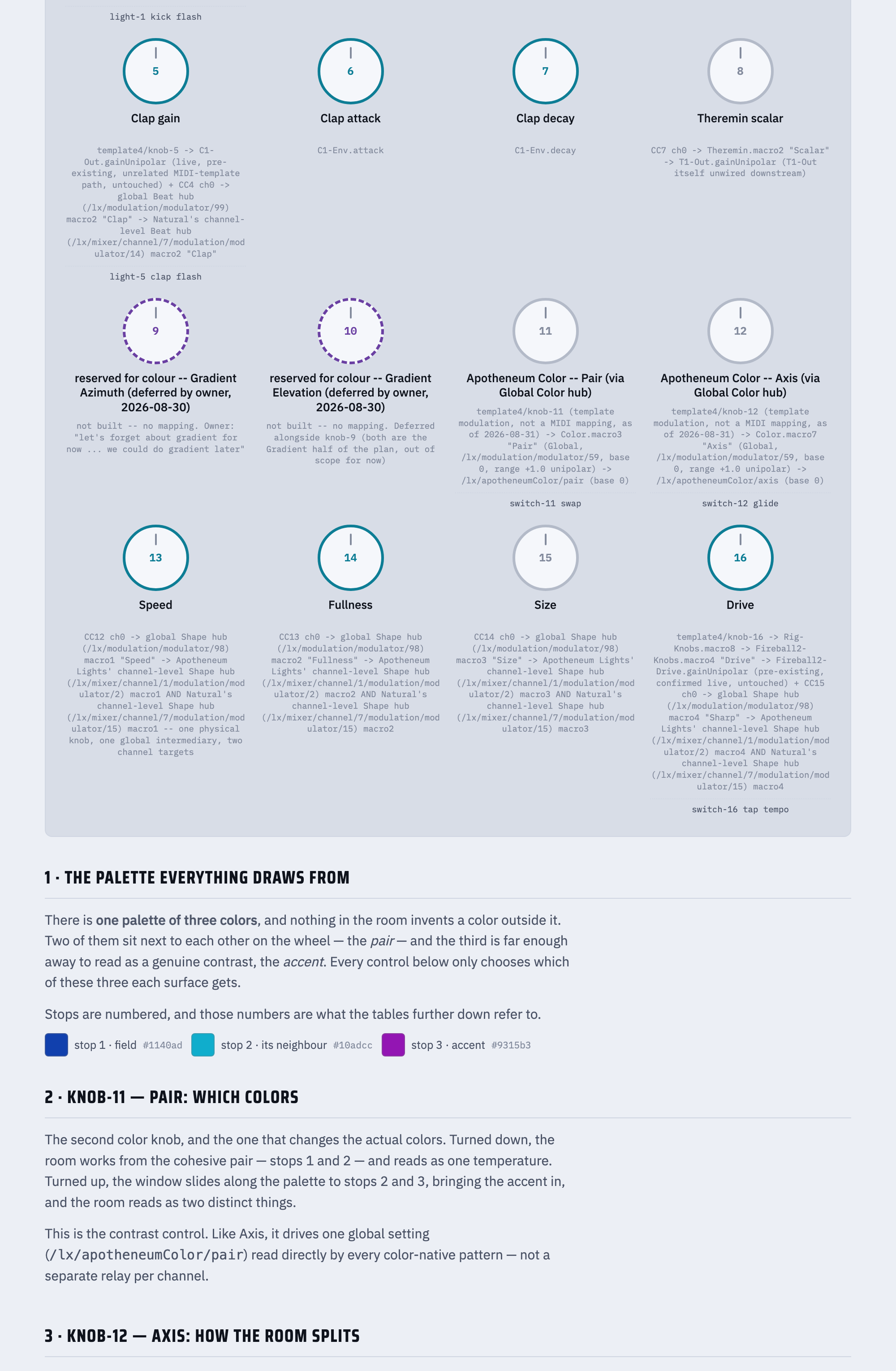
Here's an example of using Claude to design a mapping and create an artifact to review and refer to when doing further programming. It's a nice visual output that can also be printed out as a guide, and it maintains itself.
Here are a few example prompts that show how this API can be used. They're adapted from real sessions with this tool. The main use case here was Chromatik, through the Chromatik MCP server, but this could be generalized to other tools.
An Akai MPD218 was already mapped in another project, and this project had the Twister instead.
Well, let's take a step back. Do you know how all the buttons and knobs were mapped? Because it would be nice now to map a different controller in the same way.
MPD218 (bank A only) — knobs A1-A4 are the "beat modulation intensity" knobs you
remembered (kick/clap gain), A5-A6 do the same for melody. Pads: A9/A10 are
dual-purpose (fire a kick/clap and recall a pattern/swatch), A11/A12 cycle
pattern/palette, A13/A14 live-edit the kick/clap rhythm, A16 fires the Drop.
…
Straight MIDI mapping works fine for this and is simpler. The one thing the
template class gets you that ad-hoc mapping doesn't: bidirectional feedback — it
sends CC/note back to the device so its LED rings track the current parameter
value. For a beat-intensity knob that's mostly hands-on anyway, that's a
nice-to-have, not essential.
…
Done. The knob side is fully wired. Try turning the top-left 6 encoders on the
Twister — they should move KickGain1/ClapGain1/KickGain2/ClapGain2/MelodyGain1/
MelodyGain2 exactly like the MPD218's A1-A6 knobs did.
The simple one was enough. By hand that would have been an evening of cross-referencing CC numbers.
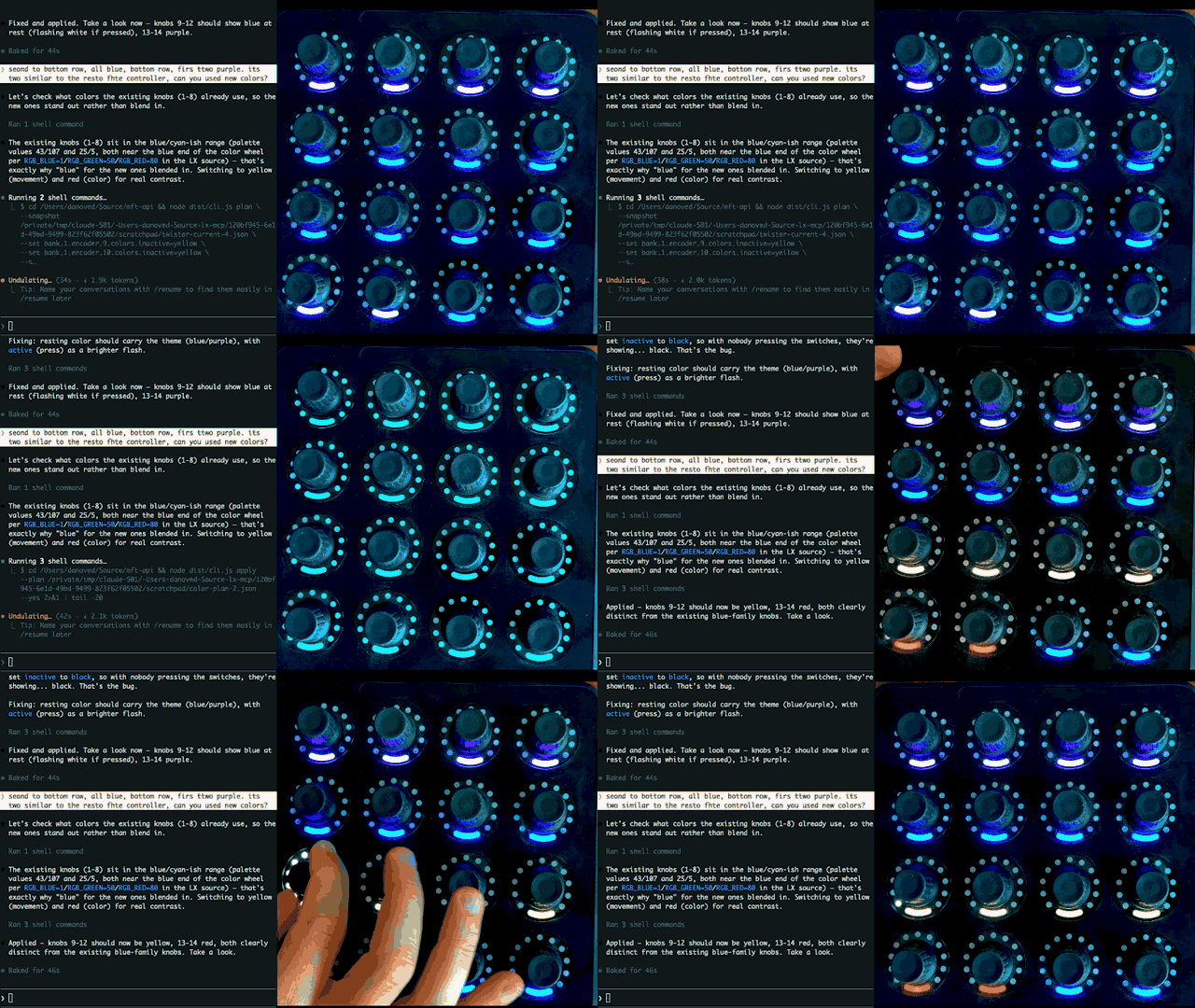
This is the exchange in the video at the top.
Second-to-bottom row all blue, bottom row first two purple. It's too similar to the rest of the controller, can you use new colors?
Let's check what colors the existing knobs (1-8) already use, so the new ones
stand out rather than blend in.

The existing knobs (1-8) sit in the blue/cyan-ish range … — that's exactly why
"blue" for the new ones blended in. Switching to yellow (movement) and red
(color) for real contrast.

Applied — knobs 9-12 should now be yellow, 13-14 red, both clearly distinct from
the existing blue-family knobs. Take a look.
Three more: tap tempo, a button that won't pulse, and a dark bank
Can we make the bottom-right button of the controller tap tempo?
Switch-16 is confirmed free in all three scopes. Wiring it to the tempo tap.

Now verifying encoder 16's switch is still momentary on the hardware — a toggle
would only fire on alternate presses, which would break tap.

Done — bottom-right button (encoder 16) now taps tempo:

  Switch-16 ──trigger──> /lx/tempo/tap

One thing you need to know before you rely on it: the tempo clockSource is
currently MIDI, not Int — it's at 133.2 bpm following an external MIDI clock.
Under MIDI clock, LX's bpm is read-only, so tap presses will be swallowed and
won't move the tempo. The mapping is correct and will work the moment you switch
clockSource to Int.
The clap trigger's light had just been moved to a new knob, and the knob stayed one color.
It's not pulsing. It's just light blue. It should be pulsing to green too.
This is a Twister hardware LED-color config issue, not an LX wiring issue — the
switch's color scheme (what it shows idle vs. active) is separate persistent
controller state.

Encoder 1/2 (row 1, "green when active / purple when inactive") use
colors.active=43 / colors.inactive=107. Encoder 5 currently has a completely
different palette (active=25, inactive=5), which is why it just looks static
light blue. Setting it to match row 1's convention.

Both changes applied and verified. Encoder 5's switch should now show
light-blue-to-green pulsing on each clap, matching row 1's scheme.
Can you explain the bank switch button? Pressing to the right makes it all dark. The second bank is all black. How can it show colors? How do you get to bank 2 on the MIDI Fighter Twister?
Side-button actions are read-only in the tool, but exporting will tell us
exactly what your buttons are set to do.

  side button 1  →  ccToggle
  side button 2  →  shiftPage2Toggle
  side button 3  →  ccToggle
  side button 4  →  ccToggle
  side button 5  →  shiftPage1Toggle
  side button 6  →  ccToggle

None of the six side buttons is assigned a bank action. So pressing right isn't
failing to switch banks — it was never going to. Four of them just emit a CC, and
two toggle shift pages, which are a different mechanism from banks entirely.
What you're seeing when the grid goes dark is almost certainly a shift page with
nothing configured on it, not bank 2.

Bank 2 isn't dark — you're not reaching it. Your device's encoders for bank 2
are configured and colored: they send CC 16–19 on channel 1, which is exactly
what knob-17…knob-20 in the template listen to.
…
Reassign a side button to a bank action. This has to be done in DJ TechTools'
MIDI Fighter Utility.
Underneath, the Twister side runs through the CLI documented below. Nothing is hidden — the same work by hand looks like this:
mft-config export --out twister-config.json

mft-config plan \
  --snapshot twister-config.json \
  --set bank.1.encoder.9.colors.inactive=yellow \
  --set bank.1.encoder.10.colors.inactive=yellow \
  --set bank.1.encoder.11.colors.inactive=yellow \
  --set bank.1.encoder.12.colors.inactive=yellow \
  --set bank.1.encoder.13.colors.inactive=red \
  --set bank.1.encoder.14.colors.inactive=red \
  --out patch-plan.json

mft-config apply --plan patch-plan.json --yes # disabled: see #14The MIDI Fighter Twister is a banked USB MIDI controller with:
- 16 endless rotary encoders arranged in a 4×4 grid
- a push switch under every encoder
- RGB illumination and an LED position ring for every encoder
- six side buttons for MIDI, shift-page, and bank actions
- four configuration banks, with optional eight-bank firmware support
- separate MIDI mappings and visual behavior for every encoder in every bank
Turning an encoder can send notes, absolute or relative control changes, switch velocity, or mouse-emulation messages. Pressing it can act as a momentary or toggle CC/note button, reset its value, enable fine adjustment, or temporarily select a shifted encoder layer. The colors, indicator style, detent, response, MIDI channel, and MIDI number are independently configurable.
listdiscovers connected Twisters without changing them.exportreads device identity, global settings, and all 64 or 128 banked encoder records into JSON.plancreates an offline, content-addressed description of proposed changes. It does not open MIDI ports.applywrites an eligible plan, saves a backup first, and reads the entire controller back after every changed target to verify the result.
Only apply can write configuration. System commands, reset commands, and
bootloader commands are always blocked. Live writes currently require firmware
2026-07-02 and a strong command-0x05 device identity.
applyis disabled in the current release while the write-path defects in #14 are open. Still outstanding:.mft-state— the backups and the single-use plan journal — resolves against the current working directory, so applying from a different directory consults a different journal; and a plan whose apply died mid-write can be replayed, because only a completed plan is recorded as consumed. The first became easy to hit once the CLI could be installed and run from anywhere.
list,export, andplanare unaffected and are the whole read path. To write settings meanwhile, use the vendor MIDI Fighter Utility.
Requires Node.js 20 or newer. Prebuilt MIDI binaries ship for macOS, Windows, and Linux, so no compiler is needed on common platforms. Nothing below needs a clone, a build, or a local toolchain.
Two commands, and the agent can talk to the controller:
/plugin marketplace add oveddan/mft-api
/plugin install mft-configurator@mft-api
That installs the mft-configurator skill. It reaches the CLI through
npx -y mft-config, so there is no second install step — though a global
install (below) makes every command noticeably faster to start.
Codex has no marketplace, so the skill is fetched directly. This copies only the skill directory:
mkdir -p ~/.codex/skills/mft-configurator && curl -fsSL https://github.com/oveddan/mft-api/archive/refs/heads/main.tar.gz | tar -xz --strip-components=4 -C ~/.codex/skills/mft-configurator mft-api-main/.claude/skills/mft-configuratornpm install -g mft-configOr run it without installing anything:
npx -y mft-config listEvery example below uses mft-config. The old mft-export name still works as
a deprecated alias and will be removed in a future release.
Upgrading, removing, and the details of both agent installs are in docs/agent-skill.md.
Run every command from the same directory. mft-config writes its backups
and its single-use plan journal to .mft-state/ relative to the current working
directory, so switching directories between plan and apply consults a
different journal. Pick a directory and stay in it.
List connected Twisters:
mft-config listExport the only connected device:
mft-config export --out twister-config.jsonIf more than one Twister is connected, use the index shown by list:
mft-config export --device 1 --out twister-config.jsonThe JSON includes the firmware and unit identity, detected bank count, all decoded global and encoder fields, the original raw tag values, and warnings for unknown or incomplete firmware responses.
Each bank contains encoders 1 through 16, numbered left-to-right and
top-to-bottom:
 1   2   3   4
 5   6   7   8
 9  10  11  12
13  14  15  16
A setting path has this form:
bank.<bank>.encoder.<encoder>.<setting>
For example, bank.1.encoder.2.switch.action.code is the push-switch action for
the second knob in the top row of bank 1. Bank and encoder numbers are one-based.
Every physical knob has a rotary encoder and a push switch. Each bank gives that pair an independent configuration.
| Setting path | Values | What it controls |
|---|---|---|
encoder.midiChannel |
1..16 |
MIDI channel used when turning the knob |
encoder.shiftedMidiChannel |
1..16 |
MIDI channel used while the knob's shift layer is active |
encoder.midiNumber |
0..127 |
note or CC number sent by the rotary encoder |
encoder.type.code |
0..5 |
rotary output type; see below |
movement.code |
0..2 |
direct, responsive, or velocity-sensitive response |
switch.midiChannel |
1..16 |
MIDI channel used by the push switch |
switch.midiNumber |
0..127 |
note or CC number sent by the push switch |
switch.action.code |
0..8 |
momentary, toggle, reset, fine, or shift behavior |
colors.active |
name or 0..127 |
RGB color while the switch is active |
colors.inactive |
name or 0..127 |
RGB color while the switch is inactive |
detent.enabled |
true / false |
enables the encoder's detent behavior |
detent.color |
name or 0..127 |
RGB color used at the detent |
indicator.code |
0..3 |
LED-ring display style |
superKnobEnabled |
true / false |
enables the global secondary super-knob range |
| Code | Exported name | Behavior |
|---|---|---|
0 |
note |
sends note messages |
1 |
cc |
sends absolute control-change values |
2 |
relativeEncoder |
sends relative CC values centered around 64 |
3 |
switchVelocityControl |
sends CC values and also adjusts push-switch velocity |
4 |
mouseDrag |
relative encoder mode interpreted as mouse drag by compatible software |
5 |
mouseScroll |
relative encoder mode interpreted as mouse scroll by compatible software |
| Code | Exported name | Behavior |
|---|---|---|
0 |
direct |
normal one-to-one encoder response |
1 |
responsive |
firmware emulation/responsive response |
2 |
velocitySensitive |
faster turns produce larger changes |
| Code | Exported name | Behavior |
|---|---|---|
0 |
ccHold |
sends CC 127 while held and CC 0 when released |
1 |
ccToggle |
alternates CC 127 and 0 on each press |
2 |
noteHold |
sends note-on while held and note-off when released |
3 |
noteToggle |
alternates note-on and note-off on each press |
4 |
resetToZero |
resets the encoder to zero, or its center when detent is enabled |
5 |
resetToMaximum |
resets the encoder to 127, or its center when detent is enabled |
6 |
fineAdjust |
makes turning finer while the switch is held |
7 |
shiftHold |
uses the shifted encoder layer while held |
8 |
shiftToggle |
toggles the shifted encoder layer on and off |
| Code | Exported name |
|---|---|
0 |
dot |
1 |
bar |
2 |
blendedBar |
3 |
spreadBar |
The six physical side buttons share the global MIDI channel. They can be banked or unbanked, and the export identifies each button's action:
| Codes | Actions |
|---|---|
0..3 |
ccHold, ccToggle, noteHold, noteToggle |
4..7 |
shiftPage1Hold, shiftPage2Hold, shiftPage1Toggle, shiftPage2Toggle |
8..10 |
bankUp, bankDown, bankSelect |
11..18 |
direct selection of bank1 through bank8 |
19 |
cycleBank |
global.sideButtonsBanked can currently be changed by the planner. Individual
side-button actions are exported but are intentionally read-only until their
write path is added and tested.
| Setting path | Values | Meaning |
|---|---|---|
global.midiChannel |
1..16 |
system and side-button MIDI channel |
global.sideButtonsBanked |
true / false |
give side buttons bank-specific MIDI numbers |
global.superKnob.start |
0..127 |
start of the secondary super-knob range |
global.superKnob.end |
0..127 |
end of the secondary super-knob range |
global.brightness.rgb |
0..127 |
RGB illumination brightness |
global.brightness.indicator |
0..127 |
LED-ring brightness |
global.colorMap.code |
0 / 1 |
classic or MF64 color palette |
global.animationChannels.encoder |
1..16 |
MIDI feedback channel for encoder-ring animation |
global.animationChannels.switch |
1..16 |
MIDI feedback channel for switch-color animation |
global.sleep.timeoutIndex |
0..7 |
timeout: 0, 1, 3, 5, 10, 20, 30, or 60 minutes |
global.sleep.animation.code |
0 / 1 |
lights off or rainbow-wave sleep animation |
global.bankAnimationsEnabled |
true / false |
enables bank-change animations |
The export also reports all six side-button actions and preserves every raw global tag, including fields that are not yet writable.
Colors can be supplied as palette indices from 0 through 127. The planner
also accepts these names for the palette recorded in the snapshot:
- Classic:
off,black,blue,green,yellow,red,magenta,purple,white - MF64:
off,black,white,red,orange,yellow,green,teal,blue,purple,magenta,pink
Do not change global.colorMap.code and use named colors in the same plan: color
names are resolved using the palette in the input snapshot. Export a fresh
snapshot after changing palettes, then plan the color changes.
Changes use a deliberate three-step workflow: export a fresh snapshot, create and inspect an offline plan, then explicitly apply it. Plans expire after 15 minutes and are bound to the snapshot hash, firmware version, and device ID.
The third step is disabled in this release — see the note under What this
tool does. The recipes below still work through plan,
which is offline and never opens a MIDI port; only the final apply refuses.
mft-config export --out twister-config.json

mft-config plan \
  --snapshot twister-config.json \
  --set bank.1.encoder.1.colors.active=green \
  --set bank.1.encoder.1.colors.inactive=purple \
  --set bank.1.encoder.2.colors.active=green \
  --set bank.1.encoder.2.colors.inactive=purple \
  --set bank.1.encoder.3.colors.active=green \
  --set bank.1.encoder.3.colors.inactive=purple \
  --set bank.1.encoder.4.colors.active=green \
  --set bank.1.encoder.4.colors.inactive=purple \
  --out patch-plan.json

mft-config apply --plan patch-plan.json --yes # disabled: see #14Code 1 is ccToggle:
mft-config export --out twister-config.json

mft-config plan \
  --snapshot twister-config.json \
  --set bank.1.encoder.1.switch.action.code=1 \
  --set bank.1.encoder.2.switch.action.code=1 \
  --out patch-plan.json

mft-config apply --plan patch-plan.json --yes # disabled: see #14This makes bank 2, encoder 5 send CC 20 on channel 3 when turned, and a momentary CC 40 on channel 4 when pressed:
mft-config export --out twister-config.json

mft-config plan \
  --snapshot twister-config.json \
  --set bank.2.encoder.5.encoder.type.code=1 \
  --set bank.2.encoder.5.encoder.midiChannel=3 \
  --set bank.2.encoder.5.encoder.midiNumber=20 \
  --set bank.2.encoder.5.switch.action.code=0 \
  --set bank.2.encoder.5.switch.midiChannel=4 \
  --set bank.2.encoder.5.switch.midiNumber=40 \
  --out patch-plan.json

mft-config apply --plan patch-plan.json --yes # disabled: see #14mft-config export --out twister-config.json
mft-config plan \
--snapshot twister-config.json \
--set bank.3.encoder.9.movement.code=2 \
--set bank.3.encoder.9.indicator.code=3 \
--set bank.3.encoder.9.detent.enabled=true \
--set bank.3.encoder.9.detent.color=red \
--out patch-plan.json
mft-config apply --plan patch-plan.json --yes # disabled: see #14mft-config export --out twister-config.json
mft-config plan \
--snapshot twister-config.json \
--set global.brightness.rgb=96 \
--set global.brightness.indicator=80 \
--set global.sleep.timeoutIndex=4 \
--set global.sleep.animation.code=0 \
--out patch-plan.json
mft-config apply --plan patch-plan.json --yes # disabled: see #14Timeout index 4 means 10 minutes; sleep animation code 0 turns the lights
off.
Before sending any configuration frame, apply:
- validates the plan hash and expiry;
- discovers the controller again and checks its identity and firmware;
- takes a fresh complete snapshot and rejects stale expected values;
- saves a timestamped JSON backup under
.mft-state/backups/; - writes targets sequentially without automatic retries;
- reads the full configuration after every target and compares it with the expected state; and
- records pending, verified, failed, or unknown outcomes in an append-only journal.
Completed plans are single-use.
Write to a controller from one process at a time. Nothing enforces this — a lock would bring its own failure modes for what is an edge case on a single-user desk device.
Do not rely on the stale-value check to catch an overlap. Every write carries the whole record, rebuilt from the snapshot that writer read, so if two applies both export before either writes, the second one reverts the first's changes — and because each verifies against its own expectation, both report success and nothing records that a change was lost. Close the vendor MIDI Fighter Utility before writing from here, too.
See docs/write-safety.md for protocol-level details
and remaining limitations.
The protocol implementation is based on the official DJ TechTools MIDI Fighter Twister firmware.
The exporter uses Universal MIDI Identity for discovery, command 0x05 for the
2026 device ID, command 0x02 for globals, and command 0x04/subcommand 0x01
for encoder bulk pulls. It detects four versus eight banks with a non-mutating
encoder-tag probe and then reads all 64 or 128 encoder records sequentially.
- Command
0x05sends unencoded production-signature bytes. If a byte has its high bit set, the response is not valid MIDI SysEx. On macOS the exporter attempts to recover the identifier from the USB descriptor serial. - Saved four-bank sequencer slots are not exposed by a firmware SysEx pull and cannot be exported.
- Runtime LED state, the current bank, and current encoder values are not persistent configuration and are not included.
- Individual side-button actions are read-only in the current planner.
- Restore is not exposed as a command yet. Backups are retained under
.mft-state/backups/for a future confirmed restore workflow.
Working on the tool itself, rather than using it:
git clone https://github.com/oveddan/mft-api.git
cd mft-api
pnpm install
pnpm run check
pnpm run build compiles to dist/, and node dist/cli.js is then equivalent
to the installed mft-config command. pnpm pack produces the publishable
tarball and runs the full check first.
MFT_UNSAFE_APPLY=1 lifts the apply block so the write path can be exercised
against real hardware while #14
is open. It is for developing this tool, not for getting work done — the defects
it steps around are real, and it is deliberately absent from the agent skill.
On Linux you need the ALSA development package required by RtMidi if you are building the native dependency from source rather than using its prebuilds.
Publishing is manual. Bump the version in package.json, merge it, then run
the Release workflow from the Actions tab. Nothing reaches npm without
someone choosing to send it.
The workflow refuses a version that is already published, so a forgotten bump
fails immediately instead of part-way through. prepack runs the full check
before anything uploads, and the released commit is tagged v<version> only
after the publish succeeds. Authentication is npm trusted publishing, so there
is no token stored in the repository — it has to be enabled once on npmjs.com,
as .github/workflows/release.yml describes.
This project is licensed under the MIT License. See the LICENSE file for the full text.