
HiveMind is shared memory for your AI agents: a fact one agent writes on one machine is there for the next agent and the next machine, with no server in between.
Free and open source under the AGPL-3.0. Alpha: the agent contract (today 4.2, hv version) still changes between minor versions.
curl -fsSL https://raw.githubusercontent.com/projectmentor/hive-mind/main/scripts/installer/install.sh | bash
hive-mind install
./hv remember "The payments API rate-limits at 100 req/s" --tags api,payments
./hv search "payments"
On a second machine: run hive-mind invite on the first, paste the line it prints into hive-mind install on the second, run the same search, see the same fact.
A markdown handoff travels only if someone copies it. Mem0 and the stock MCP memory server keep memory for an application, usually with a service in the middle. HiveMind keeps the agents' own notes on your own machines and leaves a disagreement visible.



Website: hivemind.projectmentor.org ·
Docs: docs/ · For developers: hivemind.projectmentor.org/dev ·
Security: SECURITY.md · Changes: CHANGELOG.md · Best practices: docs/WORKING_TOGETHER.md · Current agent contract: 4.2 (hv version)
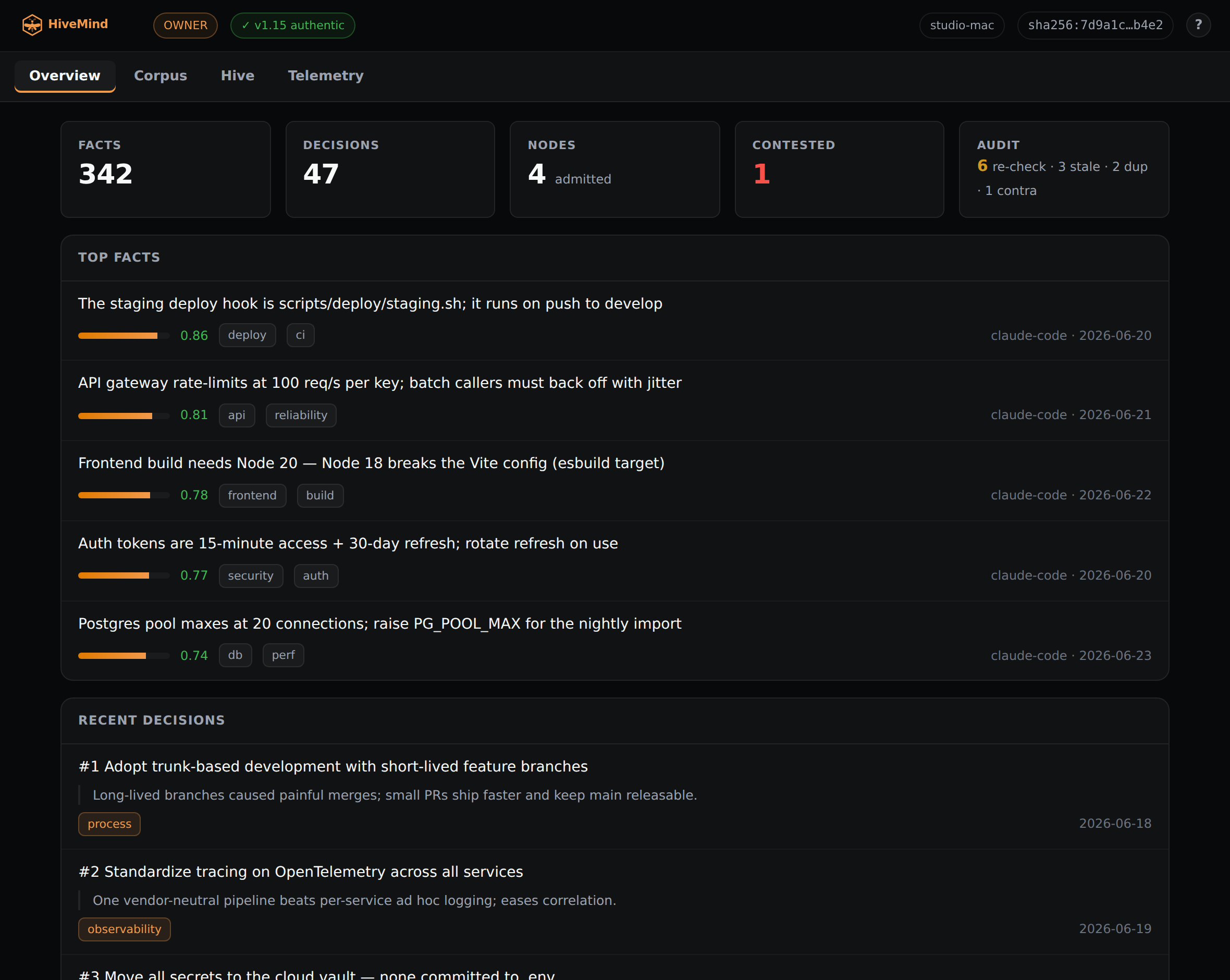
The HiveMind dashboard, hdash dash. Watch the
intro video on the site.
HiveMind gives your AI agents a shared hive. They read it and write in it. Old lines stay. A fact earns confidence, which means trust, when different agents agree on their own. An agent cannot raise that trust by repeating itself. A decision can later get a score from what happened after you made it. Each device keeps the whole hive. The devices copy new lines to each other over Tailscale, a private network between your devices.
Pinecone, Weaviate, LlamaIndex, and LangGraph help one program search a pile of text. HiveMind keeps the notes your agents share, and a record of who agreed.
- Copies itself. When one agent learns something, the other devices get a copy. They talk over Tailscale, a private network. They send only the new notes.
- Trust is earned. A fact becomes more trusted when different agents agree on their own.
Saying it again does not help. Agents on one device count for less than agents on
different devices. A new device can read. It can add notes after you admit it.
You admit it with
hive-mind group admit. If two notes disagree, you see both. - No boss device. Every device keeps the full hive. The notes only grow. They fit together when the devices meet again. The owner is the person who says who may write. If that owner key is lost, the devices you already admitted can pick a new owner.
- Learns from what happened. A decision can name the facts it used. When you write down how that decision turned out, the decision gets an outcome score. Those facts get a utility score. An agent can hint that a note is important. The score rises when other agents point at it. A guess is an idea. An idea is not a fact until other agents agree.
- Works offline. An agent keeps going with no network. The new notes join the rest when the device is online again.
- Search stays on your device.
hv searchlooks through the notes on that machine. You can sort by trust, by importance, by utility, or by how new the note is. The search does not call out to the internet. - Little to run. You do not set up a database or a cloud account. After the devices are in sync, one device's hive is the whole memory. A backup is a copy of the files.
- You can look back. Every fact says who wrote it and when. Old lines stay in the hive.
- Works with agents you already have. Claude Code, Hermes, and Claude Desktop
(through a local MCP server). Any agent that can run a command can use
hv.
Several AI agents can share one project. Give each agent one job, or the same agent will grade their own homework.
You are the owner. You say what you want, and you say yes or no on big changes. The planner writes the plan before anyone builds. The builder builds only after that plan is agreed. The checker reads the plan and the finished work, and does not build. On this project those agents are Fable, Opus, and Grok. You can use other names. Keep the split.
You do not need to code, and you do not need to learn GitHub. GitHub is the website that stores the project and the notes. A terminal is a window for typed commands. Ask the builder to install HiveMind and to tell you if the health check passed.
The full setup, the words to paste into each chat, and the order of work are in
docs/WORKING_TOGETHER.md.
That page is written in plain words.
On Android (Termux), Linux, macOS, or a WSL terminal on Windows 11, run:
curl -fsSL https://raw.githubusercontent.com/projectmentor/hive-mind/main/scripts/installer/install.sh | bash
hive-mind install
The installer will:
- Install Tailscale (used for syncing between machines) and authenticate it
- Install Python dependencies
- Clone this repo to
~/projects/hive-mind - Look for hives on your tailnet and ask whether to join one or start your own. On Android,
paste the line printed by
hive-mind inviteon a device that is already in the hive. First machine? Just press Enter to start a new hive; you become its owner. - Initialise the local database
- Install and start the sync daemon under your OS's service manager (systemd on Linux/WSL, launchd on macOS, termux-services/runit on Android)
- Wire the Hermes memory plugin (if Hermes is installed)
- Wire Claude Code, the
hive-memoryskill and its hooks (if Claude Code is installed)
- Android (Termux), Linux (native), macOS, or Windows 11 with WSL2 (with systemd enabled). The daemon runs under each platform's supervisor: systemd on Linux/WSL, launchd on macOS, termux-services/runit on Android (plus Termux:Boot for start-on-reboot).
- Internet access (for the install and git clone)
- Tailscale only if you want multiple machines to sync. The installer sets it up for
you (inside WSL on Windows; on macOS install the app or
brew install tailscale). On Android Tailscale is the VPN app — install and connect it from the Play Store/F-Droid; the installer can't manage it from Termux. It is not needed on the Windows host. A single-machine setup needs no Tailscale at all — there are no peers to reach.
Android (Termux) setup notes
# In Termux (install it from F-Droid, not the Play Store build):
pkg install python git
curl -fsSL https://raw.githubusercontent.com/projectmentor/hive-mind/main/scripts/installer/install.sh | bash
hive-mind install
The installer adds termux-services (runit) to keep the daemon alive while Termux runs. For
start-on-reboot, install the Termux:Boot app from F-Droid, open it once, and disable
battery optimisation for Termux + Termux:Boot so Android Doze doesn't freeze the daemon.
Connect the Tailscale Android app before syncing. A phone behind Tailscale's userspace VPN
can't accept inbound connections, but it doesn't need to: it converges by syncing outbound
every 5 minutes.
Joining an existing hive from the phone. Android has no tailscale CLI (Tailscale is the
app), so the installer can't auto-discover hives on the tailnet. Instead, on a device that's
already in the hive run hive-mind invite — it prints one line (that device's Tailscale
address). Paste it when the phone's hive-mind install asks for a hive address. You only need
one node to join; everything else syncs from there. Then admit the phone from the owner:
hive-mind group admit <phone-device-id> --principal <you>.
Enable systemd in WSL (if it isn't already)
sudo bash -c 'echo -e "[boot]\nsystemd=true" >> /etc/wsl.conf'
# Then, from a Windows terminal:
wsl --shutdown
# Reopen WSL and proceed./hv remember "The payments API rate-limits at 100 req/s" --tags api,payments
./hv search "payments"
./hv decide "Use AGPL for the core" --rationale "keeps the dual-license option open" --tags licensing
./hv decide "Ship on Friday" --informed h:3f9a1c0b2d # name the facts the decision relied on
./hv remember "The Friday release went out clean" --outcome-of h:7c01d2e9aa --polarity 1
./hv propose "Slow builds correlate with the new cache" # a hypothesis, not a fact
./hv remember "The cache cut build time" --supports h:3f9a1c0b2d
./hv decide --revoke h:7c01d2e9aa --rationale "The Friday ship slipped"
hive-mind unforget h:9a2b3c4d5e --reason "That forget was a mistake" # owner only
./hv stats
hdash dash # open the read-only web dashboard (the hdash module: facts, decisions, peers) in your browser
./hv doctor # health check: integrity, crypto, sync, authorization, trust drift, agent hooks, sync-bind, daemon-code, peer-address, forget-authz (--fix self-heals)
./hv sync now # manual sync to all peersThe dashboard (hdash dash) is a read-only web view of your hive: an overview, the corpus (facts
and decisions, searchable, filterable by tag, sortable by confidence, importance, utility, or
recency), your devices and their health, and telemetry. Since 3.1 it is the
hdash module, served at
http://127.0.0.1:9896/, so open it on a device that runs HiveMind — including an Android phone
running it in Termux. To look at another device, pick it in the dashboard: your own daemon fetches
that device's data with a signed request. Nothing is exposed to the public internet.
Most of the time your agents call hv for you. Full reference:
docs/CLI_REFERENCE.md.
| Command | Description |
|---|---|
hive-mind install |
Full device setup from scratch |
hive-mind status |
Show device health and peer sync state |
hive-mind invite |
Print the one line a new device pastes into hive-mind install to join this hive |
hive-mind uninstall |
Remove HiveMind from this device (--keep-hive preserves your journal + keys; --keep-identity preserves only this device's identity, so a reinstall needs no re-admit; --yes skips the confirmation prompt) |
hive-mind group |
Owner only: admit, revoke, deny, change or purge devices (hv group list shows the roster) |
hive-mind module |
Install, list, configure, update and remove modules (install, list, config, status, update, remove; add and quota too) |
hive-mind update |
Pull latest and restart the daemon (auto-heals after a force-push / history rewrite) |
hive-mind reset |
Recover a wedged install: force-align code to origin + rebuild + restart + verify. Keeps your Hive data (journal, keys, identity). -y skips the prompt. |
- Journal (
journal/YYYY-MM-DD.jsonl) — an append-only event log. This is the source of truth. Each entry carries a device id, per-node sequence, type, payload, a hash chain, and a signature. A node identifies by an Ed25519 device key (not a hostname), and entries are signed and verified on sync, so a peer cannot forge another node's identity to inflate confidence. - SQLite (
store.db) — a derived index (WAL + FTS5) rebuilt from the journal on any node. - Merkle index — per-node chunk hashes for efficient delta sync: only missing entries move.
- Sync daemon — a stdlib HTTP server on
:9876that syncs with peers (every 5 minutes, or on demand). No leader, no central broker. The tailnet is the transport; the trust root is each device's key and the owner key. Sync reads are signed by an admitted device (hv sync auth; seedocs/SYNC_API.md), and the daemon binds the Tailscale address (never all interfaces), caps request bodies, times out slow reads, bounds concurrent requests, and rate-limits per peer, so a single misbehaving peer can't exhaust a node. - Capsules — share secrets (API keys, tokens) as encrypt-to-device capsules: a secret sealed
so only the devices you've admitted can open it. Each recipient's key is derived from that
device's signed identity, so a capsule can never be sealed to a key a device hasn't proven it
holds. See
hv capsule. - Confidence model — a fact's confidence is derived from independent corroboration, never
declared by the agent that wrote it. It's a governed projection: agreement across distinct
devices counts most, multiple agents on one device are discounted, only owner-admitted
devices count, and agreement among one principal's own machines is capped. Governance (owner,
admitted devices, tunable parameters) lives in owner-signed journal entries, so every device
computes the same confidence. The owner runs the membership lifecycle with
hive-mind group(admit, revoke, deny, change, purge);hv group listshows the roster. The owner key is recoverable, not a dead end: back it up off-device or escrow it in the hive (hive-mind owner export/escrow), and hand it off to a new key by nomination or transfer (hive-mind owner nominate/claim/transfer). If it is lost outright with no backup, admitted devices can elect a successor by quorum once the owner goes dark (hive-mind config set, thenhv owner propose-election/vote); a live owner is never unseated, since any owner act (includinghive-mind owner heartbeat) resets the dead-man timer. Seehv owneranddocs/INTERNALS.md. - Links and learning — relationships between entries (a decision that replaces another, a
correction, what a decision relied on, an outcome) are signed
linkentries. A link from a device that is neither the owner nor the author of its target can add evidence but can never hide or replace anything. Outcomes score decisions; utility and importance are learned from links. Seedocs/INTERNALS.md.
Deeper reading: docs/INTERNALS.md,
docs/SYNC_API.md, docs/HV_ARCHITECTURE.md (the two
planes, hv and hive-mind), docs/MODULES.md (how to write a module),
docs/history/P2P_DESIGN.md (the original
sync design, kept as history), the
continual-learning design behind contract
1.19–1.20, how several agents share one project in
docs/WORKING_TOGETHER.md, and for security SECURITY.md,
docs/THREAT_MODEL.md — what HiveMind defends against, and what it
assumes — and docs/ADVISORIES.md.
Integrating an agent? See docs/AGENT_INTEGRATION.md — a
runtime-agnostic spec each agent uses to wire itself to the hive (and keep itself current). One
brain (hv), one spec, no hand-maintained per-agent adapters.
- Claude Code — a skill (
integrations/claude-code/) lets Claude Code read and write the hive directly. - Hermes — if Hermes Agent is installed, the
installer wires the memory plugin. Every
memory()call is mirrored to the hive in the background (it never blocks a turn), and the agent gets the same tools as the MCP server:hive_search,hive_remember(outcomes, corrections, support or contradiction),hive_decide(with what informed it) andhive_propose. Manual setup:hermes config set memory.provider hive-mind. - Claude Desktop (MCP) — a local stdio MCP server (
integrations/mcp/) exposes the hive to Claude Desktop, so it reads and writes your shared memory with no copy-paste. - Any CLI agent — if it can run a shell command, it can use
hv.
A module is a signed add-on that gives HiveMind a new ability without changing the core. It is its own process,
with its own device key and its own write quota, and it talks to the hive only on loopback, through /v1, never
through the owner key.
A module is a git repository with a signed manifest (module.json). Under module contract 1 the manifest names
every file by digest and declares the module's trust tier (trusted or confined), its typed per-module config
schema, and the commands the core runs for its status and health. One idempotent command installs, updates or leaves
alone:
hive-mind module install <name> --from <repo>Trust. The publisher signs the manifest, and that key is shown and pinned on first use (or you pass --publisher).
The HiveMind release key never signs a module. The owner then admits the module's device. On a machine without the
owner key, install stages the tree and prints the owner's admit line; running it again after that admit has synced
finishes the install. A confined module runs in a sandbox that can write only its own key directory, and
a node can lower any module to confined. Nothing is installed until the signed tree checks out.
Modules run on Linux with a systemd user manager. The developer guide is docs/MODULES.md: the
manifest, signing, the config schema, the module API and a worked example. The route reference is
docs/MODULE_API.md.
- hwatch keeps a team of agents working without anyone polling: it watches GitHub and the hive, routes addressed posts to agent seats and launches their sessions. Overview.
- hconfig puts every setting on a node in one place, with its schema, its current value, where the value came from and who may change it. hive-mind-config.
- hdash shows your hive in a browser, read-only: the facts and decisions, your devices and their health. hive-mind-dash.
- hcns wakes a session within a second of a new hive entry by carrying short events between processes and nodes, so nothing has to poll. Overview.
Run the installer on each machine. On Linux, macOS, and WSL it finds your hive on the tailnet;
otherwise paste the line printed by hive-mind invite on a device already in the hive. The owner
then admits the new device (hive-mind group admit). Each WSL instance is its own machine on the
tailnet, with its own Tailscale IP (not the Windows host's).
cd ~/projects/hive-mind
./hv sync now    # pull from all peers
./hv stats       # confirm the journals converged
Each device can run HiveMind under its own OS account: devices are known by their device keys and
principals, never by OS user, and every path is per account. What is not supported is two OS
users running separate hives on the same machine (not planned): the sync daemon (9876) and the module API
(9886) listen on fixed default ports, so the second hive's daemons cannot bind them. See
One hive per machine.
Sync runs over HTTP on port 9876 and needs no SSH. If you also want to administer
one node from another (run git, systemctl, or hv on a peer), that uses
Tailscale SSH, which needs an accept rule in your tailnet SSH ACL. See
Remote administration for
the policy and the common failure modes.
The source is open to read, audit, fork, and self-host. Contributions are welcome on a best-effort, solo-maintainer basis. Please read CONTRIBUTING.md first. Code contributions require a one-time CLA, automated on your pull request.
Questions or ideas? Start a Discussion.
HiveMind is licensed under the GNU Affero General Public License v3.0 (see LICENSE). You are free to use, modify, and self-host it; if you run a modified version as a network service, you must make your source available under the same terms. The copyright holder (Certified Project Management, LLC, d/b/a ProjectMentor) also reserves the right to offer a separate commercial license.
HiveMind is free and open source. If it helps you, you can help keep it alive:
- ❤️ GitHub Sponsors
- ☕ Ko-fi
- 🥤 Buy Me a Coffee
Built by ProjectMentor. HiveMind by ProjectMentor, a project of Certified Project Management, LLC. Need custom development or consulting on multi-agent systems? Reach out at hello@projectmentor.org.