


A cross-platform python based utility to download courses from acloud.guru for personal offline use.
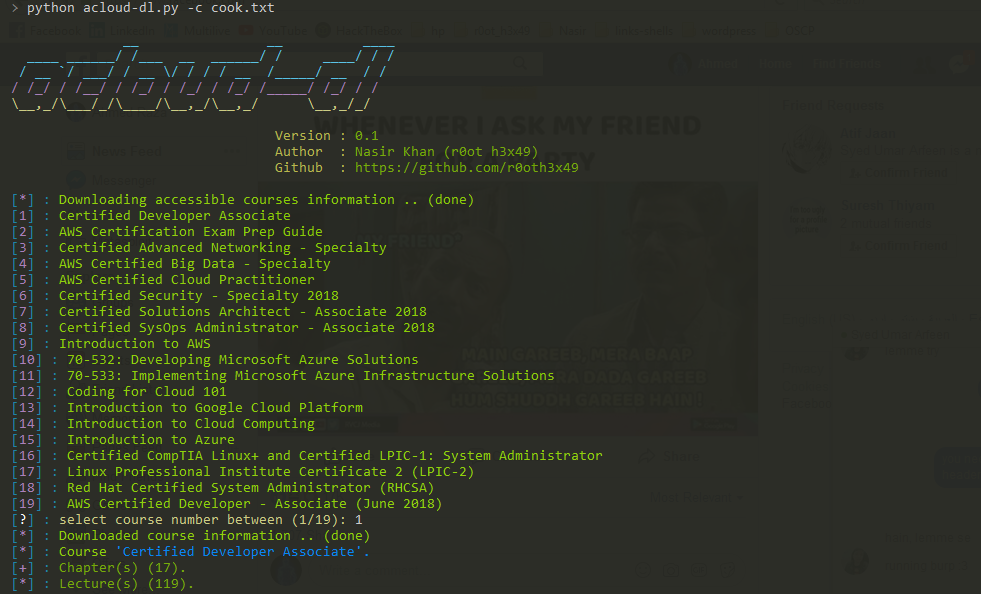
- You should run this with python3 (latest preferred), In future updates i will completely remove python2 support.
- Resume capability for a course video.
- Download subtitle for a lecture.
- Download all courses without any prompt (option:
-a / --all). - List down course contents and video resolution, suggest the best resolution (option:
-i / --info). - Download lecture(s) requested resolution (option:
-q / --quality). - Download course to user requested path (option:
-o / --output). - Authentication using cookies (option:
-c / --cookies). - Download only courses that haven't been downloaded (option:
-n / --new). - Rename course lecture video/audio files extensions to defined by user (option:
-e / --extension).
- Login to your acloud.guru account via browser.
- Once you are logged in right click on page the search for option called Inspect Element and click on that.
- Under that look for Network Tab and click on that. Under that Network Tab click on Requests type XHR .
- Now click on Browse Courses in the acloud.guru navbar and refresh the page you will see some requests under Network Tab.
- Right click on any of the Requests which links to acloud.guru. Simply copy Request Headers and save to text file.
- Done run the acloud-dl against that text file it will start downloading the course.
- Python 3 (3.9 tested, 3.11 broken)
- Python
pip - Python module
requests - Python module
colorama - Python module
unidecode - Python module
six - Python module
requests[security]orpyOpenSSL
pip install -r requirements.txt
- Windows 7/8/8.1/10
- Kali linux (2017.2)
- Ubuntu-LTS (64-bit) (tested with super user)
- Mac OSX 10.9.5 (tested with super user)
You can download the latest version of acloud-dl by cloning the GitHub repository.
git clone https://github.com/r0oth3x49/acloud-dl.git
Steps before running acloud-dl.py which will list down courses you started
- Login to your acloud.guru account via browser.
- Click on Browse Courses.
- Move mouse to the course you want to download.
- On mouseover you will see a button "GET" click on that.
- It Will redirect to the course there is another button "START THIS COURSE" click on that.
- Done, Now you can use the below usage.
Download a course
python acloud-dl.py -c file_containing_cookie.txt
Download all courses
python acloud-dl.py -c file_containing_cookie.txt -a
Download courses by custom range
python acloud-dl.py -c file_containing_cookie.txt
[1] : Advanced AWS CloudFormation
[2] : AWS Certified Security - Specialty 2020
[3] : AWS ECS - Scaling Docker
[4] : AWS Certified Advanced Networking - Specialty 2020
[5] : LPIC-1_ System Administrator
[6] : Mastering AWS CloudFormation
[?] : provide range (e.g:- 1-3,6) or select course number between (1/6/all/range): 2,4-6
Download course with specific resolution
python acloud-dl.py -c file_containing_cookie.txt -q 720
Download course to a specific location
python acloud-dl.py -c file_containing_cookie.txt -o "/path/to/directory/"
Download course with specific resolution to a specific location
python acloud-dl.py -c file_containing_cookie.txt -q 720 -o "/path/to/directory/"
List down course information
python acloud-dl.py -c file_containing_cookie.txt --info
Author: Nasir khan (r0ot h3x49)

usage: acloud-dl.py [-h] [-v] [-c] [-o] [-q] [-i] [-a] [-n] [-e]

A cross-platform python based utility to download courses from acloud.guru for
personal offline use.

General:
  -h, --help       Shows the help.
  -v, --version    Shows the version.

Authentication:
  -c , --cookies   Cookies to authenticate with.

Advance:
  -o , --output    Download to specific directory.
  -q , --quality   Download specific video quality.
  -i, --info       List all lectures with available resolution.
  -a, --all        Download all courses without any prompt (default: false).
  -n, --new        Download only courses that have not already been downloaded (default: false).
  -e, --extension  Rename course lecture video/audio files extension to defined by user.

Example:
  python acloud-dl.py -c cookies.txt
The app can be executed within a container to avoid dependency issues. Clone the repository then execute following commands from the root location of the project.
Build Image
docker build -t acloud-dl .
Run Container
Assuming cookie file called cookie.txt and stored in root of project:
docker run -v ${PWD}:/opt/app \
  -u $(id -u ${USER}):$(id -g ${USER}) \
  -it --rm \
  acloud-dl -c cookie.txt
extra options or arguments can be appended as normal.
Please note, if you're using the --output option to specify a specific output directory then ensure that the container has access to these volumes (use additional docker bind-mounts as needed)