Markdown to Print (md2p)
md2p is a small command-line utility for rendering Markdown files to the terminal, using ANSI (or nroff) escape sequences for styling. It is intended as a lightweight helper to preview Markdown content without leaving the terminal.
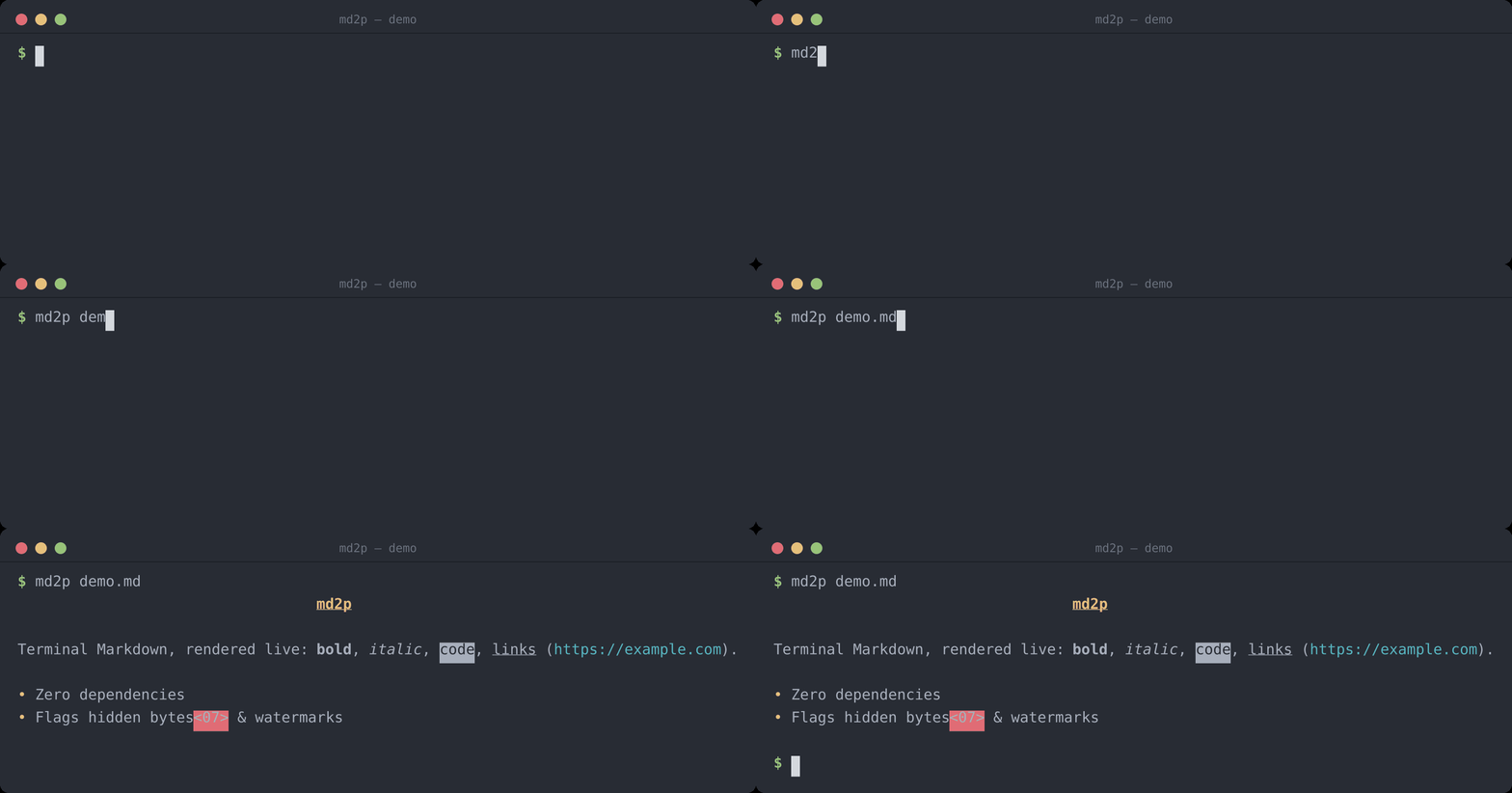
Current version: 1.0.2
- Renders to stdout with ANSI colour/style escapes, or nroff overstrike sequences via
--nroff - Simple CLI usage with a Markdown file path, or via stdin
- Supported Markdown elements:
- ATX headers
#–######(each level styled distinctly) and setext headers (===/---) - Horizontal rules, blockquotes, fenced code blocks (
```/~~~) - Ordered and unordered lists, including nested indentation
- Tables, rendered as bordered ASCII grids
- Inline formatting: bold, italic, bold+italic, inline code, links, images
- ATX headers
- Non-printable bytes and hidden Unicode variation selectors (a common vector for invisible watermarks/payloads) are never passed through silently — each is replaced with a visible hex marker (see example below)
- Input is capped at 50 MB and raw ANSI escapes in the source file are stripped before rendering, so a malicious Markdown file can't inject terminal escape sequences
- Ensure you have Python 3.8+ installed.
- (Optional) Create and activate a virtual environment:
python3 -m venv .venv
source .venv/bin/activate
There are no external dependencies required by default.
pip install md2p
# or, without installing into an environment:
uvx md2p README.md
Linux (user install)
To install md2p for your user on Linux, use the included install.sh to copy the script to ~/.local/bin (or your XDG_BIN_HOME):
chmod +x install.sh
./install.sh
# or specify destination explicitly
./install.sh --dest "$HOME/.local/bin"
Uninstall with:
./install.sh --uninstallEnsure your user bin directory is in PATH, for example add to your shell profile:
export PATH="$HOME/.local/bin:$PATH"Run the script with a Markdown file path:
python3 md2p.py path/to/file.mdThis prints the processed Markdown to stdout. Redirect output to a file if desired:
python3 md2p.py README.md > out.txtYou can also pipe Markdown in on stdin:
cat README.md | md2p-v,--version— print the version and exit.-n,--nroff— emit nroff overstrike sequences (X⌫Xfor bold,_⌫Xfor underline) instead of ANSI colour escapes. This is for viewers that interpret the classic nroff bold/underline convention but not ANSI SGR colours — most notably Midnight Commander's internal file viewer innroffmode. Colours, dim and italic are mapped onto the two available styles (bold / underline).
To preview Markdown with formatting inside mc's internal viewer (F3), add the
following to ~/.config/mc/mc.ext.ini:
[markdown]
Regex=\.(md|mkd|mdown|markdown)$
RegexIgnoreCase=true
View=%view{nroff} md2p --nroff %f
%view{nroff} tells the internal viewer to interpret the overstrike sequences
produced by md2p --nroff. For full ANSI colour instead, drop %view and pipe
through a colour-capable pager: View=md2p %f | less -R.
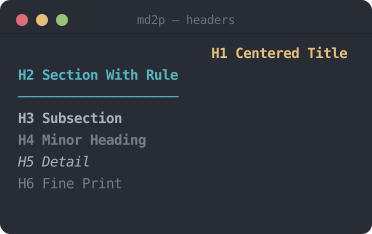
Each ATX header level (# through ######) gets distinct styling — H1 is centred, bold, underlined; H2 gets an underline rule; H3–H6 step down through bold, dim, italic, and plain dim text.
Source Markdown:
# H1 Centered Title
## H2 Section With Rule
### H3 Subsection
#### H4 Minor Heading
##### H5 Detail
###### H6 Fine Print
Terminal output:
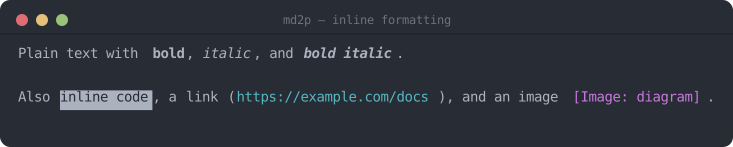
Bold, italic, bold+italic, inline code, links, and images are all styled distinctly.
Source Markdown:
Plain text with **bold**, *italic*, and ***bold italic***.
Also `inline code`, a [link](https://example.com/docs), and an image .Terminal output:
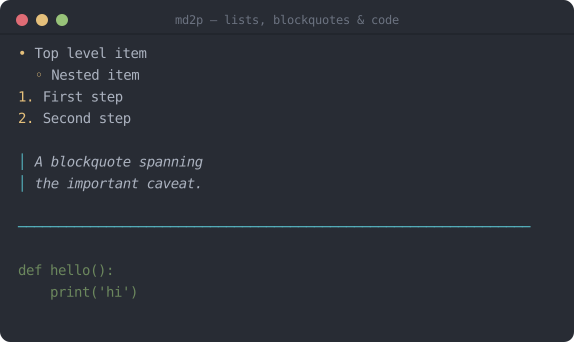
Source Markdown:
- Top level item
  - Nested item
1. First step
2. Second step

> A blockquote spanning
> the important caveat.

---

```
def hello():
    print('hi')
```
Terminal output:
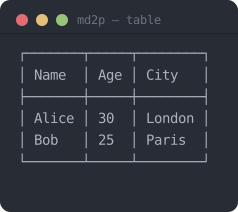
Tables are rendered as bordered ASCII grids with aligned columns.
Source Markdown:
| Name  | Age | City   |
|-------|-----|--------|
| Alice | 30  | London |
| Bob   | 25  | Paris  |
Terminal output:
Example: Non-printable Characters & Hidden Watermarks
Non-printable characters (anything that is not a printable Unicode character, newline, carriage return, tab, or space) are never passed through silently. Each such character is replaced inline with a red-background hex marker so it is immediately visible. Single-byte characters are shown as <HH>, and multi-byte UTF-8 sequences as <H0,H1,...>.
Source Markdown (paragraph contains a raw BEL U+0007 and a NULL U+0000):
This line has a bell \x07 and a null \x00 byte inside.
Terminal output:
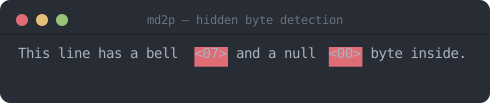
The surrounding text is printed normally; only the offending bytes are highlighted, making it easy to spot encoding errors or accidental binary content in Markdown source files.
This also catches Unicode variation selectors (U+FE00–U+FE0F and U+E0100–U+E01EF). Python's str.isprintable() reports these as printable even though they render with zero visible width, and they are the block most commonly used today to smuggle hidden bytes — watermarks or payloads — onto an otherwise ordinary-looking character. md2p checks for them explicitly and flags each one with the same red-background hex marker, so text carrying a hidden variation-selector payload is not silently invisible in the rendered output.
Run the existing tests with pytest:
pytest -qContributions and bug reports are welcome. Open an issue or submit a pull request.
This project is licensed under the MIT License — see the LICENSE file for details.