

Understand what matters! Know what to do!
From complicated documents to clear explanations and actionable next steps.


Bureaucratic documents are everywhere.
Contracts, notices and forms often hide important information behind complex language and lengthy details.
Most people simply want to know:
- What does it mean?
- What do I need to do?
- What happens if I do nothing?
Understanding this can be crucial before signing or responding to a document.
What if a document could explain itself?

I work in real estate, where documents are part of everyday work.
Contracts, notices, forms and other documents are often filled with legal language and details that matter.
Over time, I noticed something simple: the person receiving the document often just wants to understand it.
That observation became the starting point for Clarify AI.
Clarify AI turns a document into a clearer, more actionable explanation.
| Feature | What it does |
|---|---|
| Text input | Analyze text directly without uploading a file |
| Image input | Extract text from document images using OCR |
| AI explanation | Transform complex content into a clearer explanation |
| Actionable next steps | Highlight what the user may need to do next |
| Language support | Return the explanation in the document's original language or English |
| Simplification levels | Choose a quick summary, a clear and detailed explanation, or an in-depth one |
| Simple interface | Focus on understanding the document, not navigating a complicated tool |
┌─────────────────────┐
│      Document       │
│                     │
│  Complex language   │
│  Legal references   │
│  Important details  │
└──────────┬──────────┘
           │
           ▼
┌─────────────────────┐
│     Clarify AI      │
│                     │
│  OCR + AI analysis  │
└──────────┬──────────┘
           │
           ▼
┌─────────────────────┐
│      Clarity        │
│                     │
│  What it means      │
│  What to do next    │
└─────────────────────┘
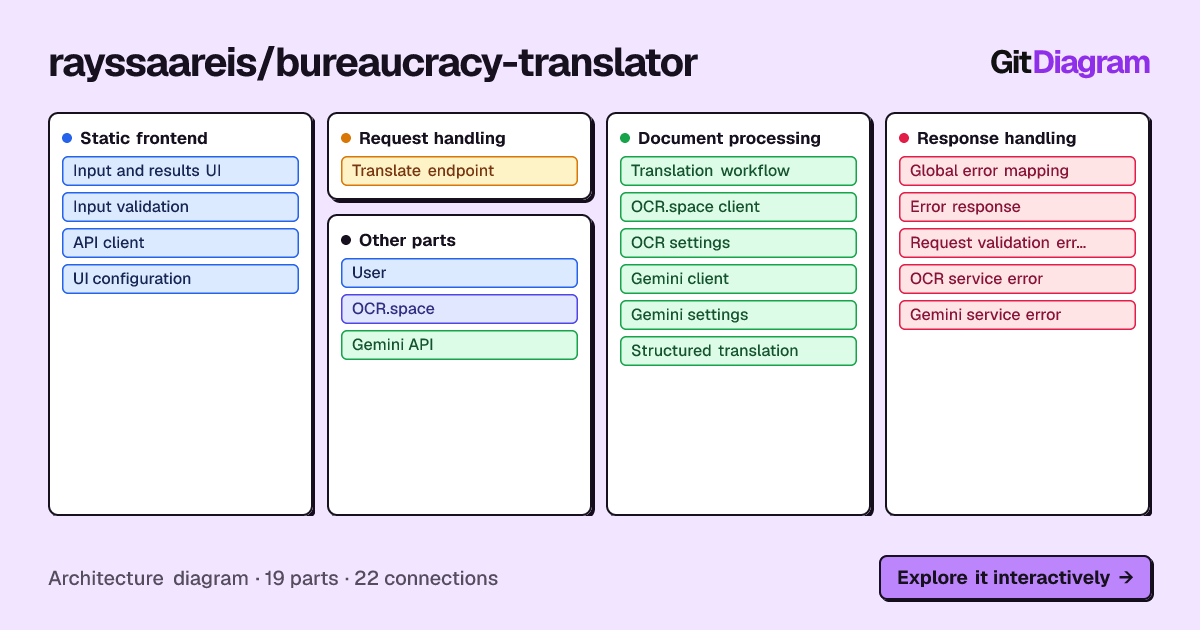
Behind the interface, Clarify AI receives the user's input, processes the document when necessary, sends the relevant content through the AI pipeline, and returns a structured response containing an explanation and next steps.
User
  ↓
Frontend
  ↓
POST /api/translate
  ↓
Controller
  ↓
Service
  ↓
OCR / Gemini
  ↓
Response
The frontend communicates with the backend through a REST API.
The backend validates the request, determines whether the input is text or an image, processes the content when necessary, orchestrates the external services, and returns the final result to the frontend.
┌──────────────────────────────┐
│           Frontend           │
│                              │
│  HTML + CSS + JavaScript     │
└──────────────┬───────────────┘
               │
               │ HTTP
               ▼
┌──────────────────────────────┐
│        Spring Boot API       │
│                              │
│        Controller            │
│             ↓                │
│          Service             │
│             ↓                │
│      External Clients        │
└────────────┬───────┬─────────┘
             │       │
             ▼       ▼
        OCR.space  Gemini
             │       │
             └───┬───┘
                 ▼
              Response
The backend follows a layered structure so that HTTP handling, business logic and external integrations remain separated.
| Layer | Technology |
|---|---|
| Language | Java 21 |
| Backend | Spring Boot 3 |
| Build | Gradle |
| API | REST |
| Frontend | HTML, CSS, JavaScript |
| OCR | OCR.space API |
| AI | Google Gemini API |
| Testing | JUnit + Spring Boot Test |
For image-based documents, Clarify AI uses a two-stage processing pipeline:
Image
  ↓
OCR.space
  ↓
Extracted text
  ↓
Gemini
  ↓
Explanation + Next Steps
For text input, the OCR step is skipped:
Text
  ↓
Gemini
  ↓
Explanation + Next Steps
This keeps the processing path appropriate to the type of input received by the API.
Clarify AI exposes its own REST endpoint:
POST /api/translateThe endpoint accepts exactly one input type:
textimage
It also accepts:
targetLanguage = original | en
simplificationLevel = QUICK_SIMPLE | CLEAR_DETAILED | IN_DEPTH   (optional, default: CLEAR_DETAILED)
An invalid simplificationLevel returns 400. Requests that omit it keep working and use CLEAR_DETAILED.
curl -X POST http://localhost:8080/api/translate \
  -F "text=Your document text here" \
  -F "targetLanguage=original" \
-F "simplificationLevel=QUICK_SIMPLE"curl -X POST http://localhost:8080/api/translate \
-F "image=@document.png" \
-F "targetLanguage=original"{
"explanation": "A clear explanation of what the document means.",
"nextSteps": [
"Review the requested information.",
"Respond before the indicated deadline."
]
}{
"error": "Description of the error."
}The project includes automated tests covering the main backend behavior and external client integrations.
Run the complete test suite with:
./gradlew clean testOn Windows:
.\gradlew.bat clean testThe test suite covers request validation, controller behavior, OCR integration behavior, Gemini integration behavior, malformed responses, HTTP failures and network failures.

Before running Clarify AI locally, you need:
- Java 21
- A Gemini API key
- An OCR.space API key
- Internet access for the external API integrations
The application uses external AI and OCR services, so their respective API access and usage limits apply.
Clone the repository:
git clone https://github.com/rayssaareis/bureaucracy-translator.git
cd bureaucracy-translator
Configure the required environment variables.
[Environment]::SetEnvironmentVariable("GEMINI_API_KEY", "your-gemini-key", "User")
[Environment]::SetEnvironmentVariable("OCR_SPACE_API_KEY", "your-ocr-space-key", "User")
Restart the terminal after configuring the variables.
You can verify that the variables are available with:
$env:GEMINI_API_KEY
$env:OCR_SPACE_API_KEY
Do not commit API keys or other secrets to the repository.
Start the application with:
./gradlew bootRunOn Windows:
.\gradlew.bat bootRunThen open:
http://localhost:8080
Run the complete automated test suite:
./gradlew clean testOn Windows:
.\gradlew.bat clean test
bureaucracy-translator/
│
├── docs/
│
├── gradle/
│   └── wrapper/
│
├── src/
│   ├── main/
│   │   ├── java/
│   │   │   └── com/
│   │   │       └── bureaucracytranslator/
│   │   │           ├── client/
│   │   │           ├── config/
│   │   │           ├── controller/
│   │   │           ├── dto/
│   │   │           ├── exception/
│   │   │           └── service/
│   │   │
│   │   └── resources/
│   │       ├── static/
│   │       │   ├── assets/
│   │       │   ├── css/
│   │       │   ├── js/
│   │       │   └── index.html
│   │       └── application.properties
│   │
│   └── test/
│       └── java/
│
├── gradlew
├── gradlew.bat
└── README.md
The frontend is responsible for the user experience and communicating with the API.
The backend owns validation, processing and integration with external services.
Business logic is kept outside the controller so that HTTP concerns do not become tightly coupled to document processing.
OCR and Gemini communication are handled through dedicated clients.
This makes external service behavior easier to test and keeps the core application logic independent from implementation details.
Instead of returning an unstructured block of generated text, the API returns:
{
  "explanation": "...",
  "nextSteps": []
}
This gives the frontend predictable data to render and keeps the distinction between understanding the document and deciding what to do next.
API credentials are provided through environment variables rather than being stored directly in source code.
Potential future improvements include:
- Support for additional document formats
- More advanced document structure detection
- Improved multilingual support
- Conversation history for document analysis
- More granular explanations of specific sections
- Additional accessibility improvements
- More robust observability and monitoring
Clarify AI was built as a hackathon project with a simple goal:
Make complex information easier to understand and act on.
Built as a hackathon project. <3
Clarify AI is a hackathon project created by Rayssa Reis.
The project is shared for educational and portfolio purposes. No open-source license has been applied at this time.