Yet another JSON library for C++. This one targets C++23 for developer-friendliness, a reasonably fast parser, and no dependencies beyond a compliant compiler and standard library. If you love Doxygen, check out the documentation.
Features include (but are not necessarily limited to):
- Simple
- A
valueshould not feel terribly different from a C++ Standard Library container - Write valid JSON with
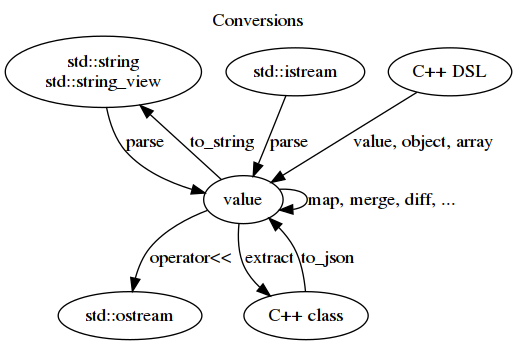
operator<< - Simple JSON parsing with
parse - Read JSON Lines and other runs of concatenated documents with
documents - Reasonable error messages when parsing fails
- Full support for Unicode-filled JSON (encoded in UTF-8 in C++)
- A
- Efficient
- Minimal overhead to store values (a
valueis 16 bytes on a 64-bit platform) - No-throw move semantics wherever possible
- Minimal overhead to store values (a
- Serialization/Deserialization
- Deserialize a C++ type straight from JSON text or a stream, or from a
value, usingdeserialize<T> - Serialize a C++ type straight to JSON text using
serialize, or into avalueusingto_json
- Deserialize a C++ type straight from JSON text or a stream, or from a
- Safe
- In the best case, illegal code should fail to compile
- An illegal action should throw an exception
- Almost all utility functions have a strong exception guarantee
- Stable
- Worry less about upgrading -- the API and ABI will not change out from under you
- Documented
- Consumable by human beings
- Answers questions you might actually ask

The library is a CMake package. The quickest way in is FetchContent, which builds it as part of your own project:
include(FetchContent)
FetchContent_Declare(jsonv
                     GIT_REPOSITORY https://github.com/tgockel/json-voorhees.git
                     GIT_TAG        v2.0.0
                     FIND_PACKAGE_ARGS
                    )
FetchContent_MakeAvailable(jsonv)

target_link_libraries(your-target PRIVATE jsonv::jsonv)
FIND_PACKAGE_ARGS (CMake 3.24) uses a copy already installed on the system when there is one and clones the tag
otherwise; leave it out to always build from source. To link only against an installed copy, from a package or
cmake --install:
find_package(jsonv CONFIG REQUIRED)
target_link_libraries(your-target PRIVATE jsonv::jsonv)
Either way, jsonv::jsonv carries everything a consumer needs: the include directory, the C++23 requirement (a
target linking it is compiled as C++23 if it was not already), and JSONV_SO=0 when the library is static. The
library has no dependencies of its own. examples/fetchcontent is a complete project built from the snippet above.
Outside CMake, the install provides a pkg-config file: pkg-config --cflags --libs libjsonv. Both it and the
CMake package files find the installation relative to themselves, so an installed tree can be moved. The NuGet package
is a Release build of the static library; link it from a Release or RelWithDebInfo configuration, since MSVC will
not link Debug objects against a library built with the release runtime.
JSON Voorhees uses CMake 3.23 or newer. On Linux or macOS, with cmake, a C++23 compiler
and a build tool installed:
cmake -S . -B build
cmake --build build --parallel
ctest --test-dir build --output-on-failure
sudo cmake --install build
The tests are built by default for a stand-alone build, and cmake --build build --target check runs them without
going through CTest. CMakePresets.json holds the usual developer configurations, each in its own build-<preset>
directory:
cmake --workflow --preset dev        # Debug with tests
cmake --workflow --preset release    # Release with tests and link-time optimization
On Windows, use CMake with Visual Studio:
cmake -S . -B build -G "Visual Studio 18 2026" -A x64
cmake --build build --config Release --parallel
ctest --test-dir build -C Release --output-on-failure
The build options, each settable with -D:
| Option | Default | Meaning |
|---|---|---|
BUILD_SHARED_LIBS |
ON except on Windows |
Build jsonv as a shared rather than a static library |
JSONV_BUILD_TESTS |
ON when top-level |
Build jsonv-tests and register it with CTest |
JSONV_BUILD_BENCHMARK |
OFF |
Build json-benchmark (suites: JSONV_BENCHMARK_*) |
JSONV_BUILD_FUZZERS |
OFF |
Build the libFuzzer targets (Clang only) |
JSONV_INSTALL |
ON when top-level |
Generate install rules, and CPack configuration when top-level |
JSONV_LTO |
ON when top-level and not sanitizing |
Link-time optimization in Release and RelWithDebInfo |
JSONV_SANITIZE |
OFF |
AddressSanitizer and UndefinedBehaviorSanitizer |
JSONV_COVERAGE |
OFF |
gcov instrumentation |
JSONV_RELEASE_WITH_DEBUG_SYMBOLS |
OFF |
-ggdb in Release builds |
When another project pulls the library in with add_subdirectory or FetchContent, the "when top-level" defaults
are off and the library type follows that project's BUILD_SHARED_LIBS.
CPack can create native binary packages from the CMake install rules. The package target builds everything, so
the tests are switched off. On Linux:
cmake -S . -B build-package -G Ninja -DCMAKE_BUILD_TYPE=Release -DJSONV_BUILD_TESTS=OFF -DCMAKE_INSTALL_PREFIX=/usr
cmake --build build-package --target package --parallel
This builds .deb and .rpm packages when the corresponding platform tools are installed.
To build only one format, configure with -DCPACK_GENERATOR=DEB or -DCPACK_GENERATOR=RPM.
On Windows, CPack builds a native NuGet package:
cmake -S . -B build-package -G "Visual Studio 18 2026" -A x64 -DJSONV_BUILD_TESTS=OFF -DCPACK_GENERATOR=NuGet
cmake --build build-package --config Release --target package --parallel
On macOS, CPack builds a native installer package:
cmake -S . -B build-package -G Ninja -DCMAKE_BUILD_TYPE=Release -DJSONV_BUILD_TESTS=OFF -DCMAKE_INSTALL_PREFIX=/usr/local -DCPACK_GENERATOR=productbuild
cmake --build build-package --target package --parallelLicensed under the Apache License, Version 2.0 (the "License"); you may not use this file except in compliance with the License. You may obtain a copy of the License at
http://www.apache.org/licenses/LICENSE-2.0
Unless required by applicable law or agreed to in writing, software distributed under the License is distributed on an "AS IS" BASIS, WITHOUT WARRANTIES OR CONDITIONS OF ANY KIND, either express or implied. See the License for the specific language governing permissions and limitations under the License.
JSON Voorhees 2.0 requires a C++23-capable compiler and standard library.
The support contract is the C++23 language mode, not a fixed compiler-version matrix.
As examples, modern GCC and Clang toolchains should be built with --std=c++23.
For MSVC, use stable /std:c++23 support when it is available for your toolset; MSVC
/std:c++23preview is treated as experimental.
The language mode alone is not always sufficient, since the library also uses C++23 library
features. std::expected requires libstdc++ 12 or libc++ 16; with libstdc++ it additionally
requires Clang 19, because Clang 18 reports __cpp_concepts as 201907 while libstdc++ gates
<expected> on 202002. On Linux that makes GCC 12 and Clang 19 the practical floor.
Like every software system ever, JSON Voorhees describes versions in 3 part
semantic versioning: ${major}.${minor}.${patch}.
The version components changing have very specific meanings:
major: There are no guarantees whatsoever across major releases.minor: For a given minor release, all code is forward-compatible source-code compliant. That means code written against version 1.1 can be recompiled against version 1.4 and continue to work. No guarantees are made for going backwards (version 1.4 might have added new functions).patch: Code is ABI-compatible across patch. Library A built against JSON Voorhees 1.2.4 should be able to pass ajsonv::valueto library B built against JSON Voorhees 1.2.9. Any change to publicly-visible data structures or calling conventions will correspond to a bump in the minor version.
The preceding statements are not true of a pre-release, whose version carries a suffix such as -rc.1
(JSONV_VERSION_PRERELEASE in jsonv/config.hpp).
These are allowed to do whatever they feel like before a release.
A pre-release has the numbers of the release it leads up to: find_package(jsonv 2.0) and JSONV_VERSION treat
2.0.0-rc.1 as 2.0.0, and its shared library has the same name and SONAME.
The deb and rpm packages and libjsonv.pc spell it 2.0.0~rc.1, which those tools sort before 2.0.0.
When developing code, follow this simple workflow to determine which version components need to change:
- Will this change force users to change their source code?
If yes, bump the
majorversion. - Will this change force users to recompile to continue to work?
If yes, bump the
minorversion. - Will this change the behavior in any way?
If yes, bump the
patchversion. - Did I only change comments or rearrange code positioning (indentation, etc)? If yes, you do not need to update any part of the version.
- Did I miss something? Yes. Go back to #1 and try again.
This library assumes you really love UTF-8. When parsing JSON, this library happily assumes all sequences of bytes from C++ are UTF-8 encoded strings; it assumes you also want UTF-8 encoded strings when converting from JSON in C++ land; and it assumes the non-ASCII contents of a source string should be treated as UTF-8.
On output, the system takes the "safe" route of using the numeric encoding for dealing with
non-ASCII std::strings.
For example, the std::string for "Travis Göckel" ("Travis G\xc3\xb6ckel") will be encoded in
JSON as "Travis G\u00f6ckel", despite the fact that the character 'ö' is the most basic of the
Unicode Basic Multilingual Planes.
This is generally considered the most compatible option, as (hopefully) every transport mechanism
can gracefully transmit ASCII character sequences without molestation.
The drawback to this route is a needlessly lengthened resultant encoding if all components of the
pipeline gracefully deal with UTF-8.
If they do, jsonv::ostream_encoder::ensure_ascii(false) writes well-formed UTF-8 out as it is.
jsonv::serialize(obj) and jsonv::serialize(obj, stream) take the safe route too.
To serialize a C++ object as UTF-8, make the jsonv::ostream_encoder yourself, turn ensure_ascii
off, and jsonv::serialize(obj, writer) into a jsonv::writer over it.
JSON Voorhees was written for a C++ programmer who wants to be productive in this modern world. Ten years ago, that probably meant something, but these days, most of the JSON C++ libraries make JSON types feel like a regular part of the language. Are there modern features? Sure, but this library is not meant to be a gallery of them -- a good API should get out of your way and let you work.
The big difference maker is the a powerful serialization framework for converting from JSON into C++ types and back again. There is an extensible Serialization Builder DSL to help you writing your application. The serialization framework was designed with the modern application in mind -- you will like it or your money back!
The JSON specification only has a number type, whereas this library has kind::integer
and kind::decimal.
Behavior between the two types should be fairly consistent -- comparisons between two different
kinds should behave as you would expect (assuming you expect things like value(1) == value(1.0)
and value(2.0) < value(10)).
If you wish for behavior more like JavaScript, feel free to only use as_decimal().
The reason integer and decimal are not a single type is because of how people tend to use JSON in C++. If you look at projects that consume JSON, they make a distinction between integer and decimal values. Even in specification land, a distinction between the numeric type is pretty normal (for example: Swagger). To ultimately answer the question: integer and decimal are distinct types for the convenience of users.
The JSON specification does not have support for non-finite floating-point numbers like
NaN and infinity.
This means the value defined with object({ { "nan", std::nan("") }, { "infinity", INFINITY } })
to get serialized as { "nan": null, "infinity": null }.
While this seems to constitute a loss of information, not doing this would lead to the encoder
outputting invalid JSON text, which is unacceptable.
If you want to check that there will be no information loss when encoding, use the utility funciton
validate.
Why not throw when encoding?
One could imagine the encoder::encode throwing something like an encode_error instead of
outputting null to the stream.
However, that would make operator<< a potentially-throwing operation, which is extremely uncommon
and would be very surprizing (imagine if you tried to log a value and it threw).
Why not throw when constructing the value?
Instead of waiting for encoding time to do anything about the problem, the library could attack the
issue at the source and throw an exception if someone says value(INFINITY).
This was not chosen as the behavior, because non-finite values are only an issue in the string
representation, which is not a problem if the value is never encoded.
You are free to use this JSON library without parse and encode, so it should not prevent an
action simply because someone might use encode.
If you are looking through the implementation, you will find a ton of places where there are
default cases in switch statements that should be impossible to hit without memory corruption.
This is because it is unclear what should happen when the library detects something like an invalid
kind.
The library could assert, but that seems overbearing when there is a reasonable option to fall
back to.
Alternatively, the library could throw in these cases, but that leads to innocuous-looking
operations like x == y being able to throw, which is somewhat disconcerning.
Not really...