
A distributed ML training platform that pools networked hardware to execute PyTorch training jobs across multiple worker nodes. Submit a job, and the system splits it into shards, assigns each shard to an available worker, trains in parallel, and aggregates the results.
This project was developed by a three-person team for the KiroHacks hackathon. Kiro was used extensively for planning, implementation, debugging, and iteration.
The platform has three components:
- Coordinator — A FastAPI server that manages worker registration, job submission, task scheduling, heartbeat monitoring, metrics aggregation, and checkpoint storage. It uses Supabase (Postgres + Storage) as its backend.
- Worker — A standalone Python agent that registers with the Coordinator, polls for tasks, runs PyTorch training, uploads checkpoints, and reports metrics. Multiple workers can run on different machines.
- Dashboard — A Next.js web UI for monitoring nodes, submitting jobs, and viewing training progress and results in real time.
- Workers register with the Coordinator and begin sending heartbeats.
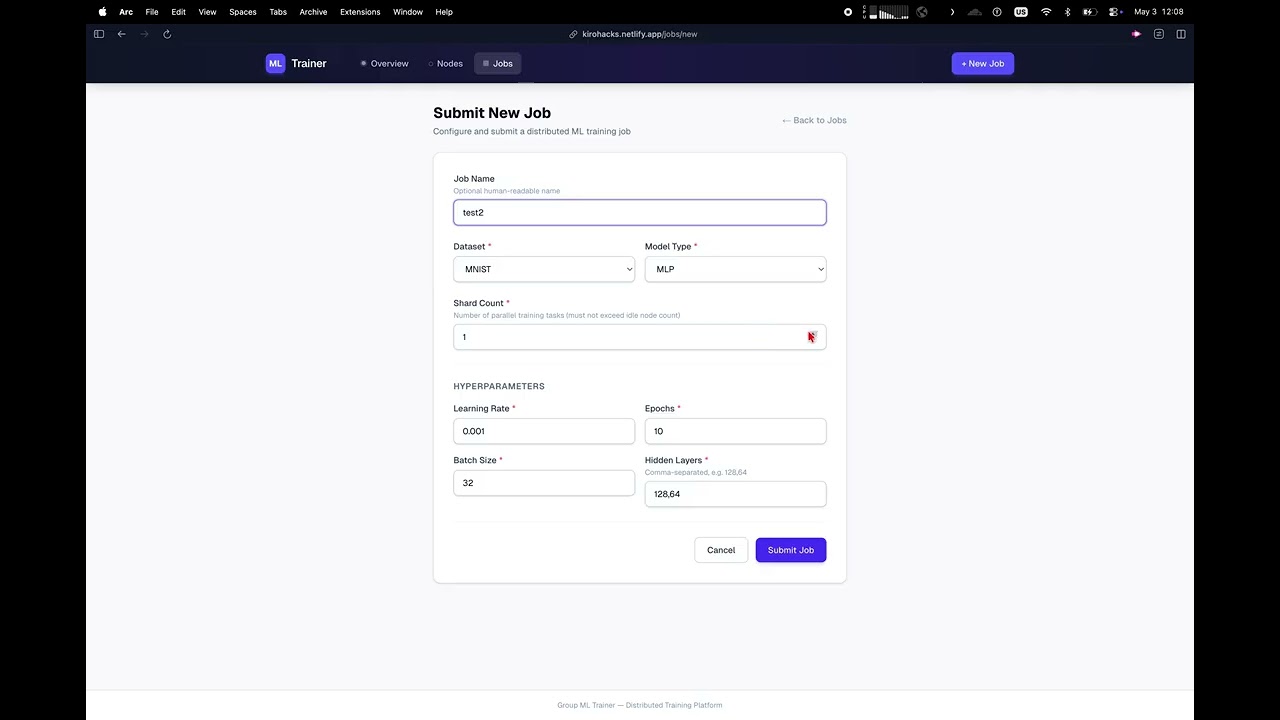
- A user submits a job (via the Dashboard or API) specifying a dataset, model type, hyperparameters, and shard count.
- The Coordinator splits the job into tasks (one per shard) and queues them.
- Workers poll for tasks. When a task is assigned, the worker loads its dataset shard, trains the model, reports per-epoch metrics, uploads the final checkpoint, and marks the task complete.
- Once all tasks finish, the Coordinator aggregates metrics (mean loss, mean accuracy, per-node breakdown) and marks the job as completed.
| Options | |
|---|---|
| Datasets | MNIST, Fashion-MNIST, synthetic |
| Models | MLP (multi-layer perceptron) |
| Hyperparameters | learning_rate, epochs, batch_size, hidden_layers, activation |
- Python 3.11+
- Node.js 18+ (for the Dashboard)
- A Supabase project with Storage enabled
- PyTorch 2.6+ (installed automatically with worker dependencies)
Create a .env file in the project root:
SUPABASE_URL=https://<your-project-ref>.supabase.co
SUPABASE_KEY=<your-service-role-key>
Find the service-role key in your Supabase project under Settings → API → service_role (secret).
Do not commit
.envto version control.
The schema is defined in scripts/bootstrap.sql. It creates five tables (nodes, jobs, tasks, metrics, artifacts) with indexes.
Option A — Supabase SQL Editor:
- Open your Supabase project → SQL Editor
- Paste the contents of
scripts/bootstrap.sql - Click Run
Option B — Supabase CLI:
supabase db push --db-url "postgresql://postgres:<password>@db.<ref>.supabase.co:5432/postgres" < scripts/bootstrap.sqlCreate a private checkpoints bucket in your Supabase project:
- Go to Storage in the Supabase Dashboard
- Click New bucket
- Name it
checkpoints, set it to private
pip install supabase python-dotenv
python scripts/verify_schema.py
This confirms all tables, columns, and the storage bucket are in place.
The platform is deployed and ready to use:
- Dashboard: https://kirohacks.netlify.app
- Coordinator API: https://kirohack-sez-production.up.railway.app
To contribute a machine as a worker node, follow these steps on that machine:
git clone https://github.com/zgoldwyn/kirohack-SEZ.git
cd kirohack-SEZpython3 -m venv .venv
source .venv/bin/activate
pip install -r worker/requirements.txtCOORDINATOR_URL=https://kirohack-sez-production.up.railway.app python -m worker.mainWindows users: Use WSL (Windows Subsystem for Linux) and follow the Linux instructions above.
That's it. The worker will:
- Auto-detect hardware (CPU cores, RAM, disk, GPU if available)
- Register with the Coordinator and receive an auth token
- Send heartbeats every 10 seconds
- Poll for training tasks every 5 seconds
- When assigned a task: load the dataset shard, train, report metrics, upload the checkpoint, and mark the task complete
Your machine will appear on the Nodes page within seconds.
| Variable | Default | Description |
|---|---|---|
COORDINATOR_URL |
http://localhost:8000 |
Coordinator base URL |
WORKER_HEARTBEAT_INTERVAL |
10 |
Seconds between heartbeats |
WORKER_POLL_INTERVAL |
5 |
Seconds between task polls |
WORKER_LOG_LEVEL |
INFO |
Logging level |
- Workers persist credentials to
~/.group-ml-trainer/worker_state.jsonso they reconnect without re-registering after a restart. - If the Coordinator rejects the stored token (401), the state file is deleted automatically. Just restart the worker to re-register.
- You can run multiple workers on the same machine by setting a custom node ID:
COORDINATOR_URL=https://kirohack-sez-production.up.railway.app python -c "import asyncio; from worker.main import Worker; asyncio.run(Worker(node_id='my-node-2').run())"
pip install -r coordinator/requirements.txt
uvicorn coordinator.main:app --reload
The Coordinator starts on http://localhost:8000 by default.
pip install -r worker/requirements.txt
python -m worker.maincd dashboard
npm install
npm run devOpens on http://localhost:3000. The dashboard auto-refreshes every 10 seconds and provides:
- Overview — Live counts of online/idle/busy/offline nodes and queued/running/completed/failed jobs.
- Nodes — Table of all registered workers with hardware info, status, and last heartbeat.
- Jobs — List of all jobs with status, model, dataset, and timestamps. Click a job to see per-task progress, per-epoch metrics, aggregated results, and artifacts.
- New Job — Form to submit a training job with dataset, model, hyperparameters, and shard count.
Set NEXT_PUBLIC_API_URL if the Coordinator is not running on http://localhost:8000.
All worker-facing endpoints require a Authorization: Bearer <token> header (issued at registration). Dashboard endpoints are unauthenticated.
| Method | Path | Description |
|---|---|---|
POST |
/api/nodes/register |
Register a new worker node |
POST |
/api/nodes/heartbeat |
Send a heartbeat (authenticated) |
POST |
/api/jobs |
Submit a training job |
GET |
/api/tasks/poll |
Poll for an available task (authenticated) |
POST |
/api/tasks/{id}/start |
Mark a task as running (authenticated) |
POST |
/api/tasks/{id}/complete |
Mark a task as completed (authenticated) |
POST |
/api/tasks/{id}/fail |
Mark a task as failed (authenticated) |
POST |
/api/tasks/{id}/upload-url |
Get a signed URL for checkpoint upload (authenticated) |
POST |
/api/metrics |
Report per-epoch training metrics (authenticated) |
| Method | Path | Description |
|---|---|---|
GET |
/api/nodes |
List all registered nodes |
GET |
/api/jobs |
List all jobs |
GET |
/api/jobs/{id} |
Job detail with tasks and metrics |
GET |
/api/jobs/{id}/results |
Aggregated metrics and checkpoint paths |
GET |
/api/jobs/{id}/artifacts |
List artifacts for a job |
GET |
/api/monitoring/summary |
System-wide node and job counts |
GET |
/health |
Health check |
curl -X POST http://localhost:8000/api/jobs \
  -H "Content-Type: application/json" \
  -d '{
    "job_name": "mnist-test",
    "dataset_name": "MNIST",
    "model_type": "MLP",
    "shard_count": 2,
    "hyperparameters": {
      "learning_rate": 0.01,
      "epochs": 5,
      "batch_size": 64,
      "hidden_layers": [128, 64]
    }
  }'
The shard_count must not exceed the number of idle workers.
├── coordinator/          # FastAPI Coordinator server
│   ├── main.py           # API routes and app lifecycle
│   ├── db.py             # Supabase PostgREST client
│   ├── auth.py           # Token generation and validation
│   ├── scheduler.py      # Task creation and pull-based assignment
│   ├── aggregator.py     # Metrics aggregation and job completion
│   ├── heartbeat.py      # Background staleness monitor
│   ├── dashboard.py      # Read-only dashboard endpoints
│   ├── config_parser.py  # Job/task config validation
│   ├── storage.py        # Signed upload URL generation
│   ├── models.py         # Pydantic request/response models
│   ├── constants.py      # Enums and supported datasets/models
│   └── logging_config.py # Structured logging setup
├── worker/               # Standalone Worker agent
│   ├── main.py           # Worker lifecycle (register, heartbeat, poll, train)
│   ├── trainer.py        # PyTorch training loop
│   ├── datasets.py       # Dataset loading and shard partitioning
│   ├── models.py         # MLP model definition
│   ├── reporter.py       # HTTP client for Coordinator communication
│   ├── storage.py        # Checkpoint upload via signed URLs
│   ├── config.py         # Task config parsing
│   └── state.py          # Local credential persistence
├── dashboard/            # Next.js web dashboard
│   ├── app/              # App router pages (overview, jobs, nodes)
│   ├── components/       # Shared UI components
│   └── lib/              # API client and TypeScript types
├── scripts/
│   ├── bootstrap.sql     # Database schema DDL
│   └── verify_schema.py  # Schema verification script
└── tests/                # Test suite
pip install pytest
pytest tests/- Pull-based scheduling — Workers poll for tasks rather than receiving pushes. The Coordinator matches queued tasks to idle workers based on resource requirements (RAM, GPU).
- Token auth — Each worker gets a unique token at registration. Tokens are SHA-256 hashed before storage. All worker requests are authenticated via Bearer token.
- Heartbeat monitoring — A background loop checks for stale heartbeats every 10 seconds. Workers silent for 30+ seconds are marked offline, and their in-progress tasks are failed.
- Checkpoint storage — Workers upload checkpoints to Supabase Storage via time-limited signed URLs. Workers never hold direct Supabase credentials.
- Retry with backoff — The worker's HTTP client retries transient failures (503, network errors) with exponential backoff. Auth failures (401) immediately stop the worker.
- State persistence — Workers save credentials locally so they survive restarts without re-registering.