FAQ
:: Target v2.19.5+ ::
SPCPLAY will automatically stop playback to protect your ears and audio equipment in the event of an unexpectedly loud volume.
If you wish to disable this safety feature, please lower the volume in the settings or edit the SPCPLAY.INI file.
EARSAFE  0 : 1
    ⬇️
EARSAFE  0 : 0
:: Target v2.18.0+ ::
You can increase window scale to 150% or 200% by editing SPCPLAY.INI.
SCALE    0 : 100
    ⬇️
SCALE    0 : 150
    or
SCALE    0 : 200
* If SCALE set to 150, text display may be slightly corrupted.
:: Target v2.18.0+ ::
You can change the font by editing SPCPLAY.INI.
Please try specifying the name of a monospaced font.
FONTNAME 3 :
    ⬇️
FONTNAME 3 : Lucida Console
:: Target v2.18.0+ ::
Try editing SPCPLAY.INI to force it to display in English.
LANGUAGE 1 : 0
    ⬇️
LANGUAGE 1 : 2
:: Target v2.18.0+ ::
- Try set to 🟥OFF in the "Settings" - "Expansion Flags" - "SNES Echo/FIR Method".
- Try set to ✅ON in the "Settings" - "Expansion Flags" - "Disable FIR Filter".
- Try set to ✅ON in the "Settings" - "Expansion Flags" - "Disable Echo".
The above steps may work around this problem, but the resulting sound will differ from the actual device.
If this problem does not occur on the actual hardware, or if the song is from a commercial game title, it may be a bug in SPCPLAY.
I would appreciate it if you could report the issue.
:: Target v2.18.0+ ::
- Try set the output to the same as the actual device.
- Try set to 🟥OFF in the "Settings" - "Expansion Flags" - "SNES Echo/FIR Method".
- If this solves the problem, the same issue may occur when playing the song on the actual device.
This is likely due to the limited memory capacity of the SPC700, not your PC. - Try reducing the echo delay, changing the echo address, or relocating the BRR data.
- If this solves the problem, the same issue may occur when playing the song on the actual device.
The above steps may work around this problem, but the resulting sound will differ from the actual device.
If this problem does not occur on the actual hardware, or if the song is from a commercial game title, it may be a bug in SPCPLAY.
I would appreciate it if you could report the issue.
However, please note that SNESAPU is not cycle-perfect.
Therefore, I may be unable to accommodate requests involving timing-related issues, I ask for your understanding in such cases.
The SNES DSP is originally designed for 16-bit audio at 32kHz, and its internal DSP data is stored in the 64KB RAM.
However, some emulators support higher bit depths and sampling rates for high-quality sound reproduction.
To achieve this, a separate sound buffer is allocated independently of the 64KB APU RAM to store the enhanced DSP data.
Similarly, SNESAPU allocates echo memory independently of the APU RAM.
When the "SNES Echo/FIR Method" option is turned ✅ON, SNESAPU mimics the hardware behavior of the DSP overwriting the APU RAM, just like the actual device.
However, the values written to the APU RAM are not actually used for echo processing.
Due to this behavior, the output results may differ slightly from the actual hardware.
[UPDATE] :: Target v2.21.0+ ::
You can now select the numeric font from the "Settings" - "Information Viewer" - "Numeric Font" menu.
| Font type | Sample image |
|---|---|
| Font like analog (presents by OffGao6502) |  |
| Font like 7-segment display |  |
:: Target v2.18.0+ ::
When some channels are muted, the leading silence is not adjusted regardless of your settings.
You can permanently disable this blank time adjustment by editing SPCPLAY.INI.
WAVBLANK 0 : 500
    ⬇️
WAVBLANK 0 : -1
[UPDATE] :: Target v2.21.0+ ::
Malware may be detected by some vendors on VirusTotal, but this is likely a false positive due to AI/heuristic scanning.
For independent developers, these false positives are a persistent challenge.
Currently, false positive detections have been confirmed with the following vendors:
- Bkav Pro (detected:
W32.AIDetectMalware)- Typically, simply rebuilding to change the binary's hash value eliminates false positives.
- McAfee Scanner (detected:
Ti!************, example:Ti!F93C6AC02DC2)- Typically, simply rebuilding to change the binary's hash value eliminates false positives.
- Microsoft (detected:
Trojan:Win32/Wacatac.*!ml)- Rescanning the file on VirusTotal 48 hours after the initial detection often shows that the false positive has been cleared.
- SecureAge (detected:
Malicious)- As a general rule, reporting the false positive to SecureAge is required, and resolution takes at least 72 hours.
Fortunately, some vendors provide a false positive reporting page.
For the STABLE version, I wait for vendor approval after reporting false positives. It typically takes a few days from submitting a false positive report until the results are received, meaning the stable release will be delayed accordingly.
However, for the BETA version, I may release it immediately after reporting without waiting for results. If you are concerned about false positives, please wait until they are resolved or use the stable version.
If you are concerned about using SPCPLAY, I recommend using alternative players that can utilize my improved SNESAPU.DLL.
My primary recommendation is "Kuroneko SPC" (黒猫SPC), as it supports all of SNESAPU's proprietary extension options and has recently added support for English display.
Since the default interface is in Japanese, please follow the steps below to switch the display to English:
- Download Kuroneko SPC, and extract the compressed file.
- Download Lang.ini from here (Right click -> Save link as...), and save to same folder as "KuronekoSPC.exe".
- Run KuronekoSPC.exe, and make sure the display is in English.
* Display in English is supported from version 220806 or later.
The most reliable way is to build the binaries yourself from the source code.
The build method is explained on the following page: How to build
[UPDATE] :: Target v2.21.2+ ::
By default, the sound buffer is set to approximately 130 ms.
Therefore, it will take 130 ms for any configuration changes to actually take effect.
Additionally, prior to v2.21.1, the default was 500 ms.
This behavior prevents audio dropouts when the PC is under heavy load, but may be inconvenient for some purposes.
If you want a faster response, reduce the sound buffer size by editing SPCPLAY.INI.
BUFNUM   2 : 22
    ⬇️
BUFNUM   2 : 4
* If this value is too small, audio dropouts may occur. If you experience sound skipping, increase this value gradually.
* Do not set this to 3 or below, as the system may become unstable.
Modern computers are so powerful that prioritizing low latency is not a problem in most cases.
The following settings render at approximately 60 Hz and provide a balanced latency.
(These values became the default in v2.21.2.)
BUFNUM   2 : 8
BUFTIME  2 : 17
[UPDATE] :: Target v2.21.0+ ::
To create multiple .wav files in a single operation, use the command-line option.
For example, by creating a .bat file with the following content and running it, you can generate output-1.wav through output-8.wav from the input.spc file.
start spcplay.exe
timeout 1
FOR %%I IN (1 2 3 4 5 6 7 8) DO start /wait spcplay.exe -wav -s %%I -o output-%%I.wav input.spc
* (v2.21.3+) The first 2 lines (start, timeout) can be omitted. If omitted, the application will run in CUI mode.
** The method using SPCCMD.EXE is deprecated. Please update SPCPLAY.EXE to v2.21.0 or newer and use the command-line options of SPCPLAY instead. **
[UPDATE] :: Target v2.20.3+ ::
You can change the theme by editing SPCPLAY.INI.
THEME    0 : 0
    ⬇️
THEME    0 : 1
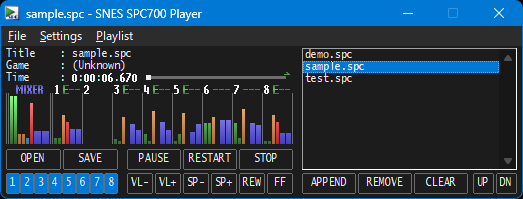
* The dark theme can be enabled on Windows 10/11 (22H2 or later). Other operating systems or versions may work, but operation is not guaranteed.
* This feature uses some non-public Windows APIs to achieve the dark theme. If SPCPLAY fails to start after modifying this value, please revert the THEME value.
:: Target v2.18.0+ ::
THEME    0 : 0
        ⬆️
This number represents the version for each item.
If an update makes the item's value incompatible with older versions, this number will be incremented.
When the version changes, the value to the right of the colon reverts to its default.
[UPDATE] :: Target v2.21.2+ ::
Fast seeking is enabled by default.
Since fast seeking skips DSP processing, seeking may not work properly with sound drivers that read the DSP state (register values).
This issue has been confirmed with the Hudson sound driver.
If you experience problems with seeking, try setting it to 🟥OFF in the "Settings" - "Seek Time" - "Fast Seek" menu.
If you want to disable fast seek temporarily, hold down the Ctrl key while clicking the seek bar, [REW], or [FF] buttons.
Please note that as a side effect, the seek processing will be slower.