Repository navigation
Developer Guide
Welcome onboard to Vital Labs! Vital consists of multiple small and bigger cogs working in symphony to provide the virtualization service used by Courses in NYU.
Author of this document: Yuvraj Singh https://github.com/reg1reg1
Before you begin work on vital, make sure you have the following prerequisites checked.
- Make sure you are added to the Github team for vital, and can see the private repositories , the project board etc.
- Request the professor for view access to google docs for the credentials of the server machines.
- Make sure you are able to access all the machines and have superuser privileges on all machines.
- Make sure you have a navicat installed on your machine for administrative work
- Make sure you have a SSH client for accessing the machine. I personally prefer this https://termius.com/.
- Make sure you read through this guide, and the vital workflow guide and the resources links.
- For working on python code, you may use any IDE or text editor of your choice.
- Get your email added to the vital.nyu.edu alias so that you are in the mail chain for communications.
- Always be aware of the machine you are logging in, and especially when carrying out actions as super users.
There are two separate clusters of servers currently - Development and Production. The development environment is where the development work or feature testing is carried out before moving it to production with the exception of hotfixes. To understand how the development and maintenance work is carried out in vital, checkout the vital development process guide. The environments are completely separate in terms of functionality and use separate hardware machines. The production has a higher number of dedicated machines, while development uses dockerized version of some of the services.
This is a short system architecture description to help you understand the way Vital is built and works. Before you go any further in the installation, make sure you read this description to get a high-level overview.
Vital consists of 2 core (mandatory) modules:
- Vital Front-End: Running on the web-server
- Vital Xen-API: Running on the Xen Installations
Vital Front-End is written in Django, python2 and serves the web-service to access the platform. Currently, we are in the middle of the process to migrate it to python3.
Vital Xen-API is mostly written in pure python2 and follows XMLRPC to expose the xl tool stack functions.
The front-end is handled by an Apache web-server using mod_wsgi and serves the web pages. Django is written with PostgreSQL as the database and all the configuration and platform data are handled by the database. The backend communicates with the database to fetch the student details and network configurations. The system uses [gluster-fs] (https://docs.gluster.org/en/latest/) (as a network service)(On Production) and NFS (on Development) as the file system to store the disk images and Xen configuration files. The system further uses ØMQ as a message queue for a communication channel between Xen servers and vital front-end.
Vital custom modules are managed by a process manager Circus which ensure that the system runs without downtime.
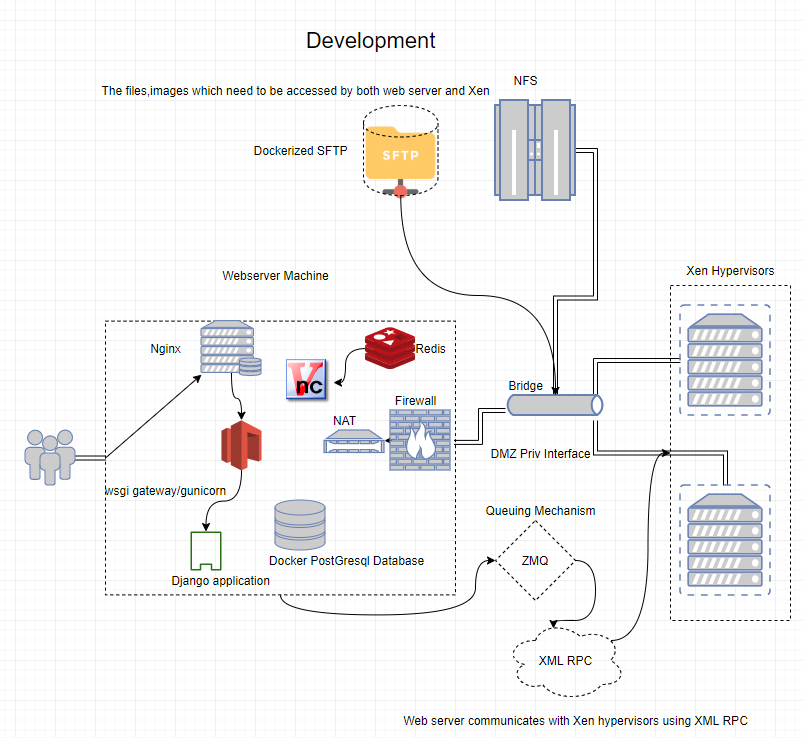
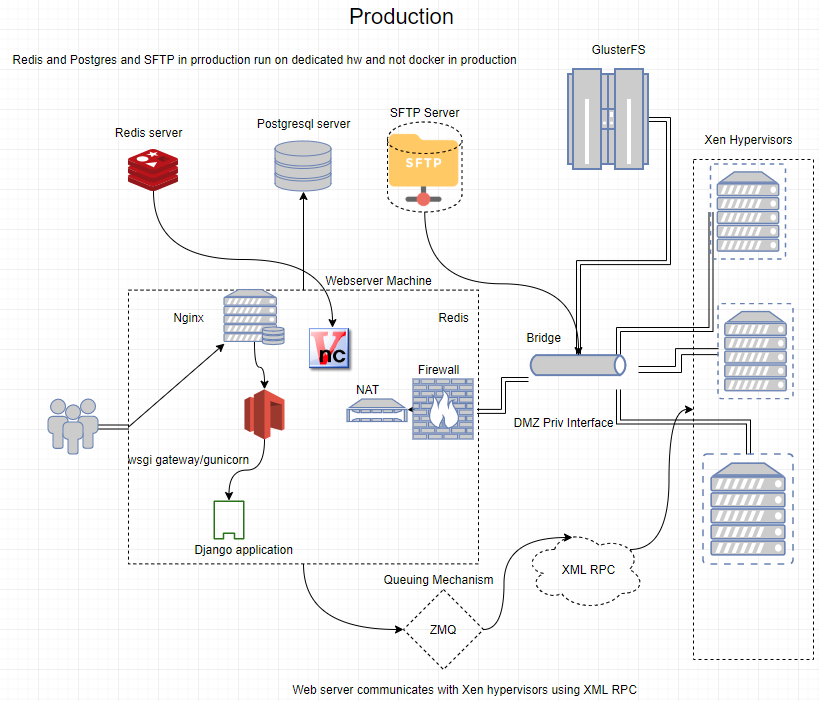
The services like Redis, Docker, Postgresql are dockerized on development. The file server on production is a distributed file system (GlusterFs), while on development it runs only on 1 machine (non-distributed) NFS.
There is a part and detail that has been left out in the high level design. The 2 parts are details of the private network and metrics. The Xen hypervisors and the web servers send metric data to influxDB and this can be seen on a Dashboard using a Graphana Interface. The Graphana Interface is purely for visualizing the details on a UI with regards to their memory status and the no of VM's which are running on each Hypervisor.
The internal private network is setup using VLAN and Linux Bridges. If you are not sure, on how VLAN works, consider the resources and links section for more help in that area. In the high level design the VLAN, bridges and bonds have been left out for brevity.
The architecture implementation varies slightly from development to production in terms of some database and services running on the web server itself rather than remotely on a separate machine. The following describes the entire architecture from a bird's eye-view on each environment.
The following subsections will elaborate briefly on how the small parts fit in making vital work and provide the platform as a service model.
The Webserver in vital is the only machine which has a public interface. It thereby sits in the DMZ. The webserver of vital runs the following services. The dockerized services which run on the same hardware in development have been excluded as these are not functionally part of the webserver.
-
Vital Service The vital service is the web application code that runs on the webserver. The code is written in python2.7 and Django framework. Like any python web framework, in non-developer mode, the web application uses a wsgi gateway called gunicorn which exposes the application to the webserver (nginx). The web application is a service, as this is written into a Linux service config (to be controlled by systemctl) and other watchers. The vital web service is watched over the circusd service, which can be management interface circusctl.
-
DHCP Service The DHCP service is used by the course VM's. This is discussed in the network layout in detail.
-
Firewalls The webserver sits in the DMZ and uses firewalls and port forwarding for controlling packet flow and forwarding between the public and private interfaces.
-
Django Management There are django management commands which run on the webserver that are managed by circus and have access to the application interface.
-
Websockify _Websockify _is a service that proxies the vnc connections received over the vnc client to vnc server over tcp connections. This service comes along with the noVNC service, and this proxies the vnc traffic between xen and the webserver.
On web server as root user, you may see the services by going into the circus interface by typing circusctl
Xen is a type 1 hypervisor. A type 1 hypervisor sits directly on top of kernel , and managing user & system calls (both privileged and unprivileged). If you are new to virtualization, check out the resources guide in the wiki. A hypervisor like Xen is used for supporting cloud's version of platform as a service and was used by AWS until 2019 , where they later announced a move to the newer KVM. Xen hypervisor is Open source, however there is a Citrix Xen Project which is an enterprise version of the open source. Xen enables vital to have virtual machines run for the courses. The hardware emulation is done by qemu which is used by xen internally. In Vmware, the memory, no of network interfaces and other hardware configurations are specified in a human-readable file called VMX. Similar to that xen uses conf files which specify the virtual machines configurations for each student and each VM. The Xen hypervisor related issues are harder to debug, as to understand xen in depth, there are lot of virtualization and operating system concepts one has to understand. The documentation on xen is often hard to locate due to multiple products using the name.
_Qemu _is responsible for hardware emulation. Hardware emulation is achieved by xen which uses the qemu library. There is another aspect of qemu library used by vital. Instead of having a hard disk copy for every copy of the virtual machine being run on xen, qcow file systems come into play. Check out how qcow file systems work through links posted in Resources section, and search more online to delve into a greater depth. In short, qcow stands for (QEMU Copy on Write)- Each student has a small sized version of qcow which points to the base img file. The qcow files stores the changes made by each user ( on top of base img- sort of like a delta of changes or diff), and each student has his own qcow. Since qcow files grow only with delta of changes on top of base img, a ton of hard disk space is saved when compared to the approach of each student have a separate hard disk. This approach also makes implementing and scaling vital easier by decoupling used filesystem from the hard disk of vm, and opens up avenues for horizontal scaling.
The vnc service is used to provide a GUI to the VM's being brought up on the Xen hypervisor. VNC is an application layer protocol. You may get a brief overview at wiki https://en.wikipedia.org/wiki/Virtual_Network_Computing The VNC has 3 major components. 1) The VNC Client, 2)The VNC server and 3)The VNC protocol. The VNC server is what runs on the xen hypervisor. The vnc client which runs on the web server, and there are options to choose from here like TightVNC, _TigerVNC _, but vital uses _noVNC _because of its native _websockify _support. The VNC protocol is what runs between the webserver and the browser client which acts as a proxy , converting http based traffic to tcp (for transfer between web server and Xen hypervisor).
Postgress is the database of choice for vital. It is a relational database which acts as the ACID backend database for vital. Since vital does not involve a lot of updates, so far there has been no identified need for a NoSQL database. The _InfluxDB _collects statistics from the webserver and hypervisors alike, such as uptime, free memory , and vm's running to be displayed on a graphical GUI called graphana which aids in remote management and administration of vital.
_ZeroMQ _is a queuing mechanism used by vital as an asynchronous way of getting the status of starting and stopping machines between Xen's and the webserver to avoid long http polling before vm start and stop requests are completed.Note that the status of the actions are communicated via the Q, the actual functionality is performed by XML-RPC. Whenever a student requests the vm start, the vlab server being the master takes note of the request and instructs the slaves sitting on xen hypervisors to start and stop the VM. The web server is relieved of this responsibility and awaits the response only from the ZMQ Master.
The web application logic must be able to control VM's being started on Xen hypervisors remotely. Here there is a need for a remote procedure call, and the web application logic uses XML-RPC to communicate the required action via a remote procedure call. The python xml-rpc api is used in the application logic, and is one of the major hurdles of migrating to 3.x.
The VM images and qcow files must be stored on a hardware which is large (dedicated) and can be accessed by the Webservers and the hypervisor. Since there is only 1 machine in dev, the choice for the filesystem is a simple NFS. In production, however, the distributed file system GlusterFs is used. There are multiple isolated hardware which are hosting the same file system, hence there is a need for managing updates and distributing these, which is why there is a need for the distributed file system.
Redis is an in-memory database which is extremely fast (due to being in-memory) and serves caching needs well. The redis service in vital is used to map the tokens assigned to each student vm being run to a port number on the xen for the vnc client to map to. This needs to be done on the webserver and fast, and here the redis service is used to get the xen hypervisor on which the vm is running, along with the vnc port number the vnc-server is currently using.
Postgres Installation
Xen Installation From Source
Xen Installation Using Ansible
InfluxDB Setup
Grafana Setup
standalone VM creation on Xen
Cloning IMG files
Using kpartx
Vital Web Server Installation
Course creation
Updating and Adding VMs in an existing course
VM types and features